












1.3K ·GitHub
What is this?
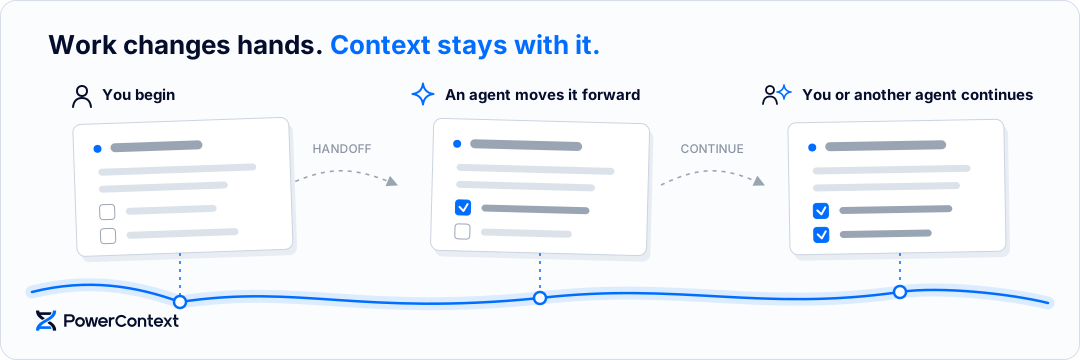
 PowerContext is a self-hosted context service from the OceanBase team. It keeps decisions, evidence, and task state together with the project, so you or another agent can pick the work up in a later session.
PowerContext is a self-hosted context service from the OceanBase team. It keeps decisions, evidence, and task state together with the project, so you or another agent can pick the work up in a later session.So is it a library I import into my code, or a service I run?It's a Server you run plus client integrations: applications connect through an async Python client, HTTP API, MCP, or the in-process Core SDK.
It's a Server you run plus client integrations: applications connect through an async Python client, HTTP API, MCP, or the in-process Core SDK.How do I set it up?Install the 1.1.0 release with Git and uv (uv provisions Python 3.11+), open the interactive configuration wizard in a dedicated directory, then start the Server in its own terminal and keep it running.
Install the 1.1.0 release with Git and uv (uv provisions Python 3.11+), open the interactive configuration wizard in a dedicated directory, then start the Server in its own terminal and keep it running.Do I need my own model API keys?Only Full memory capabilities needs them: automatic Memory and Topic Memory require separate Generation and Embedding API credentials, which an agent subscription does not cover. Basic memory works with no extra model APIs.
Only Full memory capabilities needs them: automatic Memory and Topic Memory require separate Generation and Embedding API credentials, which an agent subscription does not cover. Basic memory works with no extra model APIs.Does it work on Windows yet?macOS and Linux are supported; Windows support is experimental. If Python dependency downloads are slow or fail, the README has mirror retry instructions.
macOS and Linux are supported; Windows support is experimental. If Python dependency downloads are slow or fail, the README has mirror retry instructions.Can the Server run on a different machine from my agent?Yes. For a Server on another machine use HTTPS or the remote connection guide; remote plain-HTTP URLs require explicit consent, and automated setup can pass --allow-insecure-http.
Yes. For a Server on another machine use HTTPS or the remote connection guide; remote plain-HTTP URLs require explicit consent, and automated setup can pass --allow-insecure-http.Where does the context data live?In the Server you run yourself: the wizard asks whether storage and access are local or remote, and remote connections go over HTTPS with explicit consent.
In the Server you run yourself: the wizard asks whether storage and access are local or remote, and remote connections go over HTTPS with explicit consent.What is the difference between Memory and Handoff?Memory holds durable information such as confirmed decisions and evidence, and reusable approaches can be saved as Experience or Skill. A Handoff packages the current objective and state so the next person or agent can continue without rereading the full history. Every item stays scoped to its work and keeps its sources and earlier revisions.
Memory holds durable information such as confirmed decisions and evidence, and reusable approaches can be saved as Experience or Skill. A Handoff packages the current objective and state so the next person or agent can continue without rereading the full history. Every item stays scoped to its work and keeps its sources and earlier revisions.Is there a walkthrough for learning the workflow?Yes — 22 Jupyter tutorials (in Chinese) plus a complete team workflow that runs Memory, context preparation, Handoff, Experience, Skill, and a real agent step by step. The first seven tutorials need no model or API key.
Yes — 22 Jupyter tutorials (in Chinese) plus a complete team workflow that runs Memory, context preparation, Handoff, Experience, Skill, and a real agent step by step. The first seven tutorials need no model or API key.How does it relate to PowerMem?PowerContext is the successor to PowerMem, so new setups should start here. The 1.1.0 release includes the guided setup wizard.
PowerContext is the successor to PowerMem, so new setups should start here. The 1.1.0 release includes the guided setup wizard.What is the seekdb dependency installed during setup?It's a dependency of PowerContext: if it's missing, the setup wizard asks once and installs it in the background for you.
It's a dependency of PowerContext: if it's missing, the setup wizard asks once and installs it in the background for you.Which topics is it in?context, databases, pi-coding-agent, langgraph, long-term-memory, hermes-agent, agentic, knowledge-management, langchain, context-engineering, collaboration, openclaw
context, databases, pi-coding-agent, langgraph, long-term-memory, hermes-agent, agentic, knowledge-management, langchain, context-engineering, collaboration, openclaw