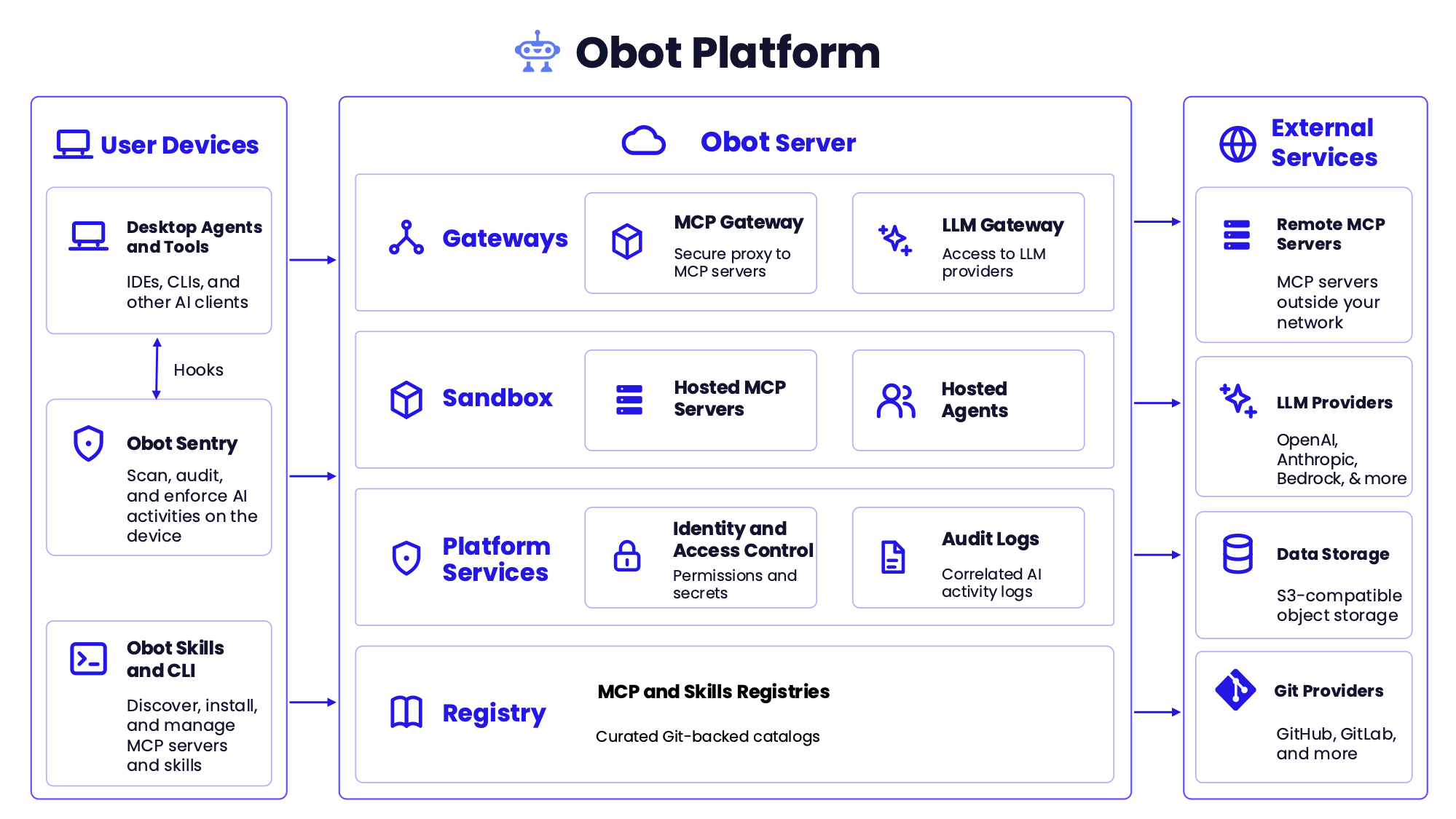
Что это?
 Obot — это платформа с открытым исходным кодом, которая помогает организациям управлять, защищать и контролировать всю свою экосистему ИИ: подключать ИИ-клиенты к моделям и инструментам, распространять одобренные MCP-серверы и навыки, управлять учётными данными агентов и вести аудит действий в размещённых сервисах и на пользовательских устройствах.
Obot — это одно приложение или набор сервисов?Это платформа из нескольких связанных частей: Obot Server (шлюзы MCP и LLM, реестры, сервисы идентификации и аудита), Obot CLI и Obot Sentry для мониторинга активности ИИ на пользовательских устройствах.
Это платформа из нескольких связанных частей: Obot Server (шлюзы MCP и LLM, реестры, сервисы идентификации и аудита), Obot CLI и Obot Sentry для мониторинга активности ИИ на пользовательских устройствах.Как мне его запустить?Для локальной разработки или ознакомления Obot запускается через Docker, а вход выполняется с помощью сгенерированного bootstrap-токена; для продакшена или многопользовательского использования Obot развёртывается в Kubernetes.
Для локальной разработки или ознакомления Obot запускается через Docker, а вход выполняется с помощью сгенерированного bootstrap-токена; для продакшена или многопользовательского использования Obot развёртывается в Kubernetes.Нужен ли мне ключ API провайдера моделей, чтобы попробовать?Для базового ознакомления — нет: встроенный провайдер идентификации Local позволяет создавать учётные записи без внешней системы идентификации, а ключ провайдера моделей понадобится только если вы захотите использовать LLM Gateway.
Для базового ознакомления — нет: встроенный провайдер идентификации Local позволяет создавать учётные записи без внешней системы идентификации, а ключ провайдера моделей понадобится только если вы захотите использовать LLM Gateway.Готова ли настройка на Docker для работы в продакшене?Нет: настройка на Docker монтирует сокет Docker хост-машины, чтобы запускать соседние контейнеры, и предназначена только для разработки, ознакомления или доверенной однопользовательской среды; для продакшена и многопользовательских развёртываний требуется Kubernetes.
Нет: настройка на Docker монтирует сокет Docker хост-машины, чтобы запускать соседние контейнеры, и предназначена только для разработки, ознакомления или доверенной однопользовательской среды; для продакшена и многопользовательских развёртываний требуется Kubernetes.Для кого предназначена эта платформа?Она создана для организаций, которым нужен централизованный контроль над инструментами ИИ, моделями и доступом агентов для множества пользователей и устройств, а не для отдельных разработчиков, которым нужен один ассистент.
Она создана для организаций, которым нужен централизованный контроль над инструментами ИИ, моделями и доступом агентов для множества пользователей и устройств, а не для отдельных разработчиков, которым нужен один ассистент.Что такое vMCP?vMCP (виртуальный MCP-сервер) объединяет один или несколько MCP-серверов из каталога за одной конечной точкой, независимо от того, размещены ли эти серверы в Obot или работают во внешней среде, и может быть закреплён за определённым снимком каталога.
vMCP (виртуальный MCP-сервер) объединяет один или несколько MCP-серверов из каталога за одной конечной точкой, независимо от того, размещены ли эти серверы в Obot или работают во внешней среде, и может быть закреплён за определённым снимком каталога.Что делает Obot Sentry?Obot Sentry работает на пользовательских устройствах: сканирует, проверяет и применяет политики к локальной активности ИИ — ведёт опись установленных ИИ-клиентов и инструментов, записывает локальные вызовы инструментов и (экспериментально) применяет списки разрешённых вызовов инструментов для таких клиентов, как Claude Code, Codex, Cursor и Kiro.
Obot Sentry работает на пользовательских устройствах: сканирует, проверяет и применяет политики к локальной активности ИИ — ведёт опись установленных ИИ-клиентов и инструментов, записывает локальные вызовы инструментов и (экспериментально) применяет списки разрешённых вызовов инструментов для таких клиентов, как Claude Code, Codex, Cursor и Kiro.Какие ИИ-клиенты и IDE работают с Obot?Obot не требует единого клиента: такие инструменты, как Claude Code, Codex, Cursor, VS Code и другие IDE и CLI, могут использовать те части платформы, которые к ним относятся.
Obot не требует единого клиента: такие инструменты, как Claude Code, Codex, Cursor, VS Code и другие IDE и CLI, могут использовать те части платформы, которые к ним относятся.На каких языках доступен интерфейс Obot?Сейчас интерфейс поддерживает английский, японский, корейский и упрощённый китайский языки.
Сейчас интерфейс поддерживает английский, японский, корейский и упрощённый китайский языки.Какие есть похожие проекты?casdoor, archestra, bifrost, evenfire, anythingmcp, zitadel, labtether, github-mcp-server
casdoor, archestra, bifrost, evenfire, anythingmcp, zitadel, labtether, github-mcp-serverВ каких он темах?modelcontextprotocol, ai-governance, authorization, compliance, llm-gateway, audit-log, sso, rbac, vscode, chat, enterprise, oauth
modelcontextprotocol, ai-governance, authorization, compliance, llm-gateway, audit-log, sso, rbac, vscode, chat, enterprise, oauth- Автор
- obot-platform
- Размер
- 57.8 MB
- Звёзды
- 1.2K
- Обновлён
- КоммитNov 17Релизv0.28.1Nov 13
- Возраст
- 2 г
- Коммиты · 90 дней