CleanFrame
A quieter home screen for Samsung The Frame. Your apps, a photograph and the time, with an interface made for the TV remote.
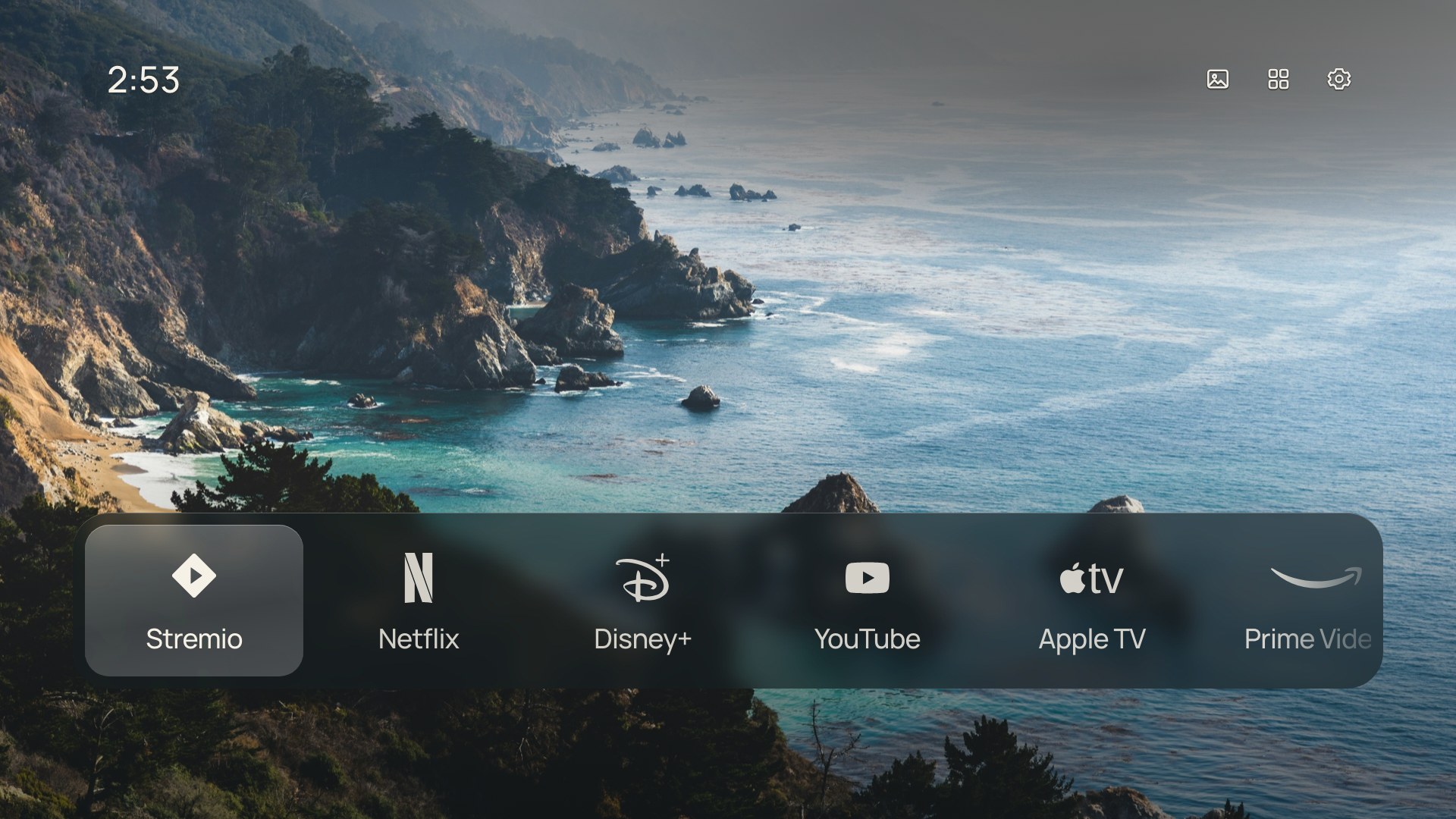
I built CleanFrame for one TV: my own Samsung The Frame, running Tizen. I'm sharing the code and setup notes as a starting point for other people to build on.
Use it at your own risk. The web launcher targets Tizen 5.0 and later for installation, with owner reports across several models. That minimum is not a promise that every device flow is verified. The TV setup scripts and native Home helpers still reflect specific computers and firmware, so adapt them and test on your own hardware.
I highly recommend forking it and building on top of it, ideally with a coding agent that can help you understand and adapt the setup. Start with the browser preview, make the interface your own, then work through TV installation when you're ready. Native Home/startup changes need particular care; the setup guide covers the risks and recovery steps.
Try the interface
You need Node.js 22.13+ (22 LTS), or 24+, and Python 3.10+ to run the browser preview.
git clone https://github.com/nthnclrk/CleanFrame.git
cd CleanFrame
npm ci
npm run dev:public
Open localhost:4795/home/. Use the arrow keys, Enter and Escape, or click the controls. App launches and Samsung screens require a TV; the preview reports that limitation when you select them.
The public preview uses the included Manrope, Geist and Newsreader fonts.
What you can change
- Choose a List or Dock layout, with icons, names or both.
- Use a photograph, light or dark background, with a simple 12-hour clock.
- Adjust typography, focus and glass materials through the same Settings interface.
- Choose and reorder Home apps; discover installed apps on the TV.
- Select from fifteen wallpapers and save your preferences locally.
- Open Settings → Samsung → Inputs to choose a discovered HDMI source.
The glass and blur are rendered ahead of time. The TV loads the finished images and uses transforms and opacity for focus feedback.
Use a coding agent
Open this repo in a local coding agent and give it a bounded change:
Read AGENTS.md, docs/development.md and docs/interaction-behaviour.md.
Help me adapt CleanFrame. Start with the public-font browser preview.
My first change is: <describe one change>.
Preserve remote navigation, saved preferences and the ES5 runtime.
Run the source checks and relevant browser checks. Show the result.
This task is browser-only: do not connect to a TV, sign or install a
package, or change Home/startup settings.
See working with an agent for the TV setup prompt and the distinction between UI work, app installation and native Home changes. An agent needs local computer access for TV work; a hosted chat cannot reach your TV merely by reading this repo.
Put it on a TV
Use the staged Samsung The Frame setup guide to understand the process used on my TV and adapt it to yours. It covers the remote's Developer Mode sequence, official Samsung tools, your own certificates and app identity, installation, visible checks and recovery.
The latest release includes an unsigned, public-font widget for inspection and adaptation. For your installation, build from source using your own identity in .local/signing.json and sign with your own certificates. The download is not a ready-to-install signed package.
Signing supports an ignored .local/signing.json based on signing.example.json: select your SDK, existing certificate profile and your own SDK-generated app identity. See local signing setup. The TV installation commands and native Home helper still contain reference-machine assumptions. Your agent must check the installed-app IDs and each device stage with you. Installing the app and assigning the remote Home button are separate steps.
| Area |
Evidence and limits |
| Reference hardware |
Samsung QA55LS03DAWXXY / LS03D, firmware 2130.0, Tizen 9.0, 32-bit ARM |
| App installation |
Signed installation and launch commands succeeded through 0.6.1. Latest rendering and remote feel still need physical observation. |
| App launch and Home |
Netflix/YouTube launch and physical Home from Netflix were confirmed on the reference setup. |
| Still open |
Normal power-on after streaming/Art Mode, corrected Smart Hub escape and native Art Mode destinations need definite physical checks. |
| Other TVs |
Web installation target: Tizen 5.0+. See the attributed device reports for tested flows and omissions. Android TV, Google TV, LG webOS and Roku need separate implementations. |
The optional 2020 LS03T profile supplies experimental owner-configured native source. It leaves the reference helper unchanged and is not an unattended installer.
The detailed device record separates observed results from SDK responses. Native Home/startup uses undocumented, guarded helpers; it is optional and can fail after firmware changes. Keep a recovery baseline before attempting that work. The app can be opened manually without it.
Develop and check
npm run check
npm run check:tools
npx playwright install chromium
CLEANFRAME_PUBLIC_FONTS=1 npm run check:browser
npm run check:public
npm run export:public
npm run check, including its check:device command, runs only source checks and synthetic device-adapter tests. It never connects to a TV. The browser checks use isolated Chromium profiles and a loopback preview. They never contact a TV. The public export creates dist/CleanFrame-public-unsigned.wgt, with public fonts and notices. It needs your own identity and signing before installation. It does not certify asset redistribution rights or device compatibility.
| Location |
Purpose |
app/ |
Current packaged UI and runtime assets |
scripts/ |
Preview, validation, asset generation and reference TV tools |
| Development / testing |
Runtime map, preferences, checks and device boundaries |
| Assets / third-party notices |
Rendering recipes, font separation and asset provenance |
| Asset sources |
Photo credits and verification of the bundled third-party assets |
.local/, dist/ |
Ignored private setup, recovery data, generated files and packages |
Contribute
Fork it, experiment and build something that suits your TV. If you find a useful fix or improve the setup instructions, contributions are welcome. Read CONTRIBUTING.md before a larger change. Reports should include model, firmware and the observed result, with private identifiers removed.
Licence and credits
CleanFrame's original code and documentation use the MIT licence. Fonts, photographs and logos retain their own terms; read THIRD_PARTY_NOTICES.md. Paid Pangram binaries are excluded from Git and public exports. A local package may include them, so keep personal builds separate from public downloads.
The release review records the publication checks. Third-party assets retain the terms listed in their notices. CleanFrame is an independent project with no Samsung or streaming-service affiliation.
TV Detox is a useful example of making an agent-assisted TV project approachable. Its Android setup is a different implementation; the prompts and instructions here are written for CleanFrame and Tizen.

 CleanFrame 是三星 The Frame 电视(运行 Tizen 系统)的个人主屏幕替代方案,会显示已安装的应用、一张照片和时间。它适合 fork 之后按自己的电视进行修改。