1.1K ·GitHub
Что это такое?
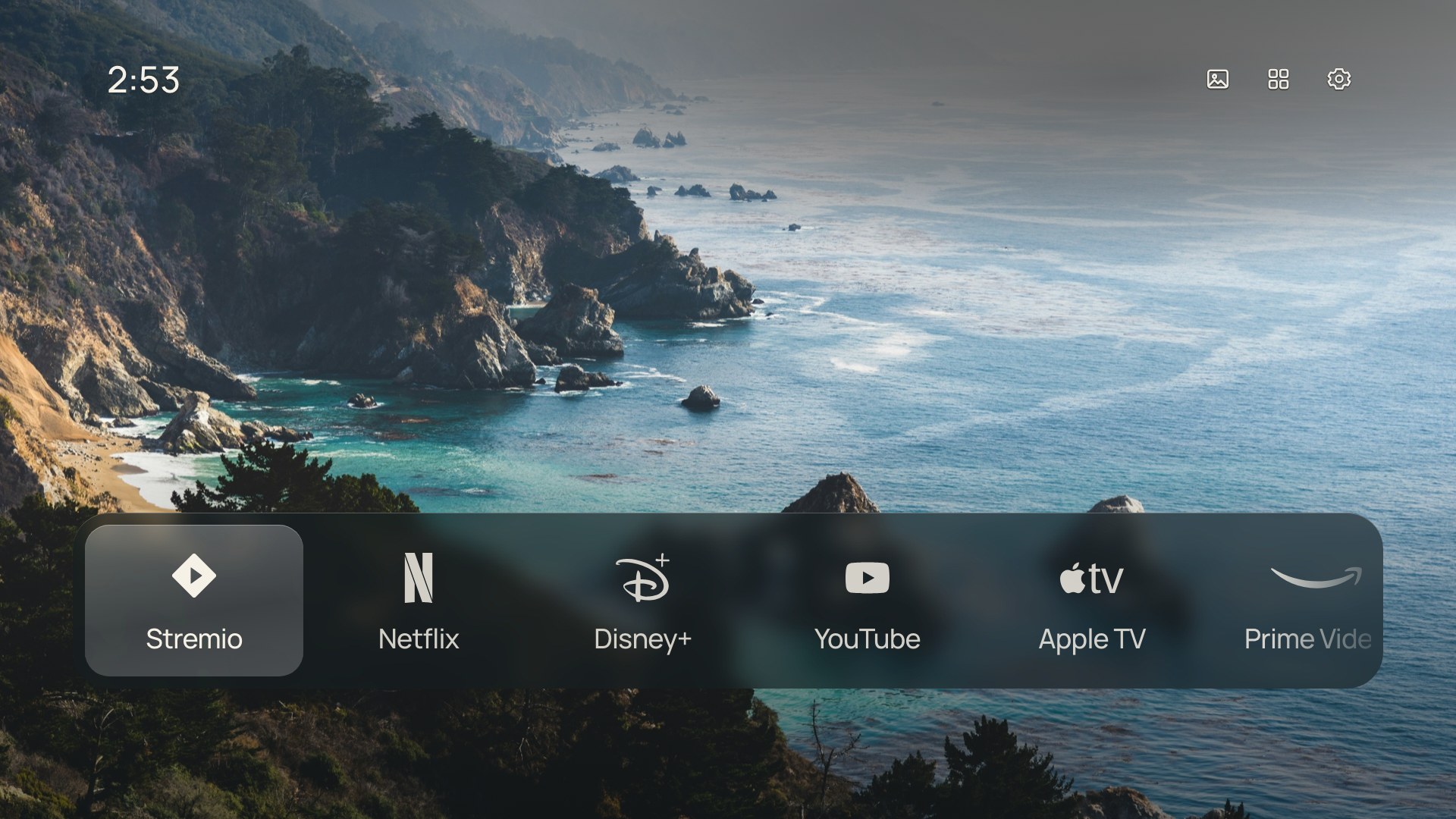
 CleanFrame — это личный домашний экран для Samsung The Frame на Tizen, который показывает установленные приложения, фотографию и время. Его можно форкнуть и адаптировать под свой телевизор.
Это готовое приложение или заготовка, которую нужно доработать?Это личный проект, опубликованный как заготовка: приложение для Tizen и скрипты установки, рассчитанные на телевизор, прошивку и компьютер автора. Его задумано форкать и настраивать, а не ставить как готовый универсальный продукт.
Это личный проект, опубликованный как заготовка: приложение для Tizen и скрипты установки, рассчитанные на телевизор, прошивку и компьютер автора. Его задумано форкать и настраивать, а не ставить как готовый универсальный продукт.Как попробовать, не трогая телевизор?Запустите локальный предпросмотр в браузере с Node.js 22+ и Python 3.10+, затем откройте localhost:4795/home/ и перемещайтесь стрелками, Enter и Escape, прежде чем переходить к установке на телевизор.
Запустите локальный предпросмотр в браузере с Node.js 22+ и Python 3.10+, затем откройте localhost:4795/home/ и перемещайтесь стрелками, Enter и Escape, прежде чем переходить к установке на телевизор.Что нужно, чтобы установить это на телевизор?Помимо Node.js 22+ и Python 3.10+ для предпросмотра, для установки на телевизор нужно включить режим разработчика через пульт, использовать официальные инструменты разработчика Samsung, а также собственные сертификаты подписи и идентификатор приложения.
Помимо Node.js 22+ и Python 3.10+ для предпросмотра, для установки на телевизор нужно включить режим разработчика через пульт, использовать официальные инструменты разработчика Samsung, а также собственные сертификаты подписи и идентификатор приложения.Это будет работать на любом смарт-телевизоре?Нет. Приложение собрано и протестировано только на конкретной модели Samsung The Frame и прошивке автора, поэтому совместимость с другими телевизорами не заявлена. Android TV, Google TV, LG webOS и Roku потребуют отдельной реализации.
Нет. Приложение собрано и протестировано только на конкретной модели Samsung The Frame и прошивке автора, поэтому совместимость с другими телевизорами не заявлена. Android TV, Google TV, LG webOS и Roku потребуют отдельной реализации.Кому это на самом деле подойдёт?Тем, у кого есть Samsung The Frame, кто готов форкнуть код, адаптировать скрипты установки под своё оборудование и, желательно, использовать агента для программирования на этапе установки на телевизор.
Тем, у кого есть Samsung The Frame, кто готов форкнуть код, адаптировать скрипты установки под своё оборудование и, желательно, использовать агента для программирования на этапе установки на телевизор.Лицензия MIT — это всё, что нужно знать?Код и документация CleanFrame распространяются по лицензии MIT, но встроенные шрифты, фотографии и логотипы действуют на своих условиях. Платные двоичные файлы шрифтов Pangram исключены из публичного репозитория и экспортов.
Код и документация CleanFrame распространяются по лицензии MIT, но встроенные шрифты, фотографии и логотипы действуют на своих условиях. Платные двоичные файлы шрифтов Pangram исключены из публичного репозитория и экспортов.Что можно на самом деле настроить в интерфейсе?Можно выбрать макет List или Dock, фон из фото или светлую/тёмную тему с 12-часовыми часами, настроить шрифты, эффекты фокуса и стекла, изменить порядок приложений на главном экране и выбрать один из пятнадцати встроенных обоев.
Можно выбрать макет List или Dock, фон из фото или светлую/тёмную тему с 12-часовыми часами, настроить шрифты, эффекты фокуса и стекла, изменить порядок приложений на главном экране и выбрать один из пятнадцати встроенных обоев.Может ли агент для программирования установить это на телевизор без моего участия?Нет. Агенту нужен доступ к локальному компьютеру, чтобы работать с телевизором: обычный чат в браузере не может подключиться к телевизору, просто прочитав репозиторий. Агент помогает адаптировать скрипты подписи и проверяет каждый этап установки вместе с вами.
Нет. Агенту нужен доступ к локальному компьютеру, чтобы работать с телевизором: обычный чат в браузере не может подключиться к телевизору, просто прочитав репозиторий. Агент помогает адаптировать скрипты подписи и проверяет каждый этап установки вместе с вами.Опасно ли заменять стандартную кнопку Home на телевизоре?Да. Замена стандартного Home и настройки запуска опираются на недокументированные защищённые вспомогательные функции Tizen, и сама замена необязательна. После обновлений прошивки они могут перестать работать, поэтому в руководстве по установке рекомендуется сначала сохранить резервную копию для восстановления.
Да. Замена стандартного Home и настройки запуска опираются на недокументированные защищённые вспомогательные функции Tizen, и сама замена необязательна. После обновлений прошивки они могут перестать работать, поэтому в руководстве по установке рекомендуется сначала сохранить резервную копию для восстановления.Есть ли аналог для других платформ телевизоров?TV Detox упоминается как похожий проект с помощью агента, но для Android TV. Это другая реализация, тогда как CleanFrame работает только на Tizen.
TV Detox упоминается как похожий проект с помощью агента, но для Android TV. Это другая реализация, тогда как CleanFrame работает только на Tizen.Какие есть похожие проекты?couch-tv, tv-fresh, aerial-tv, glasshouse, cleanyourtv, neonplan3d, quiet-tizen, dumbtv
couch-tv, tv-fresh, aerial-tv, glasshouse, cleanyourtv, neonplan3d, quiet-tizen, dumbtvВ каких он темах?smart-tv, personal, wallpaper, tv, smart-home, fonts, home-automation, launcher, app, customization, ui, coding-agent
smart-tv, personal, wallpaper, tv, smart-home, fonts, home-automation, launcher, app, customization, ui, coding-agent- Автор
- nthnclrk
- Размер
- 21.1 MB
- Звёзды
- 1.1K
- Обновлён
- КоммитNov 02Релизv0.7.0Nov 02
- Возраст
- 29 д
- Коммиты · 90 дней