🇬🇧 English
🇬🇧 English
🇩🇪 Deutsch
🇪🇸 Español
🇧🇷 Português (Brasil)
🇹🇷 Türkçe
🇨🇿 Čeština
🇷🇺 Русский
🇨🇳 中文 (简体)
🌎 Help translate!

Mac Mouse Fix
Make Your $10 Mouse Better Than an Apple Trackpad!
Mac Mouse Fix is an app that makes your mouse better.
I want to turn Mac Mouse Fix into the best mouse driver of all time! Some features are still missing at the moment, but I think it already turns regular mice into the best input devices for Macs in some ways. At the same level or even better than an Apple Trackpad or a Logitech MX Master mouse.
For more information on how exactly Mac Mouse Fix enhances your mouse, visit the website.
Features
See the website for an overview of the features of Mac Mouse Fix, including video demos!
For more details, see the Releases.
Installation
Download the latest version of Mac Mouse Fix on the website.
You can also install Mac Mouse Fix through Homebrew! Just type the following command into the terminal:
brew install mac-mouse-fix
You can download older versions of Mac Mouse Fix under Releases.
macOS compatibility
The latest version of Mac Mouse Fix is made for macOS 11 Big Sur or later.
If you're on macOS 10.15 Catalina, macOS 10.14 Mojave, or macOS 10.13 High Sierra, you can use the latest version of Mac Mouse Fix 2. Mac Mouse Fix 3.0.0 and later might still work on your machine, but they will have visual issues and some features might not work properly.
If you're on macOS 10.12 Sierra, or 10.11 El Capitan, you can use Mac Mouse Fix 2.2.0 or below.
Pricing
See the website for an overview of the pricing for Mac Mouse Fix 3.
Mac Mouse Fix 2 and below will remain free forever.
Uninstallation
Uninstall Mac Mouse Fix by simply moving it to the bin.
However, there will be files left on your system. To get rid of these files I recommend the awesome AppCleaner by FreeMacSoft.
Under macOS, it is not feasible for apps to delete these leftover files by themselves when you delete the app. That's why I highly recommend using an app like AppCleaner.
What people say
Thanks so much to everyone sharing their excitement about Mac Mouse Fix!
On the website you can find a collection of nice things people have said about the app.
Tips
Manage windows with a simple Click and Drag
Swish is my favorite way to manage windows on macOS. With a simple swipe on your trackpad, it lets you position any window so it takes up half, a quarter, or the whole screen.
Swish is designed for trackpad gestures, but with Mac Mouse Fix you can use it from any third-party mouse! Just go to Mac Mouse Fix and set any button's 'Click and Drag' action to 'Scroll & Navigate' and then you can snap windows with a simple Click and Drag.
Anything you can do with a two-finger swipe on an Apple trackpad works just as well with the 'Scroll & Navigate' feature in Mac Mouse Fix.
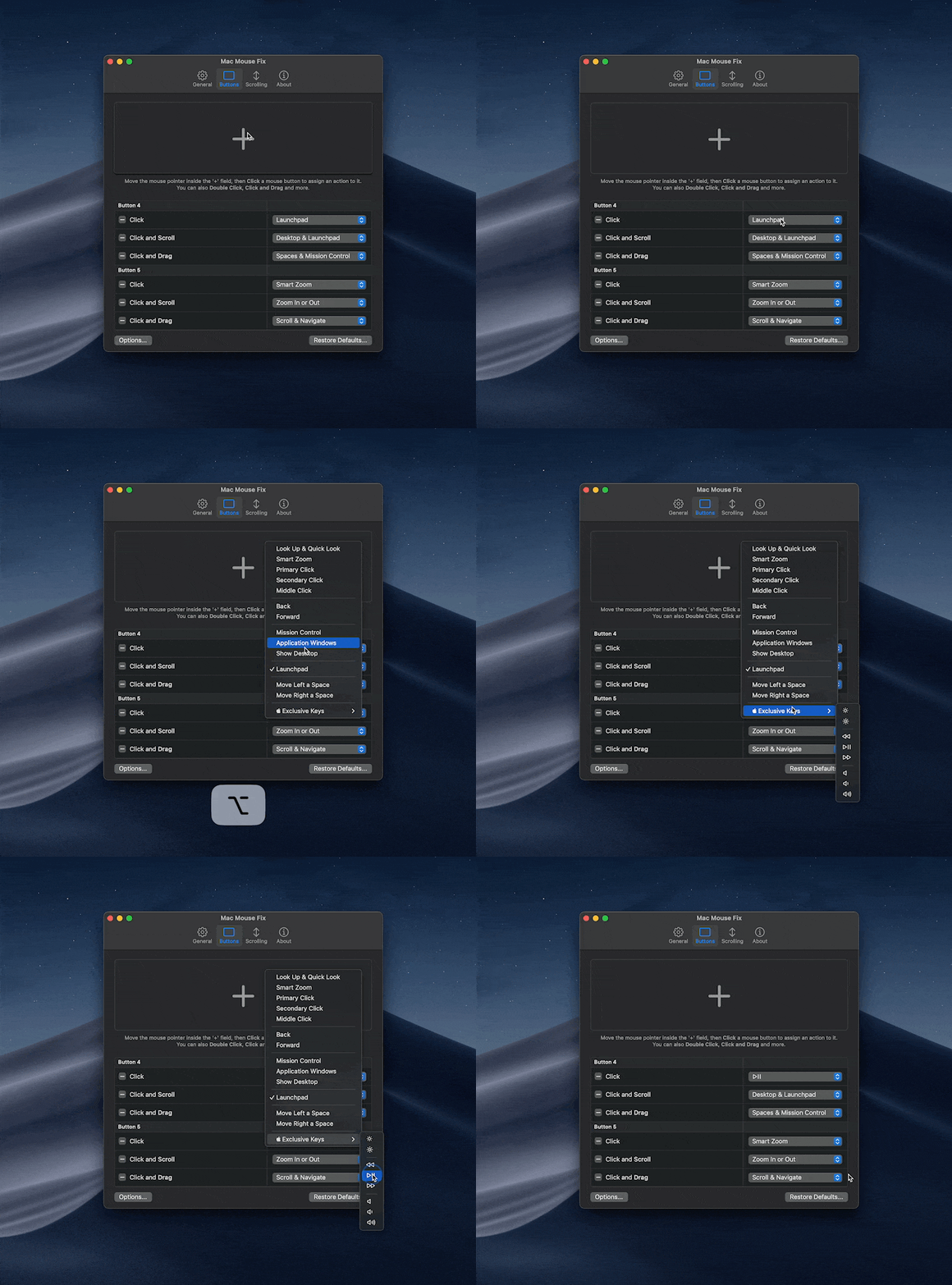
Control Screen Brightness, Audio Volume, or Media Playback right from your mouse
Mac Mouse Fix lets you use any key on your keyboard directly from your mouse -
even special keys only found on Apple keyboards that let you control Screen Brightness, Audio Volume, Media Playback, and more.
If you don't have an Apple keyboard at hand, hold Option (⌥) to choose the special Apple keys.
Questions
Is Mac Mouse Fix native on Apple Silicon?
Yes, Mac Mouse Fix runs 100% native on Apple Silicon.
Why is there a delay when I click?
When you click, Mac Mouse Fix might wait to see if you're going to double click.
To remove the delay for a button, delete any 'Double Click' actions for that button.
Can I open App Exposé through a Click and Drag Gesture?
Yes! Just choose the 'Spaces & Mission Control' Action and then Click and Drag down.
If this doesn't work, it's likely because the 'App Exposé' trackpad gesture is disabled on your Mac.
You can enable the gesture under System Settings or by running the following command in the terminal:
defaults write com.apple.Dock showAppExposeGestureEnabled -bool TRUE; killall Dock
Are there 'App-Specific Settings' or 'Profiles'?
In Mac Mouse Fix 2, you can disable features like Smooth Scrolling under More... > App-specific settings.
In Mac Mouse Fix 3, this feature doesn't exist yet.
Both 'app-specific settings' and 'mouse-specific settings' are planned, but I don't have a timeline yet for when they'll be released.
Tip: Until 'app-specific settings' arrive in Mac Mouse Fix 3, you can do this:
- Open the
General tab
- Turn on
Show in Menu Bar
- Now you can disable features like Smooth Scrolling directly from the Menu Bar
I'm also interested to hear what your use case is. Feel free to submit a feature request. Your input will help make the feature as good as possible once it arrives.
Is my mouse supported?
Probably. If you want to know for sure, it's best to download Mac Mouse Fix and try it out.
Mac Mouse Fix works very well with most mice. However, on certain mice designed to be used with proprietary driver software like Logitech Options, Mac Mouse Fix can't recognize all the buttons at the moment.
That's because these mice communicate with your computer using a special, proprietary protocol, instead of the standard USB protocol.
I would love to add full compatibility for these mice at some point, but it's a ton of work and it won't be coming soon.
Some buttons on my mouse are not recognized
See the question 'Is my mouse supported?' above.
Is the Magic Mouse supported?
I might add features in the future which enhance the Apple Magic Mouse, but currently, Mac Mouse Fix has no effect on it.
Are tiltable scroll wheels supported?
Some mice let you tilt the scroll wheel left or right to scroll horizontally. Mac Mouse Fix will make this feel more natural and easy to control. However, it's not currently possible to trigger other actions, such as switching between desktops, by tilting the scroll wheel. I'd love to implement this feature at some point, but it's a ton of work and it won't be coming soon.
Turning off pointer acceleration
Mac Mouse Fix doesn't let you turn off the pointer acceleration, but if you're on macOS 14 Sonoma or later, you can turn off the pointer acceleration under System Settings > Mouse > Advanced... > Pointer acceleration.
I plan to add really nice ways to improve pointer acceleration in the future, but I'm not sure when that's coming.
What's the difference between Mac Mouse Fix 2 and 3?
Monetization:
Mac Mouse Fix 2 is 100% free, and I plan to keep supporting it.
Mac Mouse Fix 3 is free for 30 days, then costs a few bucks to own.
Features:
Here's a feature comparison. I wrote it shortly after Mac Mouse Fix 3 released – so it may be slightly out of date.
You can also download Mac Mouse Fix 2 and 3 for free to evaluate them yourself!
Does Mac Mouse Fix collect my data?
Mac Mouse Fix does not have ads, and it does not collect any personal information about you.
However, at the moment that you buy the app, the sales provider Gumroad.com collects some personal info, such as your email address, and this info is visible to me. This is necessary to be able to issue refunds, send a license key to your email, etc. I cannot turn this off. To learn more about the data collected when you buy Mac Mouse Fix, see the Gumroad Privacy Policy.
How many devices can I use my license on?
Your license works on all your Macs.
The goal is that you can just buy a license, activate it, and never have to worry about it again.
If you log in with the same Apple Account, the license will even sync automatically to your other devices via iCloud!
If you encounter problems activating your license, you can send me an email.
I sometimes take a while to answer. I'm sorry about this. But I will get back to you!
There is one restriction:
Licenses are not meant to be shared publicly. One license is meant for one person. Publicly shared licenses might be invalidated. (Sharing with your mom is ok.)
Will my license work with future versions?
Your license covers all Mac Mouse Fix 3.x versions.
Future versions, like 4.0, may require a new purchase, but I'll try to avoid this, unless it's necessary to support the continued development of the app.
Is there a refund policy?
There is no official refund policy, but the app is free for 30 days.
If you experience any problems after buying the app, just reach out to me, and I will do my best to help.
Will Mac Mouse Fix still be Open Source now that it's monetized?
Yes, Mac Mouse Fix will still be open source!
I encourage anyone to use the source code of Mac Mouse Fix in their own projects, as long as they don't release a simple copy of Mac Mouse Fix.
Learn about the details in the MMF License which Mac Mouse Fix 3 and later are licensed under.
Can I get Mac Mouse Fix for free if I already donated?
Yes! If you donated via PayPal, click here to receive a free license.


 一款 macOS 应用,能让便宜的三方鼠标用起来像 Apple 触控板或 Logitech MX Master 一样顺手——滚动更顺滑、按钮可以自定义映射,还支持点击拖动手势。作者希望把它做成有史以来最好的鼠标驱动。