sofka
A Kubernetes TUI written in Rust, on kube-rs and
ratatui. Async everywhere, so the UI never blocks on the
cluster.
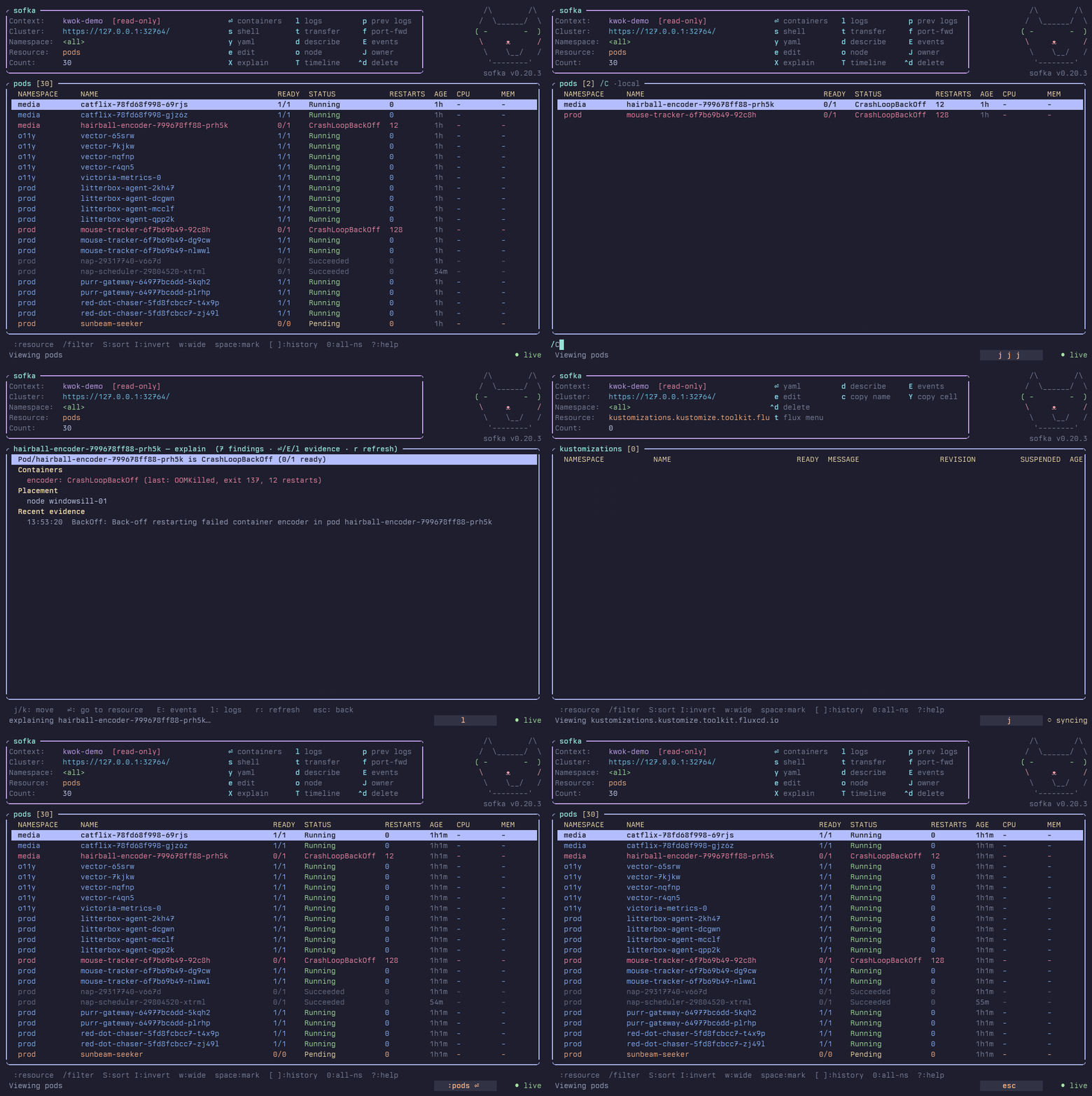
sofka.rs - the website, with a watchable tour of a real
session (sofka.rs/#play).
Why "sofka"
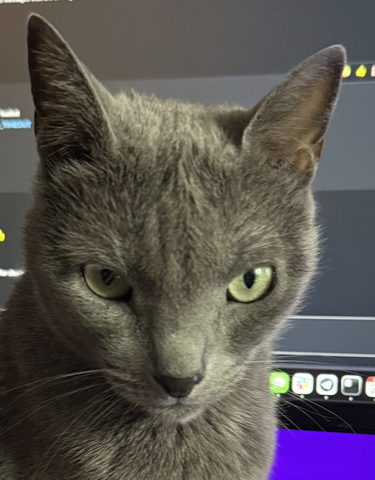
That's Sophie, a Russian Blue. She sits behind the monitor and watches the
screen. Constantly, not sometimes. She has the narrow-eyed look of someone who
has seen a pod in CrashLoopBackOff. She catches every state change and doesn't
get distracted. She is, in effect, a cluster watchman that is a cat.
sofka is the Serbian short form of Sophia, which means "wisdom". A good cluster
TUI and a good cat both watch things closely, and both know when something is
wrong.
What it does
sofka is a Kubernetes terminal interface inspired by
k9s. It uses a shared object pipeline. Both
programs support built-in and custom resources. The main functions are:
- Custom resource browsing - one generic render pipeline, built-in columns
for common kinds, NAME/AGE for the rest, and
enter on a CRD drills into its
custom resources.
- Flux CD built in -
t suspends, resumes, and reconciles through native API
patches. No flux binary. Plus a native Helm inspector that decodes release
Secrets itself.
- Argo CD built in -
t suspends, resumes, and syncs ArgoCD Applications.
ApplicationSets support suspend and resume. These actions use native API
patches. No argocd binary.
- It tells you why something is broken -
X opens a deterministic,
evidence-based incident view. No AI, no external service.
- Bulk actions -
space marks rows for delete, kill, or Flux actions across
many resources at once.
- Port-forwards run in the background - starting one doesn't freeze the TUI,
and
:pf manages them all.
- Guardrails and read-only mode - "never delete in prod" is enforced, not
remembered.
- Skins - Catppuccin, Gruvbox, Solarized, Nord, Dracula, Tokyo Night, One
Dark, Rosé Pine, Rosé Pine Dawn, Monokai, Flexoki, with auto dark/light
detection.
The full feature list is long. So is the
comparison with k9s, with shared functions and design differences.
Installation
Every release ships prebuilt
binaries for macOS, Linux, and Windows (aarch64/x86_64).
Windows ZIP files contain sofka.exe and the license notices.
Linux releases also include DEB, RPM, Arch Linux, and Alpine APK packages.
See release packages for installation and platform limits.
brew install nklmilojevic/sofka/sofka   # Homebrew project tap (macOS/Linux)
brew install sofka                      # Homebrew official core tap (macOS/Linux)
nix run github:nklmilojevic/sofka       # Nix, nothing to install
cargo install sofka                     # Cargo
Or build from source: cargo build --release (see
Development).
Use the Home Manager module to install Sofka and manage
its configuration with Nix.
macOS: "cannot be opened because the developer cannot be verified"
The release binaries aren't signed or notarized yet, so Gatekeeper refuses a
tarball you downloaded in a browser. Nothing is broken. Clear the quarantine flag
once:
xattr -d com.apple.quarantine sofka
(Or right-click the binary in Finder, pick Open, confirm once.)
Usage
Shell completion is available for Bash, Zsh, Fish, Elvish, and PowerShell.
Run sofka completion <shell> and follow the
setup instructions.
sofka [RESOURCE] [-n NAMESPACE] [-A] [--context NAME] [--kubeconfig PATH] [--readonly | --write]

  RESOURCE          resource to open (alias/plural/kind), default: pods
  -n, --namespace   namespace to start in
  -A, --all-namespaces
  --context         kubeconfig context to start in (default: current context)
  --kubeconfig      kubeconfig file to use (sets $KUBECONFIG for the session)
  --allow-v1-client-cert  allow X.509 v1 client certificates for this run
  --readonly        disable every mutating action for the session
  --write           force write mode, overriding any config `readonly`
  --experimental-describe  use deskribe for native resource descriptions
Use sofka ctx or sofka contexts to open the context picker before connecting.
Select a context to connect and open its configured default resource, or pods.
--context NAME selects the initial context in the picker. An unknown name
returns an error. -n and -A apply to the first successful selection only. These launch commands
require interactive mode and cannot be used with --check or --snapshot.
--readonly and --write set the mode for the whole session and win over the
config readonly option, including per-cluster and per-context overrides, on
every :ctx switch. With no flag, switching into a context whose config sets
readonly = true enables read-only mode (shown as [read-only] in the header),
and switching away restores write mode.
Headless modes need no TTY and double as CI smoke tests:
sofka --check                # connect, run discovery, print a summary, exit
sofka pods --snapshot        # render one frame of a resource view to stdout
sofka dp -A --snapshot       # deployments, all namespaces
sofka info                   # runtime diagnostics: build, config, discovery, latency, dirs
sofka info --offline         # the same report without connecting to a cluster
sofka plugin search          # search the official reviewed plugin catalog
sofka plugin install ID      # install the latest compatible package
sofka plugin update          # explicitly update all managed packages
sofka plugin list            # offline installed-package inventory
Native describe is experimental and uses the standalone deskribe Rust library.
Enable it with --experimental-describe or [experimental] native_describe = true
in config to use it for d. Kubectl remains the default. See
configuration.
Keys
The essentials. ? in the app shows everything, or see the
full key reference.
| Key |
Action |
: |
command palette - fuzzy over kinds, commands, bookmarks, workspaces (:deploy social also works) |
/ |
filter: text · a|b · ~fuzzy · /regex/ · !inverse · -l/-f · status=X age<2h |
enter / esc |
drill down / go back |
j/k, g/G |
navigate |
ctrl-f / ctrl-b |
page forward / back (also PgDn / PgUp) |
n / 0 / :ctx |
namespace switcher / all namespaces / context switcher |
space |
mark row for bulk actions |
y / d / E |
YAML / describe / live events |
l / L |
logs / VictoriaLogs history |
X / T |
explain why it's unhealthy / state-change timeline |
s / e / a |
shell or scale / edit in $EDITOR / attach |
f |
port-forward - port picker from manifest, ● marks active forwards (:pf manages them) |
t |
Flux/ArgoCD menu · CronJob trigger · pod file transfer |
r / i |
rollout restart / set container image |
ctrl-d / ctrl-k |
delete / force-delete (marked rows, or current) |
S / w / ctrl-e |
sort picker / wide columns / compact mode |
? / :q |
help / quit |
Configuration
Use config.toml, config.yaml, or config.yml under $XDG_CONFIG_HOME/sofka
(or ~/.config/sofka). Keep one file at each config level. All
optional - an empty config behaves like no config. :reload re-reads it live.
default_namespace = "kube-system"
default_resource  = "deployments"
readonly          = false
favorite_namespaces = ["kube-system", "monitoring"]

[aliases]
dep = "deployments"

[skin]
name = "gruvbox-dark"   # omit to auto-detect dark/light
Any option can be overridden per cluster or per kubeconfig context, so prod can
be read-only in a light skin while everything else stays as is. See the
configuration reference for the rest.
Docs
| Doc |
What's in it |
| Features |
the complete feature list |
| vs k9s |
shared functions and design differences |
| Performance benchmark |
measured TUI latency, memory use, and binary size |
| Keys |
full keymap, per-view keys |
| Configuration |
every config section, per-cluster/per-context overrides |
| Views and thresholds |
custom columns, CRD printer columns, coloring bands |
| Plugins |
plugins, bookmarks, workspaces, saved forwards |
| Safety |
read-only mode, guardrails, :can-i, action journal |
| Providers |
right-sizing, VictoriaLogs, fleet dashboard |
| Debugging |
explain, timeline, diff, notifications, debug pods, bundles |
| Architecture |
module layout, data flow, dev loop, release process |
Contributing
Read the contribution guide for feature discussions, bug
reports, development setup, and pull request checks.
License
Dual-licensed under MIT or Apache-2.0, at your
option - the Rust ecosystem standard.

 Sofka — терминальный интерфейс (TUI) для управления кластерами Kubernetes, написанный на Rust на базе kube-rs и ratatui, с асинхронным подходом (async-first), чтобы интерфейс никогда не подвисал при обращении к кластеру.