10.4K ·GitHub
Что это такое?
 Home Manager управляет вашим пользовательским окружением с помощью пакетного менеджера Nix: вы описываете в конфигурации пакеты и дотфайлы для конкретного пользователя (не общесистемные) вместо того, чтобы вручную устанавливать и настраивать всё по отдельности.
Home Manager управляет вашим пользовательским окружением с помощью пакетного менеджера Nix: вы описываете в конфигурации пакеты и дотфайлы для конкретного пользователя (не общесистемные) вместо того, чтобы вручную устанавливать и настраивать всё по отдельности.Это отдельная утилита, которую я запускаю, или конфиг внутри NixOS?И то и другое: он распространяется как самостоятельный инструмент home-manager и как модули, которые можно подключить к системной конфигурации NixOS или nix-darwin, так что ваш пользовательский профиль собирается вместе с системой.
И то и другое: он распространяется как самостоятельный инструмент home-manager и как модули, которые можно подключить к системной конфигурации NixOS или nix-darwin, так что ваш пользовательский профиль собирается вместе с системой.Как его настроить?Следуйте руководству для вашего режима: отдельная установка (единственный вариант вне NixOS и macOS), модуль NixOS, собираемый через nixos-rebuild, или модуль nix-darwin, собираемый через darwin-rebuild. Поддерживаются как варианты на основе каналов, так и на основе flakes.
Следуйте руководству для вашего режима: отдельная установка (единственный вариант вне NixOS и macOS), модуль NixOS, собираемый через nixos-rebuild, или модуль nix-darwin, собираемый через darwin-rebuild. Поддерживаются как варианты на основе каналов, так и на основе flakes.Мне нужно уже знать язык Nix?По сути да — README просит перед началом работы уверенно владеть языком Nix и различными инструментами экосистемы Nix.
По сути да — README просит перед началом работы уверенно владеть языком Nix и различными инструментами экосистемы Nix.Что может пойти не так при использовании?Ошибки бывают трудночитаемыми, и Home Manager не всегда может определить, что сейчас перезапишет настройки, которые вы настроили вручную — например, модуль Gnome Terminal пишет напрямую в ваше хранилище dconf.
Ошибки бывают трудночитаемыми, и Home Manager не всегда может определить, что сейчас перезапишет настройки, которые вы настроили вручную — например, модуль Gnome Terminal пишет напрямую в ваше хранилище dconf.Для него обязателен NixOS?Нет. Вне NixOS и macOS отдельный инструмент — единственный вариант, и даже пользователям NixOS или macOS рекомендуется пользоваться именно им, если они хотят управлять домашним каталогом независимо от системы в целом.
Нет. Вне NixOS и macOS отдельный инструмент — единственный вариант, и даже пользователям NixOS или macOS рекомендуется пользоваться именно им, если они хотят управлять домашним каталогом независимо от системы в целом.Работает ли он вне NixOS, например на обычной машине с Debian или на Mac?Он ориентирован на nixpkgs-unstable и NixOS 26.05, поэтому на других дистрибутивах Linux он может работать, а может и нет. На macOS он интегрируется через nix-darwin; везде остальное используется отдельный инструмент.
Он ориентирован на nixpkgs-unstable и NixOS 26.05, поэтому на других дистрибутивах Linux он может работать, а может и нет. На macOS он интегрируется через nix-darwin; везде остальное используется отдельный инструмент.Можно им пользоваться, пока я ещё учу Nix?Да, с одной оговоркой: авторы настоятельно советуют начать с маленькой, очень простой конфигурации и постепенно усложнять её по мере изучения Nix.
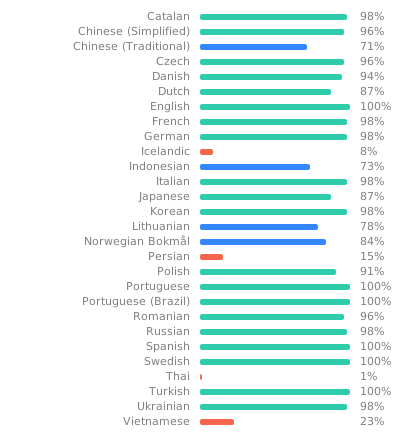
Да, с одной оговоркой: авторы настоятельно советуют начать с маленькой, очень простой конфигурации и постепенно усложнять её по мере изучения Nix.Есть ли Home Manager на других языках?У него есть базовая поддержка интернационализации через gettext, а переводы размещены на Weblate, где любой может предлагать улучшения.
У него есть базовая поддержка интернационализации через gettext, а переводы размещены на Weblate, где любой может предлагать улучшения.What are similar projects?nixpkgs, omnibin, nix, terraform, awesome-zsh-plugins, vim-plug, chezmoi, hexyl
nixpkgs, omnibin, nix, terraform, awesome-zsh-plugins, vim-plug, chezmoi, hexylWhich topics is it in?configuration-management, nixos, nix, declarative, dotfiles, configuration, sysadmin, command-line, developers, devops, free, cli
configuration-management, nixos, nix, declarative, dotfiles, configuration, sysadmin, command-line, developers, devops, free, cli