10.4K ·GitHub
What is this?
 Home Manager manages your user environment with the Nix package manager: you declare user-specific (non-global) packages and dotfiles in configuration instead of installing and tweaking things by hand.
Home Manager manages your user environment with the Nix package manager: you declare user-specific (non-global) packages and dotfiles in configuration instead of installing and tweaking things by hand.Is this a tool I run, or a config that lives inside NixOS?Both: it ships as a standalone home-manager tool and as modules you can plug into a NixOS or nix-darwin system configuration, so your user profile builds together with the system.
Both: it ships as a standalone home-manager tool and as modules you can plug into a NixOS or nix-darwin system configuration, so your user profile builds together with the system.How do I get it set up?Follow the manual for your mode: standalone install (the only option outside NixOS and macOS), a NixOS module built with nixos-rebuild, or a nix-darwin module built with darwin-rebuild. Channel-based and flake-based setups are both supported.
Follow the manual for your mode: standalone install (the only option outside NixOS and macOS), a NixOS module built with nixos-rebuild, or a nix-darwin module built with darwin-rebuild. Channel-based and flake-based setups are both supported.Do I need to know the Nix language already?Effectively yes — the README asks you to be comfortable with the Nix language and the various tools of the Nix ecosystem before attempting to use Home Manager.
Effectively yes — the README asks you to be comfortable with the Nix language and the various tools of the Nix ecosystem before attempting to use Home Manager.What can go wrong when I use it?Errors can be difficult to understand, and Home Manager cannot always detect that it is about to overwrite settings you configured manually — the Gnome Terminal module, for example, writes straight to your dconf store.
Errors can be difficult to understand, and Home Manager cannot always detect that it is about to overwrite settings you configured manually — the Gnome Terminal module, for example, writes straight to your dconf store.Do I need NixOS to use it?No. Outside NixOS and macOS the standalone tool is the only choice, and even NixOS or macOS users are recommended to use it if they want their home directory managed independently of the system as a whole.
No. Outside NixOS and macOS the standalone tool is the only choice, and even NixOS or macOS users are recommended to use it if they want their home directory managed independently of the system as a whole.Does it work outside NixOS, like on a plain Debian box or a Mac?It targets nixpkgs-unstable and NixOS 26.05, so on other Linux distributions it may or may not work. On macOS it integrates through nix-darwin; everywhere else you use the standalone tool.
It targets nixpkgs-unstable and NixOS 26.05, so on other Linux distributions it may or may not work. On macOS it integrates through nix-darwin; everywhere else you use the standalone tool.Is it usable while I am still learning Nix?Yes, with a caveat: the authors strongly encourage starting with a small, very simple configuration and gradually making it more elaborate as you learn Nix.
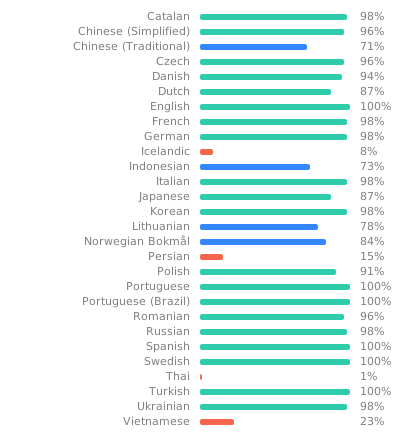
Yes, with a caveat: the authors strongly encourage starting with a small, very simple configuration and gradually making it more elaborate as you learn Nix.Is Home Manager available in other languages?It has basic internationalization support through gettext, and its translations are hosted on Weblate, where anyone can contribute improvements.
It has basic internationalization support through gettext, and its translations are hosted on Weblate, where anyone can contribute improvements.What are similar projects?nixpkgs, omnibin, nix, terraform, awesome-zsh-plugins, vim-plug, chezmoi, hexyl
nixpkgs, omnibin, nix, terraform, awesome-zsh-plugins, vim-plug, chezmoi, hexylWhich topics is it in?configuration-management, nixos, nix, declarative, dotfiles, configuration, sysadmin, command-line, developers, devops, free, cli
configuration-management, nixos, nix, declarative, dotfiles, configuration, sysadmin, command-line, developers, devops, free, cli