Charakuru / きゃらくる
A kit for turning one character illustration into a VRM avatar, sharing the work with an AI agent.
日本語 ·
한국어 ·
简体中文 ·
Tutorial ·
Download (Releases) ·
Terms of Use ·
Discord




Tripo has kindly set up a dedicated Charakuru category on its official Discord server!
Ask questions, share feedback, and show off the avatars and other creations you've made with Charakuru. You're also welcome to chat with fellow creators and Nano (ナノ), the creator of Charakuru!
We'll also use this space to announce upcoming events, including contests using Charakuru. Whether you're curious about trying the kit or already working on a project, come say hello!
👉 Join the official Tripo Discord
Once you've joined, head to the dedicated Charakuru category!
What is Charakuru?
A character modeling support kit powered by Tripo's Smart Mesh.
Creating high-quality character models with Tripo alone has been difficult, making workflow research and Blender knowledge essential. This kit solves that problem.
It packages an original workflow devised by Nano into a local app and agent Skills, distributing it in a form users can reproduce.
You can leave Tripo and Blender operations, rigging, and other complex setup work to GPT-6.1 Sol or GPT-6 Astra.
Some steps still need a human, but you don't need to operate Blender yourself. Everything can be done through simple controls in the local app.
This practical kit aims for a good balance: more realistic than handing everything off to an AI agent, and easier than doing everything by hand!
The learning curve might be a little steep.
If anything feels difficult or unclear, we'd appreciate your feedback in an issue!
All you need is a single full-body illustration to create a VRM model.
[!WARNING]
This kit is still in development.
Some documentation hasn't caught up yet, and there are bugs and missing features. Thank you for your understanding.
These docs were written by AI.
They can be a little hard for people to read. We recommend opening this repository (or the extracted release folder) in a coding agent such as Codex or Claude Code, and learning about the kit by talking with the agent.
For example: "Read README.md and AGENTS.md and tell me what this kit can do."
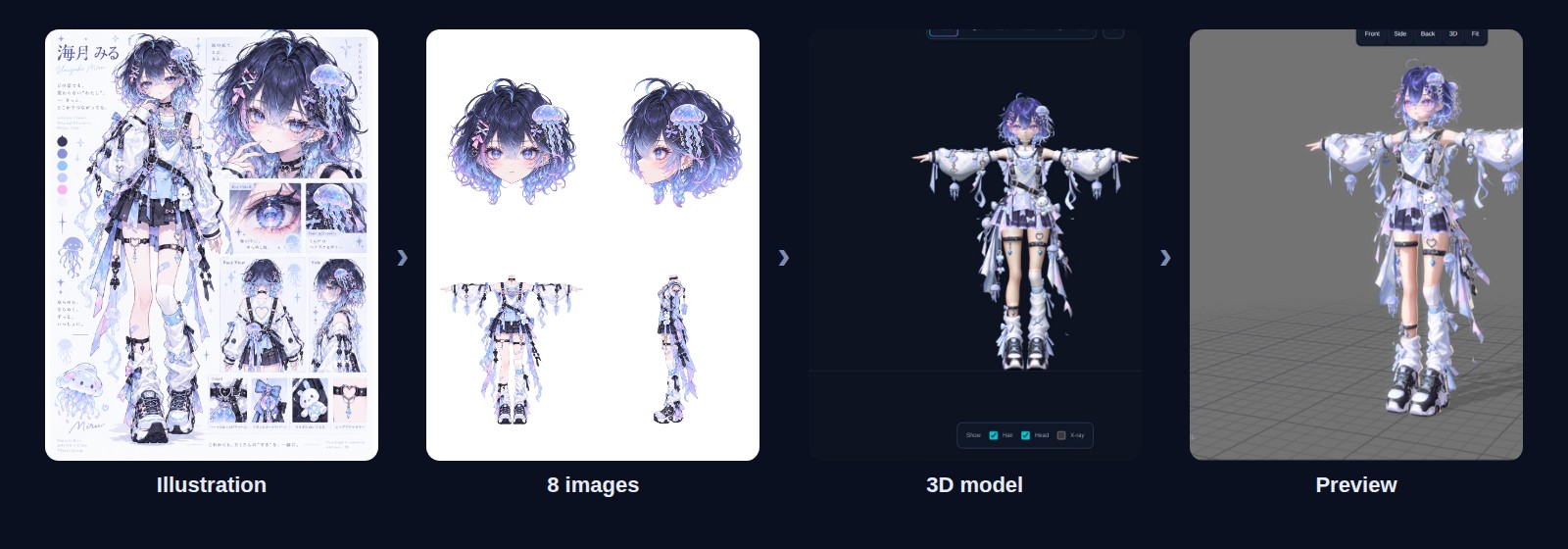
Example: 海月 みる (Miru Umitsuki). Left to right: illustration → 8 images painted by the agent → 3D model → in-app motion review.
How it feels to use
You go back and forth between reviewing in the app and asking in the chat, five times.
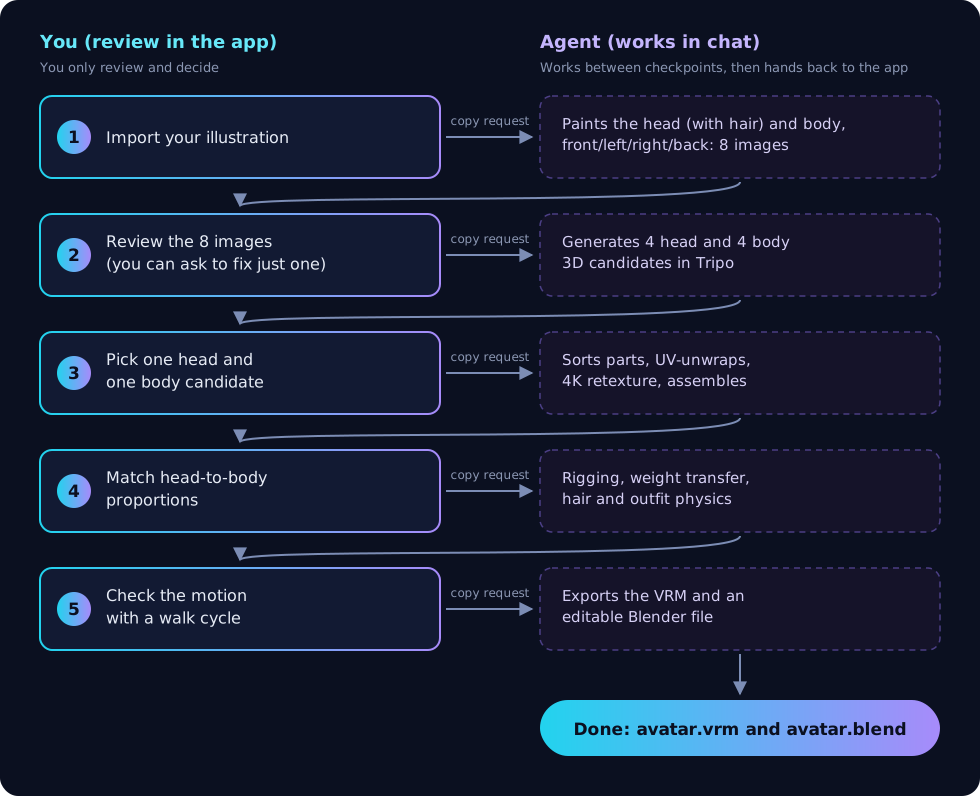
- When you're happy with a step, press the app's continue button and copy the request it shows.
- Paste it into your chat with the agent (Codex) and send it.
- When the agent finishes, the app switches to the new state on its own and stops at the next checkpoint.
There's no exporting, importing or re-saving files by hand. The agent never moves past a checkpoint on its own, and you are the one who picks the candidates.
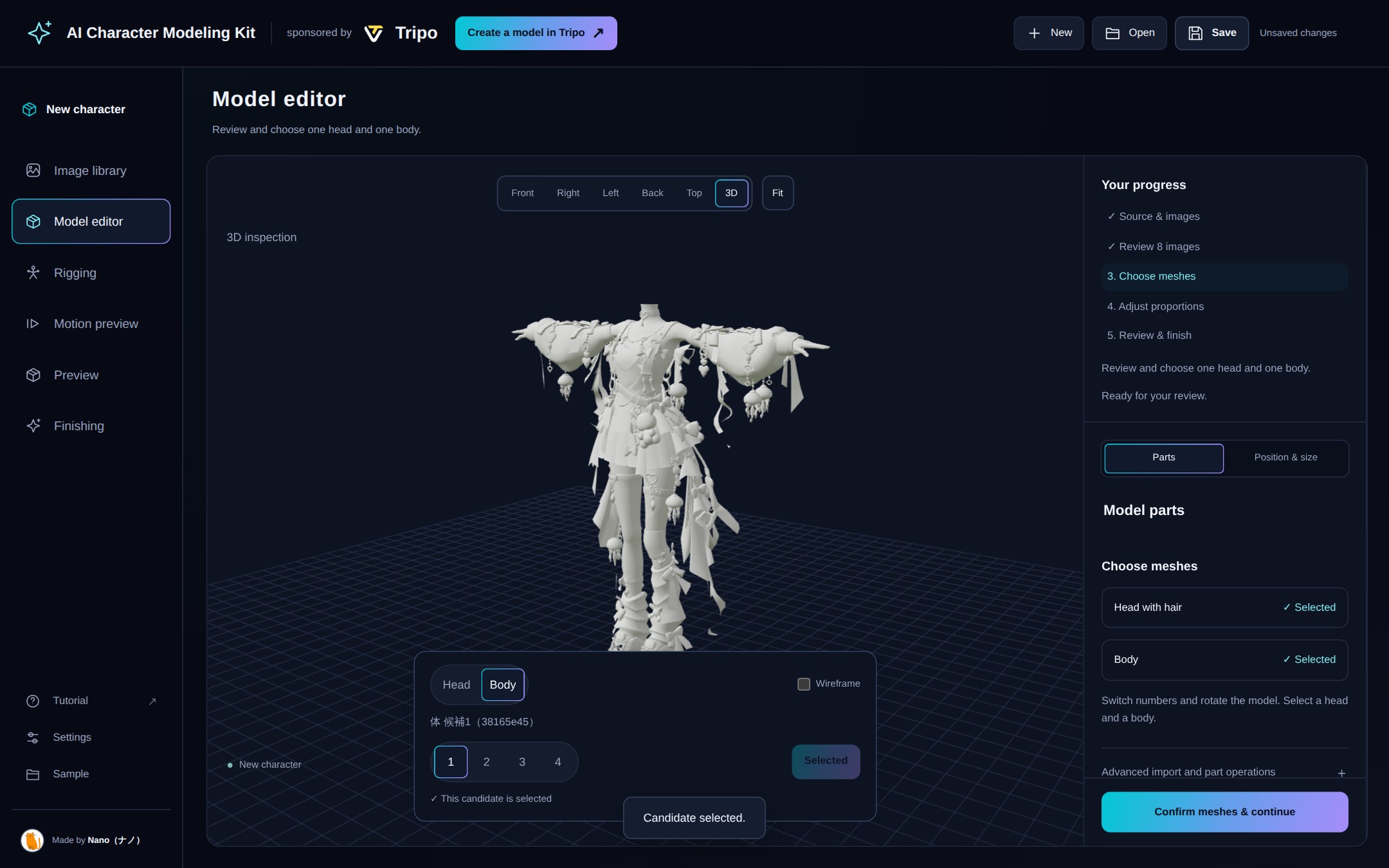
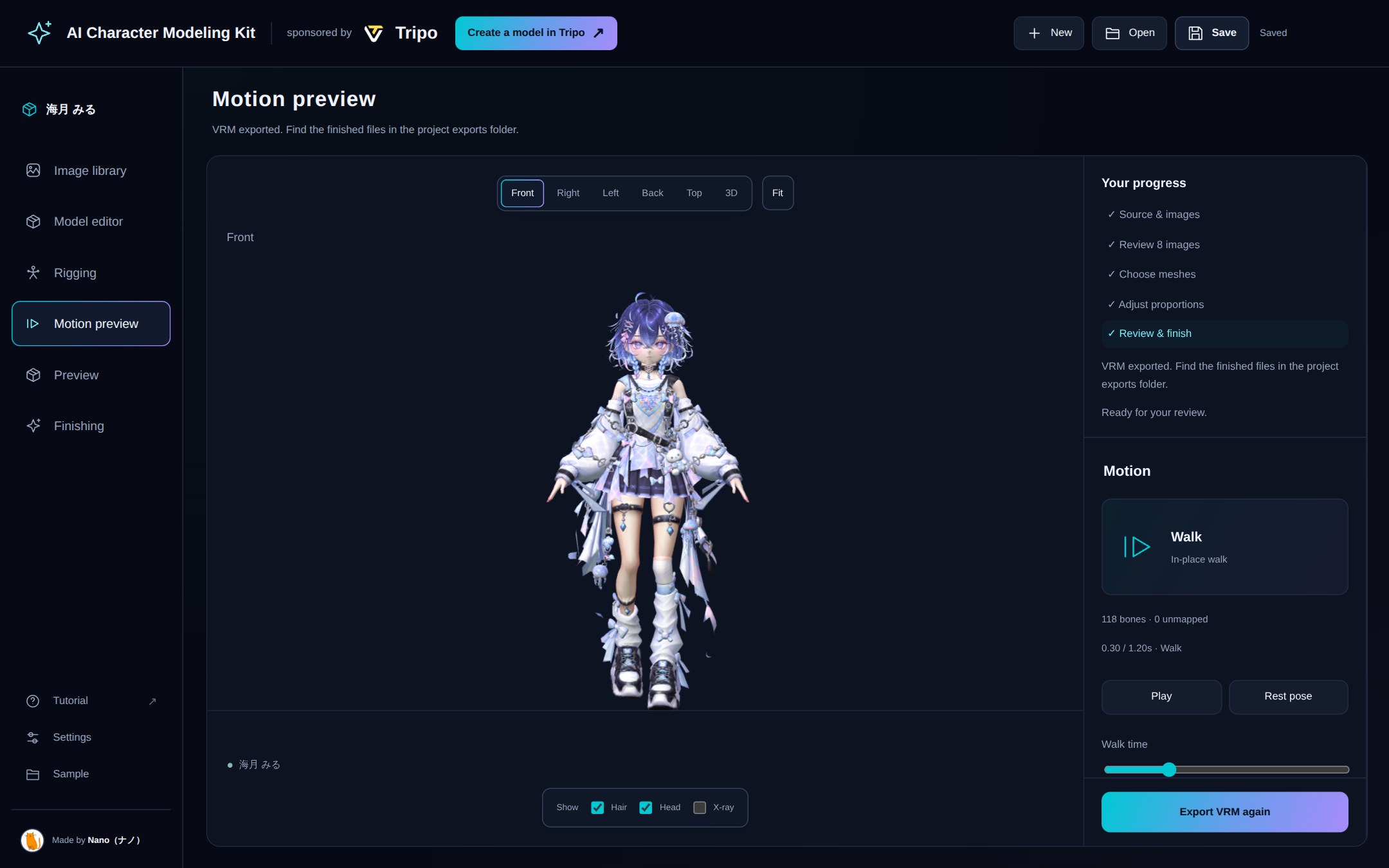
Compare model candidates in a dialog and reopen it with Choose model candidates in the model editor. The editor focuses on proportions; all three reference views share character height and foot level. Selecting a different candidate after texturing creates a separate project copy and preserves the original. Save the finished VRM at the end of Motion check.
 |
 |
 |
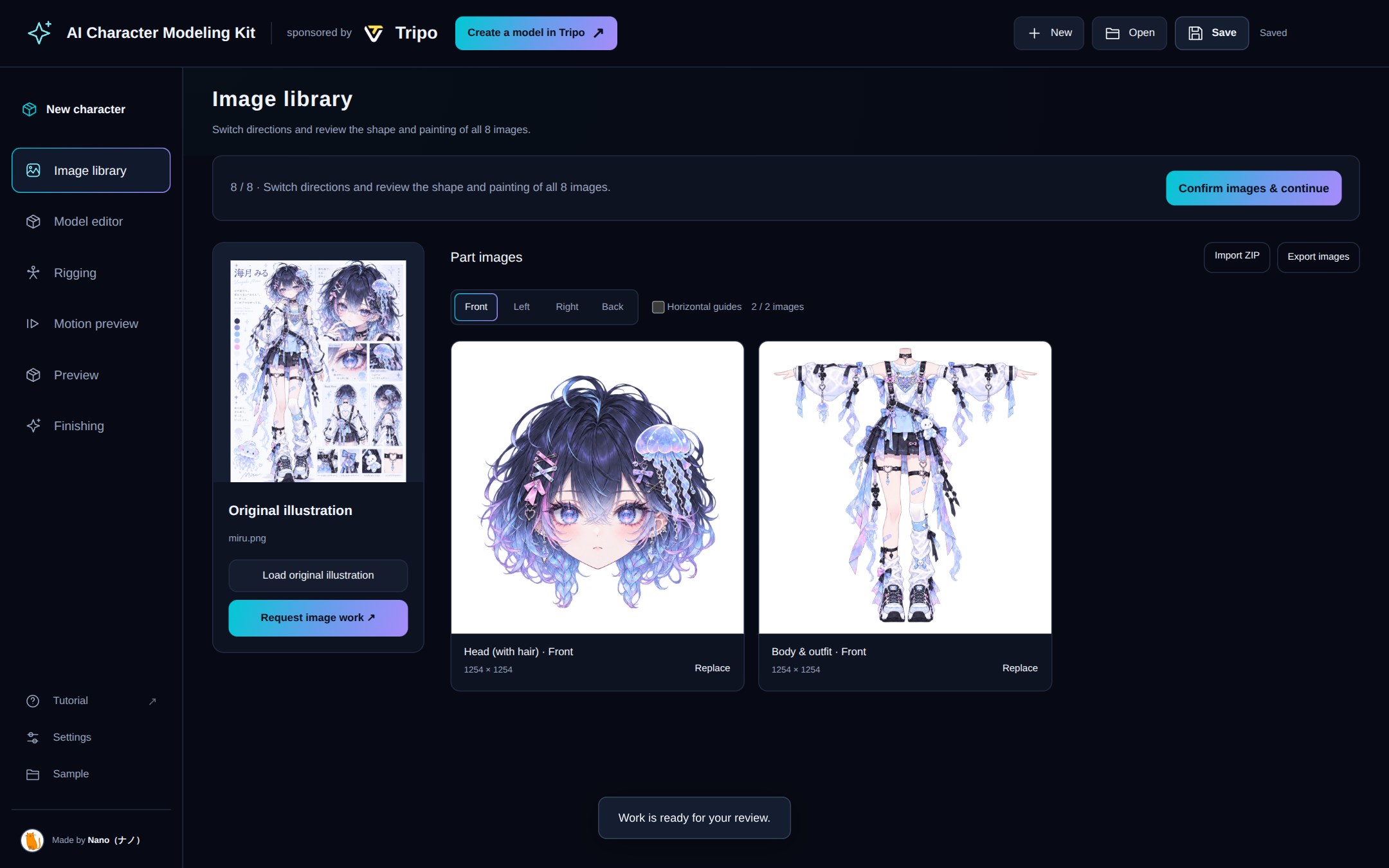
Review images
Head (with hair) and body, four views each. You can ask to fix a single image. |
Pick 3D candidates
Rotate and compare four candidates for the head and four for the body. |
Check the motion
Watch shoulders and knees bend in a walk cycle. |
Design ideas
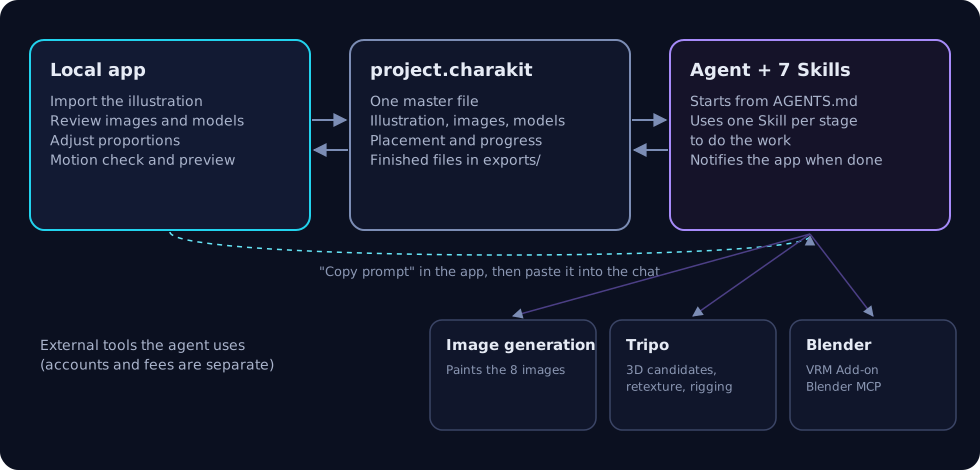
- You decide, the agent works. You handle five things: importing the illustration, reviewing images, choosing candidates, adjusting proportions and checking motion. Splitting, sorting, exporting and registering files is the agent's job, not homework for you.
- It always stops at checkpoints. The agent never picks a candidate for you. When something needs a visual judgement, it shows you the spot and asks.
- One project file. The project lives in a single
project.charakit. No dated copies or "final2" files pile up. Restarting the app from the same folder reopens where you left off.
- Runs on your computer. The app runs locally and starts without
npm install. External services such as image generation and Tripo are used with your own accounts.
What you need
|
Used for |
| Node.js 22 or later |
Running the app. |
| A desktop Chromium-based browser (Chrome, etc.) |
Opening the app. |
| Codex with image generation and browser control |
The agent that does the work. It paints images, operates Tripo in the browser and drives Blender. |
| A Tripo account (signed in in the browser) |
3D candidates, retexturing and rigging. |
| Blender 5.2, VRM Add-on for Blender, Blender MCP |
Weights, physics and VRM export. |
| An illustration you're allowed to use |
PNG / JPEG / WebP, up to 20 MB. A full-body character sheet works well. |
Accounts, terms and fees for external services are your own. The agent checks what's missing at the start and tells you.
Getting started
Download charakuru-1.1.0-….zip from Releases and extract it to any folder you can write to.
GitHub's automatic "Source code" archive contains only these documents, not the kit.
Open the extracted folder in Codex and ask:
Read the root AGENTS.md and help me start creating a character with this kit.
The agent checks your setup and starts the app. Open http://127.0.0.1:8766 in your browser and you're ready.
To start it yourself, run npm start in the extracted folder.
Then follow the tutorial, which walks through your first avatar screen by screen.
New agent requests use the begin command to avoid Codex on Windows mistaking the old start argument and a URL for a URL launch. If an old request is rejected with blocked by policy, see the recovery steps and copy a new request from the updated kit.
What's in the kit
|
|
AGENTS.md |
The agent's starting point: requirements, stages and saving rules. |
public/, server.mjs |
The local review app. |
skills/ |
Nine Skills for the production workflow. |
scripts/ |
Scripts the agent uses to update the project. |
assets/donor/weighted-body.blend |
The base body used for weight transfer. |
docs/ |
The tutorial, the motion review guide and plain-language terms in English, Japanese, Korean and Simplified Chinese. |
The nine Skills
| Skill |
Used for |
charakit-project |
Checking, reading and updating the project file |
character-parts-images |
Painting the head (with hair) and body in four views: 8 images |
character-three-views |
Full-body reference views for proportion adjustment |
character-material-brushup |
Finishing the painting and materials without changing the design |
tripo-agent-workflow |
Tripo candidates, part sorting, UV and retexturing, rigging |
tripo-studio-download |
Receiving exported Tripo Studio models and checking the saved files |
avatar-weight-transfer |
Separating swinging parts and transferring weights from the base body |
avatar-spring-setup |
Hair and outfit physics, VRM export and checking |
tripo-character-setup |
Detailed rigging from joint markers you place (only when you choose it) |
Current limitations
- Copying a request does not start the agent. Paste it into the chat and send it, and keep the app open while it works.
- New characters start with a neutral face and a fixed gaze. Use the optional Expressions tab to create or import expressions; gaze animation is not included.
- Motion review automatically shows the checked VRM, even before model information is registered. Walking and physics start enabled. You decide whether the appearance is satisfactory.
- Export VRM opens the model information form. Confirm the name, authors and usage terms, then save the information and download in one step. The model, materials and springs match motion review; the information is saved with the project for future exports. No agent request is needed.
- The UI supports English, Japanese, Korean and Simplified Chinese. Standard production requests and reports follow the selected language, even when bundled references are in another language.
- When moving your work, keep the whole project folder with the finished VRM and Blend files, not just
project.charakit.
Terms of Use
You may freely use the kit for non-commercial and commercial purposes within the following conditions.
Contact Nano in advance before redistributing the kit or integrating it into a product or service that provides kit code to users.
Private modification and copying are OK.
You must not extract bundled assets alone to take them outside the kit or redistribute them separately.
To the extent permitted by law, we accept no liability for damage arising from use of this kit.
If your entire business's annual revenue and cumulative funding are both below ¥100 million, you may use the Kit within the standard License conditions without a separate agreement or registration. If either is ¥100 million or more, contact Nano and obtain a separate written license agreement with the Licensor or an authorized representative before starting or continuing commercial or business use. Revenue and funding are not added together.
Assess annual revenue using the most recently completed fiscal year. If there is no defined fiscal year, use the preceding twelve months; if no fiscal year has yet ended, use actual revenue since the business began, limited to the preceding twelve months. Do not annualize revenue for a business operating for less than twelve months or for a short initial fiscal year. Reassess cumulative funding when funds are received, regardless of the fiscal year. See Terms of Use explained for calculation details and agreement timing.
Read the formal license here.
Reporting issues
Please report problems and ideas through Issues, following the reporting guide. Pull requests are not accepted.
Made by Nano (ナノ) · sponsored by Tripo
Expression authoring
The Expressions tab follows Rigging. Its top button copies an agent request. Import VRM 0.x/1.0, GLB, or reopen a character kit; select expressions, combine their strengths, and adjust minimum/maximum values. Controls are disabled until expressions exist. The source model, selection and adjustments are saved in the kit. Custom names are retained. These preview settings do not rewrite the source VRM.
Codex uses bundled knowledge and tools to fit a skin-only eye mask, transfer upper/lower lip motions separately, and create independent brow poses. The agent chooses correspondences by looking at the model, then refines attractive expressions with visual comparison and Blender editing. The library provides 8 eye, 10 mouth and 5 brow poses. Fixed multi-view captures, intermediate strengths and overlays support finishing; successful transfer or saving does not establish visual quality. Original geometry, UVs, materials and existing expressions are retained. Results return as optional Blend/GLB and comparison data to the same project; existing VRM exports are unchanged. See the guide. Requires Blender 5.2+ and the VRM Add-on for MToon preview. Computer Use can be used for local finishing. The expression assets were created by the kit creator and follow the same restrictions on extraction and redistribution as the other bundled assets.

 Charakuru is a kit that turns a single full-body character illustration into a VRM avatar: it pairs a local review app with nine AI agent Skills that drive Tripo and Blender to paint reference images, generate a 3D model, rig it and export a finished VRM.