waifu2x
Image Super-Resolution for Anime-style art using Deep Convolutional Neural Networks.
And it supports photo.
The demo application can be found at https://waifu2x.udp.jp/ (Cloud version), https://unlimited.waifu2x.net/ (In-Browser version).
2023/02 PyTorch version
nunif
waifu2x development has already been moved to the repository above.
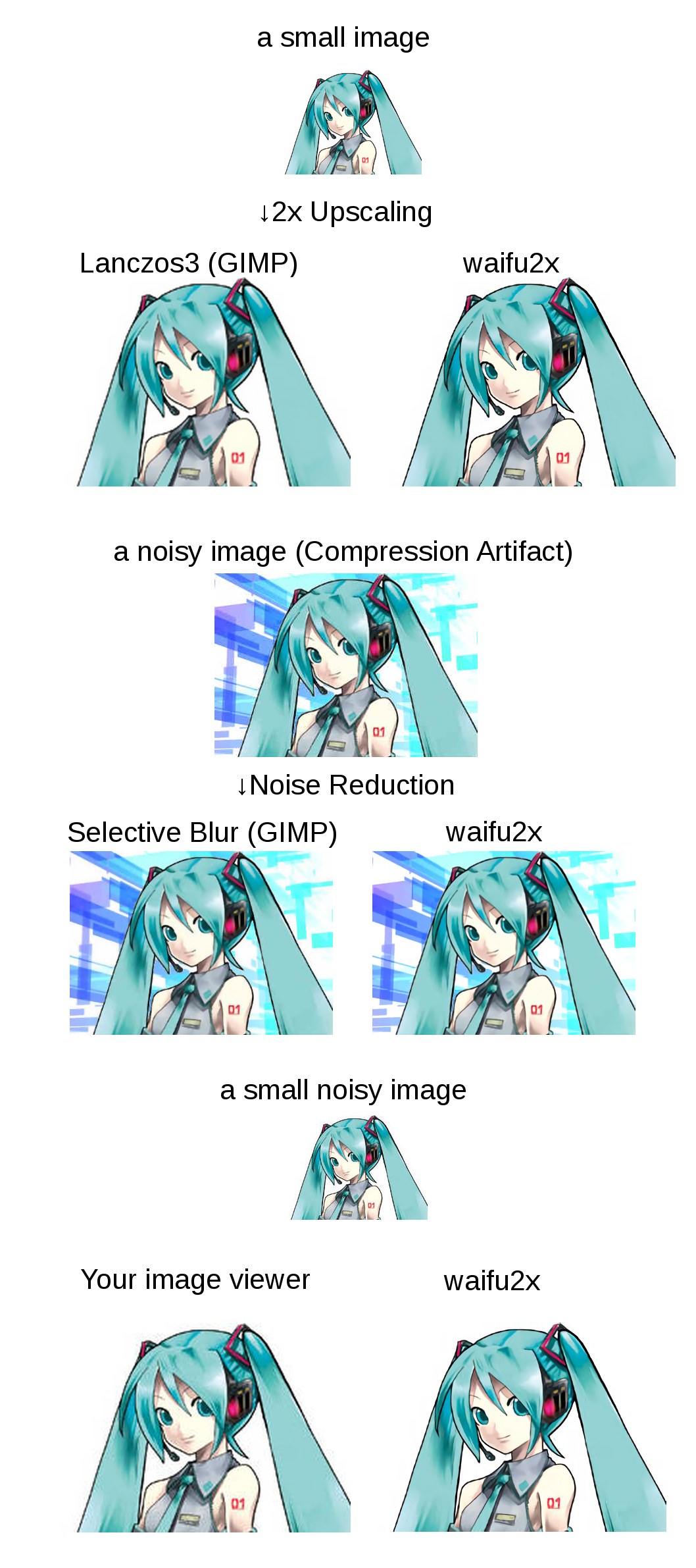
Summary
Click to see the slide show.
References
waifu2x is inspired by SRCNN [1]. 2D character picture (HatsuneMiku) is licensed under CC BY-NC by piapro [2].
Public AMI
TODO
Third Party Software
Third-Party
If you are a windows user, I recommend you to use waifu2x-caffe(Just download from releases tab), waifu2x-ncnn-vulkan or waifu2x-conver-cpp.
Dependencies
Hardware
LuaRocks packages (excludes torch7's default packages)
- lua-csnappy
- md5
- uuid
- csvigo
- turbo
Installation
(on Ubuntu 16.04)
Install CUDA
See: NVIDIA CUDA Getting Started Guide for Linux
Download CUDA
sudo dpkg -i cuda-repo-ubuntu1404_7.5-18_amd64.deb
sudo apt-get update
sudo apt-get install cuda
Install Package
sudo apt-get install libsnappy-dev
sudo apt-get install libgraphicsmagick1-dev
sudo apt-get install libssl1.0-dev # for web server
Note: waifu2x requires little-cms2 linked graphicsmagick. if you use macOS/homebrew, See #174.
Install Torch7
See: Getting started with Torch.
- For CUDA9.x/CUDA8.x, see #222
- For CUDA10.x, see #253
Getting waifu2x
git clone --depth 1 https://github.com/nagadomi/waifu2x.git
and install lua modules.
cd waifu2x
./install_lua_modules.sh
Validation
Testing the waifu2x command line tool.
th waifu2x.lua
Web Application
th web.lua
View at: http://localhost:8812/
Notes: If you have cuDNN library, than you can use cuDNN with -force_cudnn 1 option. cuDNN is too much faster than default kernel. If you got GPU out of memory error, you can avoid it with -crop_size option (e.g. -crop_size 128).
Noise Reduction
th waifu2x.lua -m noise -noise_level 1 -i input_image.png -o output_image.png
th waifu2x.lua -m noise -noise_level 0 -i input_image.png -o output_image.png
th waifu2x.lua -m noise -noise_level 2 -i input_image.png -o output_image.png
th waifu2x.lua -m noise -noise_level 3 -i input_image.png -o output_image.png
2x Upscaling
th waifu2x.lua -m scale -i input_image.png -o output_image.png
Noise Reduction + 2x Upscaling
th waifu2x.lua -m noise_scale -noise_level 1 -i input_image.png -o output_image.png
th waifu2x.lua -m noise_scale -noise_level 0 -i input_image.png -o output_image.png
th waifu2x.lua -m noise_scale -noise_level 2 -i input_image.png -o output_image.png
th waifu2x.lua -m noise_scale -noise_level 3 -i input_image.png -o output_image.png
Batch conversion
find /path/to/imagedir -name "*.png" -o -name "*.jpg" > image_list.txt
th waifu2x.lua -m scale -l ./image_list.txt -o /path/to/outputdir/prefix_%d.png
The output format supports %s and %d(e.g. %06d). %s will be replaced the basename of the source filename. %d will be replaced a sequence number.
For example, when input filename is piyo.png, %s_%03d.png will be replaced piyo_001.png.
See also th waifu2x.lua -h.
Using photo model
Please add -model_dir models/photo to command line option, if you want to use photo model.
For example,
th waifu2x.lua -model_dir models/photo -m scale -i input_image.png -o output_image.png
Video Encoding
* avconv is alias of ffmpeg on Ubuntu 14.04.
Extracting images and audio from a video. (range: 00:09:00 ~ 00:12:00)
mkdir frames
avconv -i data/raw.avi -ss 00:09:00 -t 00:03:00 -r 24 -f image2 frames/%06d.png
avconv -i data/raw.avi -ss 00:09:00 -t 00:03:00 audio.mp3
Generating a image list.
find ./frames -name "*.png" |sort > data/frame.txt
waifu2x (for example, noise reduction)
mkdir new_frames
th waifu2x.lua -m noise -noise_level 1 -resume 1 -l data/frame.txt -o new_frames/%d.png
Generating a video from waifu2xed images and audio.
avconv -f image2 -framerate 24 -i new_frames/%d.png -i audio.mp3 -r 24 -vcodec libx264 -crf 16 video.mp4
Train Your Own Model
Note1: If you have cuDNN library, you can use cudnn kernel with -backend cudnn option. And, you can convert trained cudnn model to cunn model with tools/rebuild.lua.
Note2: The command that was used to train for waifu2x's pretrained models is available at appendix/train_upconv_7_art.sh, appendix/train_upconv_7_photo.sh. Maybe it is helpful.
Data Preparation
Genrating a file list.
find /path/to/image/dir -name "*.png" > data/image_list.txt
You should use noise free images. In my case, waifu2x is trained with 6000 high-resolution-noise-free-PNG images.
Converting training data.
th convert_data.lua
Train a Noise Reduction(level1) model
mkdir models/my_model
th train.lua -model_dir models/my_model -method noise -noise_level 1 -test images/miku_noisy.png
# usage
th waifu2x.lua -model_dir models/my_model -m noise -noise_level 1 -i images/miku_noisy.png -o output.png
You can check the performance of model with models/my_model/noise1_best.png.
Train a Noise Reduction(level2) model
th train.lua -model_dir models/my_model -method noise -noise_level 2 -test images/miku_noisy.png
# usage
th waifu2x.lua -model_dir models/my_model -m noise -noise_level 2 -i images/miku_noisy.png -o output.png
You can check the performance of model with models/my_model/noise2_best.png.
Train a 2x UpScaling model
th train.lua -model upconv_7 -model_dir models/my_model -method scale -scale 2 -test images/miku_small.png
# usage
th waifu2x.lua -model_dir models/my_model -m scale -scale 2 -i images/miku_small.png -o output.png
You can check the performance of model with models/my_model/scale2.0x_best.png.
Train a 2x and noise reduction fusion model
th train.lua -model upconv_7 -model_dir models/my_model -method noise_scale -scale 2 -noise_level 1 -test images/miku_small.png
# usage
th waifu2x.lua -model_dir models/my_model -m noise_scale -scale 2 -noise_level 1 -i images/miku_small.png -o output.png
You can check the performance of model with models/my_model/noise1_scale2.0x_best.png.
Docker
( Docker image is available at https://hub.docker.com/r/nagadomi/waifu2x )
Requires nvidia-docker.
docker build -t waifu2x .
docker run --gpus all -p 8812:8812 waifu2x th web.lua
docker run --gpus all -v `pwd`/images:/images waifu2x th waifu2x.lua -force_cudnn 1 -m scale -scale 2 -i /images/miku_small.png -o /images/output.png
Note that running waifu2x in without JIT caching is very slow, which is what would happen if you use docker.
For a workaround, you can mount a host volume to the CUDA_CACHE_PATH, for instance,
docker run --gpus all -v $PWD/ComputeCache:/root/.nv/ComputeCache waifu2x th waifu2x.lua --help

 waifu2x 是一个命令行工具,用深度卷积神经网络把动漫风格的图片放大 2 倍并去除噪点——它还提供了专门的模型来处理照片。