
Kimi Code Subscription
·
API Global
·
API China
|
|
Thanks to Kimi for sponsoring this project! Kimi K3 is Moonshot AI's most capable model and the world's first open 3T-class model. With 2.8 trillion parameters, native vision, and a 1-million-token context window, K3 delivers frontier performance across long-horizon coding, knowledge work, and reasoning. Inside CCR, Kimi ships as a built-in provider preset: import the pay-as-you-go API or Kimi Code subscription in one click and route your coding agent's requests to Kimi. The subscription endpoint passes through natively without protocol conversion, API endpoints are adapted automatically, and account balance and subscription usage are visible in the CCR dashboard.
CCR already includes Kimi provider presets. Visit the Kimi Open Platform (中文站 | Global) to try the API, or explore the Kimi Code subscription.
|
Claude Code Router
Manage every agent and provider from one place.
Connect Claude Code, Claude Design, Codex, Grok CLI, Kimi CLI, Kilo Code, OpenCode, Pi, ZCode, WorkBuddy, and compatible API clients to the providers you choose—then route, fail over, extend, and observe every request from one app.







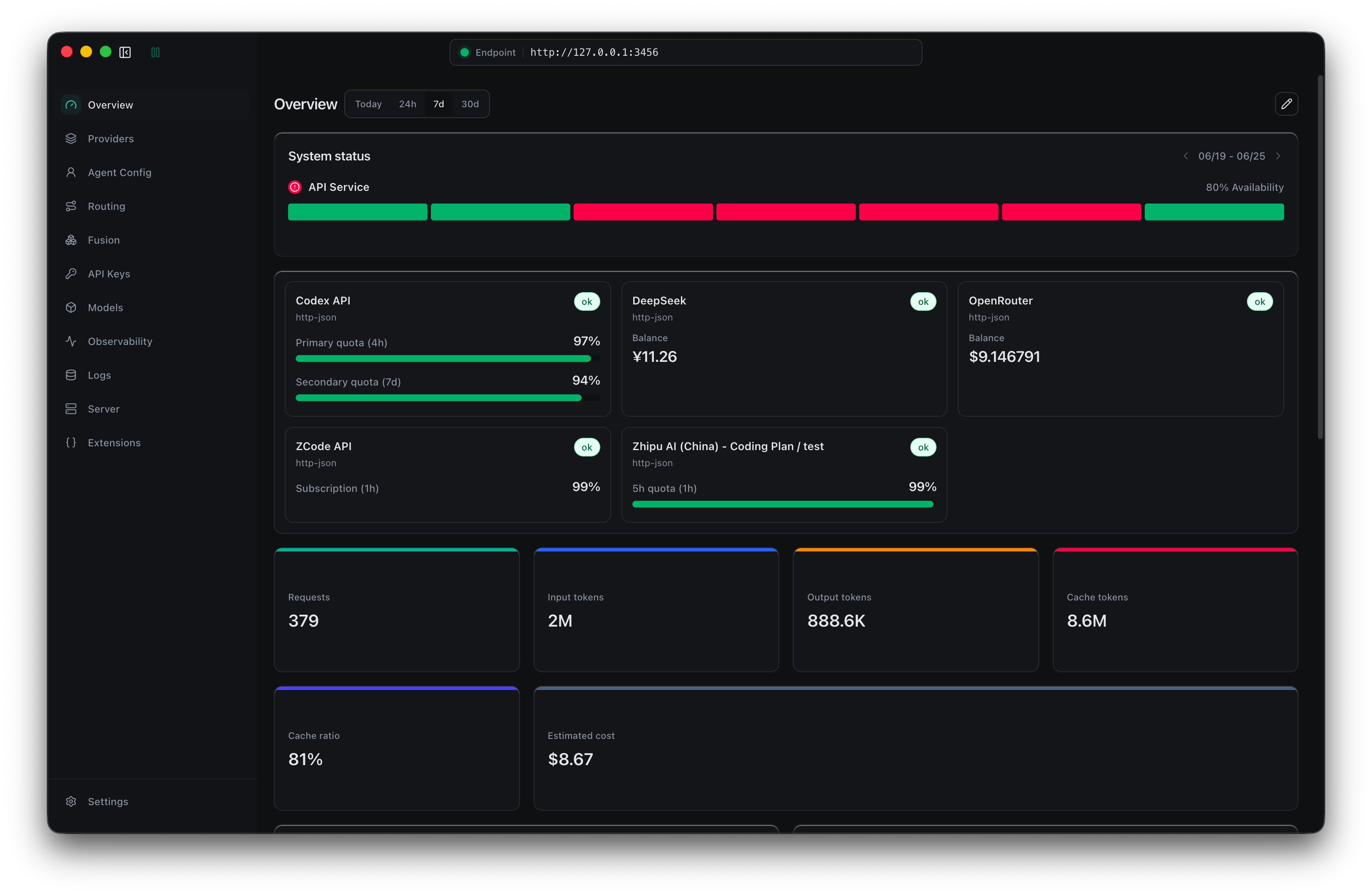
Why use Claude Code Router?
Claude Code Router (CCR) is a local model gateway and control plane for coding agents. It gives Claude Code, Claude Design, Codex, Grok CLI, Kimi CLI, Kilo Code, OpenCode, Pi, ZCode, WorkBuddy, and compatible API clients one stable local endpoint, while you manage the providers, models, accounts, routing rules, and tools behind it from one place.
Use CCR to:
- Manage all agents and providers together instead of maintaining a separate model configuration for every client.
- Switch providers or models without changing your workflow or repeatedly editing agent configuration files.
- Keep requests running with retries, credential pools, key rotation, and ordered fallback models.
- Add capabilities to existing models with Fusion vision, web search, MCP tools, and ToolHub.
- See what actually happened through request logs, resolved routes, latency, token usage, cost estimates, and account status.
CCR supports OpenAI Chat / Responses, Anthropic Messages, Gemini Generate Content / Interactions, OpenRouter, DeepSeek, SiliconFlow, Moonshot, Kimi Code, Mistral, Z.AI, Bailian, and custom compatible providers.
Supported Agents
Quick Start
Desktop app (recommended)
Download Claude Code Router for macOS, Windows, or Linux, then launch the app.
Open Providers → Add Provider. Choose a built-in preset or a custom endpoint, enter the API key, select the protocol and models, then save.
Open Server and click Start. The local model gateway listens on http://127.0.0.1:3456 by default.
Open Agent Config, choose Claude Code, Claude Design, Codex, Grok CLI, Kimi CLI, Kilo Code, OpenCode, Pi, ZCode, or WorkBuddy, select a model, and apply the profile.
Start using your agent. Open Logs to confirm the resolved provider, model, status, tokens, latency, and errors.
Your agent is now connected to CCR. To add conditions, retries, request rewrites, or fallback models, open Routing.
CLI
The npm CLI requires Node.js 22 or newer. It starts the same gateway and a browser-based management UI without Electron:
npm install -g @musistudio/claude-code-router
ccr ui
Open http://127.0.0.1:3458, then follow the same Providers → Server → Agent Profiles flow above. The model gateway remains at http://127.0.0.1:3456. See the CLI reference for service modes, authentication, and profile commands.
Docker
npm run docker:compose:up
Docker exposes the management UI and gateway routes through http://127.0.0.1:3458 by default. The npm script prepares the local plugin-capable ai-gateway runtime before building the image when ../../next-ai/gateway exists. Read the Docker deployment guide before exposing CCR remotely.
Build desktop apps
Install Node.js 22+, then run npm ci.
| Target |
Command |
Output |
| macOS local DMG/ZIP |
npm run build:app:mac |
release-local/ |
| Windows local NSIS installer |
npm run build:app:win |
release-local/ |
Windows app packaging must run on Windows x64 because better-sqlite3 ships a native Electron module. The release workflow builds macOS on macOS runners and Windows on windows-latest when a v* tag is pushed.
How it works
Claude Code · Claude Design · Codex · Grok CLI · Kimi CLI · Kilo Code · OpenCode · Pi · ZCode · WorkBuddy · Compatible API clients
                              │
                              ▼
                 Claude Code Router :3456
          Profiles · Routing · Credentials · Tools · Logs
                              │
                              ▼
             Selected provider, model, and account
Core capabilities
| Area |
Highlights |
| Agents |
Profiles for Claude Code, Claude Design, Codex, Grok CLI, Kimi CLI, Kilo Code, OpenCode, Pi, ZCode, and WorkBuddy; model overrides; scopes; environment settings; CLI and app launch entries; multi-instance workflows |
| Providers |
Presets and custom endpoints; protocol probing; model discovery; connectivity checks; local login import where supported; single keys and credential pools |
| Models & routing |
Searchable catalog; model descriptions for task selection; conditions on headers and bodies; prefixes; rewrites; retries; ordered fallbacks |
| Tools & extensions |
Fusion models; ToolHub; built-in browser automation; Chrome login-state import; wrapper and core gateway plugins; local routes and virtual models |
| Access & quotas |
Separate CCR client keys with expiration and local request, token, and image limits |
| Observability |
Request and response details; resolved provider, model, and credential; status; latency; tokens; estimated cost; tool calls; agent traces |
| AgentClaw |
Agent relay through Weixin iLink, WeCom, Slack, Discord, Telegram, LINE, Feishu, and DingTalk |
Go deeper when you are ready
The complete documentation lives at ccrdesk.top.
A huge thank you to all our sponsors for their generous support.
Community Sponsors













 Claude Code Router(CCR)是一个本地模型网关和编程智能体的控制中心:你的智能体只需连接一个稳定的本地端点,而你可以在一个应用里统一管理服务商、模型、路由规则和工具。