

short-video-maker README

The project's README from github.com/mushigaite/short-video-maker. As one markdown file: README.md.

AI shorts generator

Python Stars Forks

A free open-source project designed to turn youtube-videos into viral short videos. Highlight detection, subtitles, translation, voiceover, all in one for your content: no pre-clip credits or any watermarks. Designed for creators who want an alternative to short-video SaaS tools like OpusClip or Vidyo.ai for free.

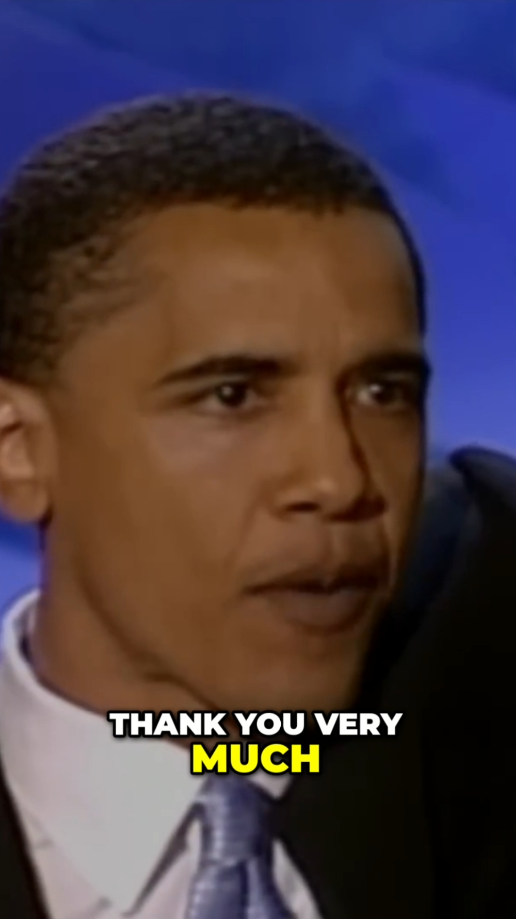
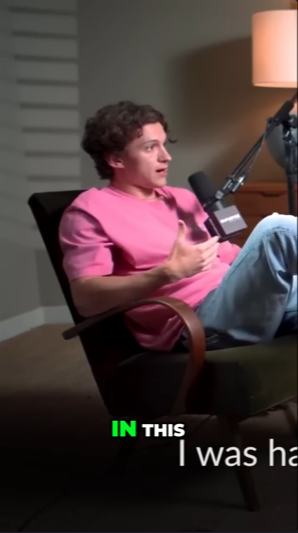
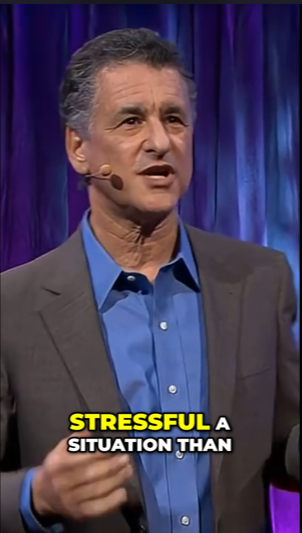
Examples of a processed video

image
"The Speech that Made Obama President"
image
"How Tom Overcame Social Anxiety - The Mindset That Changed Everything"
image
"How to stay calm when you know you'll be stressed | Daniel Levitin | TED"

Features 🪁

How It Works

  1. Download: Fetches the source video from YouTube, or uses the local file path directly
  2. Transcribe: faster-whisper produces a timestamped transcript locally — same step regardless of which LLM_PROVIDER is selected
  3. Detect content type: The chosen LLM classifies the video (podcast, interview, tutorial, vlog, etc.) and pacing, so the highlight prompt can be tuned per content style
  4. Highlight ranking: The chosen LLM (openai / gemini / muapi) scans the transcript through a virality framework — hook moments, emotional peaks, opinion bombs, revelations, conflict, quotables, story peaks, practical value — and emits ranked candidates with scores 0–100
  5. Dedupe: Overlapping candidates are collapsed by score
  6. Top-N selection: The top --n candidates are selected
  7. Auto-crop: Each highlight is rendered as a vertical short at the requested --ratio, with an optional AI-generated hook at the start unless --no-hook is set

Requirements

Quick start

  1. Clone the repo:
git clone https://github.com/mushigaite/short-video-generator-AI.git
cd short-video-generator-AI
  1. Create and activate a virtual environment:

Windows:

python -m venv venv
venv\Scripts\activate

Linux/MacOS:

python -m venv venv
venv\Scripts\activate
  1. Install dependencies
pip install -r requirements.txt
  1. Set up .env
# Used LLM provider(openai/gemini/MuAPI)
LLM_PROVIDER=openai

# Enter the API key for the chosen provider
OPENAI_API_KEY=your_openai_key_here
OPENAI_MODEL=gpt-4o-mini          # optional
GEMINI_API_KEY=your_gemini_key_here
GEMINI_MODEL=gemini-2.5-flash      # optional
MUAPI_API_KEY=your_muapi_key_here

# Whisper settings
LOCAL_WHISPER_MODEL=base # tiny / base / small / medium / large-v3
LOCAL_WHISPER_DEVICE=auto    # auto / cpu / cuda

If you uncertain about the provider:

Provider Free tier? Get key
Gemini ✅ Yes, but daily limit https://aistudio.google.com
OpenAI ❌ Paid https://platform.openai.com
MuAPI ❌ Paid, but pay-per-use, no subscription https://muapi.ai

Usage

Basic usage:

python main.py "https://www.youtube.com/watch?v=video_id" 

Renderred clips are saved to output folder

With flags:

python main.py "https://www.youtube.com/watch?v=video_id" \
      --n 3 \
      --ratio 9:16 \
      --resolution 1080 \

You can also provide a local video file instead of a YouTube link, for example:

python main.py "/Users/Admin/Folder/video.mp4" \
      --n 4 \
      --ratio 9:16 \
      --resolution 720 \
      --language zh \

CLI Flags

Flag Default Notes
--n 3 How many clips to render
--ratio 9:16 Any ratio / 9:16 for short videos / 1:1 for square
--resolution 720 Source video download resolution: 360 / 480 / 720 / 1080
--language auto Force Whisper language code (e.g. en)
--no-hook - Excludes AI generated hook from the start of the clip

Web version set-up

Instead of the CLI, you can use a local web interface to queue multiple videos at once and adjust flags visually. The LLM provider and API keys are still configured in .env — the web version only handles video input and render flags.

python3 server.py

Serve the frontend:

cd web
python3 -m http.server 8000

Then, open in your browser:

http://localhost:8000/shorts-generator-ui.html

Contributing

Feel free to open an issue or fork the repository for your projects.

License

This project is licensed under the MIT License.

short-video-maker (mushigaite/short-video-maker)

Searching Database…

这是什么?short-video-maker 能把一个 YouTube 链接(或本地视频文件)变成一条可直接发布的竖屏短视频:自动检测最容易被疯传的高光时刻,然后添加字幕、翻译和 AI 配音——没有水印,也不需要对每个片段署名。
这是命令行工具,还是也有网页界面?它主要是 Python 命令行工具,但也自带本地网页界面,你可以用它排队处理多个视频,并以可视化方式调整渲染参数,而不用敲命令。
怎么让它跑起来?克隆仓库,创建并激活 Python 虚拟环境,安装 requirements.txt,在 .env 文件里配置你的 LLM API 密钥,然后带上 YouTube 链接运行命令行,或启动网页前端。
需要 OpenAI 或 Gemini 的 API 密钥吗?需要——高光检测和开头钩子功能需要一家 LLM 提供商(OpenAI、Gemini 或 MuAPI)的密钥。Gemini 提供有每日限额的免费档位,OpenAI 和 MuAPI 则是付费的,其中 MuAPI 按用量计费。
免费的 Gemini 方案有什么限制吗?免费的 Gemini 档位有每日请求限额,重度使用最终还是会把你推向 OpenAI 或 MuAPI 这类付费提供商。
它能在 Windows、Mac 和 Linux 上运行吗?可以,安装说明分别为 Windows 和 Linux/MacOS 给出了不同的虚拟环境命令,所以它是跨平台的。
它怎么挑选哪些时刻是高光?由一个 LLM 依据传播力框架(钩子时刻、情绪高点、冲突、金句、故事高潮、实用价值)扫描字幕文稿,给每个候选片段打 0-100 分,按得分去除重叠片段,并保留得分最高的 N 个。
hook 选项是做什么的?启用后,它会在片段开头加一段简短的、结合上下文由 AI 生成的钩子,在主高光播放前先抓住观众;可以用 --no-hook 关闭。
能处理本地视频文件而不是 YouTube 链接吗?可以,直接传一个本地文件路径代替 YouTube URL 即可,它会走同样的高光、字幕和裁剪流程。
转写是怎么处理的?faster-whisper 会在本地生成带时间戳的字幕文稿,这一步不管你选哪家 LLM 提供商做高光排序都完全一样。
Creator
mushigaite
Size
1.3 MB
Stars
625
Updated
CommitOct 15
Age
12d
Commits · 90 Days