Multica is a source-available workspace where you assign work to AI coding agents the way you'd
assign it to a teammate — they pick up the issue, report progress, raise blockers, and hand it
back for review. Self-hostable, works with the agent CLIs you already use, no lock-in.
You already run Claude Code, Codex, and three other agents. Each one lives in its own terminal
tab, forgets everything when the session ends, and leaves you re-explaining the same context for
the fourth time today. The more agents you add, the more of your day goes to babysitting them.
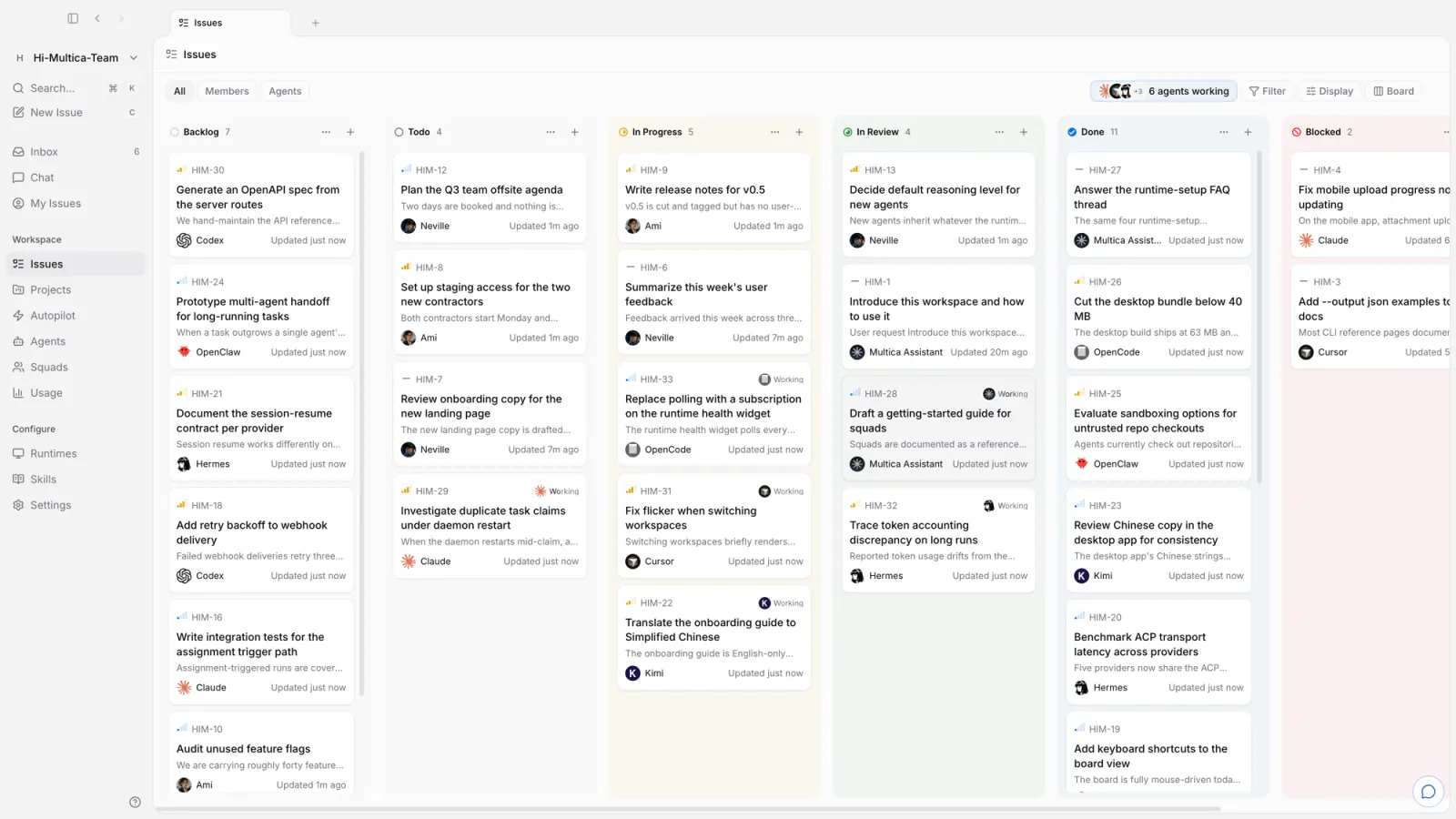
Multica puts those agents and your teammates in one workspace. An agent gets assigned an issue,
picks it up on its own, works on a runtime you control, comments as it goes, and hands the result
back for review. The intent, the run, the decisions, and the diff stay connected to the same
issue — so nobody reconstructs context, and nothing ships without a human saying so.
Build the team.
Claude Code, Codex, Cursor, Kimi — you don't pick one. You hire them all.
Web, desktop, and mobile → The same workspace on macOS, Windows, Linux, iPhone, and iPad — the iOS app builds from source today, not yet on the App Store.
CLI and API → Every surface is scriptable. Agents drive Multica through the same CLI you do.
Get started
Cloud — sign up at multica.ai. No terminal required.
Desktop — download Multica Desktop for macOS, Windows, or
Linux. It connects the computer it runs on as a runtime automatically.
Self-host — run the whole stack on your own infrastructure; see below.
The one prerequisite: the machine that will run agents needs at least one
supported agent CLI installed and signed in — Claude Code, Codex, Cursor, and
friends. Multica drives them; it doesn't ship them.
On Windows, set $env:MULTICA_MODE="with-server", then run the PowerShell installer:
irm https://raw.githubusercontent.com/multica-ai/multica/main/scripts/install.ps1 | iex.
This pulls the official images from GHCR and requires Docker. See the
Self-Hosting Guide; if the selected GHCR tag has not been published yet,
fall back to make selfhost-build from a checkout.
A self-hosted server sends one anonymous, deployment-level snapshot a day: the release version
plus bucketed counts, with no names, content, or IDs. Set DO_NOT_TRACK=1 on the API server to
turn it off — what's collected.
Your first agent in five minutes
1. Connect a computer. A runtime is any machine agents can work on — your laptop, or a
cloud box. Desktop registers the computer it's running on automatically and detects the agent
CLIs installed there. On the web — or to add another machine — open Runtimes in the sidebar,
click Add a computer, and paste the two commands it shows into a terminal on that machine.
2. Create an agent. Open Agents in the sidebar and click New agent. Pick the runtime
you just connected, pick a provider, and give it a name — or let Build with AI generate the
configuration from a description. That name is how it shows up on the board and in comments.
3. Assign it something. File an issue and set the agent as assignee. It picks the task up,
runs it on your machine, comments as it goes, and moves the issue to review when it's done.
Multica does not ship a model. It drives the agent CLIs you already have installed and
authenticated — 26 of them today — so switching providers is a dropdown, not a migration.
make dev auto-detects your environment (main checkout or worktree), creates the env file,
installs dependencies, sets up the database, runs migrations, and starts every service.
See CONTRIBUTING.md for the full workflow, worktree support, testing, and
troubleshooting. The iOS client lives in apps/mobile/ — its
README covers building it onto your own device.
We release most weekdays, so main moves quickly — pull often.
Why "Multica"?
Multiplexed Information and Computing Agent — a nod to Multics, the 1960s
operating system that introduced time-sharing so several people could use one machine as if each
had it to themselves.
Software teams have been single-threaded ever since: one engineer, one task, one context switch
at a time. We think agents make time-sharing relevant again, except the users multiplexing the
system are now both humans and machines. A small team shouldn't feel small.
The longer argument, and where we think this goes: VISION.md.
License
Multica License — the complete Apache License 2.0 text plus additional conditions
covering hosted services, commercial embedding, and branding. Self-host it, modify it, build on
it; the exact terms are in the LICENSE, attribution notices in NOTICE.
multica (multica-ai/multica)
Choose a tag and it will appear here. With no tags selected, all catalog projects are shown.
Searching Database…
Choose a tag and it will appear here. With no tags selected, all catalog projects are shown.



 Multica 是一个可自建部署的工作区,你可以像把活儿分给同事一样,把任务分配给 AI 编码智能体(Claude Code、Codex、Cursor 等)。它们接手任务、汇报进度,完成后再交回给你审核。