


Что это такое?
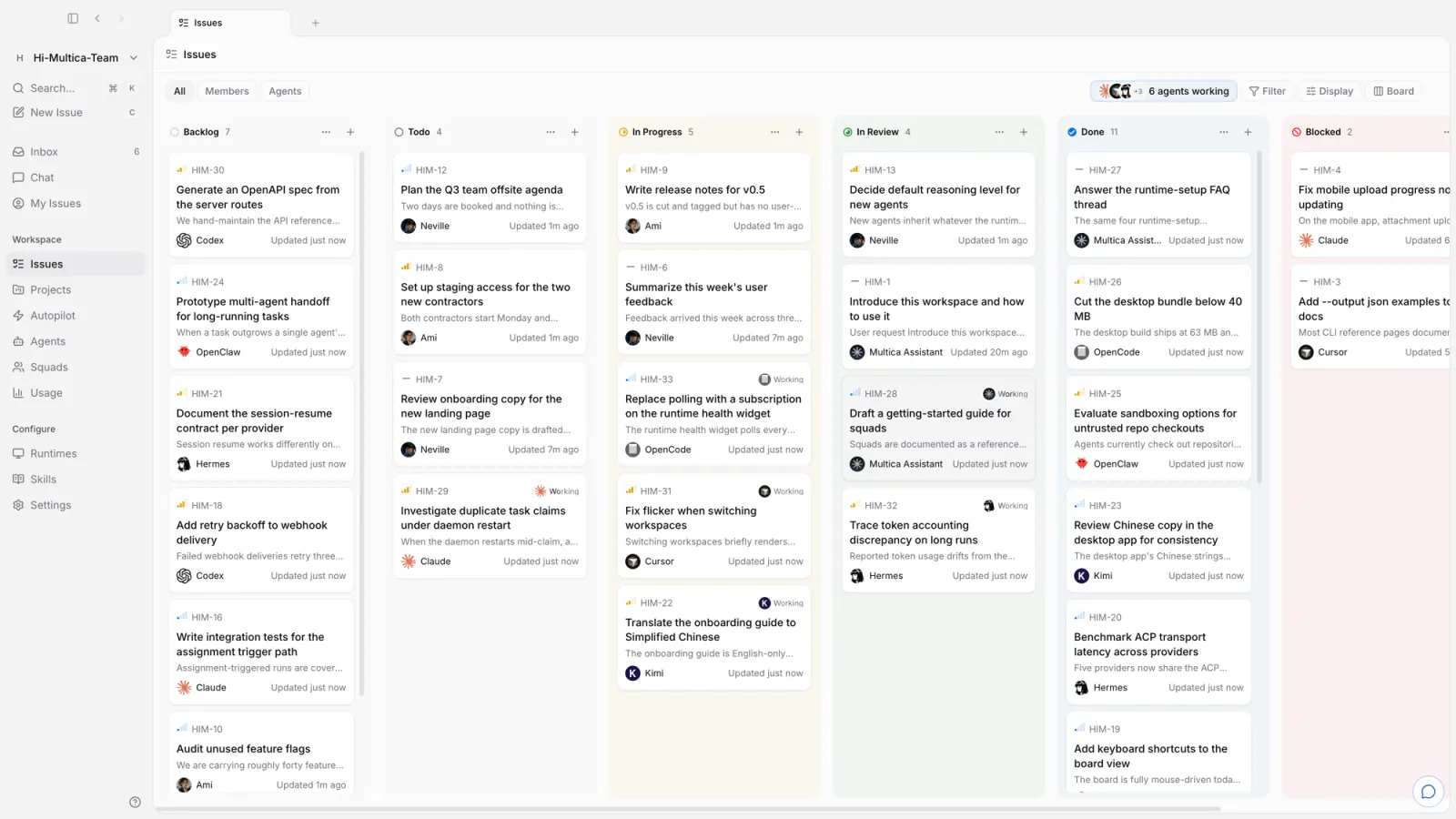
 Multica — это рабочее пространство, которое можно развернуть на собственном сервере. Вы назначаете задачи ИИ-агентам для программирования (Claude Code, Codex, Cursor и другим) так же, как назначили бы работу члену команды: агент берётся за задачу, сообщает о ходе работы и возвращает её на проверку.
Multica — это рабочее пространство, которое можно развернуть на собственном сервере. Вы назначаете задачи ИИ-агентам для программирования (Claude Code, Codex, Cursor и другим) так же, как назначили бы работу члену команды: агент берётся за задачу, сообщает о ходе работы и возвращает её на проверку.Это библиотека или полноценное приложение?Это полноценное приложение с веб-, десктопным (Electron) и мобильным (iOS) клиентами, которое работает на бэкенде на Go и базе данных PostgreSQL. Его не нужно импортировать в код.
Это полноценное приложение с веб-, десктопным (Electron) и мобильным (iOS) клиентами, которое работает на бэкенде на Go и базе данных PostgreSQL. Его не нужно импортировать в код.Как его запустить?Зарегистрируйтесь на multica.ai для облачной версии, скачайте Multica Desktop для macOS, Windows или Linux, или разверните всю систему на своём сервере с помощью Docker Compose или Helm. Для развёртывания на своём сервере в Windows задайте $env:MULTICAMODE="with-server" и запустите установщик PowerShell, который загружает образы из GHCR.
Зарегистрируйтесь на multica.ai для облачной версии, скачайте Multica Desktop для macOS, Windows или Linux, или разверните всю систему на своём сервере с помощью Docker Compose или Helm. Для развёртывания на своём сервере в Windows задайте $env:MULTICAMODE="with-server" и запустите установщик PowerShell, который загружает образы из GHCR.Нужно ли заранее устанавливать CLI-инструмент для ИИ-агента?Да. Единственное обязательное условие: на машине, где работают агенты, должен быть установлен и настроен хотя бы один поддерживаемый CLI-инструмент агента, например Claude Code, Codex или Cursor. Multica управляет этими CLI, но не поставляет их и не заменяет.
Да. Единственное обязательное условие: на машине, где работают агенты, должен быть установлен и настроен хотя бы один поддерживаемый CLI-инструмент агента, например Claude Code, Codex или Cursor. Multica управляет этими CLI, но не поставляет их и не заменяет.Приложение для iOS есть в App Store?Пока нет. Приложение для iOS собирается только из исходного кода на ваше собственное устройство и в App Store не опубликовано.
Пока нет. Приложение для iOS собирается только из исходного кода на ваше собственное устройство и в App Store не опубликовано.На каких платформах он работает?Рабочее пространство доступно на macOS, Windows и Linux, а также как мобильное приложение для iPhone и iPad и через веб-интерфейс.
Рабочее пространство доступно на macOS, Windows и Linux, а также как мобильное приложение для iPhone и iPad и через веб-интерфейс.Отправляет ли self-hosted-версия какие-либо данные разработчикам?Серверная часть, развёрнутая на вашем сервере, раз в сутки отправляет анонимный снимок состояния развёртывания (версия выпуска и округлённые количества, без имён, содержимого и идентификаторов). Отправку можно отключить, установив DONOTTRACK=1.
Серверная часть, развёрнутая на вашем сервере, раз в сутки отправляет анонимный снимок состояния развёртывания (версия выпуска и округлённые количества, без имён, содержимого и идентификаторов). Отправку можно отключить, установив DONOTTRACK=1.Сколько CLI-инструментов для агентов поддерживает Multica?Сейчас поддерживается 26 провайдеров, включая Claude Code, Codex, Cursor, Copilot, Kimi, OpenCode, Grok и другие. Переключение между ними — это просто выбор в выпадающем списке, а не миграция.
Сейчас поддерживается 26 провайдеров, включая Claude Code, Codex, Cursor, Copilot, Kimi, OpenCode, Grok и другие. Переключение между ними — это просто выбор в выпадающем списке, а не миграция.Могут ли агенты работать самостоятельно по расписанию?Да, через Autopilots: они проводят ежедневные стендапы, аудиты и готовят отчёты по расписанию cron, и никому не нужно запускать их вручную.
Да, через Autopilots: они проводят ежедневные стендапы, аудиты и готовят отчёты по расписанию cron, и никому не нужно запускать их вручную.Можно ли написать работающему агенту посреди задачи?Да, вы можете ответить, пока агент работает, и сообщение попадёт в текущий запуск (сейчас это поддерживается для Claude Code, Codex и Grok), а не будет поставлено в очередь на следующий.
Да, вы можете ответить, пока агент работает, и сообщение попадёт в текущий запуск (сейчас это поддерживается для Claude Code, Codex и Grok), а не будет поставлено в очередь на следующий.Почему Multica так называется?Название расшифровывается как Multiplexed Information and Computing Agent. Это отсылка к Multics, операционной системе с разделением времени 1960-х годов, и идея в том, что теперь и люди, и агенты мультиплексируют работу в одной системе.
Название расшифровывается как Multiplexed Information and Computing Agent. Это отсылка к Multics, операционной системе с разделением времени 1960-х годов, и идея в том, что теперь и люди, и агенты мультиплексируют работу в одной системе.Which topics is it in?kanban, helm, project-management, slack, react-native, workflow-automation, agent-orchestration, nextjs, electron, kubernetes, postgresql, docker-compose
kanban, helm, project-management, slack, react-native, workflow-automation, agent-orchestration, nextjs, electron, kubernetes, postgresql, docker-compose