



Deutsch |
Español |
français |
日本語 |
한국어 |
Português |
Русский |
中文
LocalAI is the open-source AI engine. Run any model - LLMs, vision, voice, image, video - on any hardware. No GPU required.
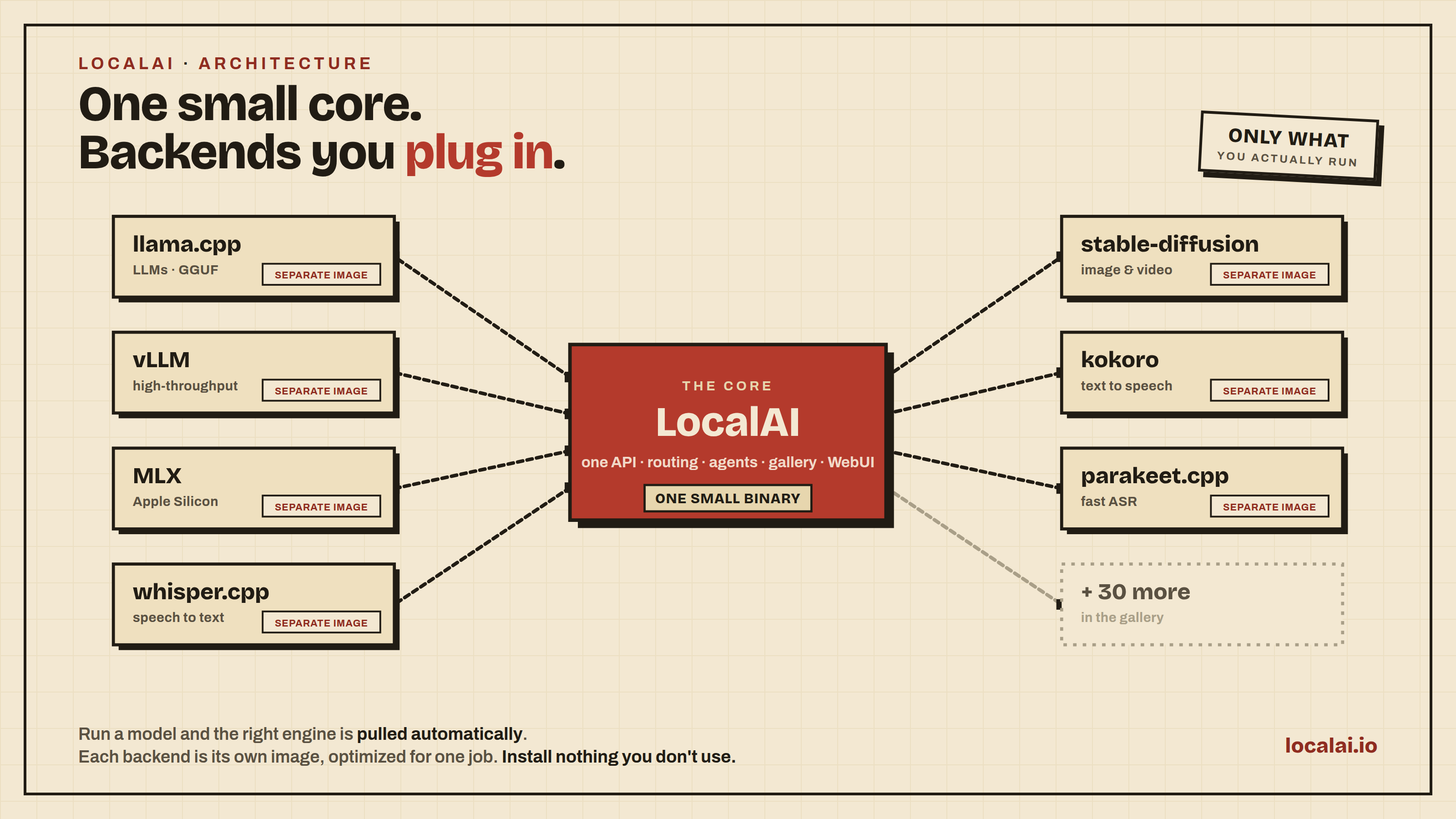
A small core, not a bundle. Each backend wraps a best-in-class engine (llama.cpp, vLLM, whisper.cpp, stable-diffusion, MLX...) in its own image, pulled only when a model needs it. You install nothing you don't use.
- Composable by design: backends are separate and pulled on demand, so you install only what your model needs
- Open and extensible: load any model, or build your own backend in any language against an open interface
- Drop-in API compatibility: OpenAI, Anthropic, and ElevenLabs APIs across every backend
- Any model, any modality: LLMs, vision, voice, image, and video behind one API
- Any hardware: NVIDIA, AMD, Intel, Apple Silicon, Vulkan, or CPU-only
- Multi-user ready: API key auth, user quotas, role-based access
- Built-in AI agents: autonomous agents with tool use, RAG, MCP, and skills
- Privacy-first: your data never leaves your infrastructure
Created by Ettore Di Giacinto and maintained by the LocalAI team.
:book: Documentation | :speech_balloon: Discord | 💻 Quickstart | 🖼️ Models | ❓FAQ
Guided tour
https://github.com/user-attachments/assets/08cbb692-57da-48f7-963d-2e7b43883c18
Click to see more!
User and auth
https://github.com/user-attachments/assets/228fa9ad-81a3-4d43-bfb9-31557e14a36c
Agents
https://github.com/user-attachments/assets/6270b331-e21d-4087-a540-6290006b381a
Usage metrics per user
https://github.com/user-attachments/assets/cbb03379-23b4-4e3d-bd26-d152f057007f
Fine-tuning and Quantization
https://github.com/user-attachments/assets/5ba4ace9-d3df-4795-b7d4-b0b404ea71ee
WebRTC
https://github.com/user-attachments/assets/ed88e34c-fed3-4b83-8a67-4716a9feeb7b
Quickstart
macOS

Note: The DMG is not signed by Apple. After installing, run: sudo xattr -d com.apple.quarantine /Applications/LocalAI.app. See #6268 for details.
Containers (Docker, podman, ...)
Already ran LocalAI before? Use docker start -i local-ai to restart an existing container.
CPU only:
docker run -ti --name local-ai -p 8080:8080 localai/localai:latest
NVIDIA GPU:
# CUDA 13
docker run -ti --name local-ai -p 8080:8080 --gpus all localai/localai:latest-gpu-nvidia-cuda-13

# CUDA 12
docker run -ti --name local-ai -p 8080:8080 --gpus all localai/localai:latest-gpu-nvidia-cuda-12

# NVIDIA Jetson ARM64 (CUDA 12, for AGX Orin and similar)
docker run -ti --name local-ai -p 8080:8080 --gpus all localai/localai:latest-nvidia-l4t-arm64

# NVIDIA Jetson ARM64 (CUDA 13, for DGX Spark)
docker run -ti --name local-ai -p 8080:8080 --gpus all localai/localai:latest-nvidia-l4t-arm64-cuda-13
AMD GPU (ROCm):
docker run -ti --name local-ai -p 8080:8080 --device=/dev/kfd --device=/dev/dri --group-add=video localai/localai:latest-gpu-hipblas
Intel GPU (oneAPI):
docker run -ti --name local-ai -p 8080:8080 --device=/dev/dri/card1 --device=/dev/dri/renderD128 localai/localai:latest-gpu-intel
Vulkan GPU:
docker run -ti --name local-ai -p 8080:8080 localai/localai:latest-gpu-vulkan
Loading models
# From the model gallery (see available models with `local-ai models list` or at https://models.localai.io)
local-ai run llama-3.2-1b-instruct:q4_k_m
# From Huggingface
local-ai run huggingface://TheBloke/phi-2-GGUF/phi-2.Q8_0.gguf
# From the Ollama OCI registry
local-ai run ollama://gemma:2b
# From a YAML config
local-ai run https://gist.githubusercontent.com/.../phi-2.yaml
# From a standard OCI registry (e.g., Docker Hub)
local-ai run oci://localai/phi-2:latest
To work with a running LocalAI server from the terminal, start the built-in agent from another shell. It answers questions, reads your files and runs commands on your machine, asking you to approve anything that changes state. Inside a session, /models lists installed models and /model <name> switches between them. See the Terminal agent docs.
# Terminal 1
local-ai run llama-3.2-1b-instruct:q4_k_m

# Terminal 2
local-ai chat --model llama-3.2-1b-instruct:q4_k_m
Automatic Backend Detection: LocalAI automatically detects your GPU capabilities and downloads the appropriate backend. For advanced options, see GPU Acceleration.
For more details, see the Getting Started guide.
Latest News
- June 2026: New native biometric backends from the LocalAI team: voice-detect.cpp for speaker recognition and voice analysis (ECAPA-TDNN, WeSpeaker, ERes2Net, CAM++, wav2vec2 age/gender/emotion) and face-detect.cpp for face detection, recognition, demographics and anti-spoofing (SCRFD/ArcFace, YuNet/SFace). Both are from-scratch C++/ggml engines with no Python or onnxruntime at inference, self-contained GGUF weights, bit-exact parity with the reference, and GPU cuDNN parity, replacing the heavier Python
insightface and speaker-recognition backends (PR #10441).
- June 2026: New realtime voice assistant demo (a tiny Go client for the Realtime API with a full talk-back voice loop and tool calling), plus streaming of the realtime LLM / TTS / transcription pipeline stages and configurable WebRTC ICE candidates.
- June 2026: Big speech push: the parakeet.cpp ASR engine gains NeMo-faithful segment timestamps, a multilingual streaming Nemotron-3.5 model, dynamic batching for concurrent transcription and CUDA graphs; the new CrispASR backend adds multi-architecture ASR + TTS, and 60 Piper TTS voices across 42 languages land in the gallery (plus per-request TTS instructions and params).
- June 2026: New backends and models: locate-anything.cpp for open-vocabulary object detection via ggml, Ideogram4 image generation in stablediffusion-ggml, llama.cpp video input, and the Gemma 4 QAT family with MTP speculative-decoding pairs. Plus an interactive CLI chat mode and RAG source citations in agent responses.
- June 2026: Distributed mode hardening: prefix-cache-aware routing, a production-ready request router with auto-sized embedding/rerank batches, ds4 layer-split distributed inference, NATS JWT auth + TLS/mTLS, and resumable file uploads.
- May 2026: LocalAI 4.3.0 -
llama.cpp prompt cache on by default (repeated system prompts collapse from minutes to seconds), keyless cosign signing of backend OCI images, per-API-key + per-user usage attribution, Distributed v3 with per-request replica routing. Release notes
- May 2026: LocalAI 4.2.0 - LocalAI sees and hears: voice recognition, face recognition + antispoofing liveness, speaker diarization. Plus drop-in Ollama API, video generation, redesigned UI with i18n + admin-configurable branding, vLLM at feature parity with llama.cpp, and 11 new backends. Release notes
- April 2026: LocalAI 4.1.0 - LocalAI becomes a control tower: distributed cluster mode with VRAM-aware smart routing + autoscaling, multi-user platform with OIDC and API keys, per-user quotas with predictive analytics, in-UI fine-tuning with TRL (auto-export to GGUF), on-the-fly quantization backend, visual pipeline editor. Release notes
- March 2026: LocalAI 4.0.0 - native agentic orchestration with the new Agenthub community hub, full React UI rewrite with Canvas mode, MCP Apps + client-side with tool streaming, WebRTC realtime audio, MLX-distributed. Release notes
- February 2026: Realtime API for audio-to-audio with tool calling, ACE-Step 1.5 support
- January 2026: LocalAI 3.10.0 — Anthropic API support, Open Responses API, video & image generation (LTX-2), unified GPU backends, tool streaming, Moonshine, Pocket-TTS. Release notes
- December 2025: Dynamic Memory Resource reclaimer, Automatic multi-GPU model fitting (llama.cpp), Vibevoice backend
- November 2025: Import models via URL, Multiple chats and history
- October 2025: Model Context Protocol (MCP) support for agentic capabilities
- September 2025: New Launcher for macOS and Linux, extended backend support for Mac and Nvidia L4T, MLX-Audio, WAN 2.2
- August 2025: MLX, MLX-VLM, Diffusers, llama.cpp now supported on Apple Silicon
- July 2025: All backends migrated outside the main binary — lightweight, modular architecture
For older news and full release notes, see GitHub Releases and the blog.
Features
Supported Backends & Acceleration
LocalAI supports 60+ backends including llama.cpp, vLLM, SGLang, transformers, whisper.cpp, diffusers, MLX, MLX-VLM, and many more. Hardware acceleration is available for NVIDIA (CUDA 12/13), AMD (ROCm), Intel (oneAPI/SYCL), Apple Silicon (Metal), Vulkan, and NVIDIA Jetson (L4T). All backends can be installed on-the-fly from the Backend Gallery.
See the full Backend & Model Compatibility Table and GPU Acceleration guide.
Backends built by us
Most backends wrap a best-in-class upstream engine. A handful of them are native C/C++/GGML engines (no Python at inference) developed and maintained by the LocalAI project itself:
| Backend |
What it does |
| vllm.cpp |
From-scratch C++20 port of vLLM for text generation: paged KV cache, continuous batching, prefix caching, safetensors + GGUF loading, engine-enforced structured output, on CPU, CUDA, Metal and Vulkan. Also serves MiniMax-H3 joint video+audio generation |
| parakeet.cpp |
C++/GGML port of NVIDIA NeMo Parakeet ASR (tdt/ctc/rnnt/hybrid), with cache-aware streaming transcription |
| moss-transcribe.cpp |
C++/GGML port of OpenMOSS MOSS-Transcribe-Diarize: joint long-form transcription, speaker diarization and timestamping in a single pass |
| moss-tts.cpp |
C++/GGML port of the OpenMOSS MOSS-TTS family: text-to-speech (MOSS-TTS-Local v1.5, 48 kHz stereo) with reference-audio voice cloning, through the MOSS-Audio-Tokenizer neural codec |
| magpie-tts.cpp |
C++/GGML port of NVIDIA's Magpie TTS Multilingual 357M: 22.05 kHz mono text-to-speech in 5 voices and 9+ languages, with the NanoCodec neural codec and tokenizer/G2P embedded in a single GGUF |
| ced.cpp |
C++/GGML port of the CED audio-tagging models: sound-event classification (527-class AudioSet) over REST and the realtime API for live recognition |
| voice-detect.cpp |
Speaker recognition and voice analysis (ECAPA-TDNN, WeSpeaker, ERes2Net, CAM++, wav2vec2 age/gender/emotion), replacing the Python speaker-recognition backend |
| voxtral-tts.c |
Mistral Voxtral-4B-TTS text-to-speech in pure C: 20 preset voices across 9 languages, 24 kHz WAV output, no dependencies beyond libc |
| vibevoice.cpp |
Native port of Microsoft VibeVoice for TTS (voice cloning) and long-form ASR with speaker diarization |
| rf-detr.cpp |
Native RF-DETR object detection and instance segmentation |
| locate-anything.cpp |
Open-vocabulary object detection and visual grounding (LocateAnything-3B) |
| depth-anything.cpp |
Depth Anything 3 monocular metric depth + camera pose estimation |
| face-detect.cpp |
Face detection, recognition, demographics and anti-spoofing (SCRFD/ArcFace, YuNet/SFace), replacing the Python insightface backend |
| free-splatter.cpp |
Pose-free 3D reconstruction (FreeSplatter): turns a handful of plain photos into 3D Gaussians, no camera poses or GPU required |
| trellis2.cpp |
C++/GGML port of Microsoft TRELLIS.2: single-image to textured 3D mesh (GLB with PBR materials) |
| privacy-filter.cpp |
Standalone GGML PII/NER token-classification engine powering LocalAI's PII redaction tier |
| LocalVQE |
Joint acoustic echo cancellation, noise suppression, and dereverberation |
| local-store |
Local-first vector database for embeddings (shipped in-tree) |
We also maintain apex-quant, a per-tensor, per-layer quantization recipe for Mixture-of-Experts models that exploits their structural sparsity to produce GGUFs matching or beating Q8_0 quality - and they run out of the box on stock llama.cpp.
Resources

 LocalAI 是一个开源、可自托管的 AI 引擎,让你能在自己的硬件上运行大语言模型(LLM)、视觉、语音、图像和视频模型,包括只有 CPU 的设备,并通过兼容 OpenAI、Anthropic 和 ElevenLabs 的 API 调用。