watch mode for auto-reloading file and Git-backed reviews
keyboard, mouse, pager, and Git difftool support
Split view with sidebar and inline AI notes
Unified view and mouse-selectable menus
Install
The default installation method on macOS and Linux downloads a standalone binary and installs it into ~/.hunk. It checks the archive against the release checksum when both SHA256SUMS and a supported checksum tool are available, and warns otherwise. Release discovery uses Hunk's anonymous aggregate endpoint with direct GitHub fallback:
curl -fsSL https://hunk.dev/install.sh | sh
Windows users can install with npm or mise. Other installation methods are also available:
npm i -g hunkdiff                    # macOS, Linux, or Windows; requires Node.js 22+
brew install hunk                    # macOS or Linux
mise use -g hunk                     # macOS, Linux, or Windows
[!NOTE]
If you previously installed hunk via modem-dev/tap, be sure to uninstall it first with brew uninstall modem-dev/tap/hunk.
Windows requires mise 2026.8.6 or newer. Nix users can use the default package exported in flake.nix; see the Nix guide for details. Hunk also ships as a default tool in Omarchy, installed through mise.
Requirements:
macOS, Linux, or Windows
On x86-64, a CPU with SSE4.2 (Intel Nehalem 2008+, AMD Bulldozer 2011+); arm64 has no CPU feature floor
Node.js 22+ for the npm install; the install script, Homebrew, mise, and Nix ship a standalone binary that does not require Node.js
Git recommended for most workflows
Update Hunk
Starting with Hunk 0.20, npm, Homebrew, and default install-script installs use Hunk’s canonical update command:
hunk update          # install the newest release
hunk update --check  # check without installing
hunk update 0.20.0   # select an exact npm or default install-script release
On an older release, update once with the installer or package manager that installed Hunk, then use hunk update going forward. Custom HUNK_INSTALL_DIR installs must re-run the installer with the same directory; mise, Nix, and source installs use their owning tools instead.
Quick start
hunk           # show help
hunk --version # print the installed version
Working with Git
Hunk mirrors Git's diff-style commands, but opens the changeset in a review UI instead of plain text.
hunk diff                      # review current repo changes, including untracked files
hunk --fast                    # experimentally offload eligible syntax highlighting
hunk diff --watch              # auto-reload as the working tree changes
hunk show                      # review the latest commit
hunk show HEAD~1               # review an earlier commit
hunk log                       # browse history on a terminal; print when redirected
hunk log --static              # force static output, paging when needed
hunk log is one auto-responsive, read-only history surface, not a repository manager. On a
terminal it opens the desktop history browser; pipes and redirects receive shell-native static
records automatically, and --static forces static output that pages only when needed. The selected VCS adapter
owns traversal, filtering, refs, and how a history item opens for review; the bundled Git and
Jujutsu adapters both implement that public capability. Static output keeps full commit, author,
date, message, branch/bookmark, remote, and tag details; --oneline provides compact records, and
--theme uses the same palette as Hunk review. Interactive history groups commits by local-calendar
day with account-like author handles and relative times, while keeping commit ids right-aligned and
clickable. Enable Graph view from the View menu to replace day groups with commit-topology lanes.
Press v and move with Up/Down or k/j to select a contiguous range. Shift+Up/Shift+Down, uppercase K/J, and Shift-click extend directly. Escape collapses the selection; opening the range
reviews the inclusive cumulative change from the oldest commit's parent through the newest commit.
History also shares review's b/f full-page and u/d half-page movement keys.
Range selection is disabled with --all or author, message, date, and path filters because traversal can interleave or hide commits.
After opening a commit or range, quit its normal Hunk review to return to the same selection.
History controls are configurable through canonical hunk.history.*keybindings.
Working with Jujutsu and Sapling
Hunk auto-detects Jujutsu and Sapling checkouts, so hunk diff [revset] and hunk show [revset] use native revsets inside jj or Sapling workspaces. hunk log --vcs jj also reads JJ history directly, including in a non-colocated workspace. To override VCS detection, set vcs = "git" or vcs = "jj" or vcs = "sl" in config.
Working with raw files and patches
hunk diff --files before.ts after.ts        # compare two files directly
hunk diff --files before.ts after.ts --watch # auto-reload when either file changes
git diff --no-color | hunk patch -          # review a patch from stdin
Watch mode remains continuous. Direct-file and Git-backed reviews normally use filesystem observation to refresh promptly, with periodic polling retained as a fallback for missed events or unavailable watchers. Jujutsu and Sapling reviews currently use polling rather than filesystem observation.
Working with agents
Open Hunk in another terminal with hunk diff or hunk show.
Tell your agent to add the skill file returned by hunk skill path.
Ask your agent to use the skill against the live Hunk session.
A good generic prompt is:
Load the Hunk skill and use it for this review. Run `hunk skill path` to get the skill path.
For the full live-session and --agent-context workflow guide, see the agent workflow guide. Experimental rich STML note bodies require starting the review with --experimental; plain agent notes remain the default.
Choose a built-in theme, auto, or a custom theme with theme. See
the theme guide for automatic selection, custom theme tables,
syntax scopes, and legacy syntax-table migration.
exclude_untracked affects Git/Sapling working-tree hunk diff sessions only.
tab_width controls source-code tab stops and can be overridden with -x4 or --tab-width 4.
file_gap is separator height between files, including the ─ rule; hunk_gap is blank rows before later hunks.
Set animations = false to make panes open and close immediately.
prompt_save_view_preferences = false disables the quit prompt for saving changed view preferences.
transparent_background can also be written as transparentBackground.
Keybindings
Every keyboard shortcut is a named command, and a [keybindings] table in your
user config remaps command ids to the keys you want them on — several keys per
command, exclusive claims over defaults, and false to unbind. See
the keybinding guide for the rules, the chord grammar,
and the full table of built-in commands and their default keys.
Git integration
Set Hunk as your Git pager so git diff and git show open in Hunk automatically:
[!NOTE]
Untracked files are auto-included only for Hunk's own hunk diff working-tree loader. If you open git diff through hunk pager, Git still decides the patch contents, so untracked files will not appear there.
git config --global core.pager "hunk pager"
Or in your Git config:
[core]
    pager = hunk pager
If you want to keep Git's default pager and add opt-in aliases instead:
To use Hunk as Sapling's pager, run sl config -u and update:
[pager]
pager = hunk pager
Extensions (experimental)
The extension API is experimental and may change in breaking ways between
minor releases while it stabilizes; breaking changes are called out in
release notes.
Hunk loads plain TypeScript extensions from ~/.config/hunk/extensions/, from a
repository's .hunk/extensions/ (after you explicitly trust that repository),
and from --extension <path> for development. --no-extensions turns those off
for one run; Hunk's own bundled backends (Git, Jujutsu, and Sapling) stay loaded.
An extension can add generic top-level CLI workflows, contribute themes and
file-extension → language mappings, add a VCS backend, rewrite the changeset
before review (collapse lockfiles, reorder files by review priority), replace
the file-navigation sidebar with its own React component, react to lifecycle
events, and show transient messages:




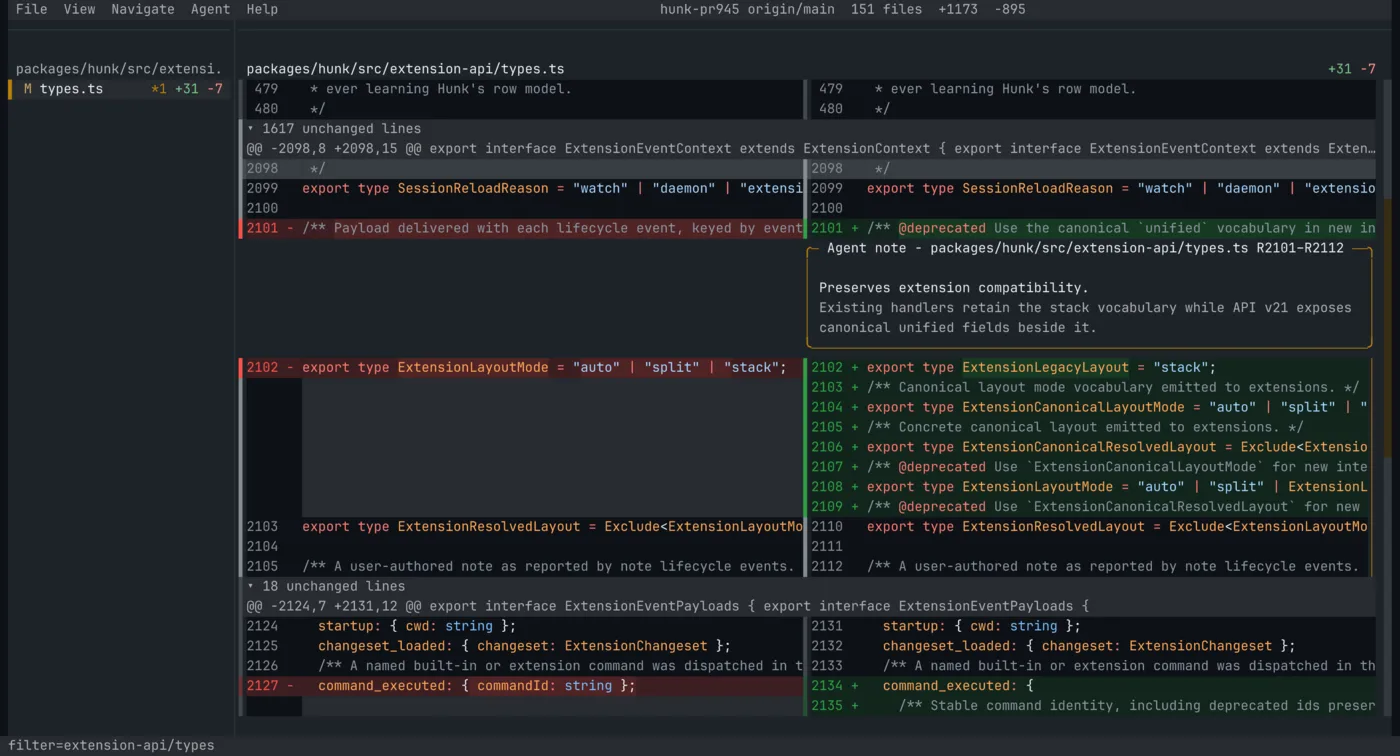
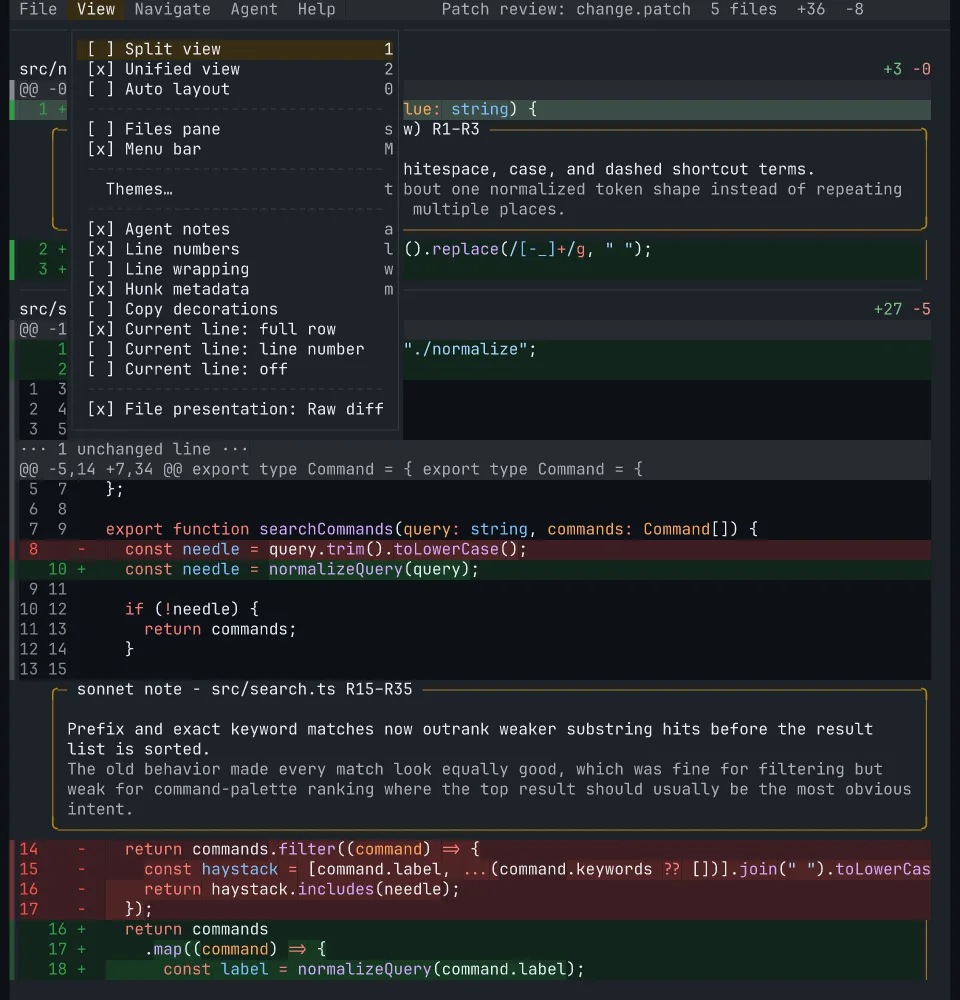


 Hunk 是一个以代码审查为先的终端 diff 查看器,专门用来查看 AI 编程助手生成的改动——它是一个终端界面,基于 OpenTUI 构建,方便你审查编程助手改了什么。