
这是做什么用的?
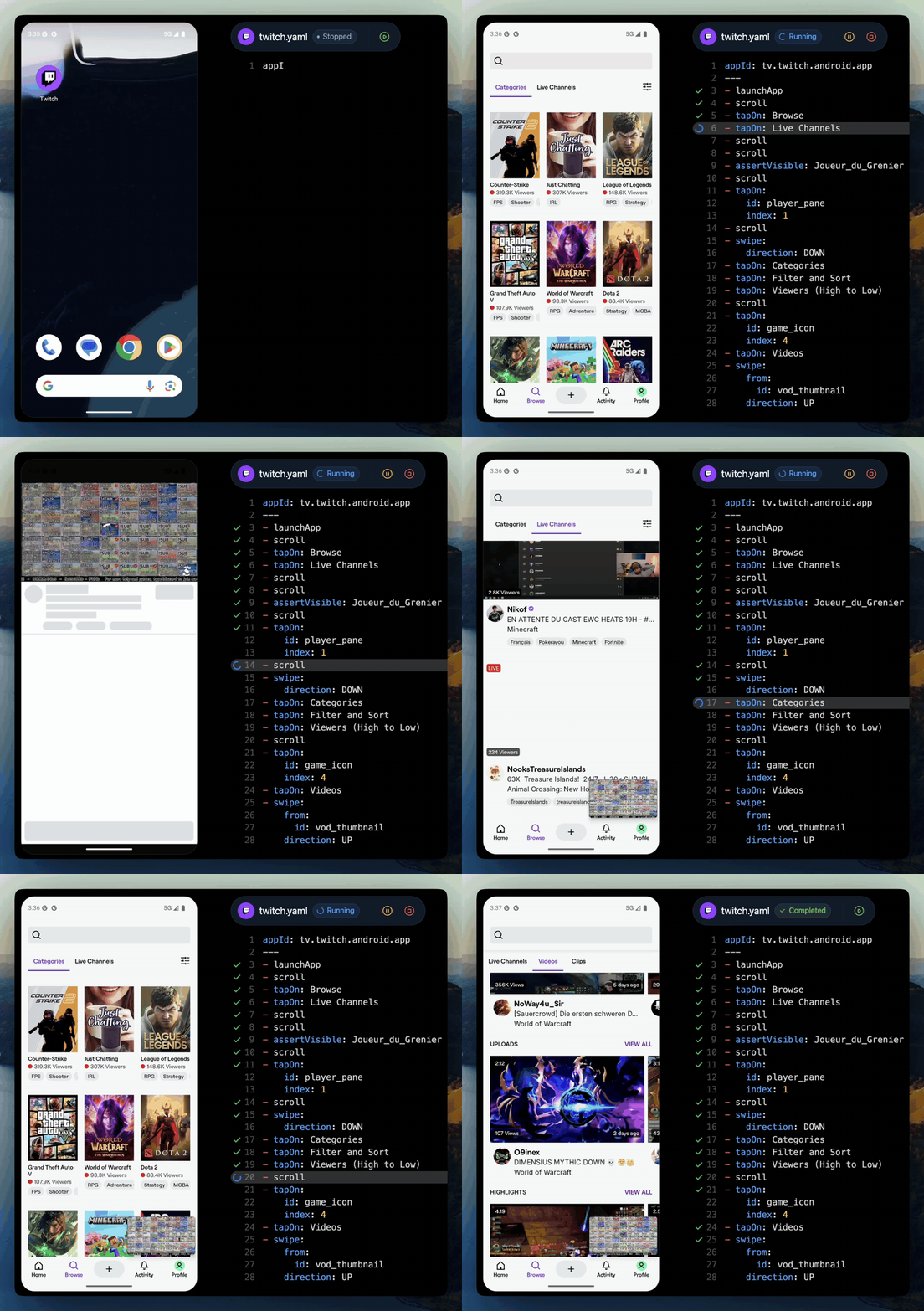
 Maestro 是一个开源框架,用于对 Android、iOS 和 Web 应用做 UI 测试和端到端测试。你可以用简单的 YAML 命令来描述测试流程,在命令行里运行,在 Maestro Studio 里可视化搭建,或者让 AI 编程助手通过 MCP 来驱动它们。
Maestro 是一个开源框架,用于对 Android、iOS 和 Web 应用做 UI 测试和端到端测试。你可以用简单的 YAML 命令来描述测试流程,在命令行里运行,在 Maestro Studio 里可视化搭建,或者让 AI 编程助手通过 MCP 来驱动它们。它和 Appium、Selenium 这类工具有什么不同?它吸收了前代工具的经验教训:Maestro 通过系统自带的辅助功能层来驱动应用,只安装一个单独的可执行文件,不需要驱动或 SDK,并且每个测试都是一段平铺的 YAML 命令,直接解释执行——没有编译这一步。
它吸收了前代工具的经验教训:Maestro 通过系统自带的辅助功能层来驱动应用,只安装一个单独的可执行文件,不需要驱动或 SDK,并且每个测试都是一段平铺的 YAML 命令,直接解释执行——没有编译这一步。我该怎么写第一个测试?在 macOS、Linux 或 Windows (WSL) 上用一行命令安装 CLI(文档里也介绍了 Windows 的常规安装方式),然后手写一个 YAML 流程。README 说第一个测试五分钟内就能搞定。
在 macOS、Linux 或 Windows (WSL) 上用一行命令安装 CLI(文档里也介绍了 Windows 的常规安装方式),然后手写一个 YAML 流程。README 说第一个测试五分钟内就能搞定。除了 Maestro 本身,我还需要装什么?只需要 Java 17 或更高版本。没有驱动、SDK 或其他依赖——所有东西都打包在这一个 CLI 文件里。
只需要 Java 17 或更高版本。没有驱动、SDK 或其他依赖——所有东西都打包在这一个 CLI 文件里。所有带 Maestro 名字的东西都是开源的吗?不是。这个框架基于 Apache 2.0 协议开源,但 Maestro Studio Desktop 虽然免费却不开放源码(它的代码不在这个仓库里),Maestro Cloud 则是付费服务。
不是。这个框架基于 Apache 2.0 协议开源,但 Maestro Studio Desktop 虽然免费却不开放源码(它的代码不在这个仓库里),Maestro Cloud 则是付费服务。我的 React Native 或 Flutter 应用能用它吗?可以——它对框架没有要求:React Native、Flutter、原生 iOS 和 Android、Ionic 以及混合应用用的都是同一套命令。Meta 自己就用 Maestro 来测试 React Native,Expo 也把它作为首选的 E2E 测试平台。
可以——它对框架没有要求:React Native、Flutter、原生 iOS 和 Android、Ionic 以及混合应用用的都是同一套命令。Meta 自己就用 Maestro 来测试 React Native,Expo 也把它作为首选的 E2E 测试平台。我的流程实际能跑在什么上面?任何模拟器、浏览器,或者真实的 Android 设备——一套流程语法同时覆盖 Android、iOS 和 Web。
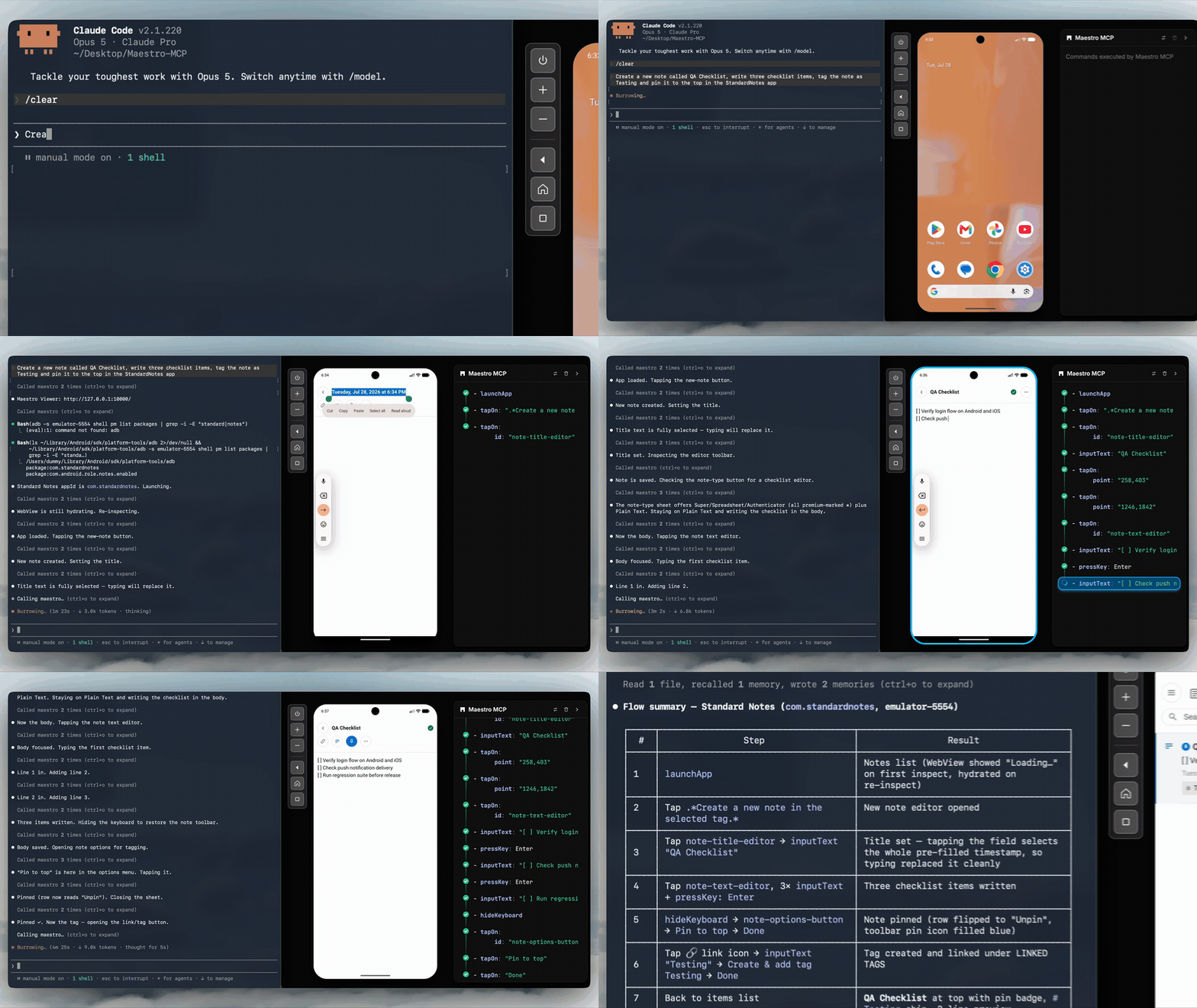
任何模拟器、浏览器,或者真实的 Android 设备——一套流程语法同时覆盖 Android、iOS 和 Web。Claude Code 这类 AI 编程助手能用 Maestro 吗?可以。CLI 里自带 Maestro MCP——运行 'maestro mcp' 就行,不用再装别的——并且支持 Claude Code、Cursor、Codex、Gemini CLI、Copilot、Grok Build 或任何 MCP 客户端。AI 助手会得到一台可以实时查看、点击、滚动和断言的设备,还能编写 YAML 流程,把它们留在你的仓库里,作为 CI 的确定性测试。
可以。CLI 里自带 Maestro MCP——运行 'maestro mcp' 就行,不用再装别的——并且支持 Claude Code、Cursor、Codex、Gemini CLI、Copilot、Grok Build 或任何 MCP 客户端。AI 助手会得到一台可以实时查看、点击、滚动和断言的设备,还能编写 YAML 流程,把它们留在你的仓库里,作为 CI 的确定性测试。遇到加载慢或有动画的页面,我需要自己加等待吗?不需要——Maestro 内置了容错机制和自动等待,动态界面不用手动写 sleep() 调用就能处理。
不需要——Maestro 内置了容错机制和自动等待,动态界面不用手动写 sleep() 调用就能处理。不用命令行也能搭建测试吗?可以——Maestro Studio Desktop 是一个免费的轻量 IDE,支持 macOS、Windows 和 Linux,你可以在里面录制操作、查看元素、可视化地搭建流程。
可以——Maestro Studio Desktop 是一个免费的轻量 IDE,支持 macOS、Windows 和 Linux,你可以在里面录制操作、查看元素、可视化地搭建流程。测试套件变得很大之后会怎样?Maestro Cloud 可以在专用基础设施上并行运行数百个测试,把执行时间最多缩短 90%,还自带通知和调试工具。它是付费服务,提供 7 天免费试用。
Maestro Cloud 可以在专用基础设施上并行运行数百个测试,把执行时间最多缩短 90%,还自带通知和调试工具。它是付费服务,提供 7 天免费试用。What are similar projects?agent-device, e2e, Detox, playwright, midscene, appium, agentic-playwright, NativeScript
agent-device, e2e, Detox, playwright, midscene, appium, agentic-playwright, NativeScriptWhich topics is it in?ui-automation, e2e-testing, testing-tools, flutter, yaml, react-native, kotlin, ci, testing, java, mobile, ios
ui-automation, e2e-testing, testing-tools, flutter, yaml, react-native, kotlin, ci, testing, java, mobile, ios