
What is this?
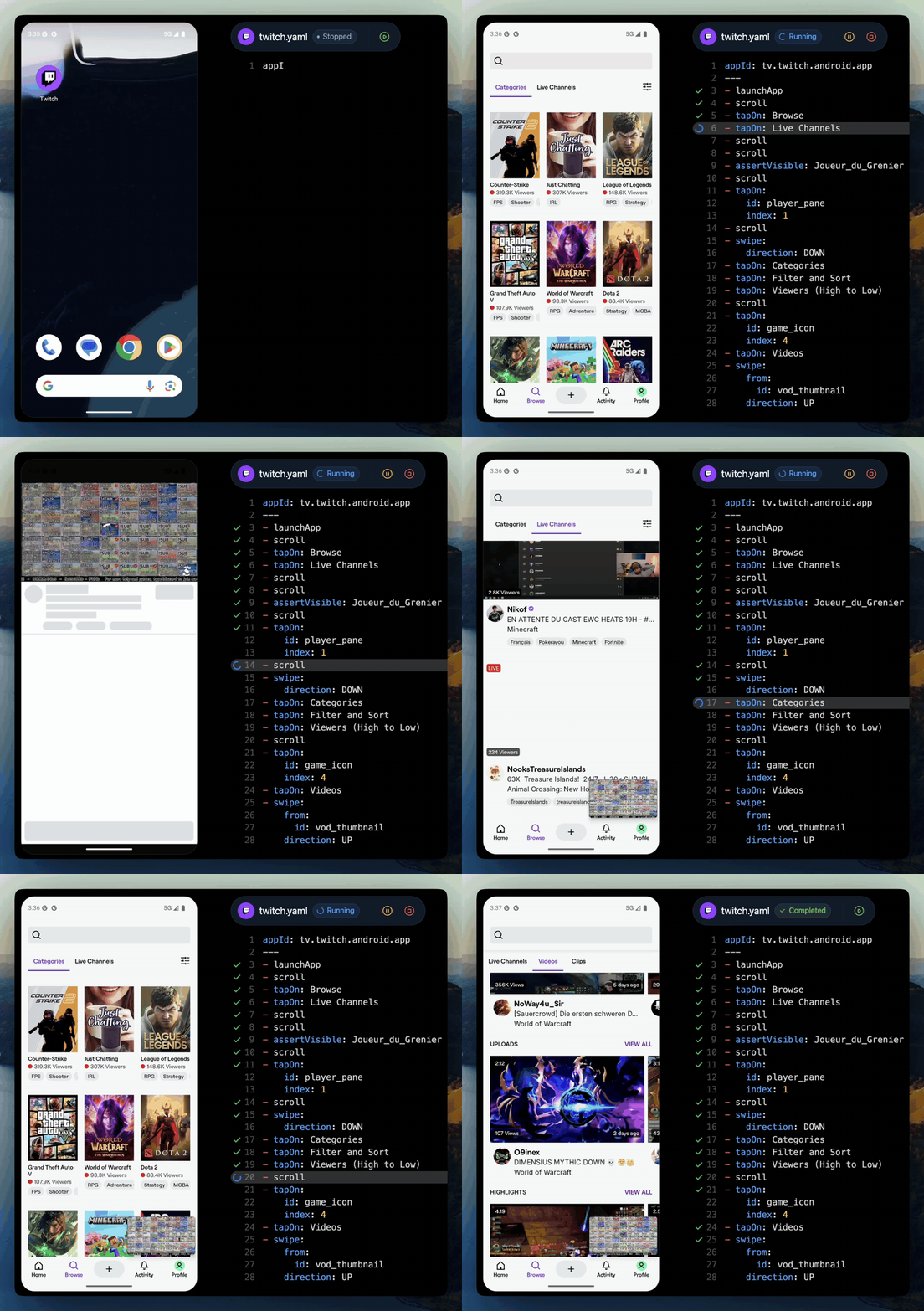
 Maestro is an open-source framework for UI and end-to-end testing of Android, iOS, and web apps. You describe flows as simple YAML commands and run them from the CLI, build them visually in Maestro Studio, or let an AI coding agent drive them through MCP.
Maestro is an open-source framework for UI and end-to-end testing of Android, iOS, and web apps. You describe flows as simple YAML commands and run them from the CLI, build them visually in Maestro Studio, or let an AI coding agent drive them through MCP.How is it different from tools like Appium or Selenium?It builds on lessons from its predecessors: Maestro drives apps through the platform's accessibility layer, installs as a single binary with no drivers or SDK, and keeps every test a flat list of YAML commands that are interpreted — there is no compilation step.
It builds on lessons from its predecessors: Maestro drives apps through the platform's accessibility layer, installs as a single binary with no drivers or SDK, and keeps every test a flat list of YAML commands that are interpreted — there is no compilation step.How do I write my first test?Install the CLI with one install line on macOS, Linux, or Windows (WSL) — the docs also cover a regular Windows installation — then hand-write a YAML flow. The README says your first test takes under 5 minutes.
Install the CLI with one install line on macOS, Linux, or Windows (WSL) — the docs also cover a regular Windows installation — then hand-write a YAML flow. The README says your first test takes under 5 minutes.What do I need installed besides Maestro itself?Only Java 17 or higher. There are no drivers, SDKs, or other dependencies — everything ships inside the single CLI binary.
Only Java 17 or higher. There are no drivers, SDKs, or other dependencies — everything ships inside the single CLI binary.Is everything under the Maestro name open source?No. The framework is open source under Apache 2.0, but Maestro Studio Desktop is free yet closed-source (its code is not in this repo), and Maestro Cloud is a paid service.
No. The framework is open source under Apache 2.0, but Maestro Studio Desktop is free yet closed-source (its code is not in this repo), and Maestro Cloud is a paid service.Will it work with my React Native or Flutter app?Yes — it is framework agnostic: React Native, Flutter, native iOS and Android, Ionic, and hybrid apps all use the same commands. Meta uses Maestro to test React Native itself, and Expo supports it as its preferred E2E testing platform.
Yes — it is framework agnostic: React Native, Flutter, native iOS and Android, Ionic, and hybrid apps all use the same commands. Meta uses Maestro to test React Native itself, and Expo supports it as its preferred E2E testing platform.What can my flows actually run on?Any emulator or simulator, browser, or physical Android device — one flow syntax covers Android, iOS, and web.
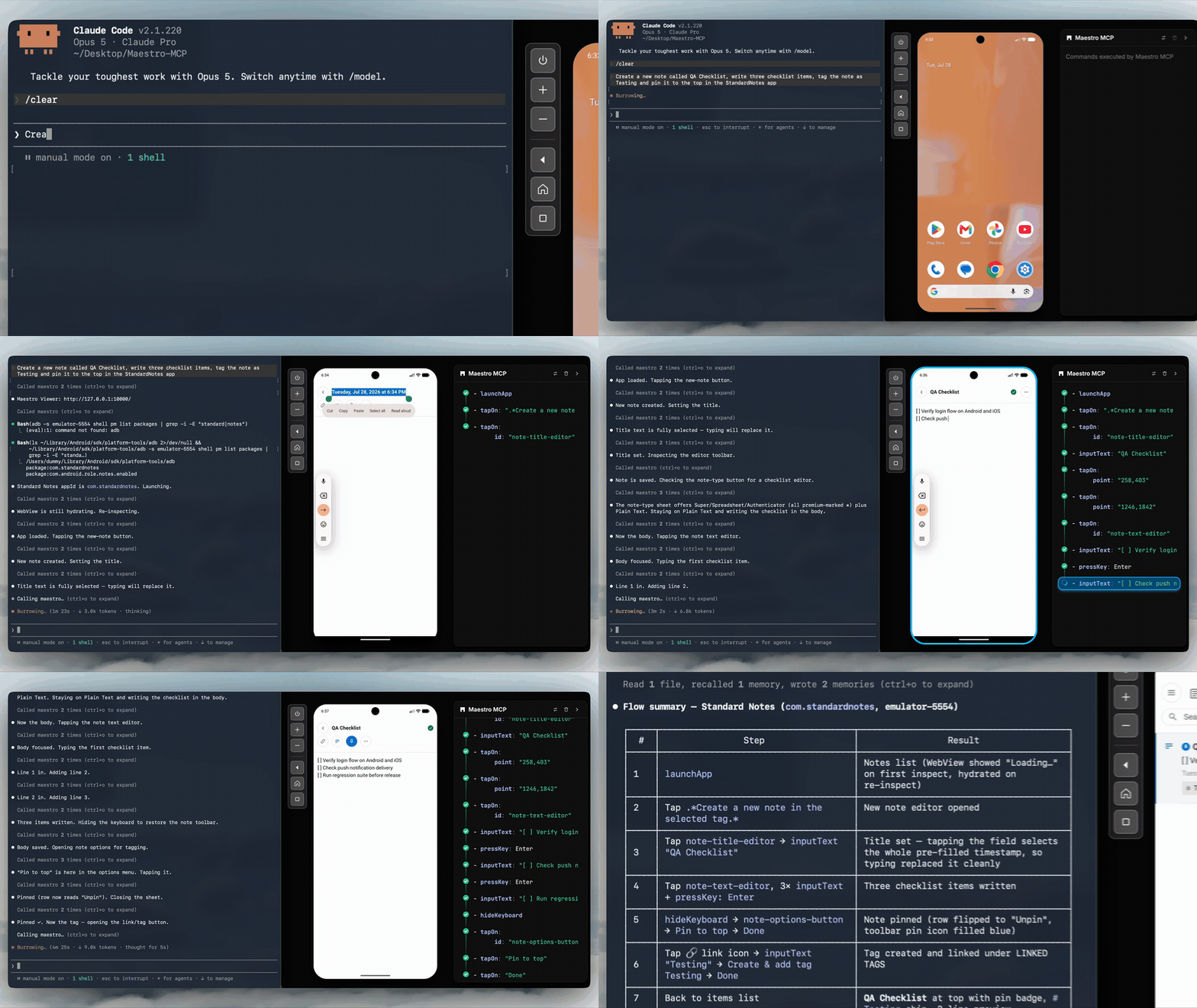
Any emulator or simulator, browser, or physical Android device — one flow syntax covers Android, iOS, and web.Can an AI coding agent like Claude Code use Maestro?Yes. Maestro MCP ships inside the CLI — run 'maestro mcp', nothing else to install — and works with Claude Code, Cursor, Codex, Gemini CLI, Copilot, Grok Build, or any MCP client. The agent gets a live device to inspect, tap, scroll, and assert on, and can write YAML flows that stay in your repo as deterministic tests for CI.
Yes. Maestro MCP ships inside the CLI — run 'maestro mcp', nothing else to install — and works with Claude Code, Cursor, Codex, Gemini CLI, Copilot, Grok Build, or any MCP client. The agent gets a live device to inspect, tap, scroll, and assert on, and can write YAML flows that stay in your repo as deterministic tests for CI.Do I have to add sleeps for slow or animated screens?No — Maestro has built-in flakiness tolerance and automatic waiting, so dynamic UIs are handled without manual sleep() calls.
No — Maestro has built-in flakiness tolerance and automatic waiting, so dynamic UIs are handled without manual sleep() calls.Can I build tests without touching the terminal?Yes — Maestro Studio Desktop is a free, lightweight IDE for macOS, Windows, and Linux where you record interactions, inspect elements, and build flows visually.
Yes — Maestro Studio Desktop is a free, lightweight IDE for macOS, Windows, and Linux where you record interactions, inspect elements, and build flows visually.What happens when my test suite grows large?Maestro Cloud runs hundreds of tests in parallel on dedicated infrastructure, cutting execution times by up to 90%, with built-in notifications and debugging tools. It is a paid service with a free 7-day trial.
Maestro Cloud runs hundreds of tests in parallel on dedicated infrastructure, cutting execution times by up to 90%, with built-in notifications and debugging tools. It is a paid service with a free 7-day trial.What are similar projects?agent-device, e2e, Detox, playwright, midscene, appium, agentic-playwright, NativeScript
agent-device, e2e, Detox, playwright, midscene, appium, agentic-playwright, NativeScriptWhich topics is it in?ui-automation, e2e-testing, testing-tools, flutter, yaml, react-native, kotlin, ci, testing, java, mobile, ios
ui-automation, e2e-testing, testing-tools, flutter, yaml, react-native, kotlin, ci, testing, java, mobile, ios