

anti-slop README

The project's README from github.com/miqdadbadjuber/anti-slop. As one markdown file: README.md.

antislop

License: MIT Version

skills.sh

antislop

Anti Slop: Rules for AI Coding Agents. It stops them from generating generic "AI slop" UI and copy, without letting the result turn sterile. It is a filter, not a style guide: no prescribed colors, fonts, or layouts. It is not only for building pages: it also writes and audits copy, so AI text stops reading like AI. And it never beautifies on its own; DESIGN.md (yours) is where beauty and direction come from.

New here? Start with the GUIDE.md. It explains what antislop is and how to install it, from zero.

What it does

The core prevents slop but cannot invent direction. DESIGN.md (yours) supplies it; a sterile result means the direction was missing, not that the filter failed (R-37).

See the difference

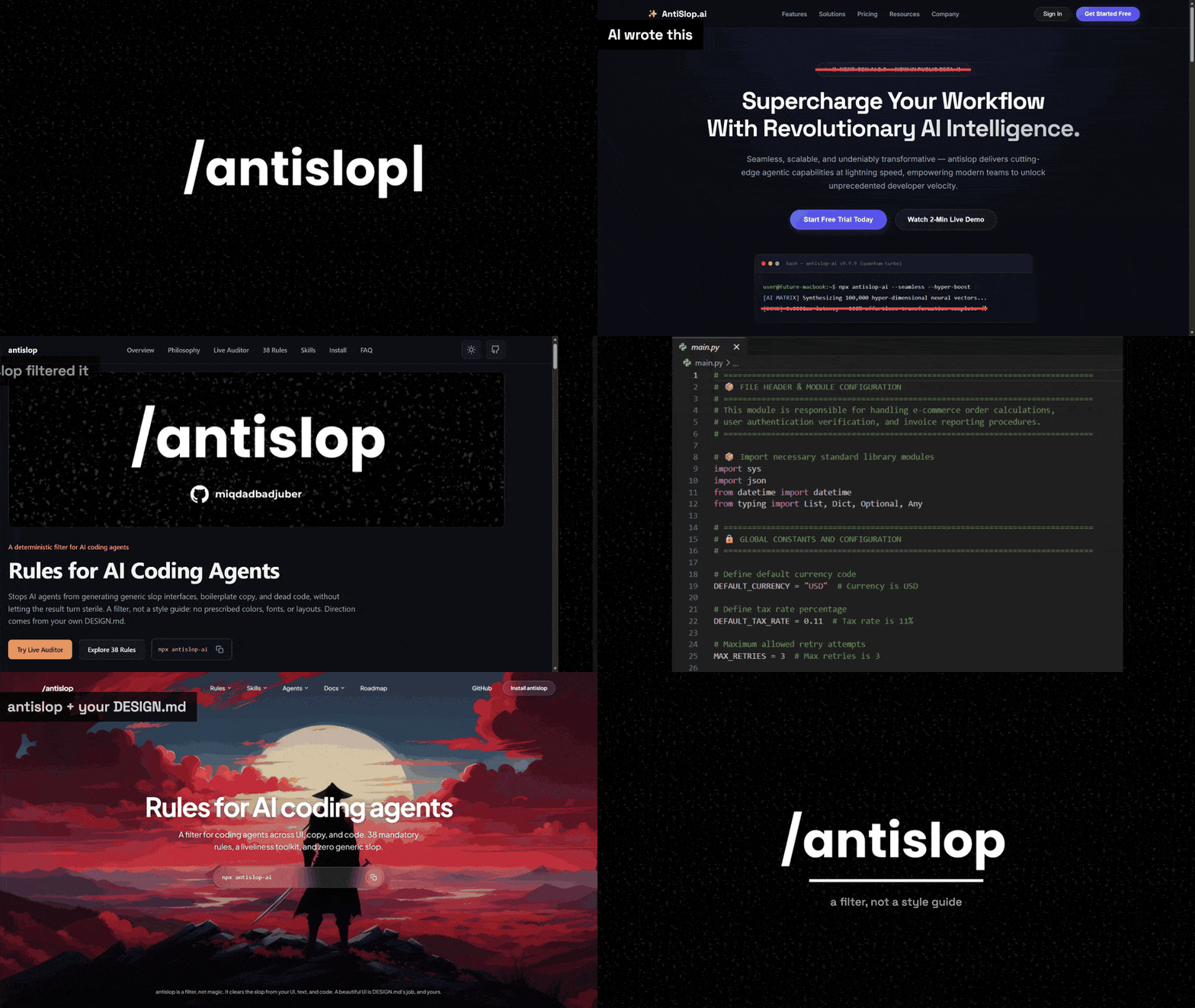
The same brief, the same page, generated four times over. antislop filters; DESIGN.md supplies direction. They are two different jobs, and these are the four results. Copy and code follow as before-and-after pairs instead of four separate builds, because nothing else has to supply direction there.

UI

Three of the four builds. The first uses neither tool, the second only antislop, the third only DESIGN.md.

Nothing at all antislop alone DESIGN.md alone
A generic landing page: a sparkle logo, a NEXT-GEN AI 2.0 beta pill above the headline, and a fake terminal reporting 0.0001ms latency The same page with antislop: honest copy on a restrained dark layout with a single accent colour The same page with DESIGN.md only: a photographic hero, with the stat cards still reading 10,000% ROI Synergy Multiplier and a 5.0 rating from 500,000 founders
Where most AI output starts: a sparkle logo, a beta pill, and a fake terminal. Honest, because the filter removed the invented numbers. Plain, because beauty is not its job. The direction lands, but the slop stays, because DESIGN.md directs and does not filter.

The fourth uses both, and it is the only one of the four that is clean and directed at the same time:

antislop + DESIGN.md
The same page with antislop and DESIGN.md: a full-bleed illustrated hero with one honest headline and project-specific navigation
Honest numbers and a real direction in the same build. The filter removes what should not be there; DESIGN.md fills the space that leaves, which is the one thing neither tool manages alone.

Copy

One prompt, run twice.

Before After
An AI written Discord launch post: emoji bullet points, NEW DROP in capitals, and hype in every line The same launch post written with antislop-copywriting: plain sentences, no emoji bullets, and a note to cut any line with nothing real to say

Code

One file, run twice.

Before After
Python with box-drawing section banners, emoji, and a comment on every constant that restates the constant The same Python with the banners and emoji gone, one comment left that says what the module does, and the code itself untouched

Every image in this section opens full size if you click it.

Install

antislop ships as a set of standard agent skills (one folder per skill, holding a SKILL.md). The core is always loaded; the other skills load only when the task needs them. This section is the reference: every install command, in one place. GUIDE.md walks through them from zero, and its Update and Remove sections cover every route the same way.

One command, then answer the prompts. It asks which extra skills you want, where to install (this project or everywhere), and which agents you use, then copies the folders. It is also the only route that writes the pointer reloading antislop every session on a project install; a global install relies on the skills loading themselves by description.

npx antislop-ai

To update later, run the same command and choose Overwrite them when it finds the existing folders. See Update.

2. The skills directory

antislop is listed on skills.sh, the open directory for agent skills:

npx skills add miqdadbadjuber/anti-slop

This copies the same folders as path 1 and nothing else: no pointer, so antislop reloads by description alone. GUIDE.md covers adding the pointer afterwards, and updating or removing this route.

3. The plugin (Claude Code)

Add the marketplace once, then install the plugin:

/plugin marketplace add https://github.com/miqdadbadjuber/anti-slop
/plugin install antislop@anti-slop

4. The plugin (Antigravity)

The same repo is an Antigravity plugin. Install it with the Antigravity CLI:

agy plugin install https://github.com/miqdadbadjuber/anti-slop

5. The plugin (Codex)

The same repo is a Codex plugin and marketplace. Add the marketplace once, then install the plugin:

codex plugin marketplace add miqdadbadjuber/anti-slop
codex plugin add antislop@anti-slop

6. The plugin (Cursor)

The same repo is a Cursor plugin. Add it as a plugin marketplace with the Cursor Agent CLI:

agent plugin marketplace add https://github.com/miqdadbadjuber/anti-slop

Then open Customize in Cursor, find antislop, and select Install, choosing project or user scope.

7. The plugin (Kimi Code)

The same repo is a Kimi Code plugin. Install it in a Kimi Code session, then start a new one:

/plugins install https://github.com/miqdadbadjuber/anti-slop

The URL resolves to the latest release. Kimi Code installs plugins per user, so this covers every project.

8. The plugin (Cline)

The same repo is a Cline plugin. Install it with the Cline CLI:

cline plugin install https://github.com/miqdadbadjuber/anti-slop.git

The plugin ships no tools and no hooks. Its whole payload is the skills/ folder it bundles, which Cline discovers on install. This has to be said plainly: Cline's own documentation limits plugins to the SDK, the CLI, and Kanban, and says the feature does not apply to the VS Code and JetBrains extensions yet. So this door covers a Cline CLI install and not an editor install, and the installer in path 1 is the route for an editor.

Where the skills live

Every skill is a folder of the open Agent Skills standard (<name>/SKILL.md), so it drops into any agent that reads the standard. The installer (path 1) installs into whichever of these you use, creating the folder if it is missing:

Agent Reads antislop from
Claude Code .claude/skills/
Codex .codex/skills/
Antigravity .agents/skills/
OpenCode .opencode/skills/
Cursor .cursor/skills/
Cline .cline/skills/
Gemini CLI .gemini/skills/
Hermes .hermes/skills/
GitHub Copilot .agents/skills/
Kimi Code .agents/skills/

The Gemini CLI row is legacy support: Antigravity replaced it, but the installer still writes there for existing setups.

Antigravity, Copilot, and Kimi Code share one folder. Copilot also reads .github/skills/ and .claude/skills/, and Kimi Code also reads .kimi-code/skills/, but the installer writes the folder they have in common, so picking them together installs antislop once.

Cline is the one agent that keeps a folder of its own and reads another one the installer writes: it loads .cline/skills/ and .claude/skills/, so installing both Claude Code and Cline puts the same names in two folders Cline reads, and the installer names that collision. It also resolves a name collision the other way round from every other agent here: a global skill outranks a project one.

Those are the project paths. A global install writes the same folder under your home directory, with three exceptions: OpenCode writes to ~/.config/opencode/skills/, Antigravity to ~/.gemini/config/skills/, and Codex to ~/.agents/skills/, the user-level folder Codex documents in place of its own ~/.codex/skills/. Copilot, OpenCode, and Kimi Code read that home-level folder too, so it is where a global install reaches them.

Hermes needs one extra step after a project install: it will not load skills out of a cloned repository until you run hermes skills trust once in that project.

Manual (single file, no packaging)

The core antislop.md alone is a complete filter you can paste into any chat window. Download it and tell your agent to read it; the First-Run wizard inside it installs skills the manual way:

curl -o antislop.md https://raw.githubusercontent.com/miqdadbadjuber/anti-slop/main/antislop.md

Update

antislop does not update itself and nothing tells you a release is out. Every route updates by running its own command again:

Route Update it with
The installer npx antislop-ai, then Overwrite them. It prints the version on disk next to the one it carries.
The skills directory npx skills add miqdadbadjuber/anti-slop
The plugin (Claude Code) claude plugin update antislop@anti-slop
The plugin (Antigravity) agy plugin install https://github.com/miqdadbadjuber/anti-slop
The plugin (Codex) codex plugin marketplace upgrade anti-slop
The plugin (Cursor) agent plugin marketplace update https://github.com/miqdadbadjuber/anti-slop
The plugin (Kimi Code) /plugins install https://github.com/miqdadbadjuber/anti-slop
The plugin (Cline) cline plugin install https://github.com/miqdadbadjuber/anti-slop.git --force
Manual download antislop.md again

Skills load when a session starts, so start a new one afterwards. To see which version you are on, open the VERSION file in the installed antislop folder, or ask your agent. GUIDE.md covers each route step by step.

Skills

Skill What it covers Ships in
antislop The core filter: rules, tiers, Delivery Gate, liveliness v3.0.0
antislop-ui UI / visual: layout, color, components, decoration, motion, structure v2.2.0
antislop-copywriting Copy & text: headlines, CTAs, tone, fake stats, anti-AI-writing patterns, markdown hygiene v2.3.0
antislop-human Human: contrast (with the checker), keyboard, focus, states v2.4.0
antislop-layoutmobile Responsive / mobile: reflowing across screen widths (phone to desktop), breakpoints, grids, overflow, tap targets v2.5.0
antislop-code Code comments: remove generic AI-slop comments, keep the valuable ones, never touch the code v3.1.0

Pick what matches the work:

Usage modes

antislop is used one of two ways, chosen at the start of a session:

Roadmap

v3.2.14 is the current release.

Every earlier release, and what comes next, is in ROADMAP.md.

In motion

The same brief, before and after the filter

The same four images from See the difference, in motion.

FAQ

Is antislop a style guide?

No, a filter. It does not prescribe colors, fonts, or layouts. It rejects technique without purpose and requires liveliness; direction is yours.

Which agents does it work with?

All of them, but the install paths differ:

The packaged skills use the open Agent Skills standard (folder per skill), so they drop into any tool that reads the standard.

What is a "skill"?

A folder that goes deeper into one concern (UI, copywriting, accessibility, and so on), holding a SKILL.md with its rules. It references the core rules by number and never duplicates them, so adding a skill does not change the core.

Star History

Star History Chart

Contributors

Thanks to everyone who helps make antislop better.

antislop contributors

Found a new AI slop pattern, a rule that missed something, or a bug in the installer? Open an issue. PRs are welcome for new AI slop patterns, clarifications, or checklist items out of sync with their rule.


“antislop is a filter, not magic.
It clears the slop from your UI, text, and code.
A beautiful UI is DESIGN.md's job, and yours.”


License

MIT: LICENSE

anti-slop (miqdadbadjuber/anti-slop)

Searching Database…

Что это такое?antislop — это свод правил для вашего ИИ-агента, пишущего код, чтобы он перестал выдавать безликий «ИИ-шлак» — шаблонные интерфейсы, тексты и код. Это фильтр, а не гайд по стилю: он запрещает шаблонщину, но не предписывает ни цвета, ни шрифты, ни раскладки.
Так что же я на самом деле устанавливаю — библиотеку, плагин или файл с промптом?Скиллы для агента: одна папка на скилл с файлом SKILL.md внутри, по открытому стандарту Agent Skills. Основной фильтр грузится всегда, а пять дополнительных скиллов (интерфейсы, тексты, доступность, адаптивная вёрстка, комментарии в коде) подключаются только когда задача этого требует.
Как установить его в моего агента?Запустите npx antislop-ai и ответьте на вопросы — какие дополнительные скиллы нужны, ставить в проект или глобально и какими агентами вы пользуетесь — и он скопирует нужные папки. Есть и другие варианты: каталог skills.sh, плагин для конкретного агента или один Markdown-файл, который можно просто вставить. Чтобы обновиться, запустите установщик заново и выберите Overwrite.
Какие агенты для кода реально умеют его использовать?Claude Code, Codex, Antigravity, OpenCode, Cursor, Cline, Gemini CLI, Hermes, GitHub Copilot и Kimi Code — каждый определяется по своей папке со скиллами. Подойдёт всё, что читает стандарт Agent Skills, а основной файл работает даже если просто вставить его в обычное окно чата.
Мои дизайны с ним действительно будут выглядеть хорошо?Сам по себе — нет: он только отсеивает шаблонщину и ничем не украшает. Направление и красоту задаёт ваш собственный DESIGN.md; стерильный результат означает, что направления не было, а не то, что фильтр не сработал.
Что именно проверяет этот фильтр?38 обязательных правил в трёх уровнях: Hard Gates, которые действуют всегда, Purpose-Gates, которые разрешают приём только если вы его обосновали, и Quality Locks для единообразия. Прежде чем что-то сдать, Delivery Gate требует отчёта PASS/FAIL, а Liveliness Toolkit с регуляторами ENERGY, RHYTHM и MOTION держит результат живым и конкретным, а не просто чистым.
Какой именно шлак он убирает?В интерфейсах: блестящие логотипы, бейджи «beta», фальшивые терминалы, выдуманные цифры. В текстах: фейковая статистика и характерные признаки написанного ИИ. В коде: безликие комментарии, сгенерированные ИИ, — при этом сам код остаётся нетронутым.
Как он встраивается в рабочий процесс?Двумя способами, на выбор в начале сессии. Режим «During» ведёт работу по ходу её выполнения и завершается Delivery Gate — он для новых интерфейсов. Режим «After» проверяет уже готовую работу, выдаёт пронумерованный список замечаний и исправляет только то, что вы одобрили.
Есть ли подводные камни, о которых стоит знать до установки?Пара есть: Hermes не подгружает скиллы, установленные в проект, пока вы не выполните hermes skills trust в этом проекте; плагин для Cline работает с его CLI, но пока не с расширениями VS Code и JetBrains; и ничего не обновляется само — при выходе новой версии нужно заново запустить команду установки.
Size
3.5 MB
Stars
6.3K
Age
2mo
Commits · 90 Days