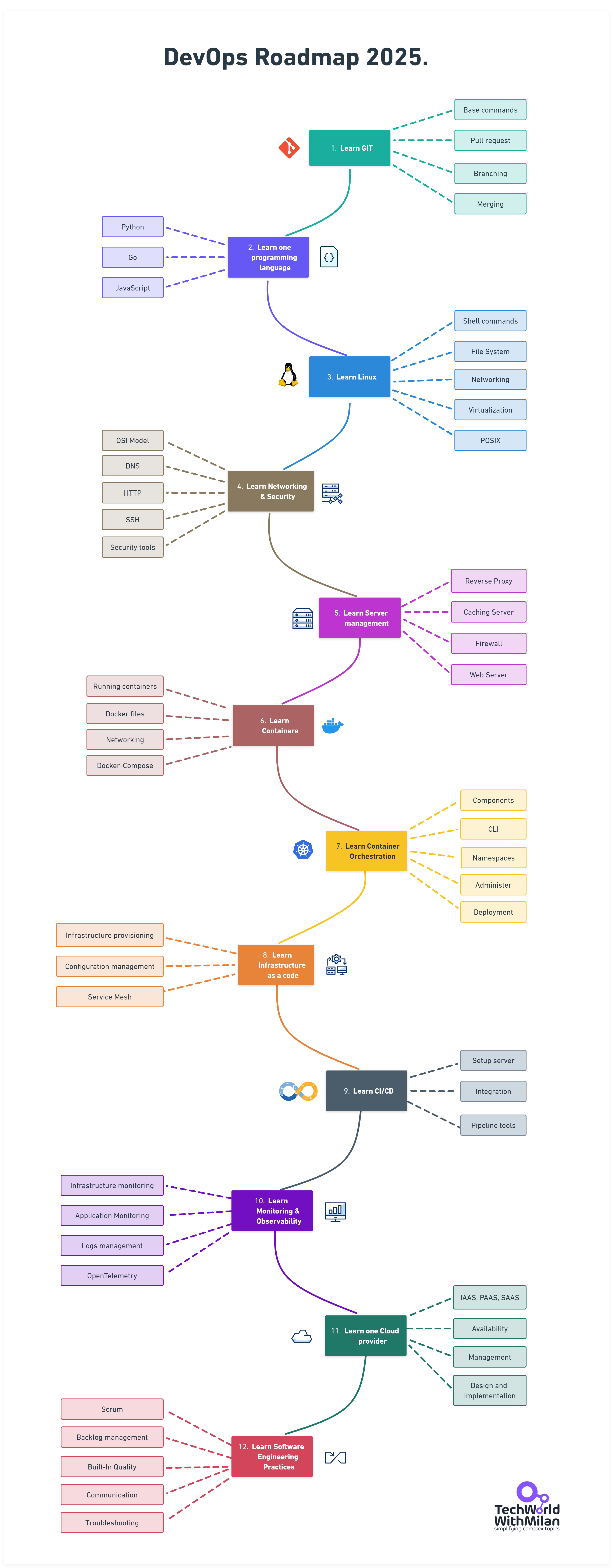
This is a step-by-step guide on how to become a DevOps engineer, with links to relevant learning resources.
If you want to learn more about DevOps, be sure to subscribe to my newsletter.
Support My Work
If you find this repository helpful, consider supporting me on Patreon:
Disclaimer
The purpose of this roadmap is to give you an idea about the landscape. The road map will guide you if you are confused about what to learn next, rather than encouraging you to pick what is hype and trendy. You should grow some understanding of why one tool would be better suited for some cases than the other and remember that hype and trendy do not always mean best suited for the job.
Give a Star! :star:
If you like or are using this project to learn or start your solution, please give it a star. Thanks!
Learning resources for DevOps Engineers (mostly free)
1. GIT
All your resources (files) will be held in a GIT repository. Those files are application code but also infrastructure as a code.
Git is a free tool used for source code management. Git is used to tracking changes in the source code, enabling multiple developers to work together on non-linear development.
The two most popular Git platforms are GitLab and GitHub.
Here you need to learn Git commands, like git clone, branch, merge, and how to collaborate on a project with pull requests.
As an engineer, it is recommended to know at least one programming language that you can use to write automation scripts.
Some popular programming languages for DevOps-es are Python, Go, and JavaScript.
Python is a multi-paradigm language. Being an interpreted language, code is executed as soon as it is written, and the syntax allows for writing code in different ways. Python is frequently recommended as the first language new coders should learn, because of its focus on readability, consistency, and ease of use.
Here you need to learn basic concepts of programming languages, such as syntax, if/else, loops, data structures, etc.
An Operating system serves as a bridge between a computer's user and its hardware. Its function is to offer a setting in which a user can conveniently and effectively run programs.
As most servers use Linux OS, you need to make yourself comfortable with Linux and its CLI.
Learn basic commands, such as: ls, cd, mkdir, rm, cp, mv, touch, cat, printenv, grep, find, chmod, chmod, ps, kill, top, df, du, tar, gzip, ssh, scp, wget, curl, etc.
One easy-to-start distribution is Ubuntu.
In addition, you need to know scripting to automate tasks for development and operations.
Here you can learn OS-specific languages, such as Bash or Powershell, or independent, like Python or Go.
A network protocol is an established set of rules that determine how data is transmitted between different devices in the same network. Essentially, it allows connected devices to communicate with each other, regardless of any differences in their internal processes, structure, or design.
Here you will need to know how a network works, how to configure firewalls, understand how DNS works, OSI model, IP addresses, ports, etc.
Server management includes all the infrastructure monitoring and maintenance required for servers to operate reliably and at optimal performance levels. The primary goals of an effective server management strategy are to:
Minimize server slowdowns and downtime while maximizing reliability.
Build secure server environments.
Scale servers and related operations to meet the needs of the organization over time.
Here you will need to know what is forward and reverse proxies, caching servers, and how to operate Web Servers, such as Nginx, Apache, or IIS.
A container is a standard unit of software that packages up code and all its dependencies, so the application runs quickly and reliably from one computing environment to another.
Docker is by far the most popular container technology today. A Docker container image is a lightweight, standalone, executable package of software that includes everything needed to run an application: code, runtime, system tools, system libraries, and settings.
Here you need to know how to run containers, Docker Networking, Volumes, Dockerfiles, and run multiple containers with Docker-Compose.
Docker Compose is important as pre-requisite for Kubernetes. It is a tool for defining and running multi-container Docker applications. With Compose, you use a YAML file to configure your application’s services. Then, with a single command, you create and start all the services from your configuration.
Container orchestration automates the deployment, management, scaling, and networking of containers.
Container orchestration can be used in any environment where you use containers. It can help you to deploy the same application across different environments without needing to redesign it. And microservices in containers make it easier to orchestrate services, including storage, networking, and security.
Here you need to learn how Kubernetes works, and how to administer the Kubernetes cluster and deploy applications on it.
You need to know basic components of Kubernetes, such as: Master Node, Worker Node, Pod, ReplicaSet, Deployment, Service, Ingress, ConfigMap, Secret, PersistentVolume, PersistentVolumeClaim, StatefulSet, DaemonSet, Job and CronJob.
Also, you need to know how to work with kubectl and Helm tools.
Sometimes referred to as IaC, it refers to the techniques and tools used to define infrastructure, typically in a markup language like YAML or JSON. Infrastructure as code allows Engineers to automate environment setup and teardown. Accelerates and de-risks deployment by provisioning gold copy environments on demand.
Terraform is the most popular infrastructure provisioning tool, but there are others such as Ansible, Chef, Puppet, and Vagrant.
Here you need to know how to do infrastructure provisioning and configuration management.
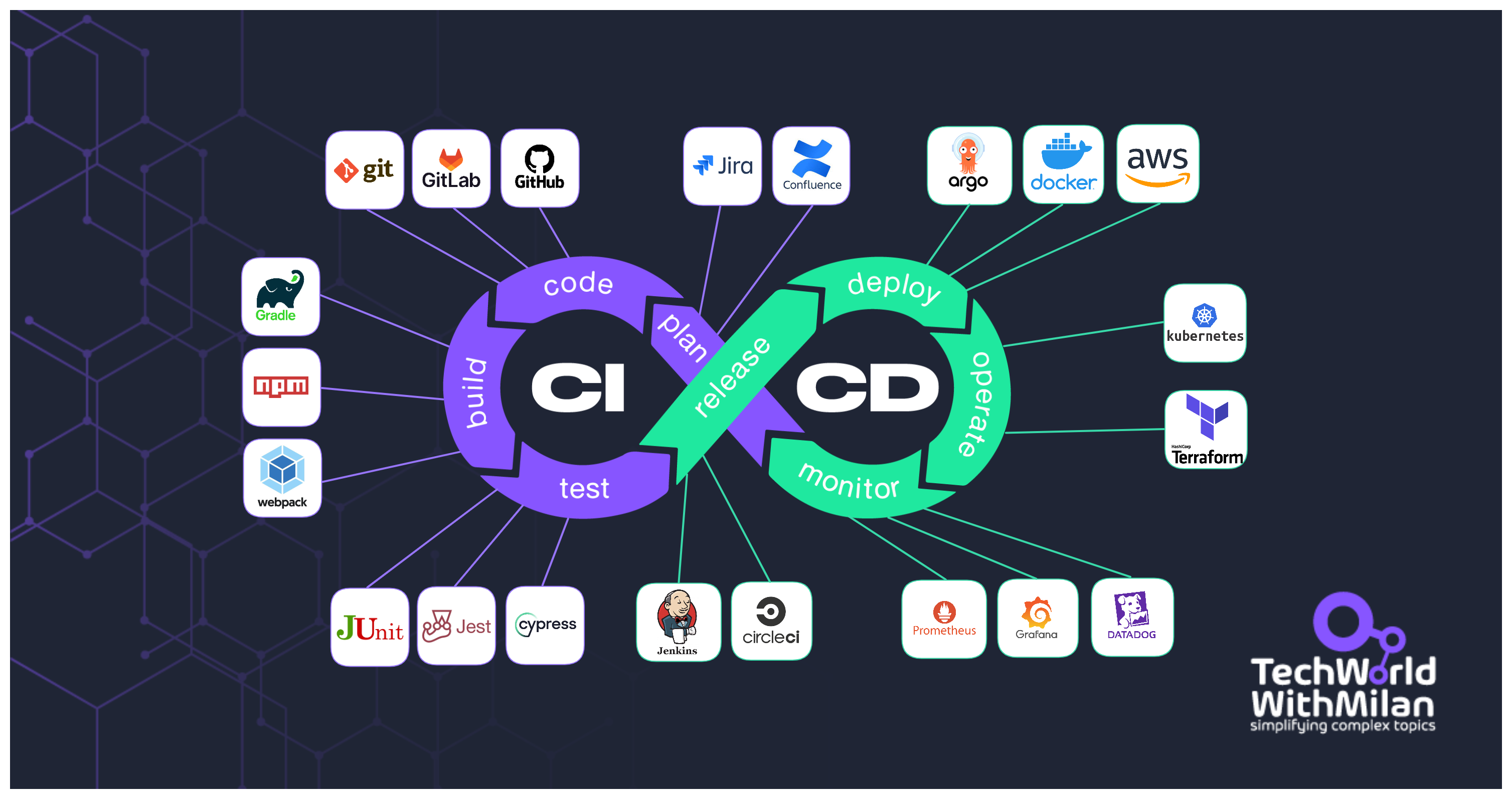
Continuous Integration / Continuous Deployment (CI/CD) is a method to frequently deliver apps to customers by introducing automation into the stages of app development. CI/CD is a solution to the problems integrating new code can cause for development and operations teams.
CI/CD introduces continuous automation and continuous monitoring throughout the lifecycle of apps, from integration and testing phases to delivery and deployment. These connected practices are often referred to as a "CI/CD pipeline" and are supported by development and operations teams.
There are different stages of a CI/CD pipeline, such as: build, test and deploy, but there could be much more activities included:
Checking code from version control and building it
Having staged gates for different kinds of approvals
Managing environment variables
Restarting services
Executing tests
And more...
Here you need to learn how to set up CI/CD server, integrate code and trigger pipelines automatically, store and read secrets, and build and package management tools.
Some popular CI/CD tools are: Jenkins, TeamCity, CircleCI, Bamboo, GitLab, and Azure DevOps.
Monitoring entails overseeing the entire development process from planning, development, integration and testing, deployment, and operations. It involves a complete and real-time view of the status of applications, services, and infrastructure in the production environment.
This is especially important when our software is in production, and we need to track all kinds of issues in our infrastructure and application.
The two most popular tools are Prometheus and Grafana, but also Cloud-based tools such as AWS CloudWatch, Azure Monitor, and Google Cloud Monitoring.
Here you need to know how to set up monitoring and visualize data, crating and setting up alerting, and creating automatization during alerting.
Cloud providers provide a layer of APIs to abstract infrastructure and provision it based on security and billing boundaries. The cloud runs on servers in data centers, but the abstractions cleverly give the appearance of interacting with a single "platform" or large application. The ability to quickly provision, configure and secure resources with cloud providers has been key to both the tremendous success, and complexity, of modern DevOps.
The most popular cloud providers in the market are AWS and Azure, as well as Google Cloud.
Here you need to know how to manage users and administration, networks, virtual servers, etc.
As a DevOps engineer, you will probably work in a team with other developers in an Agile world, such as Scrum. So, it is very important to know different parts of SDLC, as well as the tools which are used there.
In addition, it would be good to know how automation testing is working, as you will need to set up it in CI/CD way.
Here you need to know what is Scrum, all phases of SDLC, how automation testing works, etc.
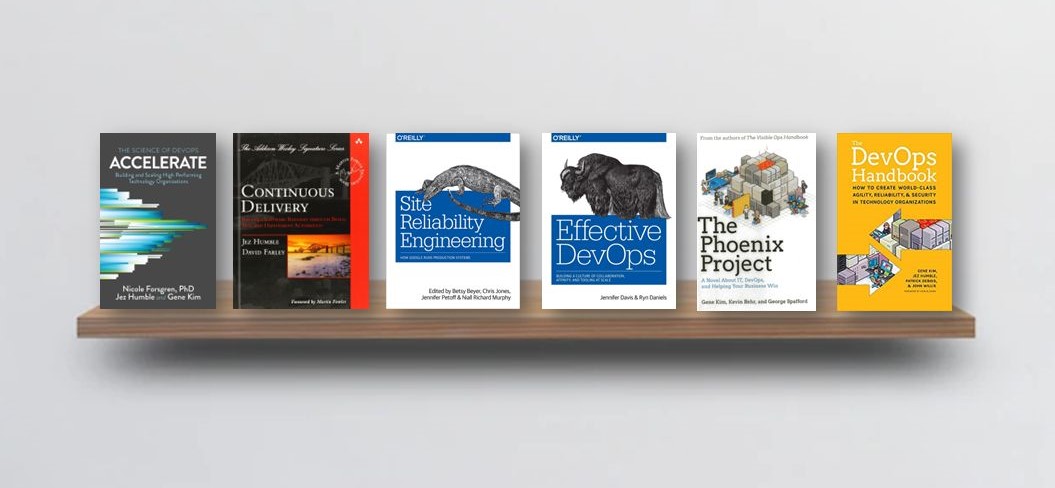
The book introduces product development, quality assurance, IT operations, and information security. It is a great read for those who are new to DevOps or who want to learn more about how the various components of DevOps work together.
This book presents both the findings and the science behind measuring software delivery performance. For promoting DevOps to senior management, it's a fantastic tool.
It introduces automated architecture management and data migration. Many of the deployment pipeline concepts that have since become standard were established in this book. Config as Code, build and deployment automation, and efficient testing techniques are covered in some technical detail. Its mostly technical book.
The book talks about how to organize teams in a way that enables fast flow of value to customers. It provides a set of four fundamental team topologies: Stream-Aligned Teams, Enabling Teams, Complicated-Subsystem Teams, and Platform Teams, which can be combined and adapted to suit different organizational contexts.
The book provides effective ways to improve team coordination. It shows how to break down information silos, monitor relationships, and repair misunderstandings that arise between and within teams in your organization.
It is a classic novel about effectiveness and communications. IT work is like manufacturing plant work, and a system must be established to streamline the workflow. One of the best books out there.
This book explains the whole life cycle of Google’s development, deployment, and monitoring, and how to manage the world’s biggest software systems (also known as SRE). Anyone who considers themselves to be more on the "Ops" end of the DevOps side or who wants to know how to strengthen the bonds between various Dev and Ops teams should read SRE.
This book provides a a comprehensive, hands-on guide to deploying and managing software in production, written for practitioners. This is a hands-on guide that includes dozens of step-by-step examples that will have you running real systems: e.g., you’ll deploy Kubernetes clusters in AWS, manage infrastructure with OpenTofu, set up CI/CD pipelines with GitHub Actions, etc.
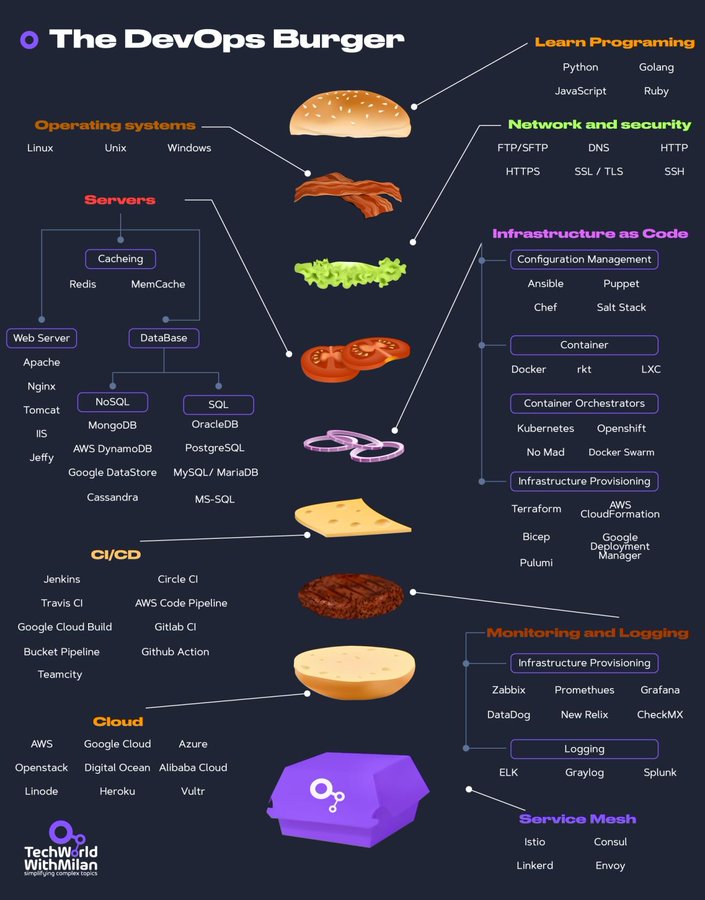
DevOps as a Burger (DaaB)
We can even present this roadmap as a burger :).
Wrap Up
If you think the roadmap can be improved, please open a PR with any updates and submit any issues. Also, I will continue to improve this, so you might want to star this repository to revisit.



 一份成为 DevOps 工程师的分步路线图,按顺序列出各个主题,每个主题都附有学习资源链接,资源大多免费。