MaterialDrawer README

The project's README from github.com/mikepenz/MaterialDrawer. As one markdown file: README.md.

MaterialDrawer

... the flexible, easy to use, all in one drawer library for your Android project.


What's included 🚀 • Setup 🛠️ • Migration Guide 🧬 • WIKI / FAQ 📖 • Used by • Sample App


What's included 🚀

If you upgrade from < 8.0.0 follow the MIGRATION GUIDE

Preview

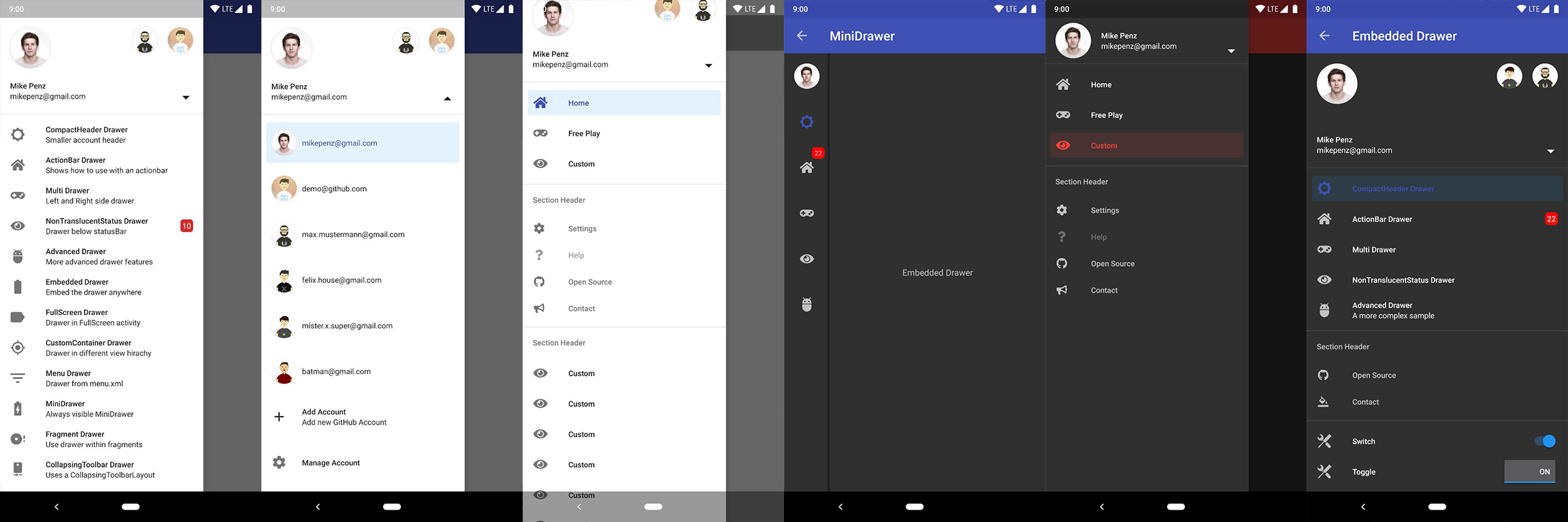
Screenshots 🎉

Image

Setup

Latest releases 🛠

1. Provide the gradle dependency

The latest release is available on Maven Central.

implementation("com.mikepenz:materialdrawer:${latestRelease}")
//required support lib modules
implementation "androidx.appcompat:appcompat:${versions.appcompat}"
implementation "androidx.recyclerview:recyclerview:${versions.recyclerView}"
implementation "androidx.annotation:annotation:${versions.annotation}"
implementation "com.google.android.material:material:1.5.0-alpha05" // requires at least 1.5.0-x
implementation "androidx.constraintlayout:constraintlayout:${versions.constraintLayout}"

NavController Support @ Maven Central.

// Add for NavController support
implementation "com.mikepenz:materialdrawer-nav:${lastestMaterialDrawerRelease}"

Android-Iconics Support @ Maven Central .

// Add for Android-Iconics support
implementation "com.mikepenz:materialdrawer-iconics:${lastestMaterialDrawerRelease}"

2. Add the Drawer into the XML

The MaterialDrawerSliderView has to be provided as child of the DrawerLayout and will as such act as the slider

<androidx.drawerlayout.widget.DrawerLayout xmlns : android ="http://schemas.android.com/apk/res/android"
xmlns:app = "http://schemas.android.com/apk/res-auto"
android:id = "@+id/root"
    android:layout_width="match_parent"
    android:layout_height="match_parent"
    android:fitsSystemWindows="true">

    ... your content ...

    <com.mikepenz.materialdrawer.widget.MaterialDrawerSliderView
        android:id="@+id/slider"
        android:layout_width="wrap_content"
        android:layout_height="match_parent"
        android:layout_gravity="start"
        android:fitsSystemWindows="true" />
</androidx.drawerlayout.widget.DrawerLayout>

3. Add the DrawerStyle to your theme

<style name="SampleApp.DayNight" parent="Theme.Material3.DayNight.NoActionBar">
    ...
    <item name="materialDrawerStyle">@style/Widget.MaterialDrawerStyle</item>
    <item name="materialDrawerHeaderStyle">@style/Widget.MaterialDrawerHeaderStyle</item>
    ...
</style>

Great. Your drawer is now ready to use.

Note

Using v9.x with Material 3 theming requires a Material3 theme as base for the activity.

Additional Setup

Add items and adding some functionality

//if you want to update the items at a later time it is recommended to keep it in a variable
val item1 = PrimaryDrawerItem().apply { nameRes = R.string.drawer_item_home; identifier = 1 }
val item2 = SecondaryDrawerItem().apply { nameRes = R.string.drawer_item_settings; identifier = 2 }

// get the reference to the slider and add the items
slider.itemAdapter.add(
	    item1,
	    DividerDrawerItem(),
	    item2,
	    SecondaryDrawerItem().apply { nameRes = R.string.drawer_item_settings }
)

// specify a click listener
slider.onDrawerItemClickListener = { v, drawerItem, position ->
    // do something with the clicked item :D
    false
}

Selecting an item

//set the selection to the item with the identifier 1
slider.setSelection(1)
//set the selection to the item with the identifier 2
slider.setSelection(item2)
//set the selection and also fire the `onItemClick`-listener
slider.setSelection(1, true)

By default, when a drawer item is clicked, it becomes the new selected item. If this isn't the expected behavior, you can disable it for this item using isSelectable = false:

SecondaryDrawerItem().apply { nameRes = R.string.drawer_item_dialog; isSelectable = false }

Modify items or the drawer

//modify an item of the drawer
item1.apply {
  nameText = "A new name for this drawerItem"; badge = StringHolder("19")
  badgeStyle = BadgeStyle().apply { textColor = ColorHolder.fromColor(Color.WHITE); color = ColorHolder.fromColorRes(R.color.md_red_700) }
}
//notify the drawer about the updated element. it will take care about everything else
slider.updateItem(item1)

//to update only the name, badge, icon you can also use one of the quick methods
slider.updateName(1, "A new name")

//the result object also allows you to add new items, remove items, add footer, sticky footer, ..
slider.addItem(DividerDrawerItem())
slider.addStickyFooterItem(PrimaryDrawerItem().apply { nameTest = "StickyFooter" })

//remove items with an identifier
slider.removeItem(2)

//open / close the drawer
slider.drawerLayout?.openDrawer(slider)
slider.drawerLayout?.closeDrawer(slider)

//get the reference to the `DrawerLayout` itself
slider.drawerLayout

Add profiles and an AccountHeader

// Create the AccountHeader
headerView = AccountHeaderView(this).apply {
    attachToSliderView(slider) // attach to the slider
    addProfiles(
        ProfileDrawerItem().apply { nameText = "Mike Penz"; descriptionText = "[email protected]"; iconRes = R.drawable.profile; identifier = 102 }
    )
    onAccountHeaderListener = { view, profile, current ->
        // react to profile changes
        false
    }
    withSavedInstance(savedInstanceState)
}

Android-Iconics support

The MaterialDrawer provides an extension for the Android-Iconics library. This allows you to create your DrawerItems with an icon from any font.

Choose the fonts you need. Available Fonts

// Add for Android-Iconics support
implementation "com.mikepenz:materialdrawer-iconics:${lastestMaterialDrawerRelease}"

// fonts
implementation 'com.mikepenz:google-material-typeface:x.y.z@aar' //Google Material Icons
implementation 'com.mikepenz:fontawesome-typeface:x.y.z@aar'     //FontAwesome
//now you can simply use any icon of the Google Material Icons font
PrimaryDrawerItem().apply { iconicsIcon = GoogleMaterial.Icon.gmd_wb_sunny }
//Or an icon from FontAwesome
SecondaryDrawerItem().apply { iconicsIcon = FontAwesomeBrand.Icon.fab_github }

Advanced Setup

For advanced usecases. Please have a look at the provided sample activities.

Load images via url

The MaterialDrawer supports fetching images from URLs and setting them for the Profile icons. As the MaterialDrawer does not contain an ImageLoading library the dev can choose his own implementation (Picasso, Glide, ...). This has to be done, before the first image should be loaded via URL. (Should be done in the Application, but any other spot before loading the first image is working too)

//initialize and create the image loader logic
DrawerImageLoader.init(object : AbstractDrawerImageLoader() {
    override fun set(imageView: ImageView, uri: Uri, placeholder: Drawable) {
        Picasso.get().load(uri).placeholder(placeholder).into(imageView)
    }

    override fun cancel(imageView: ImageView) {
        Picasso.get().cancelRequest(imageView)
    }
    
    /*
    override fun set(imageView: ImageView, uri: Uri, placeholder: Drawable, tag: String?) {
        super.set(imageView, uri, placeholder, tag)
    }

    override fun placeholder(ctx: Context): Drawable {
        return super.placeholder(ctx)
    }

    override fun placeholder(ctx: Context, tag: String?): Drawable {
        return super.placeholder(ctx, tag)
    }
    */
})

An implementation with GLIDE v4 (See tag v6.1.1 for glide v3 sample) can be found in the sample application

JVM Target 1.8

// Since 8.1.0 the drawer includes core ktx 1.3.0 which requires jvm 1.8
kotlinOptions {
    jvmTarget = "1.8"
}

Style the drawer 🖌️

Custom style - styles.xml

Create your custom style. If you don't need a custom theme see the next section, how you can set the colors just by overwriting the original colors.

// define a custom drawer style
<style name="Widget.MaterialDrawerStyleCustom" parent="Widget.MaterialDrawerStyle">
    <item name="materialDrawerInsetForeground">#4000</item>
    <!-- MaterialDrawer specific values -->
    <item name="materialDrawerBackground">?colorSurface</item>
    <item name="materialDrawerPrimaryText">@color/color_drawer_item_text</item>
    <item name="materialDrawerPrimaryIcon">@color/color_drawer_item_text</item>
    <item name="materialDrawerSecondaryText">@color/color_drawer_item_text</item>
    <item name="materialDrawerSecondaryIcon">@color/color_drawer_item_text</item>
    <item name="materialDrawerDividerColor">?colorOutline</item>
    <item name="materialDrawerSelectedBackgroundColor">?colorSecondaryContainer</item>
</style>

// define a custom header style
<style name="Widget.MaterialDrawerHeaderStyleCustom" parent="">
    <item name="materialDrawerCompactStyle">true</item>
    <item name="materialDrawerHeaderSelectionText">?colorOnSurface</item>
    <item name="materialDrawerHeaderSelectionSubtext">?colorOnSurface</item>
</style>

// define the custom styles for the theme
<style name="SampleApp" parent="Theme.Material3.Light.NoActionBar">
    ...
    <item name="materialDrawerStyle">@style/Widget.MaterialDrawerStyleCustom</item>
    <item name="materialDrawerHeaderStyle">@style/Widget.MaterialDrawerHeaderStyleCustom</item>
    ...
</style>

Adjust BezelImageView style

Overwrite the Style of the BezelImageView for the whole MaterialDrawer

<style name="BezelImageView">
    <item name="biv_maskDrawable">@drawable/material_drawer_rectangle_mask</item>
    <item name="biv_drawCircularShadow">false</item>
    <item name="biv_selectorOnPress">@color/material_drawer_primary</item>
    <item name="android:scaleType">centerInside</item>
</style>

Used by

(feel free to send me new projects)

Articles about the MaterialDrawer

Credits

Developed By

License

Copyright 2021 Mike Penz

Licensed under the Apache License, Version 2.0 (the "License");
you may not use this file except in compliance with the License.
You may obtain a copy of the License at

   http://www.apache.org/licenses/LICENSE-2.0

Unless required by applicable law or agreed to in writing, software
distributed under the License is distributed on an "AS IS" BASIS,
WITHOUT WARRANTIES OR CONDITIONS OF ANY KIND, either express or implied.
See the License for the specific language governing permissions and
limitations under the License.

MaterialDrawer (mikepenz/MaterialDrawer)

Searching Database…

Что это такое?MaterialDrawer — это open-source библиотека для Android, которая добавляет в ваше приложение гибкую боковую панель навигации (navigation drawer). Это готовое комплексное решение для выдвижного меню, сделанное по рекомендациям Material Design от Google, и у него больше 11 000 звёзд на GitHub.
Это готовое приложение или то, что я встраиваю в свой проект?Это библиотека, которую вы подключаете как зависимость к своему Android-проекту, а не отдельное приложение. Панель построена на RecyclerView и настраивается через простой и быстрый API.
Как добавить её в свой Android-проект?Подключите её как зависимость для Gradle или Maven, как показано в разделе Setup из README. Библиотека построена на support-библиотеках AndroidX, а сама панель вы собираете из drawer-элементов прямо в коде.
Будет ли она работать на старых устройствах с Android?Да — совместимость начинается с API Level 16, то есть с Android 4.1 и новее, а работает она через support-библиотеки AndroidX.
Есть ли подвох при обновлении или использовании темы Material 3?Да — при переходе с версии v9.x для оформления в стиле Material 3 в основе активити должна лежать тема Material3, так что заранее продумайте настройку темы своего приложения.
Какие приложения используют её в реальных продуктах?Длинный список выпущенных приложений: Tusky и Pachli (клиенты Mastodon), Boost for reddit, Calendula, MLManager, Meldmail, Recipedia и десятки других — они перечислены в разделе Used by из README.
Можно ли бесплатно использовать её в своём приложении?Да — она распространяется по лицензии Apache License 2.0 (авторские права у Mike Penz), так что её можно бесплатно использовать и в личных, и в коммерческих приложениях.
Что есть из коробки?AccountSwitcher и шапка с аккаунтами, несколько стандартных drawer-элементов, раскрывающиеся элементы, поддержка бейджей, закреплённые заголовки и подвалы, поддержка RTL, мини-панель в стиле Gmail (MiniDrawer) и поддержка NavController.
Какие иконки можно использовать для панели?Векторные иконки .svg и иконочные шрифты через интеграцию с Android-Iconics — в том числе Google Material Design Icons, иконки Google Material Community, FontAwesome и другие.
Могут ли аватарки профиля загружаться по URL?Да, но в библиотеку не встроен компонент для загрузки картинок — вам нужно подключить свой, например Picasso или Glide, до загрузки первой картинки, и лучше всего сделать это в классе Application.
Насколько сильно можно настраивать внешний вид панели?Довольно сильно: в комплекте есть разные темы, которые помогают не засорять ваши собственные темы, цвета можно менять на лету, а для более глубоких изменений можно переопределить styles.xml или стиль BezelImageView.
Creator
mikepenz
Size
22.7 MB
Stars
11.6K
Age
11y
Commits · 90 Days
