Prompt flow










Welcome to join us to make prompt flow better by
participating discussions,
opening issues,
submitting PRs.
Prompt flow is a suite of development tools designed to streamline the end-to-end development cycle of LLM-based AI applications, from ideation, prototyping, testing, evaluation to production deployment and monitoring. It makes prompt engineering much easier and enables you to build LLM apps with production quality.
With prompt flow, you will be able to:
- Create and iteratively develop flow
- Evaluate flow quality and performance
- Evaluate your flow's quality and performance with larger datasets.
- Integrate the testing and evaluation into your CI/CD system to ensure quality of your flow.
- Streamlined development cycle for production
- Deploy your flow to the serving platform you choose or integrate into your app's code base easily.
- (Optional but highly recommended) Collaborate with your team by leveraging the cloud version of Prompt flow in Azure AI.
Installation
To get started quickly, you can use a pre-built development environment. Click the button below to open the repo in GitHub Codespaces, and then continue the readme!

If you want to get started in your local environment, first install the packages:
Ensure you have a python environment, python>=3.9, <=3.11 is recommended.
pip install promptflow promptflow-tools
Quick Start ⚡
Create a chatbot with prompt flow
Run the command to initiate a prompt flow from a chat template, it creates folder named my_chatbot and generates required files within it:
pf flow init --flow ./my_chatbot --type chat
Setup a connection for your API key
For OpenAI key, establish a connection by running the command, using the openai.yaml file in the my_chatbot folder, which stores your OpenAI key (override keys and name with --set to avoid yaml file changes):
pf connection create --file ./my_chatbot/openai.yaml --set api_key=<your_api_key> --name open_ai_connection
For Azure OpenAI key, establish the connection by running the command, using the azure_openai.yaml file:
pf connection create --file ./my_chatbot/azure_openai.yaml --set api_key=<your_api_key> api_base=<your_api_base> --name open_ai_connection
Chat with your flow
In the my_chatbot folder, there's a flow.dag.yaml file that outlines the flow, including inputs/outputs, nodes, connection, and the LLM model, etc
Note that in the chat node, we're using a connection named open_ai_connection (specified in connection field) and the gpt-35-turbo model (specified in deployment_name field). The deployment_name filed is to specify the OpenAI model, or the Azure OpenAI deployment resource.
Interact with your chatbot by running: (press Ctrl + C to end the session)
pf flow test --flow ./my_chatbot --interactive
Core value: ensuring "High Quality” from prototype to production
Explore our 15-minute tutorial that guides you through prompt tuning ➡ batch testing ➡ evaluation, all designed to ensure high quality ready for production.
Next Step! Continue with the Tutorial 👇 section to delve deeper into prompt flow.
Tutorial 🏃♂️
Prompt flow is a tool designed to build high quality LLM apps, the development process in prompt flow follows these steps: develop a flow, improve the flow quality, deploy the flow to production.
Develop your own LLM apps
VS Code Extension
We also offer a VS Code extension (a flow designer) for an interactive flow development experience with UI.
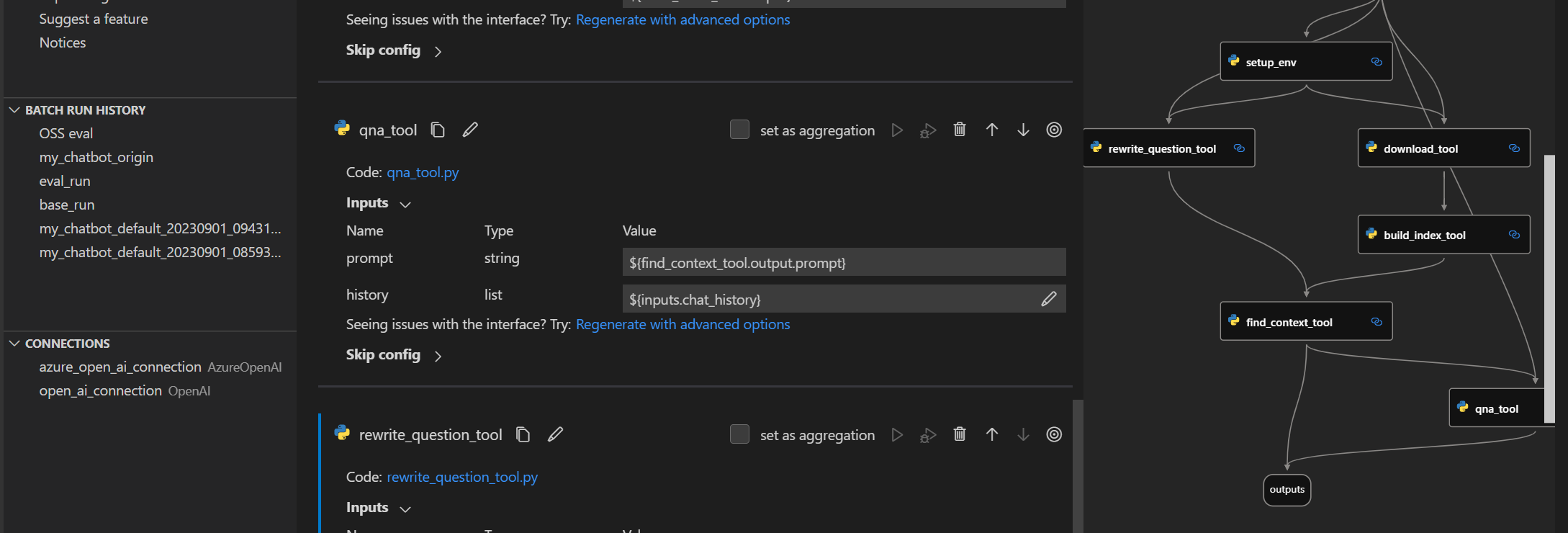
You can install it from the visualstudio marketplace.
Deep delve into flow development
Getting started with prompt flow: A step by step guidance to invoke your first flow run.
Learn from use cases
Tutorial: Chat with PDF: An end-to-end tutorial on how to build a high quality chat application with prompt flow, including flow development and evaluation with metrics.
More examples can be found here. We welcome contributions of new use cases!
Setup for contributors
If you're interested in contributing, please start with our dev setup guide: dev_setup.md.
Next Step! Continue with the Contributing 👇 section to contribute to prompt flow.
Contributing
This project welcomes contributions and suggestions. Most contributions require you to agree to a
Contributor License Agreement (CLA) declaring that you have the right to, and actually do, grant us
the rights to use your contribution. For details, visit https://cla.opensource.microsoft.com.
When you submit a pull request, a CLA bot will automatically determine whether you need to provide
a CLA and decorate the PR appropriately (e.g., status check, comment). Simply follow the instructions
provided by the bot. You will only need to do this once across all repos using our CLA.
This project has adopted the Microsoft Open Source Code of Conduct.
For more information see the Code of Conduct FAQ or
contact [email protected] with any additional questions or comments.
Trademarks
This project may contain trademarks or logos for projects, products, or services. Authorized use of Microsoft
trademarks or logos is subject to and must follow
Microsoft's Trademark & Brand Guidelines.
Use of Microsoft trademarks or logos in modified versions of this project must not cause confusion or imply Microsoft sponsorship.
Any use of third-party trademarks or logos are subject to those third-party's policies.
Code of Conduct
This project has adopted the
Microsoft Open Source Code of Conduct.
For more information see the
Code of Conduct FAQ
or contact [email protected]
with any additional questions or comments.
Data Collection
The software may collect information about you and your use of the software and
send it to Microsoft if configured to enable telemetry.
Microsoft may use this information to provide services and improve our products and services.
You may turn on the telemetry as described in the repository.
There are also some features in the software that may enable you and Microsoft
to collect data from users of your applications. If you use these features, you
must comply with applicable law, including providing appropriate notices to
users of your applications together with a copy of Microsoft's privacy
statement. Our privacy statement is located at
https://go.microsoft.com/fwlink/?LinkID=824704. You can learn more about data
collection and use in the help documentation and our privacy statement. Your
use of the software operates as your consent to these practices.
Telemetry Configuration
Telemetry collection is on by default.
To opt out, please run pf config set telemetry.enabled=false to turn it off.
License
Copyright (c) Microsoft Corporation. All rights reserved.
Licensed under the MIT license.

 Prompt flow 是微软推出的一套开发工具,用于端到端地构建基于大语言模型(LLM)的 AI 应用,涵盖原型设计、提示词调优、测试、评估,以及生产环境的部署和监控。