















autogen README

The project's README from github.com/microsoft/autogen. As one markdown file: README.md.

AutoGen Logo

Twitter LinkedIn Discord Documentation Blog

AutoGen Maintenance Mode

AutoGen is a framework for creating multi-agent AI applications that can act autonomously or work alongside humans.

[!CAUTION] ⚠️ Maintenance Mode

AutoGen is now in maintenance mode. It will not receive new features or enhancements and is community managed going forward.

New users should start with Microsoft Agent Framework. Existing users are encouraged to migrate using the AutoGen → Microsoft Agent Framework migration guide.

Microsoft Agent Framework (MAF) is the enterprise‑ready successor to AutoGen. Microsoft Agent FrameworkAF in now available as a production-ready release: stable APIs, and a commitment to long-term support. Whether you're building a single assistant or orchestrating a fleet of specialized agents, Microsoft Agent Framework 1.0 gives you enterprise-grade multi-agent orchestration, multi-provider model support, and cross-runtime interoperability via A2A and MCP.

Installation

AutoGen requires Python 3.10 or later.

# Install AgentChat and OpenAI client from Extensions
pip install -U "autogen-agentchat" "autogen-ext[openai]"

The current stable version can be found in the releases. If you are upgrading from AutoGen v0.2, please refer to the Migration Guide for detailed instructions on how to update your code and configurations.

# Install AutoGen Studio for no-code GUI
pip install -U "autogenstudio"

Quickstart

The following samples call OpenAI API, so you first need to create an account and export your key as export OPENAI_API_KEY="sk-...".

Hello World

Create an assistant agent using OpenAI's GPT-4o model. See other supported models.

import asyncio
from autogen_agentchat.agents import AssistantAgent
from autogen_ext.models.openai import OpenAIChatCompletionClient

async def main() -> None:
    model_client = OpenAIChatCompletionClient(model="gpt-4.1")
    agent = AssistantAgent("assistant", model_client=model_client)
    print(await agent.run(task="Say 'Hello World!'"))
    await model_client.close()

asyncio.run(main())

MCP Server

Create a web browsing assistant agent that uses the Playwright MCP server.

# First run `npm install -g @playwright/mcp@latest` to install the MCP server.
import asyncio
from autogen_agentchat.agents import AssistantAgent
from autogen_agentchat.ui import Console
from autogen_ext.models.openai import OpenAIChatCompletionClient
from autogen_ext.tools.mcp import McpWorkbench, StdioServerParams


async def main() -> None:
    model_client = OpenAIChatCompletionClient(model="gpt-4.1")
    server_params = StdioServerParams(
        command="npx",
        args=[
            "@playwright/mcp@latest",
            "--headless",
        ],
    )
    async with McpWorkbench(server_params) as mcp:
        agent = AssistantAgent(
            "web_browsing_assistant",
            model_client=model_client,
            workbench=mcp, # For multiple MCP servers, put them in a list.
            model_client_stream=True,
            max_tool_iterations=10,
        )
        await Console(agent.run_stream(task="Find out how many contributors for the microsoft/autogen repository"))


asyncio.run(main())

Warning: Only connect to trusted MCP servers as they may execute commands in your local environment or expose sensitive information.

Multi-Agent Orchestration

You can use AgentTool to create a basic multi-agent orchestration setup.

import asyncio

from autogen_agentchat.agents import AssistantAgent
from autogen_agentchat.tools import AgentTool
from autogen_agentchat.ui import Console
from autogen_ext.models.openai import OpenAIChatCompletionClient


async def main() -> None:
    model_client = OpenAIChatCompletionClient(model="gpt-4.1")

    math_agent = AssistantAgent(
        "math_expert",
        model_client=model_client,
        system_message="You are a math expert.",
        description="A math expert assistant.",
        model_client_stream=True,
    )
    math_agent_tool = AgentTool(math_agent, return_value_as_last_message=True)

    chemistry_agent = AssistantAgent(
        "chemistry_expert",
        model_client=model_client,
        system_message="You are a chemistry expert.",
        description="A chemistry expert assistant.",
        model_client_stream=True,
    )
    chemistry_agent_tool = AgentTool(chemistry_agent, return_value_as_last_message=True)

    agent = AssistantAgent(
        "assistant",
        system_message="You are a general assistant. Use expert tools when needed.",
        model_client=model_client,
        model_client_stream=True,
        tools=[math_agent_tool, chemistry_agent_tool],
        max_tool_iterations=10,
    )
    await Console(agent.run_stream(task="What is the integral of x^2?"))
    await Console(agent.run_stream(task="What is the molecular weight of water?"))


asyncio.run(main())

For more advanced multi-agent orchestrations and workflows, read AgentChat documentation.

AutoGen Studio

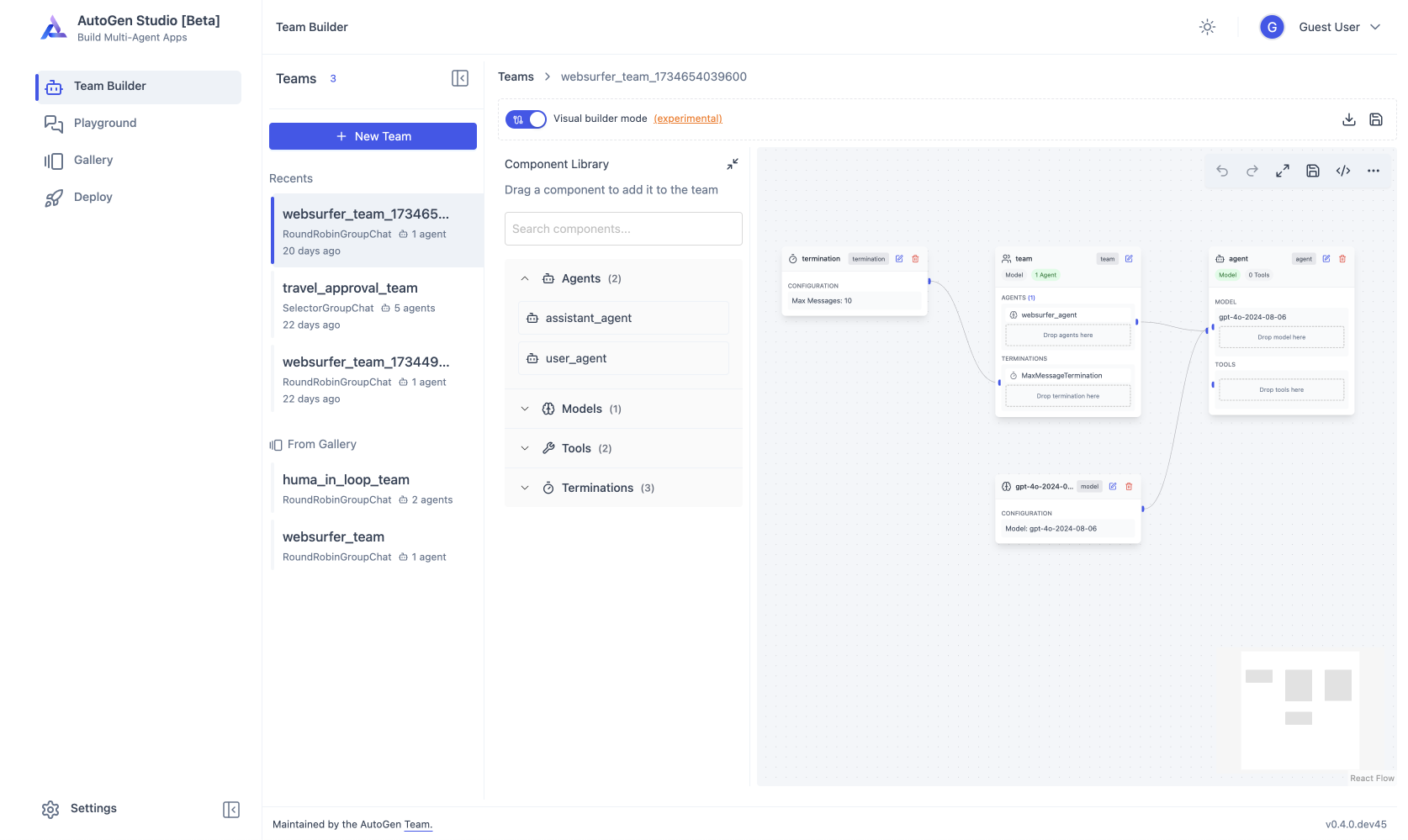
Use AutoGen Studio to prototype and run multi-agent workflows without writing code.

Caution: AutoGen Studio is meant to help you rapidly prototype multi-agent workflows and demonstrate an example of end user interfaces built with AutoGen. It is not meant to be a production-ready app. Developers are encouraged to use the AutoGen framework to build their own applications, implementing authentication, security and other features required for deployed applications. See the security note for more details.

# Run AutoGen Studio on http://localhost:8080
autogenstudio ui --port 8080 --appdir ./my-app

Why AutoGen?

AutoGen Landing

Pioneered in Microsoft Research, AutoGen opened the door to experimental multi-agent orchestration patterns that inspired the community. While AutoGen is now in maintenance mode, existing users can continue to use the framework with the architecture described below. For new projects, we recommend Microsoft Agent Framework, which builds on the lessons learned from AutoGen with enterprise-grade support.

The autogen framework uses a layered and extensible design. Layers have clearly divided responsibilities and build on top of layers below. This design enables you to use the framework at different levels of abstraction, from high-level APIs to low-level components.

The ecosystem also supports two essential developer tools:

AutoGen Studio Screenshot

You can use the AutoGen framework and developer tools to create applications for your domain. For example, Magentic-One is a state-of-the-art multi-agent team built using AgentChat API and Extensions API that can handle a variety of tasks that require web browsing, code execution, and file handling.

For community support, visit our Discord server or GitHub Discussions. Note that AutoGen is now community-managed and responses may be limited.

Where to go next?

Starting a new project? Head to Microsoft Agent Framework for the latest multi-agent capabilities with long-term support.

Existing AutoGen user? Use the migration guide to transition, or refer to the resources below for current AutoGen documentation.

Python .NET Studio
Installation Installation Install Install
Quickstart Quickstart Quickstart Usage
Tutorial Tutorial Tutorial Usage
API Reference API API API
Packages PyPi autogen-core
PyPi autogen-agentchat
PyPi autogen-ext
NuGet Contracts
NuGet Core
NuGet Core.Grpc
NuGet RuntimeGateway.Grpc
PyPi autogenstudio

Interested in contributing? See CONTRIBUTING.md for guidelines. As AutoGen is in maintenance mode, contributions are limited to bug fixes, security patches, and documentation improvements. For feature development, consider contributing to Microsoft Agent Framework.

Have questions? Check out our Frequently Asked Questions (FAQ) for answers to common queries. Community support is available through GitHub Discussions and the Discord server, though response times may vary as AutoGen is now community-managed. For actively supported tooling, see Microsoft Agent Framework.

Microsoft and any contributors grant you a license to the Microsoft documentation and other content in this repository under the Creative Commons Attribution 4.0 International Public License, see the LICENSE file, and grant you a license to any code in the repository under the MIT License, see the LICENSE-CODE file.

Microsoft, Windows, Microsoft Azure, and/or other Microsoft products and services referenced in the

autogen (microsoft/autogen)

Searching Database…

61.4K ·GitHub
Что это такое?AutoGen — это фреймворк от Microsoft для создания приложений на основе ИИ с несколькими агентами, которые могут действовать автономно или работать вместе с людьми.
Это фреймворк, с которым я пишу код, или готовое приложение?Это многоуровневый фреймворк на Python (и .NET): низкоуровневый Core API для передачи сообщений и агентов, управляемых событиями, более простой AgentChat API для быстрого прототипирования и Extensions API для подключения клиентов LLM и инструментов.
Как начать работать с ним?Установите его как пакет Python (требуется Python 3.10+) и следуйте руководствам Installation и Quickstart либо используйте AutoGen Studio — способ прототипировать рабочие процессы с несколькими агентами без написания кода.
Нужен ли мне ключ OpenAI API, чтобы запускать примеры?Да, примеры из быстрого старта обращаются к OpenAI API, поэтому нужен аккаунт OpenAI, и перед запуском ключ нужно экспортировать как переменную окружения.
Продолжается ли активная разработка AutoGen?Нет, сейчас AutoGen работает в режиме поддержки: новых функций не будет, только исправления ошибок и патчи безопасности, а Microsoft рекомендует новым проектам использовать Microsoft Agent Framework.
Что такое AutoGen Studio?AutoGen Studio — это графический интерфейс без написания кода для быстрого прототипирования и запуска рабочих процессов с несколькими агентами, однако он не предназначен для промышленного развёртывания.
Что такое AutoGen Bench?AutoGen Bench — это сопутствующий набор для бенчмаркинга, предназначенный для оценки производительности агентов, созданных на базе фреймворка.
Могут ли агенты использовать серверы MCP?Да, AutoGen может подключать агентов к серверам MCP (например, к серверу Playwright MCP для веб-браузинга), но подключайтесь только к доверенным серверам, так как они могут выполнять команды на вашем компьютере.
Что такое Magentic-One?Magentic-One — это передовая команда из нескольких агентов, построенная на API AgentChat и Extensions из AutoGen, которая может выполнять задачи, требующие веб-браузинга, выполнения кода и работы с файлами.
Creator
microsoft
Size
145.3 MB
Stars
61.4K
Age
3y
Commits · 90 Days