






Web Development for Beginners - A Curriculum
Learn the fundamentals of web development with our 12-week comprehensive course by Microsoft Cloud Advocates. Each of the 24 lessons dives into JavaScript, CSS, and HTML through hands-on projects like terrariums, browser extensions, and space games. Engage with quizzes, discussions, and practical assignments. Enhance your skills and optimize your knowledge retention with our effective project-based pedagogy. Start your coding journey today!
Join the Azure AI Foundry Discord and meet experts and fellow developers.
Follow these steps to get started using these resources:
- Fork the Repository: Click

- Clone the Repository:
git clone https://github.com/microsoft/Web-Dev-For-Beginners.git
- Join The Azure AI Foundry Discord and meet experts and fellow developers
🌐 Multi-Language Support
Supported via GitHub Action (Automated & Always Up-to-Date)
Arabic | Bengali | Bulgarian | Burmese (Myanmar) | Chinese (Simplified) | Chinese (Traditional, Hong Kong) | Chinese (Traditional, Macau) | Chinese (Traditional, Taiwan) | Croatian | Czech | Danish | Dutch | Estonian | Finnish | French | German | Greek | Hebrew | Hindi | Hungarian | Indonesian | Italian | Japanese | Kannada | Khmer | Korean | Lithuanian | Malay | Malayalam | Marathi | Nepali | Nigerian Pidgin | Norwegian | Persian (Farsi) | Polish | Portuguese (Brazil) | Portuguese (Portugal) | Punjabi (Gurmukhi) | Romanian | Russian | Serbian (Cyrillic) | Slovak | Slovenian | Spanish | Swahili | Swedish | Tagalog (Filipino) | Tamil | Telugu | Thai | Turkish | Ukrainian | Urdu | Vietnamese
Prefer to Clone Locally?
This repository includes 50+ language translations which significantly increases the download size. To clone without translations, use sparse checkout:
Bash / macOS / Linux:
git clone --filter=blob:none --sparse https://github.com/microsoft/Web-Dev-For-Beginners.git
cd Web-Dev-For-Beginners
git sparse-checkout set --no-cone '/*' '!translations' '!translated_images'
CMD (Windows):
git clone --filter=blob:none --sparse https://github.com/microsoft/Web-Dev-For-Beginners.git
cd Web-Dev-For-Beginners
git sparse-checkout set --no-cone "/*" "!translations" "!translated_images"
This gives you everything you need to complete the course with a much faster download.
If you wish to have additional translations, the supported languages are listed here. here

🧑🎓 Are you a student?
Visit Student Hub page where you will find beginner resources, Student packs and even ways to get a free certificate voucher. This is the page you want to bookmark and check from time to time as we switch out content monthly.
📣 Announcement - New GitHub Copilot Agent mode challenges to complete!
New Challenge added, look for "GitHub Copilot Agent Challenge 🚀" in most chapters. That's a new challenge for you to complete using GitHub Copilot and Agent mode. If you haven't used Agent mode before it's capable of not just generating text but can also create and edit files, run commands and more.
📣 Announcement - New Project to build using Generative AI
New AI Assistant project just added, check it out project
📣 Announcement - New Curriculum on Generative AI for JavaScript was just released
Don't miss our new Generative AI curriculum!
Visit https://aka.ms/genai-js-course to get started!
- Lessons covering everything from basics to RAG.
- Interact with historical characters using GenAI and our companion app.
- Fun and engaging narrative, you'll be time traveling!
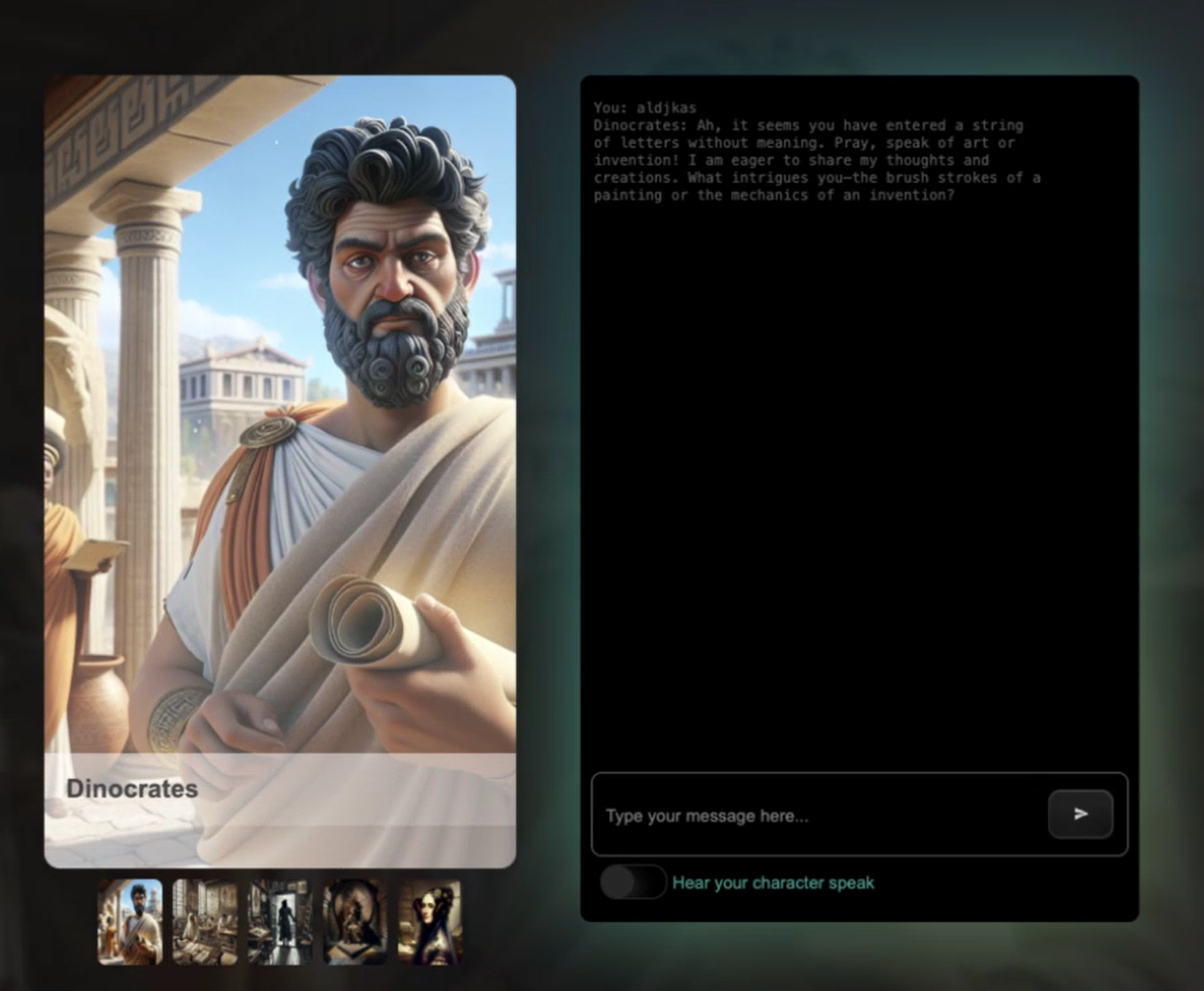
Each lesson includes an assignment to complete, a knowledge check and a challenge to guide you on learning topics like:
- Prompting and prompt engineering
- Text and image app generation
- Search apps
Visit https://aka.ms/genai-js-course to get started!
🌱 Getting Started
Teachers, we have included some suggestions on how to use this curriculum. We'd love your feedback in our discussion forum!
Learners, for each lesson, start with a pre-lecture quiz and follow through with reading the lecture material, completing the various activities and check your understanding with the post-lecture quiz.
To enhance your learning experience, connect with your peers to work on the projects together! Discussions are encouraged in our discussion forum where our team of moderators will be available to answer your questions.
To further your education, we highly recommend exploring Microsoft Learn for additional study materials.
📋 Setting up your environment
This curriculum has a development environment ready to go! As you get started you can choose to run the curriculum in a Codespace (a browser-based, no installs needed environment), or locally on your computer using a text editor such as Visual Studio Code.
Create your repository
For you to easily save your work, it is recommended that you create your own copy of this repository. You can do this by clicking the Use this template button at the top of the page. This will create a new repository in your GitHub account with a copy of the curriculum.
Follow these steps:
- Fork the Repository: Click on the "Fork" button at the top-right corner of this page.
- Clone the Repository:
git clone https://github.com/microsoft/Web-Dev-For-Beginners.git
Running the curriculum in a Codespace
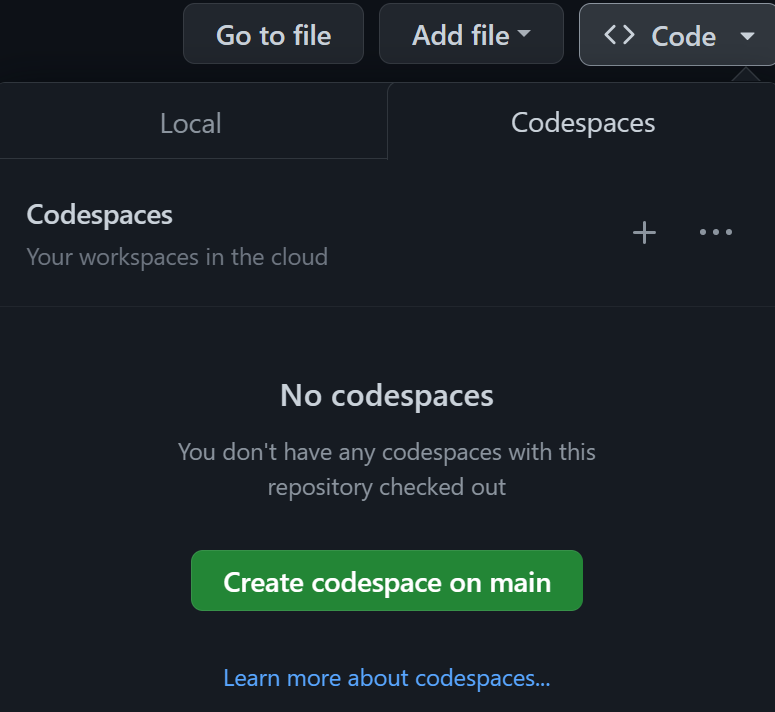
In your copy of this repository that you created, click the Code button and select Open with Codespaces. This will create a new Codespace for you to work in.
Running the curriculum locally on your computer
To run this curriculum locally on your computer, you will need a text editor, a browser and a command line tool. Our first lesson, Introduction to Programming Languages and Tools of the Trade, will walk you through various options for each of these tools for you to select what works best for you.
Our recommendation is to use Visual Studio Code as your editor, which also has a built-in Terminal. You can download Visual Studio Code here.
Clone your repository to your computer. You can do this by clicking the Code button and copying the URL:
CodeSpace
Then, open Terminal within Visual Studio Code and run the following command, replacing <your-repository-url> with the URL you just copied:
git clone <your-repository-url>
Open the folder in Visual Studio Code. You can do this by clicking File > Open Folder and selecting the folder you just cloned.
Recommended Visual Studio Code extensions:
- Live Server - to preview HTML pages within Visual Studio Code
- Copilot - to help you write code faster
📂 Each lesson includes:
- optional sketchnote
- optional supplemental video
- pre-lesson warmup quiz
- written lesson
- for project-based lessons, step-by-step guides on how to build the project
- knowledge checks
- a challenge
- supplemental reading
- assignment
- post-lesson quiz
A note about quizzes: All quizzes are contained in the Quiz-app folder, 48 total quizzes of three questions each. They are available here the quiz app can be run locally or deployed to Azure; follow the instruction in the quiz-app folder.
🗃️ Lessons
|
Project Name |
Concepts Taught |
Learning Objectives |
Linked Lesson |
Author |
| 01 |
Getting Started |
Introduction to Programming and Tools of the Trade |
Learn the basic underpinnings behind most programming languages and about software that helps professional developers do their jobs |
Intro to Programming Languages and Tools of the Trade |
Jasmine |
| 02 |
Getting Started |
Basics of GitHub, includes working with a team |
How to use GitHub in your project, how to collaborate with others on a code base |
Intro to GitHub |
Floor |
| 03 |
Getting Started |
Accessibility |
Learn the basics of web accessibility |
Accessibility Fundamentals |
Christopher |
| 04 |
JS Basics |
JavaScript Data Types |
The basics of JavaScript data types |
Data Types |
Jasmine |
| 05 |
JS Basics |
Functions and Methods |
Learn about functions and methods to manage an application's logic flow |
Functions and Methods |
Jasmine and Christopher |
| 06 |
JS Basics |
Making Decisions with JS |
Learn how to create conditions in your code using decision-making methods |
Making Decisions |
Jasmine |
| 07 |
JS Basics |
Arrays and Loops |
Work with data using arrays and loops in JavaScript |
Arrays and Loops |
Jasmine |
| 08 |
Terrarium |
HTML in Practice |
Build the HTML to create an online terrarium, focusing on building a layout |
Introduction to HTML |
Jen |
| 09 |
Terrarium |
CSS in Practice |
Build the CSS to style the online terrarium, focusing on the basics of CSS including making the page responsive |
Introduction to CSS |
Jen |
| 10 |
Terrarium |
JavaScript Closures, DOM manipulation |
Build the JavaScript to make the terrarium function as a drag/drop interface, focusing on closures and DOM manipulation |
JavaScript Closures, DOM manipulation |
Jen |
| 11 |
Typing Game |
Build a Typing Game |
Learn how to use keyboard events to drive the logic of your JavaScript app |
Event-Driven Programming |
Christopher |
| 12 |
Green Browser Extension |
Working with Browsers |
Learn how browsers work, their history, and how to scaffold the first elements of a browser extension |
About Browsers |
Jen |
| 13 |
Green Browser Extension |
Building a form, calling an API and storing variables in local storage |
Build the JavaScript elements of your browser extension to call an API using variables stored in local storage |
APIs, Forms, and Local Storage |
Jen |
| 14 |
Green Browser Extension |
Background processes in the browser, web performance |
Use the browser's background processes to manage the extension's icon; learn about web performance and some optimizations to make |
Background Tasks and Performance |
Jen |
| 15 |
Space Game |
More Advanced Game Development with JavaScript |
Learn about Inheritance using both Classes and Composition and the Pub/Sub pattern, in preparation for building a game |
|
|

 这是微软 Microsoft Cloud Advocates 团队推出的免费课程,共 12 周、24 节课。它通过生态瓶、浏览器扩展、打字游戏和太空游戏等动手项目,讲解网页开发的基础知识(HTML、CSS、JavaScript)。