

What is this?
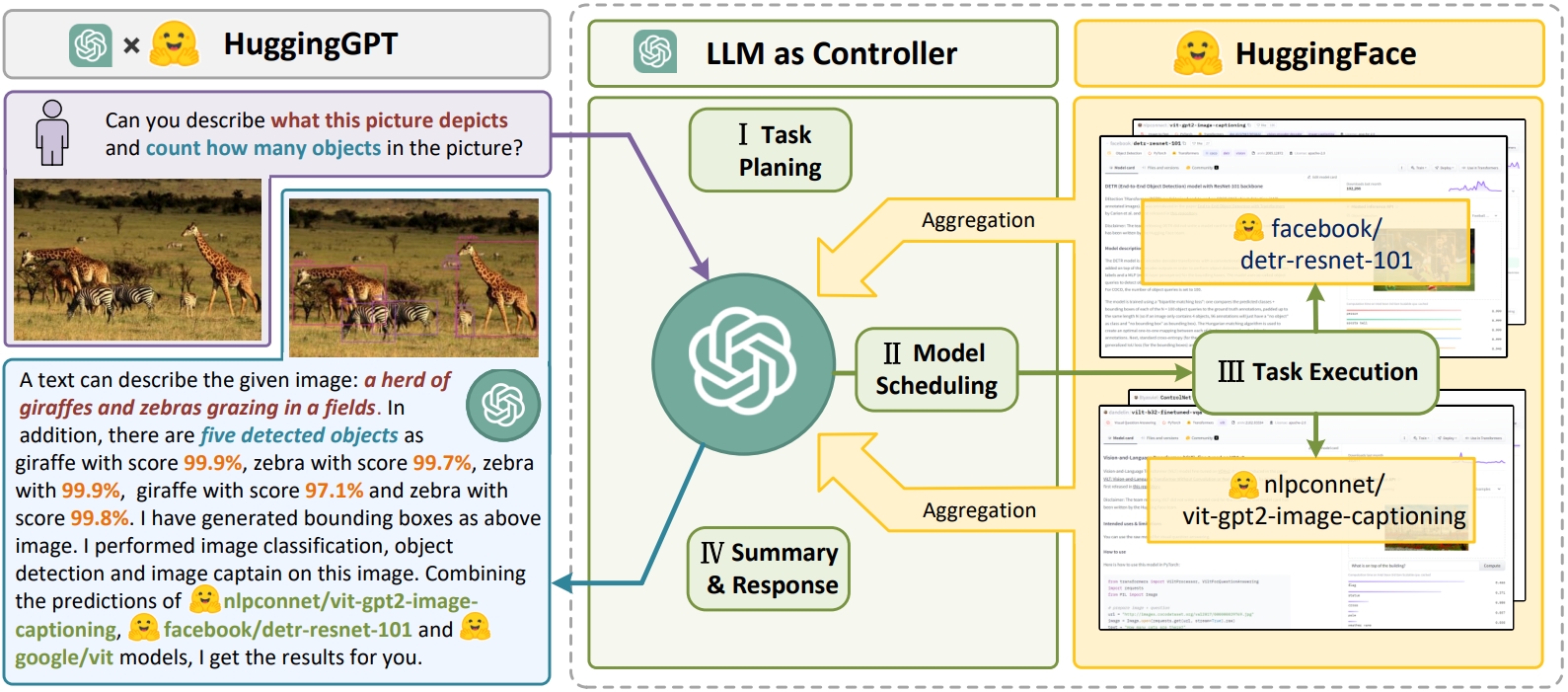
 JARVIS is an open-source research system that connects an LLM with the ML community: a large language model acts as the controller, picking and invoking expert models from the Hugging Face Hub to solve complex AI tasks.
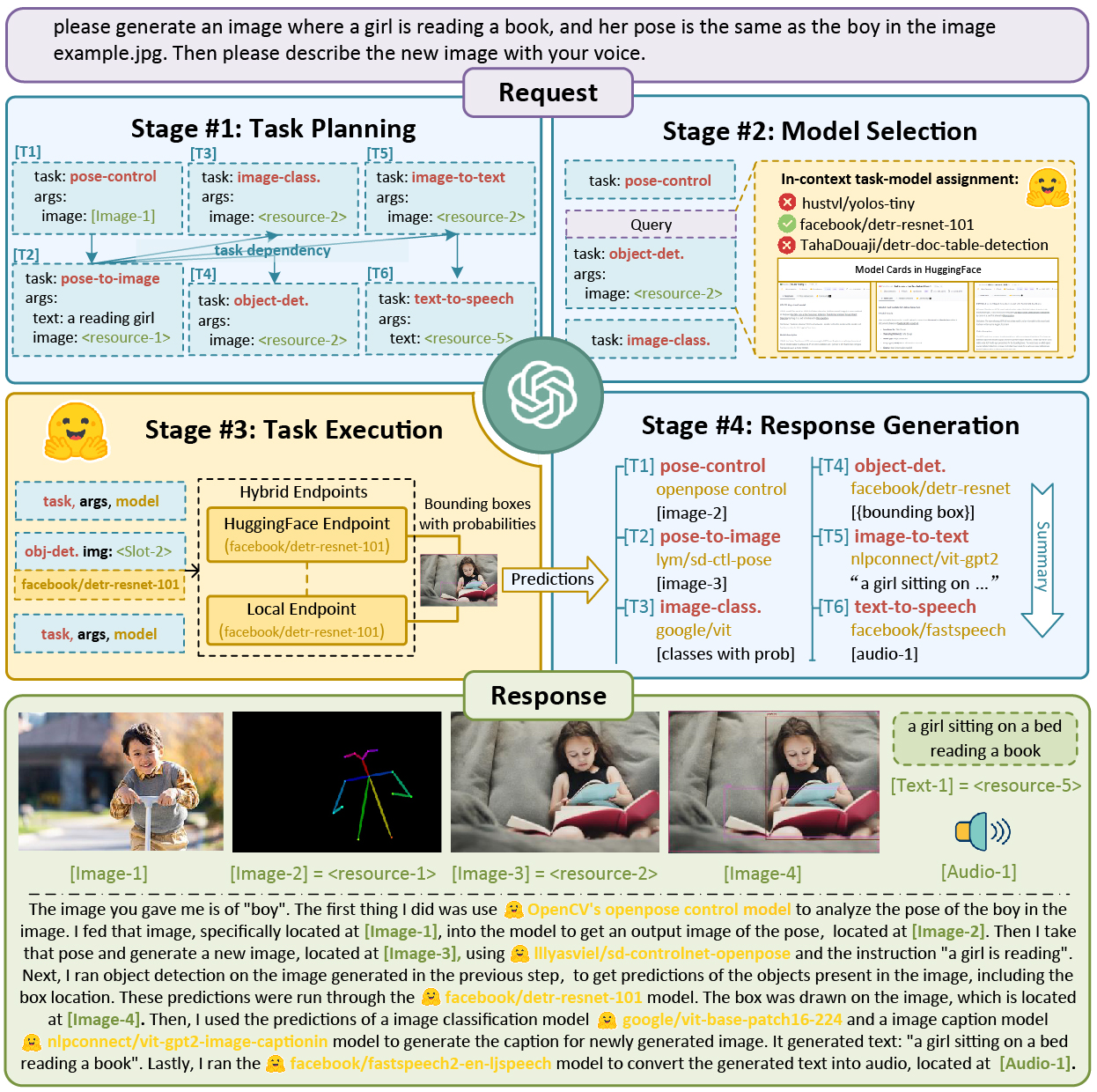
JARVIS is an open-source research system that connects an LLM with the ML community: a large language model acts as the controller, picking and invoking expert models from the Hugging Face Hub to solve complex AI tasks.How does it actually solve my request?It runs a four-stage pipeline: ChatGPT plans and splits your request into tasks, selects suitable expert models from Hugging Face by their descriptions, executes each model, then integrates all results into one response.
It runs a four-stage pipeline: ChatGPT plans and splits your request into tasks, selects suitable expert models from Hugging Face by their descriptions, executes each model, then integrates all results into one response.How do I get it running?Put your OpenAI key and Hugging Face token into server/configs/config.default.yaml or the OPENAIAPIKEY / HUGGINGFACEACCESSTOKEN env vars, then run awesomechat.py. The lightest start is: python awesomechat.py --config configs/config.lite.yaml
Put your OpenAI key and Hugging Face token into server/configs/config.default.yaml or the OPENAIAPIKEY / HUGGINGFACEACCESSTOKEN env vars, then run awesomechat.py. The lightest start is: python awesomechat.py --config configs/config.lite.yamlDo I need an OpenAI key or a Hugging Face account for it?Yes, both: a personal OpenAI Key powers the controller LLM and a Hugging Face token gives access to the expert models. The web client additionally needs Node.js and npm installed.
Yes, both: a personal OpenAI Key powers the controller LLM and a Hugging Face token gives access to the expert models. The web client additionally needs Node.js and npm installed.Which LLM can power the controller?Currently only OpenAI's text-davinci-003 is supported as the controller model; the team says integration of more open-source LLMs is in progress.
Currently only OpenAI's text-davinci-003 is supported as the controller model; the team says integration of more open-source LLMs is in progress.Does it only run on big Ubuntu servers, or on edge devices too?It is a Python server aimed at Ubuntu (16.04 LTS is listed), with the web client running in a browser. There is also an experimental Docker image for NVIDIA Jetson edge devices - the AGX Orin family with 64GB of RAM preferred.
It is a Python server aimed at Ubuntu (16.04 LTS is listed), with the web client running in a browser. There is also an experimental Docker image for NVIDIA Jetson edge devices - the AGX Orin family with 64GB of RAM preferred.Does it run the AI models on my machine or somewhere else?Configurable: inference_mode can be local (only your deployed models), huggingface (only remote HF Inference Endpoints) or hybrid. The lite config downloads no models at all, but is then limited to models that run stably on Hugging Face endpoints.
Configurable: inference_mode can be local (only your deployed models), huggingface (only remote HF Inference Endpoints) or hybrid. The lite config downloads no models at all, but is then limited to models that run stably on Hugging Face endpoints.Do I need a monster GPU to run it?The recommended default config wants 24GB+ of VRAM, 12-80GB of RAM and 284GB+ of disk for local expert models. On a personal laptop the README suggests hybrid inference mode with a minimal local deployment (ControlNet only).
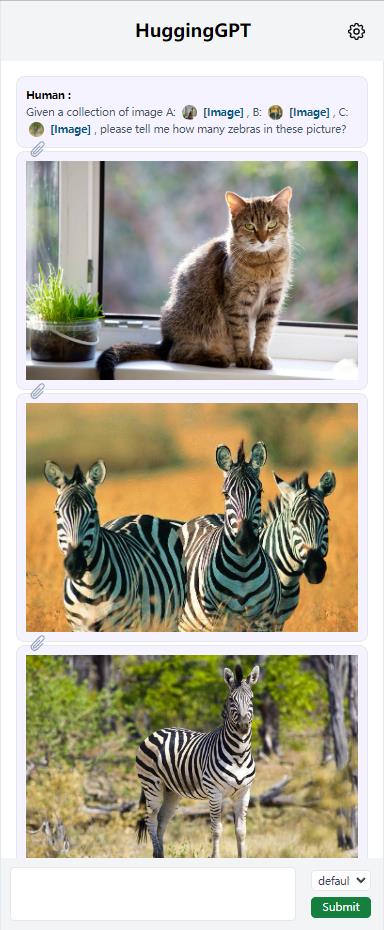
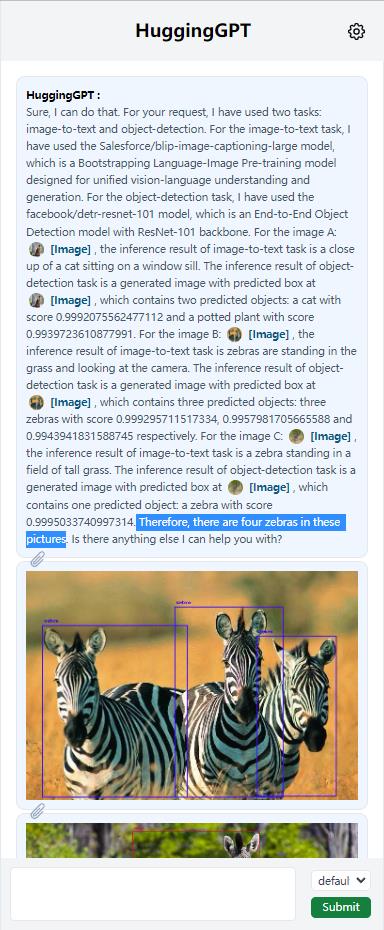
The recommended default config wants 24GB+ of VRAM, 12-80GB of RAM and 284GB+ of disk for local expert models. On a personal laptop the README suggests hybrid inference mode with a minimal local deployment (ControlNet only).How do I actually talk to it once it is running?Four ways: a browser web UI (needs Node.js and npm, plus a HUGGINGGPTBASEURL tweak if the client runs on another machine), a Web API (/hugginggpt for the full service, /tasks and /results for intermediate stages), a Gradio demo hosted on Hugging Face Spaces or run locally, and a CLI mode.
Four ways: a browser web UI (needs Node.js and npm, plus a HUGGINGGPTBASEURL tweak if the client runs on another machine), a Web API (/hugginggpt for the full service, /tasks and /results for intermediate stages), a Gradio demo hosted on Hugging Face Spaces or run locally, and a CLI mode.What is HuggingGPT?The NeurIPS 2023 paper behind JARVIS: 'Solving AI Tasks with ChatGPT and its Friends in HuggingFace'. JARVIS is its open-source implementation, and the same team later released TaskBench, a benchmark for LLM task automation, and EasyTool for tool instruction.
The NeurIPS 2023 paper behind JARVIS: 'Solving AI Tasks with ChatGPT and its Friends in HuggingFace'. JARVIS is its open-source implementation, and the same team later released TaskBench, a benchmark for LLM task automation, and EasyTool for tool instruction.Is the project still actively maintained?Development has visibly slowed: in July 2023 the team announced it was planning evaluation and a full project rebuild with a new version to come, and the newest news entry is the EasyTool release from January 2024 - so expect rough edges.
Development has visibly slowed: in July 2023 the team announced it was planning evaluation and a full project rebuild with a new version to come, and the newest news entry is the EasyTool release from January 2024 - so expect rough edges.What kinds of AI tasks can it handle?Whatever expert models it can reach. The local bundle covers Stable Diffusion v1.5 for text-to-image, ControlNet for controllable generation and a text-to-video model (video output needs ffmpeg compiled with H.264), plus models served through Hugging Face endpoints.
Whatever expert models it can reach. The local bundle covers Stable Diffusion v1.5 for text-to-image, ControlNet for controllable generation and a text-to-video model (video output needs ffmpeg compiled with H.264), plus models served through Hugging Face endpoints.What are similar projects?unsloth, CodeVideoModel, LTX-Video, DreamX-Creator, ChatTTS, ZDTaichu5.0-9B, Janus, generative-models
unsloth, CodeVideoModel, LTX-Video, DreamX-Creator, ChatTTS, ZDTaichu5.0-9B, Janus, generative-modelsWhich topics is it in?platform, text-to-video, multimodal, chatgpt, orchestration, image-generation, inference, generative-ai, huggingface, pytorch, openai, deep-learning
platform, text-to-video, multimodal, chatgpt, orchestration, image-generation, inference, generative-ai, huggingface, pytorch, openai, deep-learning