






worktrunk README

The project's README from github.com/max-sixty/worktrunk. As one markdown file: README.md.

Worktrunk logo  Worktrunk

Docs License: MIT OR Apache-2.0 CI Codecov Stars maintained with tend

September 2026: Worktrunk was released at the start of the year, and has quickly become the most popular git worktree manager. It's built with love (there's no slop!). Please let me know any frictions at all; I'm intensely focused on continuing to make Worktrunk excellent, and the biggest help is folks posting problems they perceive.

Worktrunk is a CLI for git worktree management, designed for running AI agents in parallel.

Worktrunk's three core commands make worktrees as easy as branches. Plus, Worktrunk has a bunch of quality-of-life features to simplify working with many parallel changes, including hooks to automate local workflows.

A quick demo:

Worktrunk Demo

📚 Full documentation at worktrunk.dev 📚

Context: git worktrees

AI agents like Claude Code and Codex can handle longer tasks without supervision, such that it's possible to manage 5-10+ in parallel. Git's native worktree feature give each agent its own working directory, so they don't step on each other's changes.

But the git worktree UX is clunky. Even a task as small as starting a new worktree requires typing the branch name three times: git worktree add -b feat ../repo.feat, then cd ../repo.feat.

Worktrunk makes git worktrees as easy as branches

Worktrees are addressed by branch name; paths are computed from a configurable template. Commands that take a branch also accept the path of the worktree it is checked out in.

Start with the core commands

Core commands:

Task Worktrunk Plain git
Switch worktrees wt switch feat cd ../repo.feat
Create + start Claude wt switch -c -x claude feat
git worktree add -b feat ../repo.feat && \
cd ../repo.feat && \
claude
Clean up wt remove
cd ../repo && \
git worktree remove ../repo.feat && \
git branch -d feat
List with status wt list git worktree list (paths only)

Expand into the more advanced commands as needed

Workflow automation:

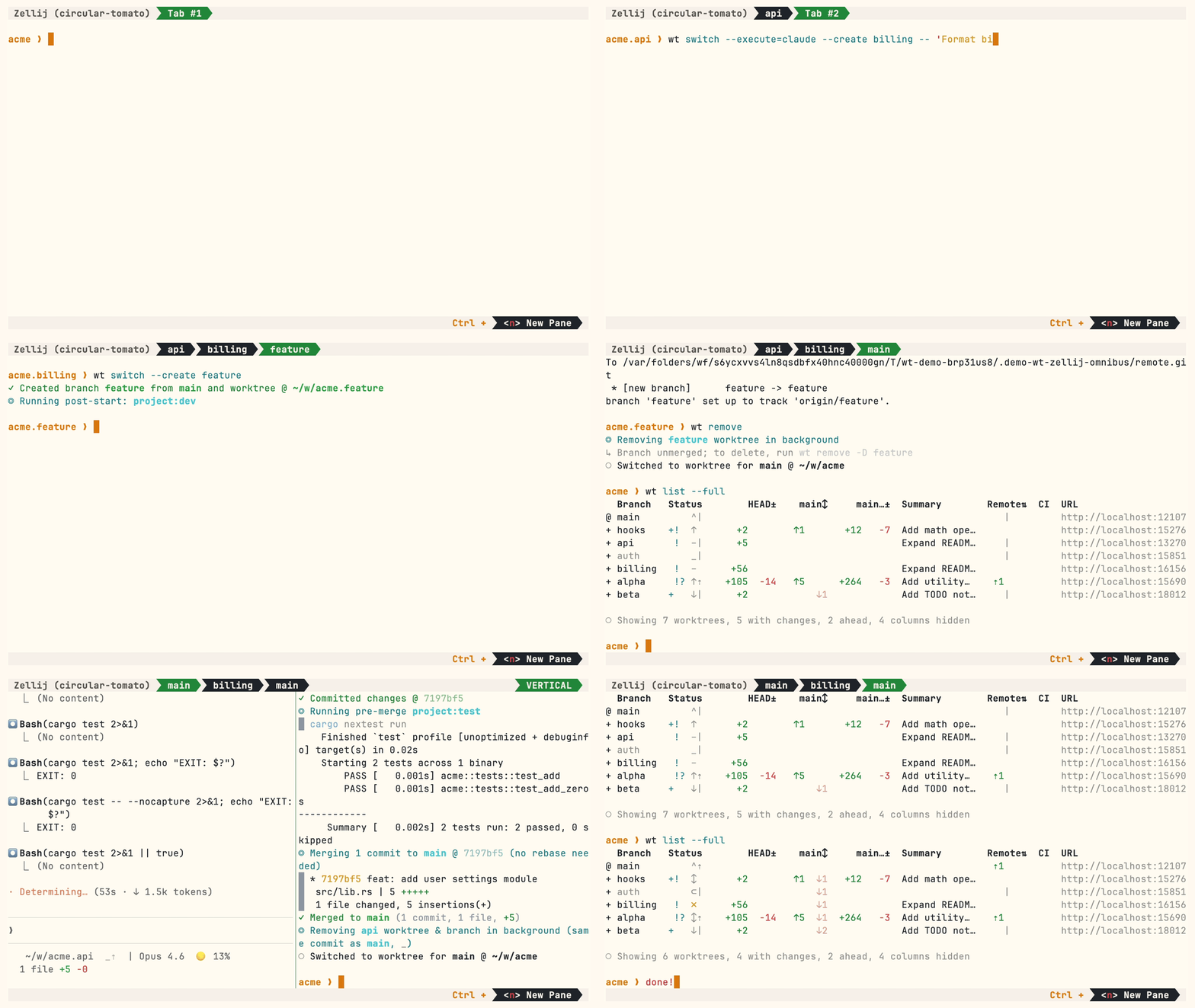
Multiple parallel agents, same simple commands:

Worktrunk omnibus demo: multiple Claude agents in Zellij tabs with hooks, LLM commits, and merge workflow

Install

Homebrew (macOS & Linux):

brew install worktrunk && wt config shell install

Shell integration allows commands to change directories.

Cargo:

cargo install worktrunk && wt config shell install
Windows & other

Windows. wt defaults to Windows Terminal's command, so Winget additionally installs Worktrunk as git-wt to avoid the conflict:

winget install max-sixty.worktrunk
git-wt config shell install

Alternatively, disable Windows Terminal's alias (Settings → Apps → Advanced app settings → App execution aliases → "Terminal"/"Terminal Preview") to use wt directly.

Free code signing provided by SignPath.io, certificate by SignPath Foundation — policy.

Arch Linux:

sudo pacman -S worktrunk && wt config shell install

Conda / Pixi (community-maintained feedstock):

conda install -c conda-forge worktrunk && wt config shell install

Or with Pixi: pixi global install worktrunk && wt config shell install.

Quick start

Create a worktree for a new feature:

$ wt switch --create feature-auth
✓ Created branch feature-auth from main and worktree @ ~/repo.feature-auth

This creates a new branch and worktree, then switches to it. Do your work, then check all worktrees with wt list:

$ wt list
  Branch        Status      HEAD±     main↕    main…±    Remote⇅  Commit    Age  Message
@ feature-auth  +   ↑      +27   -8   ↑1       +31                4bc72dc    2h  Add authenticati…
^ main              ^⇡                                    ⇡1      0e631ad    1d  Initial commit

○ Showing 2 worktrees, 1 with changes, 1 ahead, hidden: Path

The @ marks the current worktree. + means staged changes, ↑1 means 1 commit ahead of main, ⇡ means unpushed commits.

When done, either:

PR workflow — commit, push, open a PR, merge via GitHub/GitLab, then clean up:

wt step commit                    # commit staged changes
gh pr create                      # or glab mr create
wt remove                         # after PR is merged

Local merge — squash, rebase onto main, fast-forward merge, clean up:

$ wt merge main
◎ Generating commit message and committing changes... (2 files, +53, no squashing needed)
  Add authentication module
✓ Committed changes @ a1b2c3d
◎ Merging 1 commit to main @ a1b2c3d (no rebase needed)
  * a1b2c3d Add authentication module
   auth.rs | 51 +++++++++++++++++++++++++++++++++++++++++++++++++++
   lib.rs  |  2 ++
   2 files changed, 53 insertions(+)
✓ Merged to main (1 commit, 2 files, +53)
◎ Removing feature-auth worktree & branch in background (same commit as main, _)
○ Switched to worktree for main @ ~/repo

For parallel agents, create multiple worktrees and launch an agent in each:

wt switch -x claude -c feature-a -- 'Add user authentication'
wt switch -x claude -c feature-b -- 'Fix the pagination bug'
wt switch -x claude -c feature-c -- 'Write tests for the API'

The -x flag runs a command after switching; arguments after -- are passed to it. Configure post-start hooks to automate setup (install deps, start dev servers).

Next steps

Further reading

Contributing

📚 Full documentation at worktrunk.dev 📚

Star history

Star History Chart

worktrunk (max-sixty/worktrunk)

Searching Database…

这是干什么的?Worktrunk 是一个命令行工具,它让 git worktree 用起来像分支一样简单,专为同时运行多个 AI 编程代理而设计,避免它们互相覆盖对方的改动。
它是用来替代 git 的,还是建立在普通 git 之上的?它建立在 git 原生的 worktree 功能之上,并不替代 git:worktree 通过分支名来定位,路径由可配置的模板生成,凡是接受分支名的命令也都可以接受 worktree 路径。
我怎么安装并让它跑起来?macOS 和 Linux 上用 Homebrew,Windows 上用 Cargo 或 Winget,也有 Arch 软件包,以及社区维护的 Conda/Pixi 源。安装后运行 wt config shell install,这样像 wt switch 这样的命令才能切换目录。
它只能配合 Claude Code 用,还是也支持其他代理?任何编程代理都行。README 中演示了 Claude Code 和 Codex;wt switch -x 可以在切换后运行任意命令(如 wt switch -c -x claude feat),额外参数放在 -- 之后原样传入。
有什么坑需要提前知道?在 Windows 上,wt 这个名字已经被 Windows Terminal 占用了,所以通过 Winget 安装时,工具会注册为 git-wt,除非你在系统设置里关闭 Terminal 的别名。
这是给谁用的——我必须跑 AI 代理才有用吗?主要面向同时运行 5-10 个以上 AI 代理的开发者,但同样的核心命令也能让任何涉及大量并行改动的工作流轻松使用 worktree。
典型的工作流程是什么样的?wt switch -c feat 会创建分支和 worktree 并切换过去;wt list 显示所有 worktree 及其状态(@ 表示当前,+ 表示有已暂存的改动,↑1 表示领先 main 一个提交,⇡ 表示有未推送的提交)。完成后,wt merge 一条命令就能完成 squash、rebase、合并和清理——或者打开 PR 后运行 wt remove。
为什么不直接用 git 自带的 worktree 命令?作者认为 git 的 worktree 体验很笨重:光是创建一个 worktree 就要把分支名敲三遍(git worktree add -b feat ../repo.feat,然后 cd ../repo.feat)。Worktrunk 把这些浓缩成一条 wt switch -c feat。
怎么用一条命令在全新的 worktree 里启动 Claude Code?wt switch -c -x claude feat 会创建分支和 worktree,进入其中并启动 Claude。启动后的钩子(hook)还能自动安装依赖或启动开发服务器,别名(alias)功能则让你自定义自己的 wt 命令。
它还能自动做哪些事?支持在创建、合并前和合并后触发钩子;根据 diff 自动生成由 LLM 撰写的提交信息;提供带实时 diff 和日志预览的交互式选择器;wt list --full 可以显示 CI 状态和每个分支的 AI 摘要;通过 wt switch pr:123 检出 PR;通过 hashport 过滤器为每个 worktree 分配独立的开发服务器端口;还有共享构建缓存,让十个 worktree 共享 target/ 和 node_modules/ 而无需重复构建(支持 APFS、btrfs、XFS)。
Creator
max-sixty
Size
62.4 MB
Stars
9.3K
Age
1y
Commits · 90 Days
