 Worktrunk






Что это такое?
 Worktrunk — это утилита командной строки, которая делает git worktree такими же простыми, как ветки. Она создана для того, чтобы запускать несколько AI-агентов для кодинга параллельно, не мешая правкам друг друга.
Worktrunk — это утилита командной строки, которая делает git worktree такими же простыми, как ветки. Она создана для того, чтобы запускать несколько AI-агентов для кодинга параллельно, не мешая правкам друг друга.Это замена git или надстройка над обычным git?Это надстройка над штатным механизмом worktree в git, а не его замена: worktree адресуются по имени ветки, пути задаются настраиваемым шаблоном, а команды, которые принимают ветку, принимают и путь к worktree.
Это надстройка над штатным механизмом worktree в git, а не его замена: worktree адресуются по имени ветки, пути задаются настраиваемым шаблоном, а команды, которые принимают ветку, принимают и путь к worktree.Как установить и запустить?Homebrew на macOS и Linux, Cargo или Winget на Windows, пакеты для Arch или поддерживаемый сообществом Conda/Pixi. После установки выполните wt config shell install, чтобы команды вроде wt switch умели менять директорию.
Homebrew на macOS и Linux, Cargo или Winget на Windows, пакеты для Arch или поддерживаемый сообществом Conda/Pixi. После установки выполните wt config shell install, чтобы команды вроде wt switch умели менять директорию.Он работает только с Claude Code или с другими агентами тоже?С любым агентом для кодинга. В README показаны Claude Code и Codex; wt switch -x запускает любую команду после переключения (wt switch -c -x claude feat), а дополнительные аргументы передаются после --.
С любым агентом для кодинга. В README показаны Claude Code и Codex; wt switch -x запускает любую команду после переключения (wt switch -c -x claude feat), а дополнительные аргументы передаются после --.Есть ли подводные камни, о которых стоит знать?На Windows имя wt уже занято Windows Terminal, поэтому при установке через Winget команда регистрируется как git-wt — если только вы не отключите псевдоним Terminal в настройках системы.
На Windows имя wt уже занято Windows Terminal, поэтому при установке через Winget команда регистрируется как git-wt — если только вы не отключите псевдоним Terminal в настройках системы.Для кого это — обязательно ли запускать AI-агентов, чтобы была польза?В первую очередь для разработчиков, которые держат 5–10 и более AI-агентов параллельно, но те же базовые команды упрощают worktree и для любого другого сценария со множеством параллельных изменений.
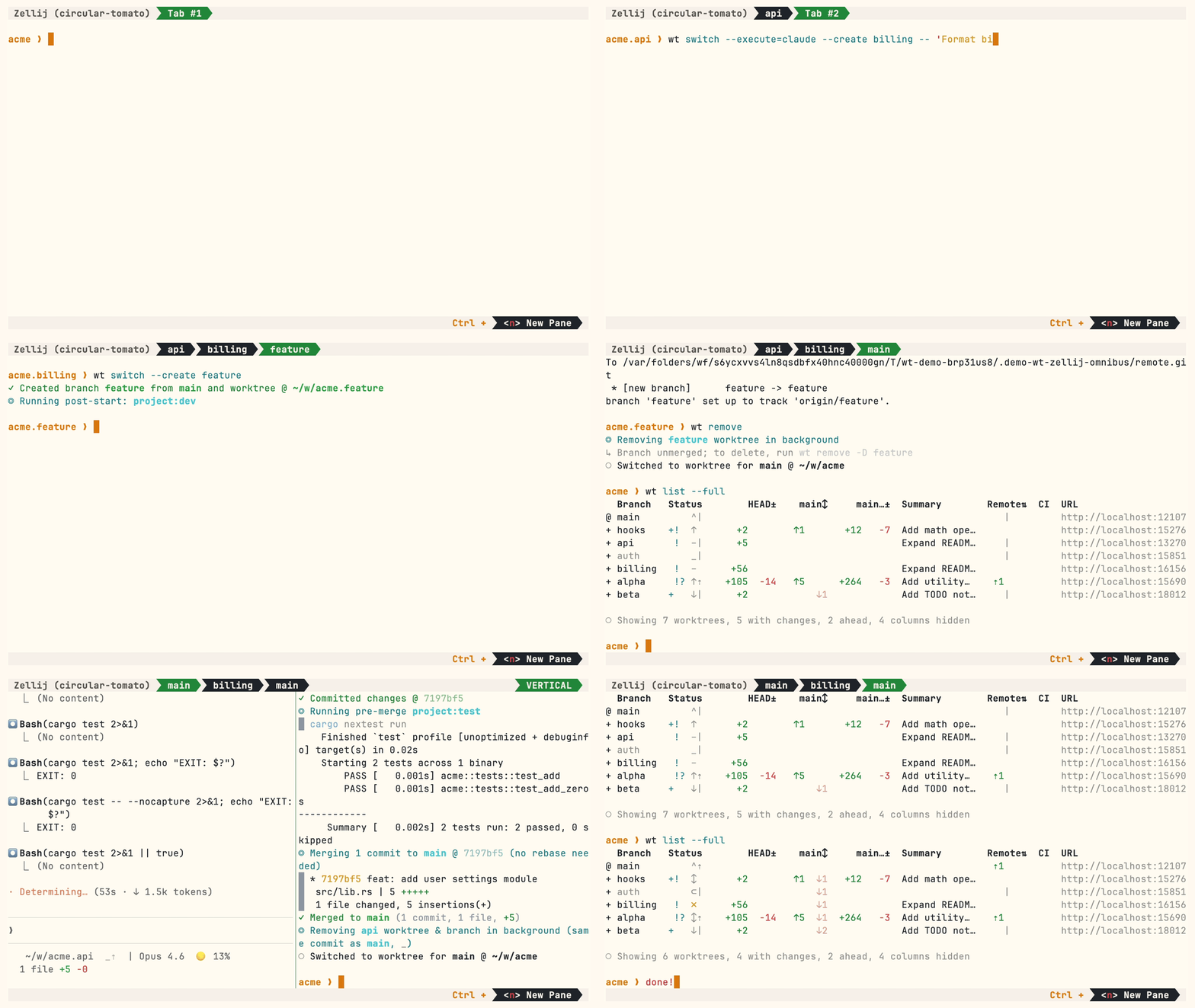
В первую очередь для разработчиков, которые держат 5–10 и более AI-агентов параллельно, но те же базовые команды упрощают worktree и для любого другого сценария со множеством параллельных изменений.Как выглядит типичный рабочий процесс?wt switch -c feat создаёт ветку и worktree и переключается на них; wt list показывает все worktree со статусом (@ — текущий, + — есть изменения в индексе, ↑1 — на один коммит впереди main, ⇡ — есть непушенные коммиты). Когда всё готово, wt merge одним командой делает squash, rebase, merge и уборку — либо откройте PR и выполните wt remove.
wt switch -c feat создаёт ветку и worktree и переключается на них; wt list показывает все worktree со статусом (@ — текущий, + — есть изменения в индексе, ↑1 — на один коммит впереди main, ⇡ — есть непушенные коммиты). Когда всё готово, wt merge одним командой делает squash, rebase, merge и уборку — либо откройте PR и выполните wt remove.Почему бы просто не использовать встроенные команды worktree в git?Автору UX worktree в git кажется неудобным: чтобы просто создать один worktree, имя ветки нужно ввести три раза (git worktree add -b feat ../repo.feat, затем cd ../repo.feat). Worktrunk сводит всё это к одной команде wt switch -c feat.
Автору UX worktree в git кажется неудобным: чтобы просто создать один worktree, имя ветки нужно ввести три раза (git worktree add -b feat ../repo.feat, затем cd ../repo.feat). Worktrunk сводит всё это к одной команде wt switch -c feat.Как запустить Claude Code в свежем worktree одной командой?wt switch -c -x claude feat создаёт ветку и worktree, переходит в них и запускает Claude. Пост-старт-хуки могут затем автоматически установить зависимости или поднять dev-серверы, а псевдонимы позволяют задать собственные команды wt.
wt switch -c -x claude feat создаёт ветку и worktree, переходит в них и запускает Claude. Пост-старт-хуки могут затем автоматически установить зависимости или поднять dev-серверы, а псевдонимы позволяют задать собственные команды wt.Что ещё он автоматизирует?Хуки на create, pre-merge и post-merge; сообщения коммитов от LLM, сгенерированные по диффам; интерактивный выбор с живым просмотром диффов и логов; wt list --full со статусом CI и AI-сводками по каждой ветке; checkout PR через wt switch pr:123; порты dev-серверов для каждого worktree через фильтр hashport; общие кэши сборки, чтобы десять worktree делили target/ и node_modules/ без пересборки (APFS, btrfs, XFS).
Хуки на create, pre-merge и post-merge; сообщения коммитов от LLM, сгенерированные по диффам; интерактивный выбор с живым просмотром диффов и логов; wt list --full со статусом CI и AI-сводками по каждой ветке; checkout PR через wt switch pr:123; порты dev-серверов для каждого worktree через фильтр hashport; общие кэши сборки, чтобы десять worktree делили target/ и node_modules/ без пересборки (APFS, btrfs, XFS).What are similar projects?emdash, 1code, agent-router, swarm-forge, shipyard, foreman, superset, firstmate
emdash, 1code, agent-router, swarm-forge, shipyard, foreman, superset, firstmateWhich topics is it in?worktrees, agentic-workflows, parallel-agents, git-worktrees, coding-agents, homebrew, workflow-automation, cli-tool, git, multi-agent, agents, coding-agent
worktrees, agentic-workflows, parallel-agents, git-worktrees, coding-agents, homebrew, workflow-automation, cli-tool, git, multi-agent, agents, coding-agent