A self-hosted swarm of AI agents, with apps on iPhone, Mac and web.
life is a self-hosted team of AI agents built on Claude Code.
It will help you meet your goals, whatever they are.
Your Mac runs the agents. It connects to your iPhone over a private
Tailscale VPN, and you talk to the agents from an
iPhone app, a desktop app or a web app. Nothing is on the public internet.
Only your devices can reach it, and you can connect as many as you like: a
Mac mini, a laptop, a phone.
The agents learn about you and your goals as you work with them. They
maintain their own code, and can change the UI or add data sources when asked.
Dangerous actions, like sending emails, are safe behind a secure approval step.
Setup takes about 2 hours, mostly waiting on Apple and the Xcode
download. You need a Mac that stays on, a
Claude subscription (about $20 to $200 a month), and an
Apple Developer membership ($99 a year, only for the iPhone and
desktop apps).
Note: everything below is a starting point and subject to change. The agents
maintain their own code, so they can change the app's front end or back end in
whichever way suits you.
Install with one prompt
Open Claude Code on your Mac and paste this:
Clone github.com/mattabate/life-distributable and set up my life agent. Follow its SETUP.md.
The agent walks you through setup from there.
Use it at your own risk. life is free, open source software, provided as
is with no warranty (see the LICENSE). The agents act for you, so
they can spend money, send messages, delete files and share data. The approval
step is there to catch that, and keeping it on is up to you. You are
responsible for what your copy does, and nothing it tells you is legal,
financial or medical advice.
⭐ Star it to get developer addenda: new features and fixes land
in ADDENDA.md every week, and your agent brings each one to you.
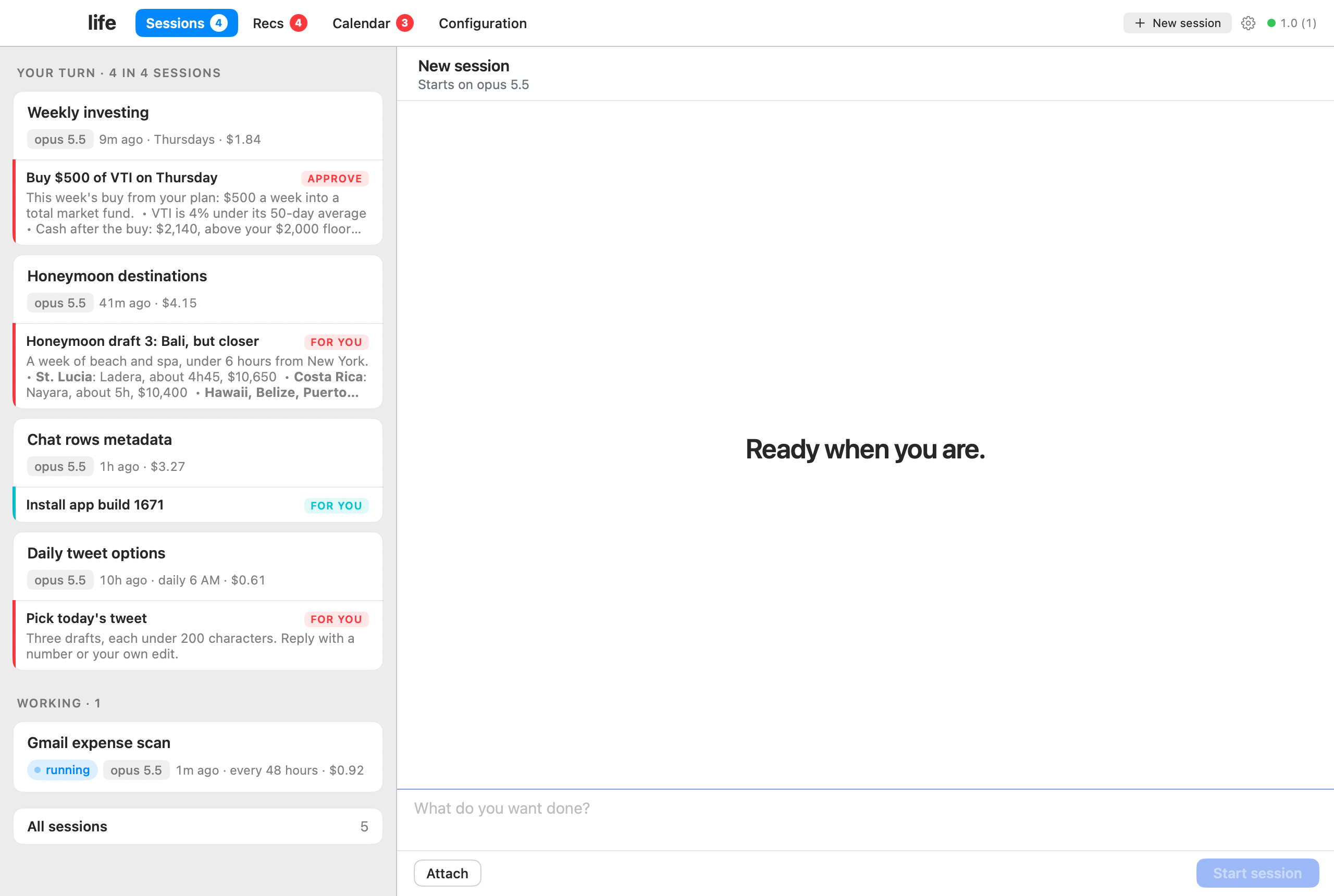
Sessions. Agents tell you when they need you.
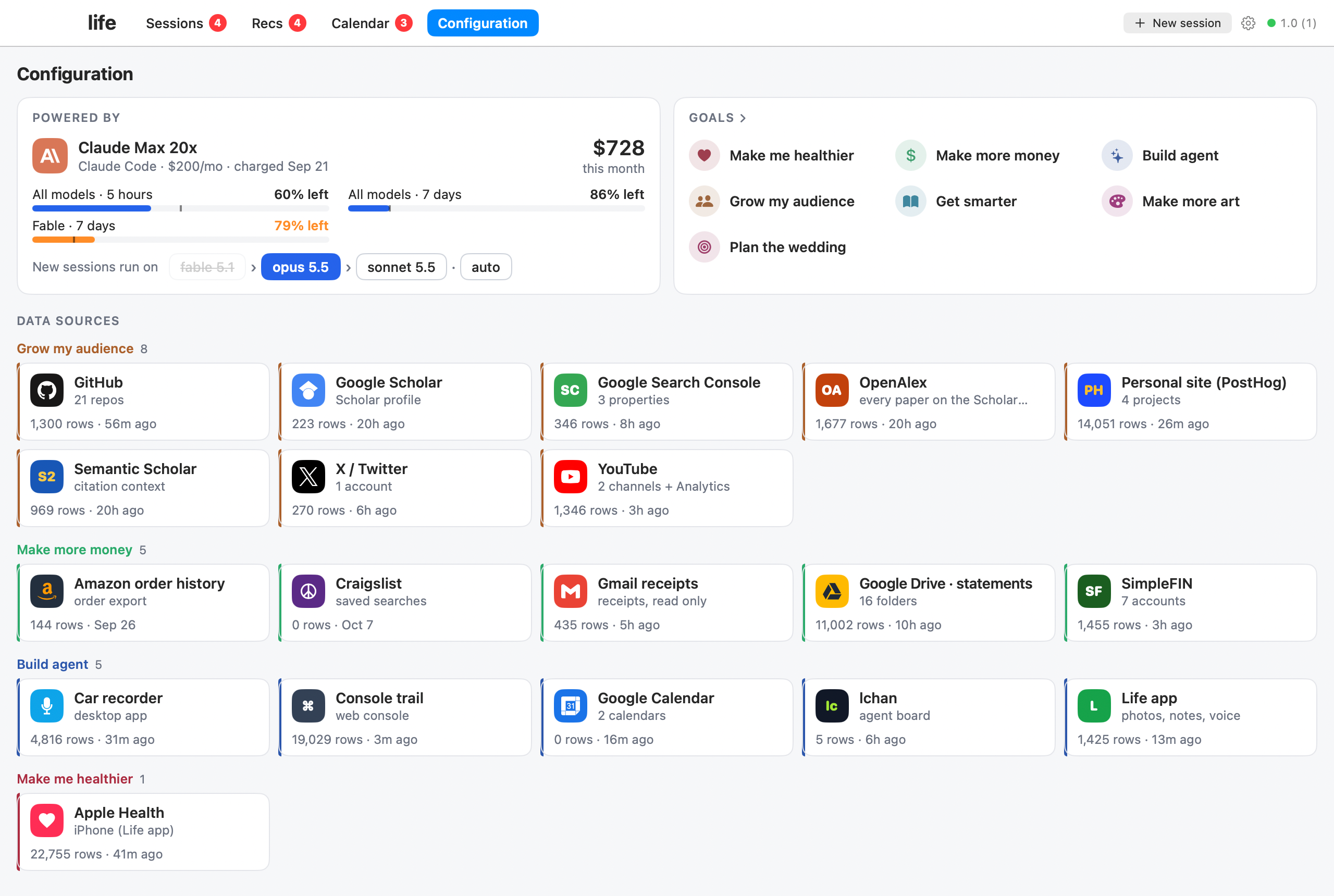
Configuration. Your team, goals, devices, and data.
Your first five minutes
You don't need to be technical.
If you don't have Claude Code yet, install it with
Anthropic's guide.
Open Terminal: press Cmd-Space, type Terminal, press Return.
In Terminal, type claude and press Return. Sign in with your
Claude account if it asks.
Give Claude the following prompt and press Return:
Clone github.com/mattabate/life-distributable and set up my life agent. Follow its SETUP.md.
Follow the instructions the agent gives you. It will ask what features
you want at the start.
What people use it for
Plan your week
Track spending, and stick to an investing plan
Keep up with your health and your errands
Practice an instrument
Grow an audience, or ship a side project
How it works
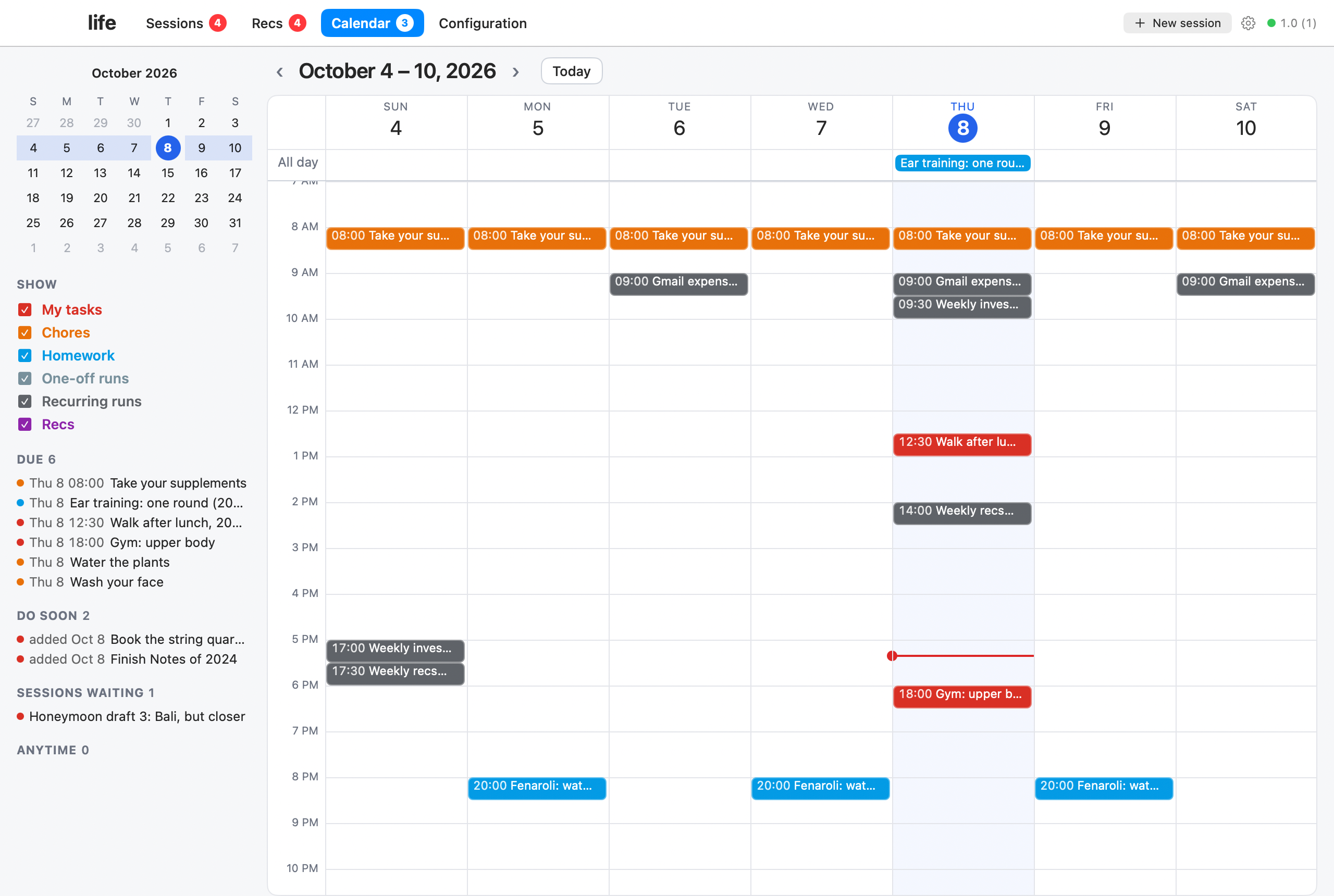
Calendar. The agents keep a calendar of what they need to do for you, and you for them.
Roles. Each agent is a long-running Claude Code session with a role, like chief of staff or CTO. They pass tasks between one another when some part of their task requires know-how from a different part of the swarm.
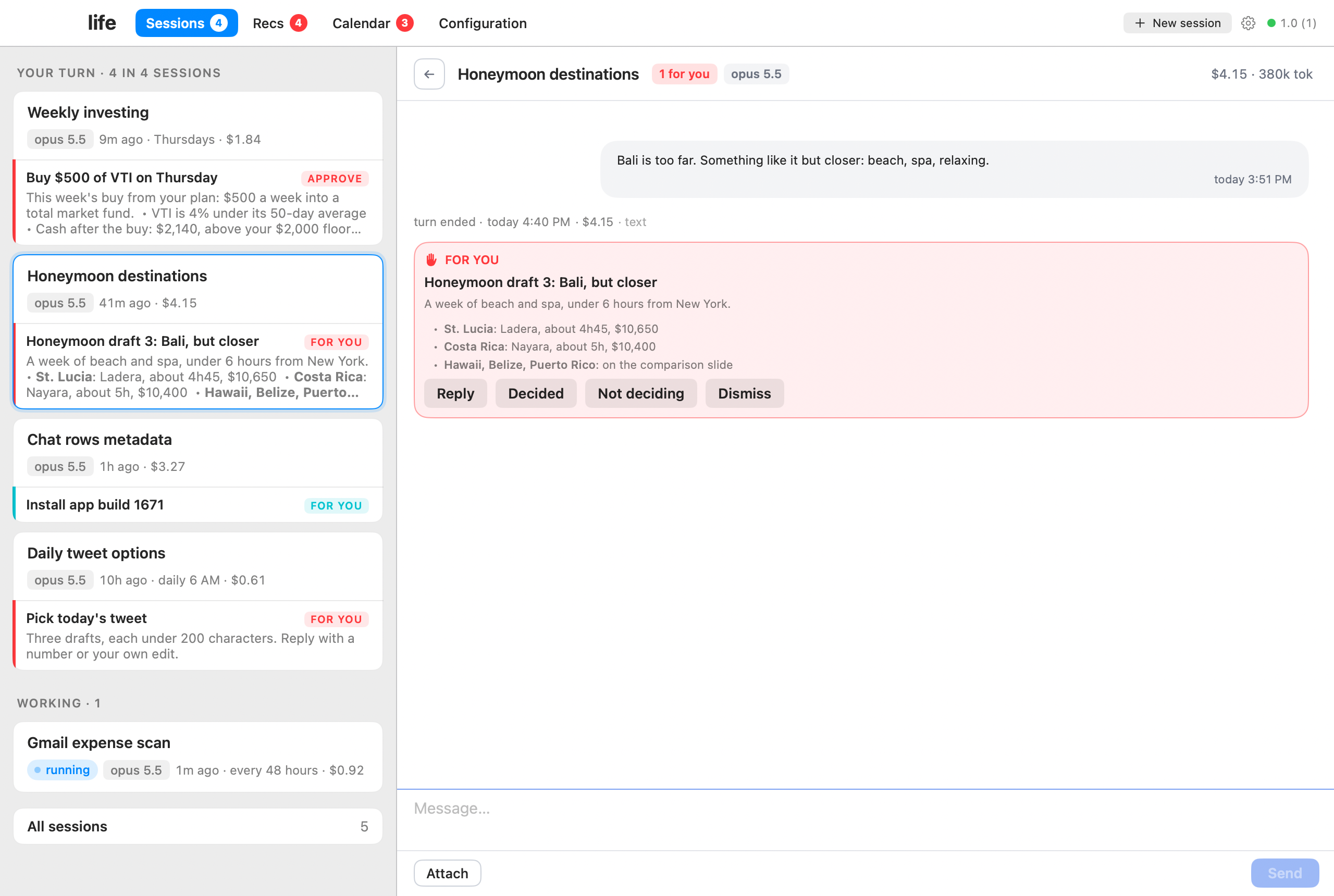
Cards, not chat. By default the chat history isn't displayed. You can only see what the agent needs you to do or wants to tell you in that moment.
All of this is a starting point and subject to change. The agents maintain their own code, so if you don't like how something looks or works, just ask and they can change it from one prompt.
Example app layout
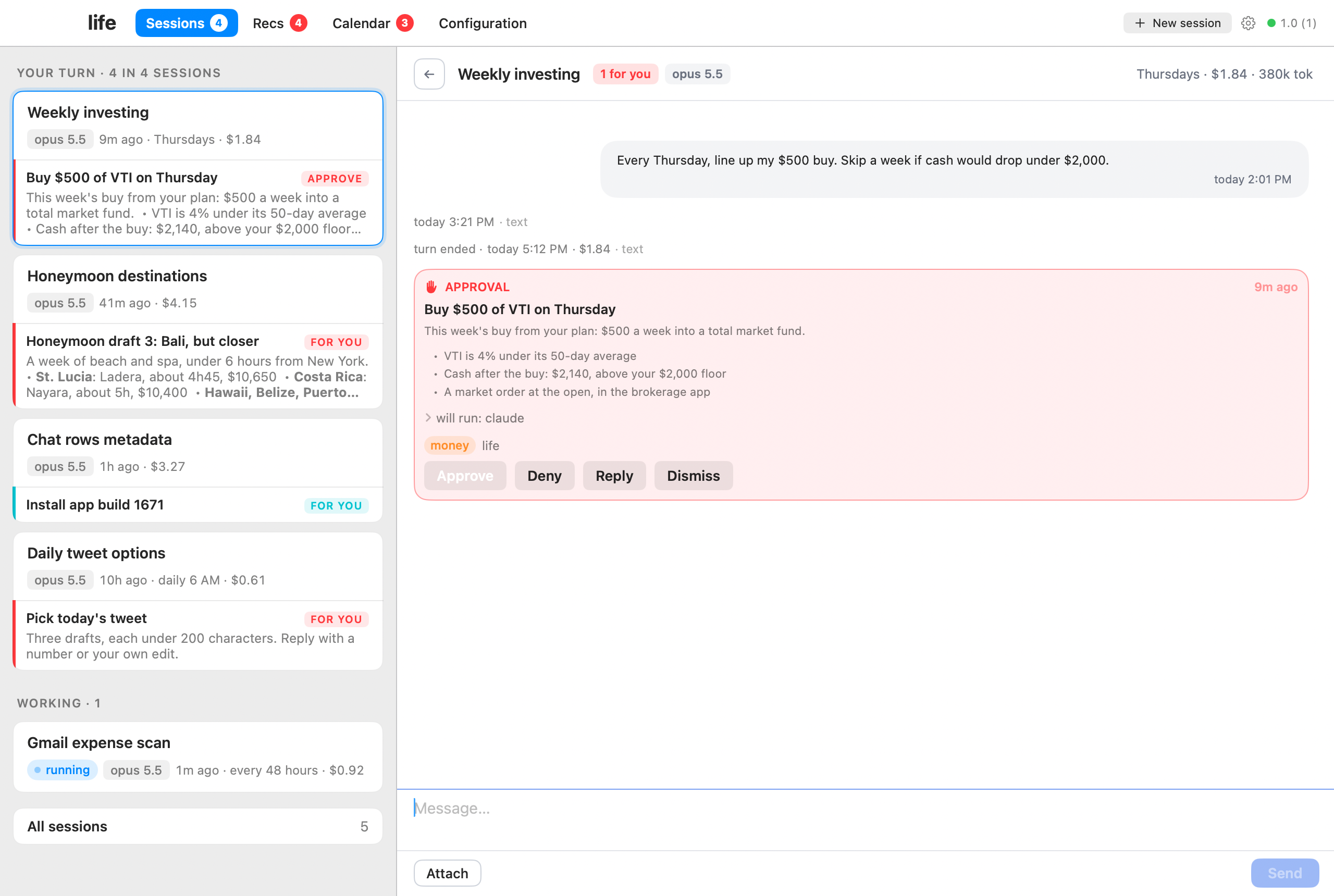
Desktop app
Calendar. Your steps and the agents' runs.
Roles. Agents hand work to each other.
Cards. The agent proposes, you approve.
Cards. A running job shows its progress.
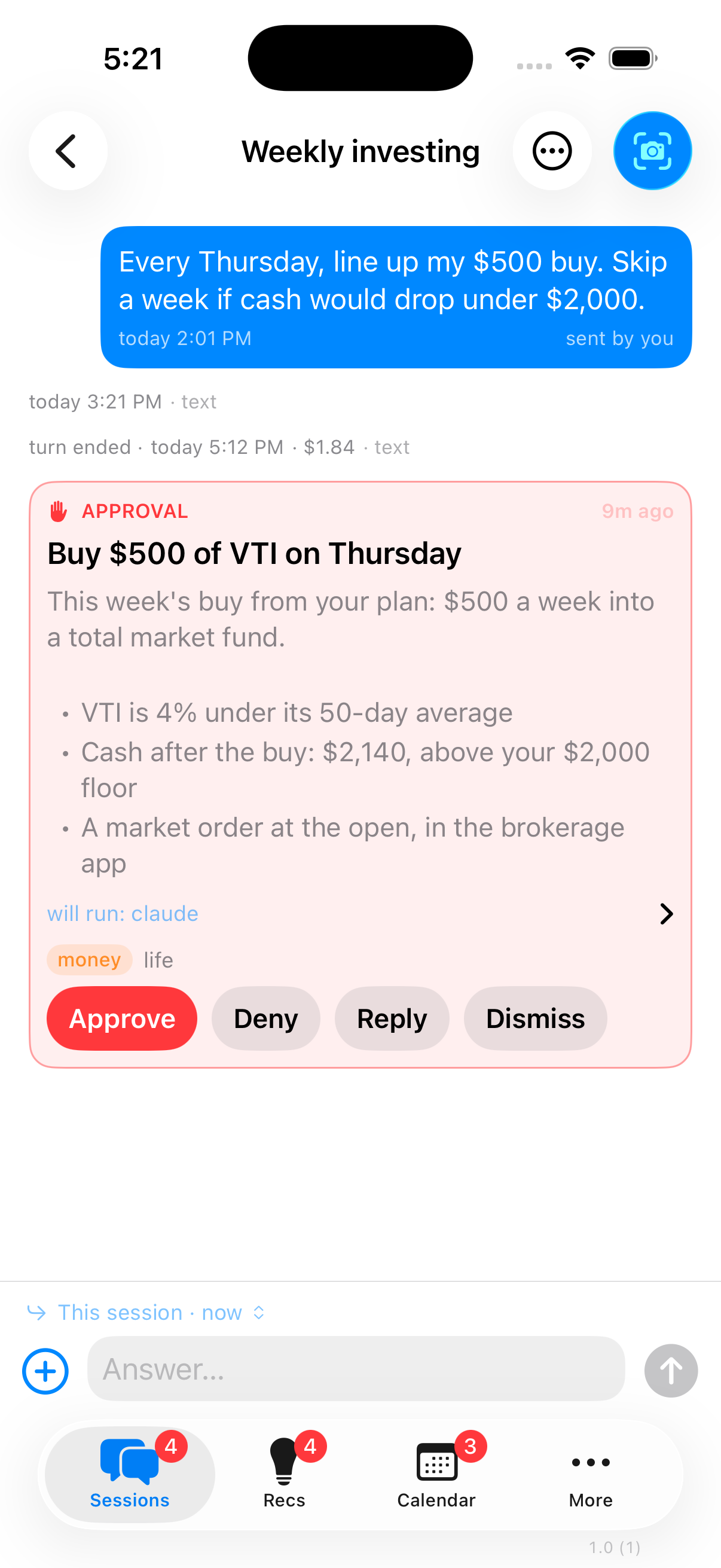
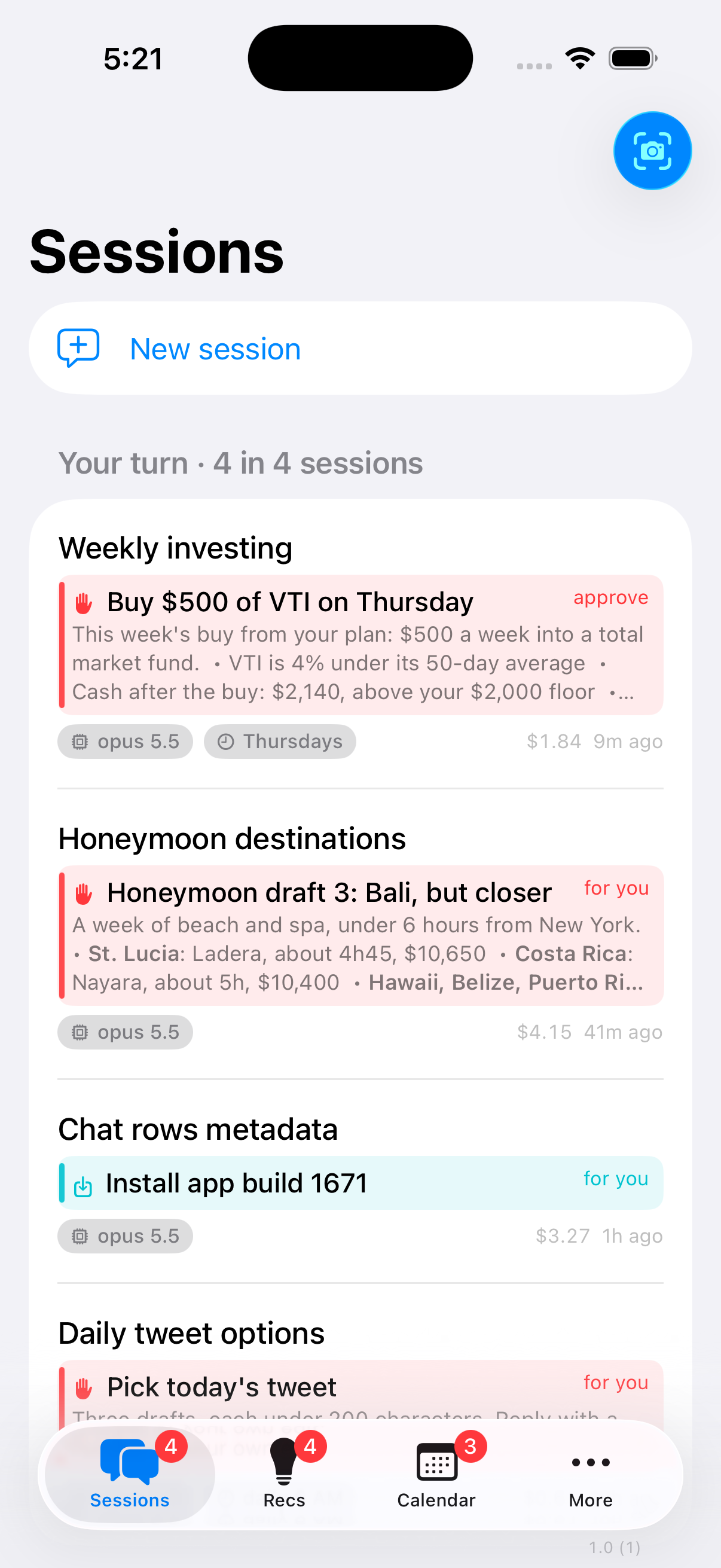
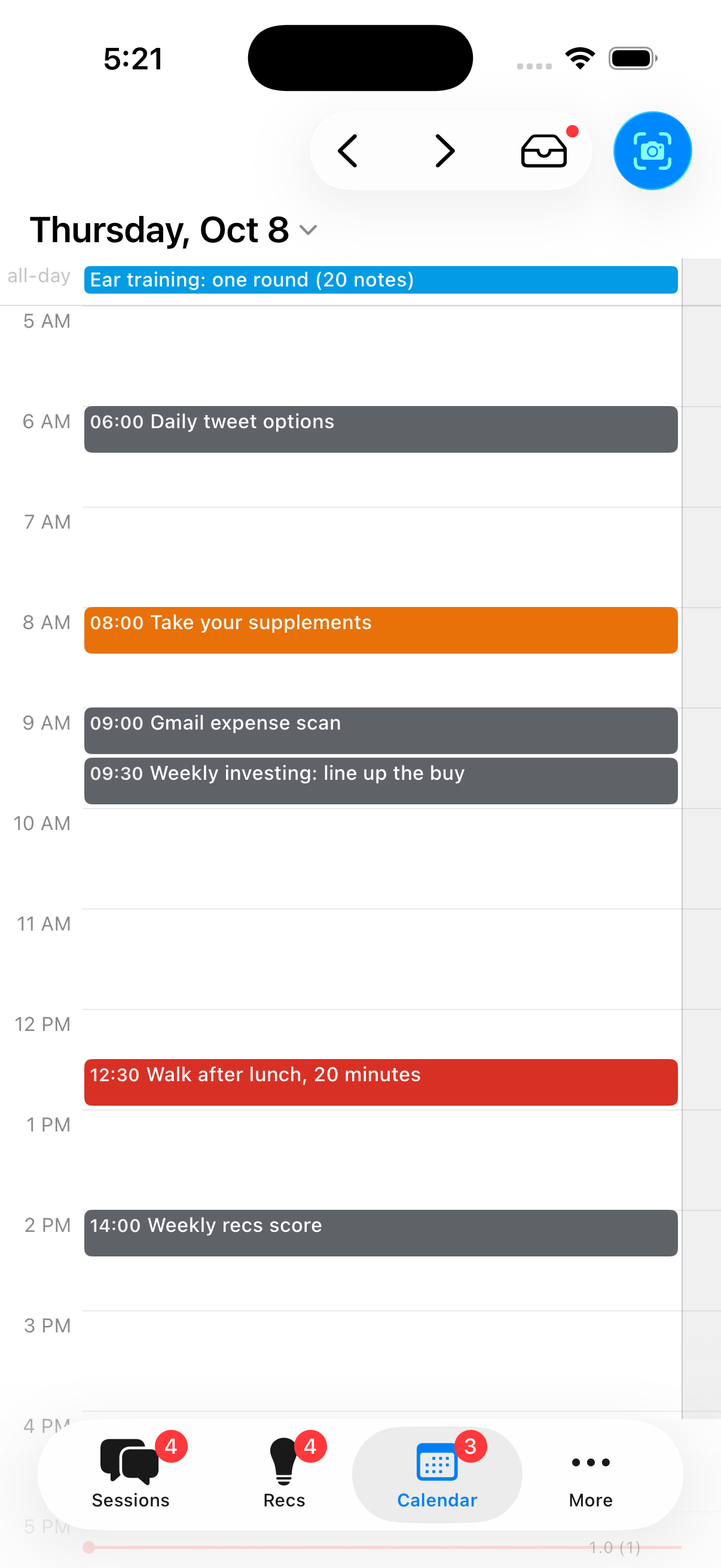
iPhone app
An approval. In your pocket.
Sessions. Cards waiting on you.
Calendar. Your day at a glance.
The screenshots are the real apps on a demo hub with made-up people and plans.
What it costs
Every cost below goes to an outside service. Nothing goes to me.
Pick your apps, see the costs (2 min). iPhone, desktop, web, or all
three. Later changes are built for the ones you picked.
Start the slow things (10 min, then waiting). Apple developer
enrollment and the Xcode download start first. Apple usually answers
within hours.
Prepare the Mac (10 min). Free tools, never sleep, disk encryption on.
Your private copy on GitHub (5 min). Your copy, your account, private.
Tailscale (10 min). A private network only your devices can join.
The hub is up (10 min). First milestone: the web console works.
Backups (15 min). Nightly, encrypted, to storage you own, tested
with a real restore.
Apple team and Xcode (10 min). Once Apple says yes.
The apps (20 min). The desktop app opens, the iPhone app installs
and buzzes.
Your first goals (15 min). The agent interviews you.
Weekly updates and wrap-up (5 min).
How security works
Your data lives on your Mac. The hub listens only on your private
Tailscale network, so nothing about it is public.
Nothing public. No open ports, no public URL. Your phone reaches the
hub through Tailscale.
Outbound, only four places: Anthropic (your Claude sessions), Apple
(push notifications), your own backup bucket, and an optional weekly
heartbeat to the project's PostHog analytics.
The heartbeat is off unless you say yes. The agent asks once at
setup, and the answer defaults to no. If you say yes, once a week it
posts one event to https://us.i.posthog.com/capture/ with a random
install id and these fields only: version, active_days,
sessions_started, goals, pages and token_bucket (a range such as
"1-10M"), with GeoIP lookup disabled (hub/internal/usage). Never text,
titles, names or amounts. Settings shows the payload and where it goes,
and switches it off; usage_host in ops/hub.json sends it somewhere
else.
Backups are yours. Encrypted on your Mac before upload, so the
storage only ever sees noise. The nightly key can't delete anything.
The gate. Anything that spends money, deletes, contacts a person,
shares data or pushes code needs your approval plus a decider code that
only you hold. With sessions run as a separate user (SETUP.md, optional),
a session can't approve its own card; without it a session runs as your
account and could reach the code's hash, so the gate is a rule it follows,
not a wall. Either way, a session lands commits on your local main and
builds the app without asking, and a hub change is rebuilt and restarted
as your account, so code a session lands runs with your rights: the
separate user guards the card, not landed code. Landed commits stay on
your Mac until a push is approved.
Updates and addenda
The copy is yours. Setup makes a private copy in your GitHub account.
Change anything.
New every week. The developer runs this same app daily, and each week
its fixes and new pieces are ported here.
Your agent checks weekly. It reads ADDENDA.md every
Monday and shows each new entry as a card on your phone.
Nothing lands without you. Say yes and a new session applies that one
update, fitted to your copy (which will have grown its own pages and look),
tests it, and tells you what changed. Optional add-ons (like voice) arrive
the same way, off until you opt in.
FAQ
Do I need to know how to code?
No. The agent runs every command. You click, copy and paste where it tells you.
Is my data sent anywhere?
Your Claude sessions go to Anthropic, like any Claude Code session. Push
notifications go through Apple. Backups go to your own Backblaze bucket,
encrypted first. Nothing else, unless you opt in to the counts-only heartbeat
(to PostHog).
Can I skip the iPhone app?
Yes. Pick web only and skip the Apple Developer membership. The console
works in any browser on your Tailscale network, phone included.
Does it run on Windows or Linux?
The hub needs a Mac. Once it runs, the web console works from any device on
your Tailscale network.
Can the agent spend my money or email people on its own?
No. Those actions are gated. It proposes, you approve with your decider code.
Is this an Anthropic product?
No. It's an independent open source project built on Claude Code.
What's in the folders?hub/ is the server on your Mac and the web console it serves. app/ is
the iPhone and desktop app. shared/ is the contract between them, so the
two sides agree by test. ops/ is the scripts that run one install: build
and start the hub, back it up nightly, install the apps, screenshot the
pages. Those scripts are the only commands a session may run, so that folder
is also the list of what the agent can do to your Mac.
What is this?A self-hosted team of AI agents built on Claude Code, meant to help you meet your goals. It runs on a Mac you own, and you talk to the agents from iPhone, Mac or web apps.
Is it an app, a framework, or a library?It's an app: a swarm of long-running Claude Code sessions on your Mac, plus an iPhone app, a desktop app and a web console to talk to them.
How do I get it running?Open Claude Code on your Mac and paste the install prompt from the README. The agent then walks you through setup, which takes about 2 hours, mostly waiting on Apple and the Xcode download.
What do I need before starting?A Mac that stays on, a Claude Pro or Max subscription ($20 to $200 a month), and Tailscale (free). An Apple Developer membership ($99 a year) is optional and only needed for the iPhone and desktop apps.
Any catches before I start?Apple usually answers developer enrollment within hours, and the README says everything is a starting point subject to change. The author also says to use it at your own risk, since the agents can spend money, send messages, delete files and share data.
Do I need to be technical?No. The agent runs every command, and you only click, copy and paste where it tells you.
Does it run on Windows or Linux?No, the hub needs a Mac. Once it runs, the web console works from any device on your Tailscale network, including phones and laptops.
Can it run on a cloud server instead of my Mac?No. The hub runs on macOS and is meant for a Mac you own that stays on.
Can the agents spend my money or email people on their own?No. Spending, deleting, contacting people, sharing data or pushing code needs your approval plus a decider code that only you hold.
How do the agents split the work?Each agent is a long-running Claude Code session with a role, such as chief of staff or CTO. They hand tasks to one another when part of a job needs another role's know-how.
Will it get new features after I install it?Yes. New fixes land in ADDENDA.md every week, and your agent shows each one as a card. Nothing is applied until you say yes.
Can I skip the iPhone app?Yes. Pick web only and skip the Apple Developer membership. The console works in any browser on your Tailscale network, phone included.



 A self-hosted team of AI agents built on Claude Code, meant to help you meet your goals. It runs on a Mac you own, and you talk to the agents from iPhone, Mac or web apps.