google-webfonts-helper 


A Hassle-Free Way to Self-Host Google Fonts
✅ https://gwfh.mranftl.com
Help me keep this service alive by sponsoring me. Thank you. ❤️


ToC
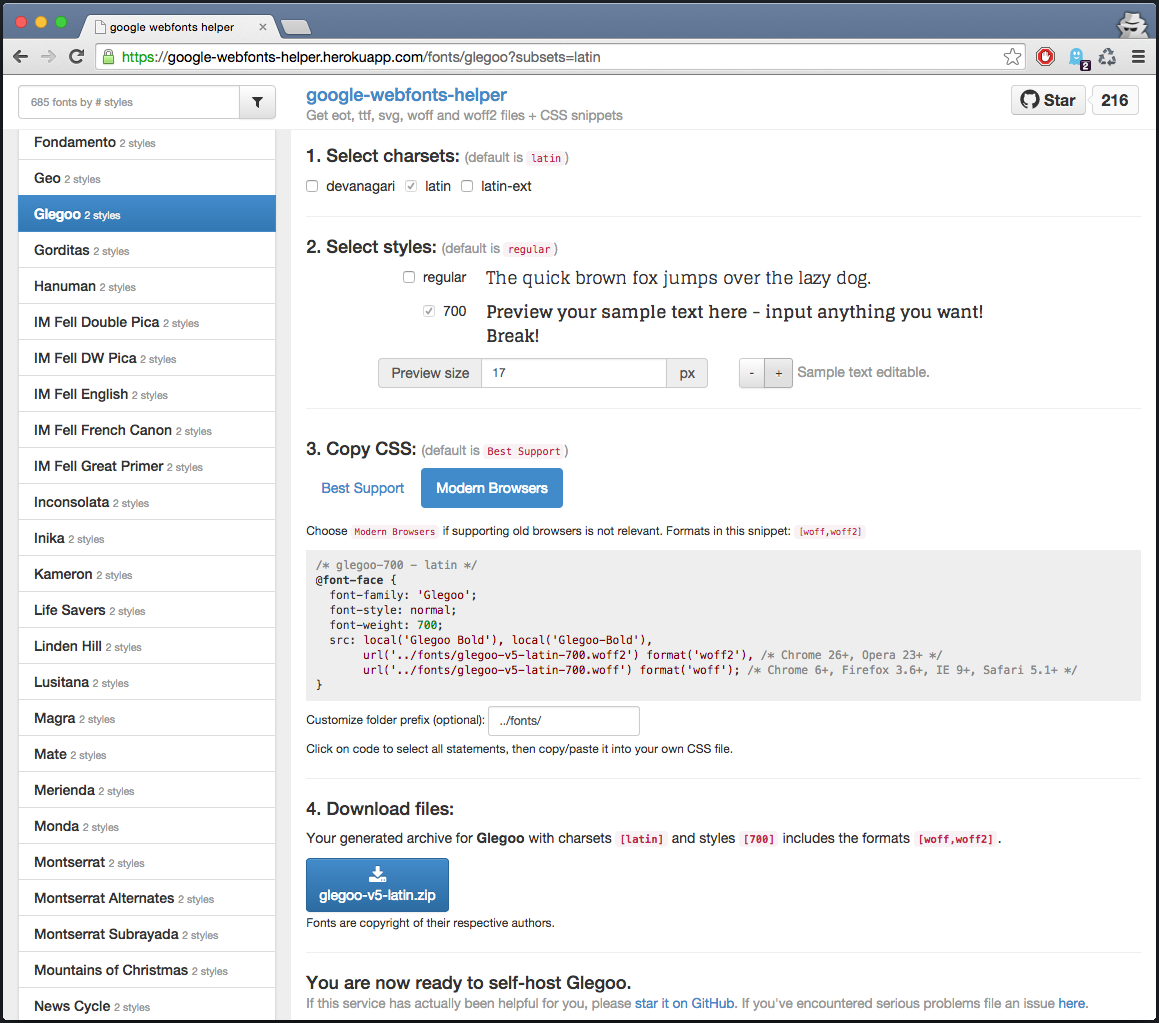
This service might be handy if you want to host a specific Google font on your own server:
- font style and charset customization
- CSS snippets
.eot, .woff, .woff2, .svg, .ttf font file formats download (zipped).
Running gwfh on your own server
I provide prebuilt Docker images via GitHub Packages. You can use them as follows:
# See https://developers.google.com/fonts/docs/developer_api for creating your own API-Key.

docker run -e GOOGLE_FONTS_API_KEY=<YOUR-API-KEY> -p 8080:8080 ghcr.io/majodev/google-webfonts-helper:<TAG>
# Express server listening on 8080, in production mode
Development
Quickstart
Do this to setup a development environment:
# Ensure to set the GOOGLE_FONTS_API_KEY env var inside your own gitignored .env file
# See https://developers.google.com/fonts/docs/developer_api for creating your own API-Key.
echo "GOOGLE_FONTS_API_KEY=<YOUR-API-KEY>" > .env

# Start up the development docker container (multistage Dockerfile, stage 1 only)
./docker-helper.sh --up
# [+] Running 1/0
#  ⠿ Container gwfh-service-1  Running
# node@3b506a285f7f:/app$

# within this development container:
node$ yarn --pure-lockfile
node$ ./node_modules/.bin/bower install

# start development server
node$ grunt serve
# [...]
# Express server listening on 9000, in development mode

# The application is now available at http://127.0.0.1:9000 (watching for code changes)

# start production server (same command as within the final docker multistage build)
node$ grunt build
node$ NODE_ENV=production node dist/server/app.js
# Express server listening on 8080, in production mode
Production build
If you want to build and run your own production container locally:
# Build the production docker container (final stage)
docker build . -t <your-image-tag>

# Run it (if you have previously started the development container, halt it!)
./docker-helper.sh --halt
docker run -e GOOGLE_FONTS_API_KEY=<YOUR-API-KEY> -p 8080:8080 <your-image-tag>
# Express server listening on 8080, in production mode
To mitigate security issues especially with the projects' deprecated dependencies, the final image is based on a minimal container image. It runs rootless and has no development dependencies.
JSON API
The API is public, feel free to use it directly (rate-limits may apply).
GET /api/fonts
Returns a list of all fonts, sorted by popularity. E.g. curl https://gwfh.mranftl.com/api/fonts:
[{
  "id": "open-sans",
  "family": "Open Sans",
  "variants": ["300", "300italic", "regular", "italic", "600", "600italic", "700", "700italic", "800", "800italic"],
  "subsets": ["devanagari", "greek", "latin", "cyrillic-ext", "cyrillic", "greek-ext", "vietnamese", "latin-ext"],
  "category": "sans-serif",
  "version": "v10",
  "lastModified": "2014-10-17",
  "popularity": 1,
  "defSubset": "latin",
  "defVariant": "regular"
} [...]
]
GET /api/fonts/[id]?subsets=latin,latin-ext
Returns a font with urls to the actual font files google's servers. subsets is optional (will serve the defSubset if unspecified). E.g. curl "https://gwfh.mranftl.com/api/fonts/modern-antiqua?subsets=latin,latin-ext" (the double quotes are important as query parameters may else be stripped!):
{
  "id": "modern-antiqua",
  "family": "Modern Antiqua",
  "variants": [{
    "id": "regular",
    "eot": "https://fonts.gstatic.com/s/modernantiqua/v6/8qX_tr6Xzy4t9fvZDXPkhzThM-TJeMvVB0dIsYy4U7E.eot",
    "fontFamily": "'Modern Antiqua'",
    "fontStyle": "normal",
    "fontWeight": "400",
    "woff": "https://fonts.gstatic.com/s/modernantiqua/v6/8qX_tr6Xzy4t9fvZDXPkh1bbnkJREviNM815YSrb1io.woff",
    "local": ["Modern Antiqua Regular", "ModernAntiqua-Regular"],
    "ttf": "https://fonts.gstatic.com/s/modernantiqua/v6/8qX_tr6Xzy4t9fvZDXPkhxr_S_FdaWWVbb1LgBbjq4o.ttf",
    "svg": "https://fonts.gstatic.com/l/font?kit=8qX_tr6Xzy4t9fvZDXPkh0sAoW0rAsWAgyWthbXBUKs#ModernAntiqua",
    "woff2": "https://fonts.gstatic.com/s/modernantiqua/v6/8qX_tr6Xzy4t9fvZDXPkh08GHjg64nS_BBLu6wRo0k8.woff2"
  }],
  "subsets": ["latin", "latin-ext"],
  "category": "display",
  "version": "v6",
  "lastModified": "2014-08-28",
  "popularity": 522,
  "defSubset": "latin",
  "defVariant": "regular",
  "subsetMap": {
    "latin": true,
    "latin-ext": true
  },
  "storeID": "latin-ext_latin"
}
Download a zipped archive with all .eot, .woff, .woff2, .svg, .ttf files of a specified font. The query parameters formats and variants are optional (includes everything if no filtering is applied). is E.g. curl -o fontfiles.zip "https://gwfh.mranftl.com/api/fonts/lato?download=zip&subsets=latin,latin-ext&variants=regular,700&formats=woff" (the double quotes are important as query parameters may else be stripped!)
History
2025:
- Switch to
node:22 for the final image.
- Adds support for linux/arm64 architecture (patches imagemin/optipng-bin)
2024:
- Switch to
node:20 for the final image.
2023:
- Project upgraded to be compatible with Node.js v18+.
- Automated prebuilt Docker images via GitHub Actions.
/server was fully refactored/modernized (async/await) and now compiles with TypeScript.- Switch to
node:18 for the final image.
/client can still be considered very legacy Angular code.
2022:
This service was mostly on life-support, most of its code and dependencies can be considered deprecated. The current docker image wrapping [email protected] runs rootless and is hopefully enough to keep the bandits out. API attack surface should be minimal anyways.
2014:
This service was originally a prototype I've created to get familiar with Angular and Express. All magic by generator-angular-fullstack. See my note here.
Idea originally by Clemens Lang who created an awesome bash script to download Google fonts in all formats.
License
(c) Mario Ranftl
MIT License
Google Fonts Open Source Font Attribution

 google-webfonts-helper 是一个可自行部署的服务,可以下载 Google Fonts 字体文件(eot、ttf、svg、woff、woff2)以及现成的 CSS 代码片段,让你从自己的服务器提供字体,而不必使用 Google 的 CDN。