The open-source Grok Bot alternative.
Bring your own agent and subscription — Claude Code, Codex, Gemini CLI, Cursor and 40+ more — as teammates you can message from your phone.
Free, open source, no paid tier. A ⭐ is how others find it; a ☕ keeps it going.
macOS: Apple Silicon + Intel (DMG) · Windows: x64 installer · Linux: AppImage · All downloads
[!WARNING]
Official account:@trycodync is my only official account. Beware of impersonators and scams.
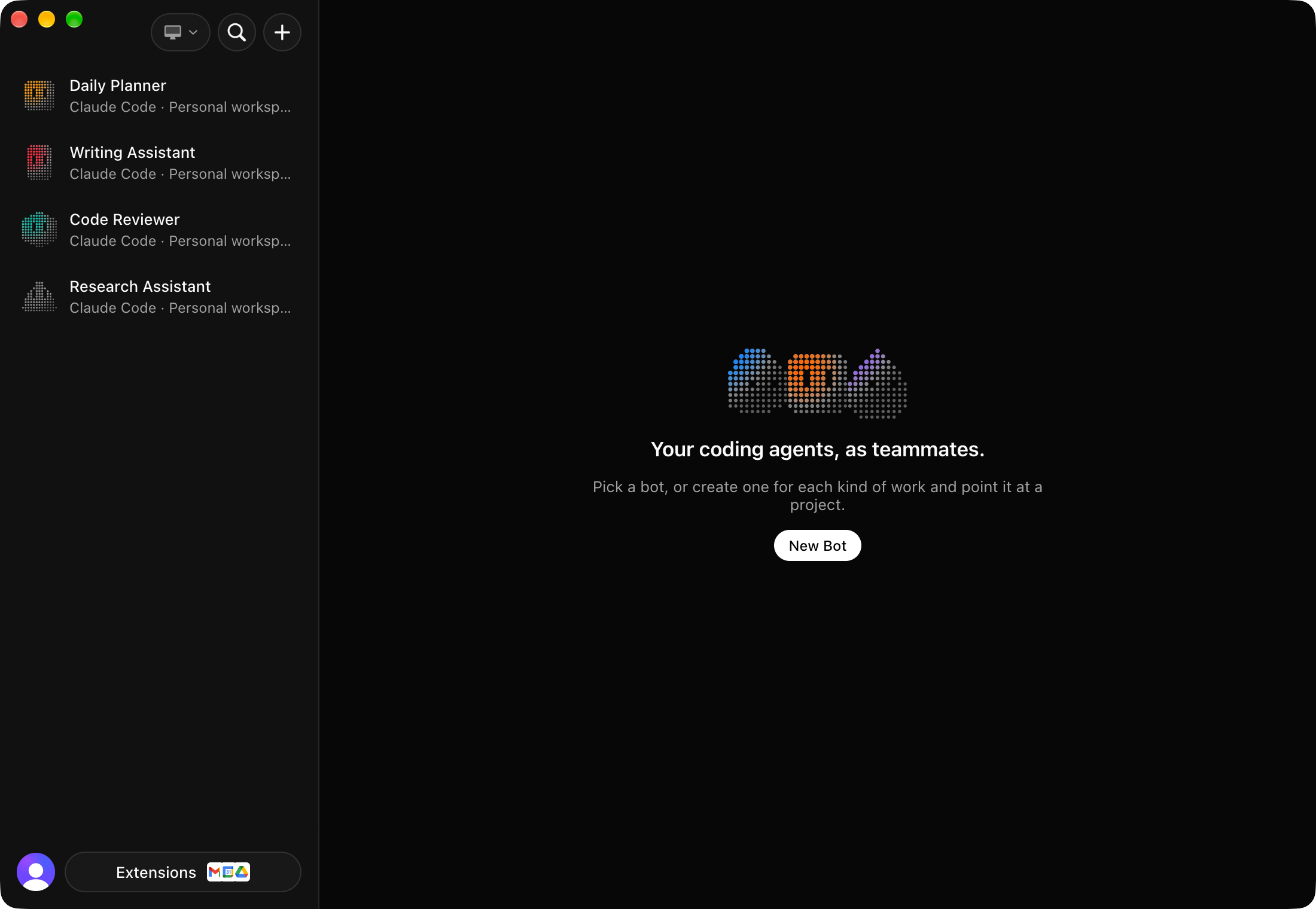
Codync turns the coding agents on your computer — Claude Code, Codex, Cursor, Pi, OpenCode, Grok Build, Gemini, Copilot, Hermes Agent and ~40 more — into persistent bots you delegate to from your iPhone, Mac, Windows PC, Linux desktop or any terminal, the way you'd message a colleague. Pick who, say what, put the phone away. You get a notification when a bot finishes or needs your approval.
Why bots? On a phone, "find the right working session, then pick an environment" is too slow. With bots you already know who to hand the intent to: open the chat, type, done.
Why Codync
Free and open source. No subscription, no paid tier, Apache 2.0 licensed.
Bring your own subscription. Bots run on the Claude, ChatGPT or other plan your agents are already signed in with, on your own computer. Codync never calls a provider's API with your login.
Agent-agnostic: bring any coding agent. Claude Code, Codex, Cursor, Gemini, Copilot, OpenCode, Pi, Grok Build and ~40 more — everything in the ACP registry. Installed agents are found automatically, the rest are fetched on first use, and every bot picks its own. Mix them freely: a Claude bot can ask a Codex bot for a review.
Many bots, one team. Run as many bots as you like side by side, each with its own agent, project folder and approvals, all working at once. Put several in a group chat and they answer in turn, like a team channel; @name picks who replies. Reply to any message, yours or a bot's, right in the chat.
Built in Rust.codync-host is one small, fast Rust binary for macOS, Windows and Linux (static on Linux, runs on any distro) that drives every agent, keeps the transcripts and serves every client.
One app per kind of device. Native SwiftUI on the iPhone, one desktop app for Mac, Windows and Linux (Electron), and a terminal UI for SSH.
A Grok Bot, Muse and Dots alternative. Persistent named bots, group chats, quote replies, bots asking each other for help, approval cards, per-bot memory, remote screen, voice calls and "needs you / done" notifications — the same features, without being tied to one model or one subscription.
Reach your computer from anywhere, free. The hosted Cloudflare relay is included at no cost: no Tailscale, no VPN, no port forwarding. Traffic is end-to-end encrypted between your phone and your computer, so the relay only forwards ciphertext. Same Wi-Fi or Tailscale? The phone connects directly instead.
Every computer, one app. Sign in and your iPhone lists every computer on your account (Mac, Windows PC, Linux desktop, server or cloud VM); open Computers and tap Ask for access, confirm a 6-digit code on that computer, and its bots show up next to the others. A new bot can live on any of them, and the desktop app on Mac, Windows and Linux reaches your SSH machines too. Each computer approves each device itself, so an account alone never unlocks a computer.
Remote screen. See and control your computer from the iPhone over WebRTC (hardware H.264), and let bots use the screen themselves through the built-in computer tool.
Voice calls. Talk to a bot hands-free from the iPhone and hear its replies read aloud.
Private push. Notification text is sealed to your phone's key, so the push relay never sees what your bots said.
Platforms
Platform
App
Highlights
📱
iPhone
Native SwiftUI
Chat with bots, approvals, push notifications, Live Activity, widgets, remote screen, voice calls
💻
macOS
Desktop app (Electron), menu bar + window
Runs the host, chat window, usage in the menu bar, iPhone pairing
🪟
Windows
Desktop app (Electron), tray + window
Runs the host, chat window, iPhone pairing (no remote screen yet)
🐧
Linux
Desktop app (Electron), tray + window
Chat window, iPhone pairing; the host runs on desktops and headless servers
⌨️
Terminal
codync-host tui
Message your bots from any terminal, over SSH too
The host (codync-host, Rust) runs on macOS, Windows and Linux; every client talks to it, so all your bots and chats are the same everywhere.
Looking for the former native Mac app (SwiftUI + AppKit)? Version 2.7.0 moved Mac and
Linux to one Electron desktop app. The native implementation is preserved in Git history at
1055636; see the archived AppKit chat implementation notes.
Bots have a name, a character avatar, standing instructions, an agent backend, a project folder and a permission policy. Each bot has one persistent chat, where you can reply to any message; the agent sessions underneath are an implementation detail (resumed with session/load, restarted with New session).
Group chats hold several bots and you. Each message starts a short room turn: the bots you @-mention (or everyone) reply one at a time, each in its own session, and can react to each other, up to 3 rounds. See group chats and replies.
Bots can ask each other for help. Tell one “ask Reviewer to check these changes.” The built-in team MCP server lets it discover your other visible bots and message one; the reply comes back to it as a new turn, and it answers you then. Requests appear in both chats; each recipient keeps its own agent, folder and approvals. Native subagents stay under the coding agent's control. See bot collaboration.
The chat only shows what matters: your messages, each turn's final reply, approval cards and notices. Every tool call, diff, plan and thought is one tap away in Full conversation. While a bot works, its row shows what it's doing right now.
Agents are detected automatically: the host hydrates PATH from your login shell (plus Homebrew, ~/.local/bin, nvm, bun, volta, asdf, mise, pnpm…), finds every agent you have installed, and prefers its native ACP mode. Anything else in the official ACP registry can be picked too — Codync fetches it on first use (npx, uvx or a checksummed binary).
codync-host (Rust, macOS, Windows and Linux) runs on your computer. It speaks the Agent Client Protocol to each agent, keeps transcripts in SQLite, and serves the phone. Every change carries a global rev, so the phone reconnects with since: rev and never misses anything.
Usage limits are read on your computer, without a model call, for the agents your bots run and any others you turn on in the Usage screen. The phone, widgets and menu bar see the resulting limits. See usage limits.
Push goes through a tiny relay that holds the APNs key. The phone trades its device token for an encrypted ticket; the host only ever holds tickets.
UI patterns (roster, character avatars, approval cards, trace sheet, "needs you / done" notifications) follow Grok Bot.
Install
One line (macOS or Linux):
curl -fsSL https://raw.githubusercontent.com/leepokai/Codync/main/packaging/install.sh | sh
On a Mac it installs the app (the host ships inside it); on Linux the host, plus the desktop app when a display is present. Add sh -s -- --host-only for servers and headless Macs. Re-run it to upgrade.
Open Codync: it sets up the host on first launch. Open Codync opens the full window; Pair phone… shows the QR code.
Windows — download codync-windows-x64.exe and run it. It installs for your user and starts the host at sign-in. The installer isn't code-signed yet, so SmartScreen asks you to confirm it once (More info → Run anyway). Not on Windows yet: remote screen, on-device speech and the Claude Code status line hook. Details: desktop app.
iPhone and Android — get Codync on the App Store (iOS 26+, free) or on Google Play (Android 10+, free), then scan the QR code from Pair phone… on the Mac, the Windows or Linux app, or codync-host pair.
Why the iPhone app can be a version behind: every iPhone release goes through Apple's App Review first, which usually takes a day or more, so the App Store version can trail the Mac, Windows, Linux and host releases. Your computer accounts for that: an update that needs a newer phone app waits until the App Store has the iPhone version and Google Play has the Android version, then installs, and the iPhone app shows a reminder when a newer version is available.
Linux — the host, plus the desktop app:
curl -fsSL https://raw.githubusercontent.com/leepokai/Codync/main/packaging/install.sh | sh
# or: brew install leepokai/codync/codync-host
codync-host install   # systemd --user service
codync-host pair      # QR code in the terminal, or Settings in the app
The script also installs the desktop app (codync, an AppImage, with its .desktop file) when you're in a graphical session. By hand: codync-linux-<arch>.AppImage, .deb or .tar.gz from Releases.
Building the desktop app yourself: cd apps/desktop && npm ci && npm run dev.
Linux server / cloud VM — the host runs headless on any distro (static binary, x86_64 + arm64). Setup, remote access and limitations: Linux servers (contributor notes).
Remote access is direct on the same network or over Tailscale, with no account. From anywhere else, a free Cloudflare relay, end-to-end encrypted, needs the computer and the phone in the same account. Details: Remote access (protocol).
Agents — install and sign in to whichever you use; Codync finds them. Claude Code, Codex and Pi run through their ACP adapters (fetched by npx, so Node.js is needed for those).
codync-host install also routes Claude Code's status line through codync-host statusline so live limits reach the host; an existing status line keeps working (it's wrapped, and restored on uninstall).
If an update fails
Quit Codync completely and reopen it first; a downloaded update may still be waiting
for the old app to exit. If updating still fails, uninstall the app and reinstall
the latest version from Releases.
On macOS, stop/remove the old host service before replacing Codync.app.
Keep ~/.codync and Codync's settings folders to retain your bots, conversations
and computer identity; do not use Reset all data, a cleanup utility, or Homebrew
--zap for this repair. Follow the reinstallation steps.
codync-host
Command
codync-host install / uninstall
background service (launchd on macOS, systemd --user on Linux, the sign-in Run key on Windows)
codync-host tui [--url … --token …]
message your bots from a terminal (this computer by default; SSH-friendly)
import bots from another app's export file; --skill prints the skill that writes one
codync-host pair [--json]
pairing QR code / link
codync-host status
installed? running?
codync-host serve [--port 19222]
run in the foreground
codync-host statusline [-- <your command>]
Claude Code status line command (wraps yours)
codync-host reset-token
rotate the local loopback bearer token
codync-host cloud [--assistants on|off] [--leave]
cloud enablement, URL and status; whether ChatGPT, Claude and other connected assistants may message this computer's bots; --leave takes this computer out of its account
For non-interactive work, send a message and wait for a machine-readable result:
codync-host send --bot reviewer --wait --json "Review the current diff without modifying files."
--bot accepts an ID or an exact, case-insensitive name; duplicate names require an ID. Use positional text or --file request.txt to read UTF-8 (--file - reads stdin). --reply-to <id> quotes a message of the bot's chat: the entryId or replyId of an earlier --json result. Without --wait, the command prints the accepted message's id, seq and turn; with --wait, it prints the reply once the bot is done (a reply in several messages comes joined; a turn that ends with no text, such as only a reaction, prints nothing). Group chats can't be waited on. Queued messages retain the host's batching behavior, so multiple sends can share one reply and turn.
--timeout <seconds> defaults to 1800 active seconds. Pending approval pauses the clock and prints a summary to stderr; the command never approves a request or stops the bot on timeout. Notices also go to stderr. --json emits one JSON object with botId, entryId, entrySeq, turn, status (completed, failed, or timeout), optional stopReason, reply and replyId, notices, elapsedSeconds (wall time), and waitedForApprovalSeconds. Without --wait, completed means the send was accepted. Errors before acceptance only use stderr. Exit codes are 0 completed/accepted, 1 stopped/limited/declined/failed, 2 invalid arguments, missing/ambiguous bot or --wait on a group chat, 3 unavailable host or refused API request, and 4 timeout. See codync-host send --help for all options.
Data lives in ~/.codync. The local bearer token authorizes loopback helpers and SSH-forwarded callers. Use --port and CODYNC_HOME when targeting a host with a different port or data directory; development builds default to port 19223 and ~/.codync-dev. Remote devices use individual keys and grants over the encrypted channel; revoke a lost device through device management rather than rotating the loopback token. Host methods and caller permissions live in host/src/api/.
FAQ
Is Codync free? Yes. $0 with every feature included, Apache 2.0 licensed. You pay only your agent's provider, through the plan or key you already have.
Can I use my Claude or ChatGPT plan? Yes. Codync runs the agents already signed in on your computer: Claude Code with your Claude plan, Codex with your ChatGPT plan, and so on. It never calls a provider's API with your login.
Is there a Claude Code or Codex app for iPhone? Codync is one, free: Claude Code or Codex keeps running on your Mac or Linux machine, and you chat with it, approve its edits and get notified from the iPhone. Guides: Claude Code on iPhone · Codex on iPhone.
Which agents can it run? Claude Code, Codex, Cursor, Gemini, Copilot, OpenCode and about 40 more through the ACP registry. Each bot picks its own.
How is it different from Grok Bot, Muse or Dots? The same bot-based way of working (named bots, group chats, replies, approvals, memory), but open source, free, running on your own computer and with any coding agent. Side-by-side pages: codync.dev/compare.
Where does my data go? Bots, chats and memory stay on your computer. The phone reaches it directly on the same network or over Tailscale. With an account, it can also go through an end-to-end encrypted relay that can't read your messages.
Do I need an account? No. Without one, your phone pairs by scanning a QR code and connects over Wi-Fi or Tailscale. A free account (Apple, Google or GitHub) adds the relay, which needs the computer and the phone in the same account. An account alone never unlocks a computer: you still pair by scanning a QR code, or approve a 6-digit code on the computer.
Which computers can run it? A Mac, a Windows PC, or a Linux desktop or headless server. The iPhone app and the terminal UI over SSH talk to the same host.
The Xcode project is generated: xcodegen generate --spec apps/project.yml.
cd host && cargo test            # host
cd apps/desktop && npm test      # desktop app (also: npm run typecheck)
# iPhone package: xcodebuild test -scheme CodyncKit-Package (apps/ios/Kit, iOS Simulator)
cd cloud && npm test            # cloud API / channel relay
cd relay && npm test             # relay tickets
Clients and the host each name the oldest version of the other they still work with (minApp in the host's hello, minHost in each client), so an app can meet an older or newer host. Details: compatibility.
The desktop notch island's design is inspired by the work of @novra.design.
Code signing policy
Free code signing provided by SignPath.io, certificate by SignPath Foundation, for the Windows releases once SignPath Foundation accepts the project (earlier releases are unsigned). What is signed and who approves it: code signing policy.
License
Apache 2.0 for the code (see NOTICE); versions up to 2.11.0 were MIT. The Codync name, logo and the Codync Cloud relay are not covered, and hosted or multi-tenant services must run their own relay and accounts: see TRADEMARK.md.
What is this?Codync turns coding agents already installed on your computer (Claude Code, Codex, Cursor, Gemini, Copilot and ~40 more via the ACP registry) into persistent named bots you message like teammates from your iPhone, Mac, Linux desktop or any terminal. It's a free, open-source alternative to Grok Bot and Muse.
Is this an app I install or a framework I code against?It's a Rust daemon called codync-host plus fully native client apps: SwiftUI for iPhone and Mac, GTK 4 / libadwaita for Linux, and a terminal UI for SSH — no web views or Electron involved.
How do I get it running?Run a one-line install script on macOS or Linux (add --host-only for servers), which installs codync-host plus the desktop app where a display is present; on Mac you can instead download codync-macos.dmg. Then install the iPhone app from the App Store and pair it by scanning the QR code shown in 'Pair iPhone...'.
Do I need anything besides the coding agents I already use?Codync auto-detects agents already on your PATH, but some are fetched on first use via npx or uvx — Claude Code, Codex and Pi specifically run through ACP adapters fetched by npx, so Node.js is required for those.
Does the host run on Windows?No — codync-host is only built for macOS and Linux (a static binary on Linux that runs on any distro); clients like the iPhone and terminal apps connect to that host.
Can I run the host on a headless cloud server instead of a desktop?Yes — codync-host runs headless on any Linux distro as a static binary (x86_64 and arm64), making it suitable for a cloud VM or server with no display attached.
Where does my data go when I message a bot remotely?Messages go through a free hosted Cloudflare relay that only ever sees ciphertext, since traffic is end-to-end encrypted between your phone and your computer; on the same Wi-Fi or Tailscale the phone connects directly instead.
Can bots ask each other for help?Yes — a built-in team MCP server lets one bot discover and message your other visible bots, so a Claude bot can ask a Codex bot for a review while each keeps its own project folder and approvals.
What does the remote screen feature do?It streams your computer's screen to the iPhone over WebRTC with hardware H.264 so you can view and control it remotely, and bots can use the same screen through a built-in computer tool.
Can several bots chat together in one conversation?Yes — group chats hold multiple bots plus you; each message triggers a short turn where @-mentioned (or all) bots reply in sequence and can react to each other for up to three rounds.



















 Codync turns coding agents already installed on your computer (Claude Code, Codex, Cursor, Gemini, Copilot and ~40 more via the ACP registry) into persistent named bots you message like teammates from your iPhone, Mac, Linux desktop or any terminal. It's a free, open-source alternative to Grok Bot and Muse.