 μPlot
μPlot
A small (~50 KB min), fast chart for time series, lines, areas, ohlc & bars (MIT Licensed)
Introduction
uPlot is a fast, memory-efficient Canvas 2D-based chart for plotting time series, lines, areas, ohlc & bars. From a cold start it can create an interactive chart containing 166,650 data points in 25ms, scaling linearly at ~100,000 pts/ms afterwards. In addition to fast initial render, the zooming and cursor performance is by far the best of any similar charting lib; at ~50 KB, it's likely the smallest and fastest time series plotter that doesn't make use of context-limited WebGL shaders or WASM, both of which have much higher startup cost and code size.
In most sane cases, you can live-stream data with uPlot at 60fps, though it may begin to struggle beyond 100k in-view points.
When updating 3,600 points at 60fps, uPlot uses 10% CPU and 12.3MB RAM.
The next fastest Canvas-based libs (Chart.js and ECharts) use 40% / 77MB and 70% / 85MB, respectively.
If you need to stream, give unclog your rendering pipeline a try.
If that does not help, consider reducing the update frequency or switch to a WebGL/WebGPU solution, like danchitnis/webgl-plot, huww98/TimeChart, epezent/implot.
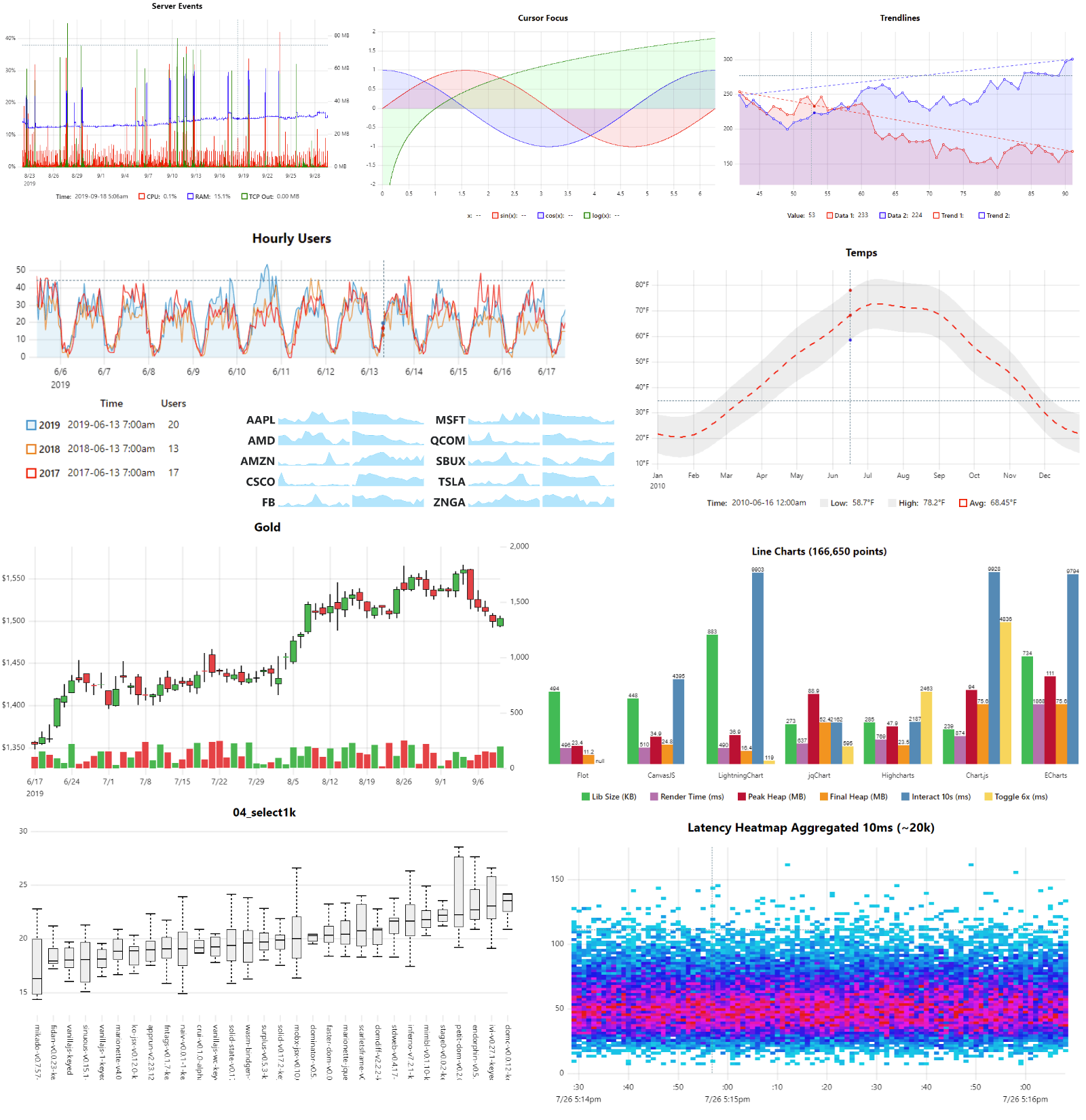
Features
- Multiple series w/toggle
- Multiple y-axes, scales & grids
- Temporal or numeric x-axis
- Linear, uniform or logarithmic scales
- Line & Area styles (stroke, fill, width, dash)
- Pluggable path renderers linear, spline, stepped, bars
- Zoom with auto-rescale
- Legend with live values
- Support for IANA Time Zone Names & DST
- Support for missing data
- Cursor sync for multiple charts
- Focus closest series
- Data streaming (live update)
- High / Low bands
- A lean, consistent, and powerful API with hooks & plugins
Non-Features
In order to stay lean, fast and focused the following features will not be added:
- No data parsing, aggregation, summation or statistical processing - just do it in advance. e.g. simples-statistics, https://github.com/leeoniya/uDSV
- No transitions or animations - they're always pure distractions.
- No collision avoidance for axis tick labels, so may require manual tweaking of spacing metrics if label customization significiantly increases default label widths.
- No stacked series: see "Stacked Area Graphs Are Not Your Friend" and a horrific demo. While smooth spline interpolation is available, its use is strongly discouraged: Your data is misrepresented!. Both visualizations are terrible at accurately communicating information.
- No built-in drag scrolling/panning due to ambiguous native zoom/selection behavior. However, this can be added externally via the plugin/hooks API: zoom-wheel, zoom-touch.
Documentation (WIP)
The docs are a perpetual work in progress, it seems.
Start with /docs/README.md for a conceptual overview.
The full API is further documented via comments in /dist/uPlot.d.ts.
Additionally, an ever-expanding collection of runnable /demos covers the vast majority of uPlot's API.
Third-party Integrations
Benchmarks done on this hardware:
- Date: 2023-03-11
- AMD Ryzen 7 PRO 5850U @ 1.9GHz, 32GB RAM
- EndeavourOS/Arch (KDE/Plasma), Chrome 113.0.5638.0 (64-bit)
- 4K display scaled to 1440p (1.5 devicePixelRatio)
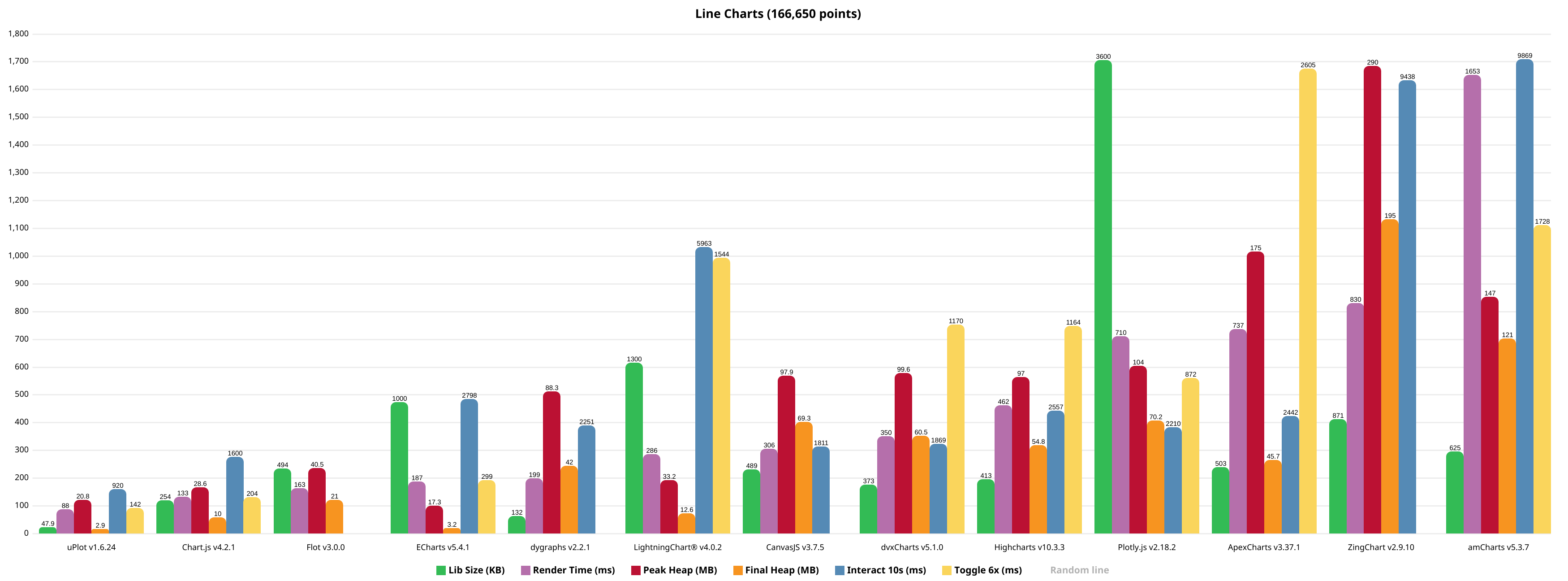
Full size: https://leeoniya.github.io/uPlot/demos/multi-bars.html
Raw data: https://github.com/leeoniya/uPlot/blob/master/bench/results.json
| lib                    | size    | done    | js,rend,paint,sys | heap peak,final | mousemove (10s)     |
| ---------------------- | ------- | ------- | ----------------- | --------------- | ------------------- |
| uPlot v1.6.24          | 47.9 KB |   34 ms |   51   2   1   34 |  21 MB   3 MB   |  218  360  146  196 |
| Chart.js v4.2.1        |  254 KB |   38 ms |   90   2   1   40 |  29 MB  10 MB   | 1154   46  165  235 |
| Flot v3.0.0            |  494 KB |   60 ms |  105   5   1   52 |  41 MB  21 MB   | ---                 |
| ECharts v5.4.1         | 1000 KB |   55 ms |  148   3   1   35 |  17 MB   3 MB   | 1943  444  203  208 |
| dygraphs v2.2.1        |  132 KB |   90 ms |  163   2   1   33 |  88 MB  42 MB   | 1438  371  174  268 |
| LightningChart® v4.0.2 | 1300 KB |  --- ms |  250   2   1   33 |  33 MB  13 MB   | 5390  120  128  325 |
| CanvasJS v3.7.5        |  489 KB |  130 ms |  266   4   1   35 |  98 MB  69 MB   | 1030  445   90  246 |
| dvxCharts v5.1.0       |  373 KB |  160 ms |  264  23   1   62 | 100 MB  61 MB   |  687  779  206  197 |
| Highcharts v10.3.3     |  413 KB |  --- ms |  416   7   1   38 |  97 MB  55 MB   | 1286  824  205  242 |
| Plotly.js v2.18.2      | 3600 KB |  310 ms |  655  14   1   40 | 104 MB  70 MB   | 1814  163   25  208 |
| ApexCharts v3.37.1     |  503 KB |  685 ms |  694   9   1   33 | 175 MB  46 MB   | 1708  421  106  207 |
| ZingChart v2.9.10      |  871 KB |  681 ms |  717   7   1  105 | 290 MB 195 MB   | 9021  305   41   71 |
| amCharts v5.3.7        |  625 KB |  --- ms | 1601   3   3   46 | 147 MB 121 MB   | 9171   71  460  167 |
- libs are sorted by their initial, cold-start, render performance (excluding network transfer time to download the lib)
size includes the lib itself plus any dependencies required to render the benchmark, e.g. Moment, jQuery, etc.- Flot does not make available any minified assets and all their examples use the uncompressed sources; they also use an uncompressed version of jQuery :/
Some libraries provide their own performance demos:
TODO (all of these use SVG, so performance should be similar to Highcharts):
- Chartist.js
- d3-based
- C3.js
- dc.js
- MetricsGraphics
- rickshaw
Unclog your rendering pipeline
Your browser's performance is highly dependent on your hardware, operating system, and GPU drivers.
If you're using a Chromium-based browser, there are some hidden settings that can unlock significant performance improvements for Canvas2D rendering.
Most of these have to do with where and how the rasterization is performed.
Head over to https://leeoniya.github.io/uPlot/demos/sine-stream.html and open up Chrome's DevTools (F12), then toggle the Performance Monitor.
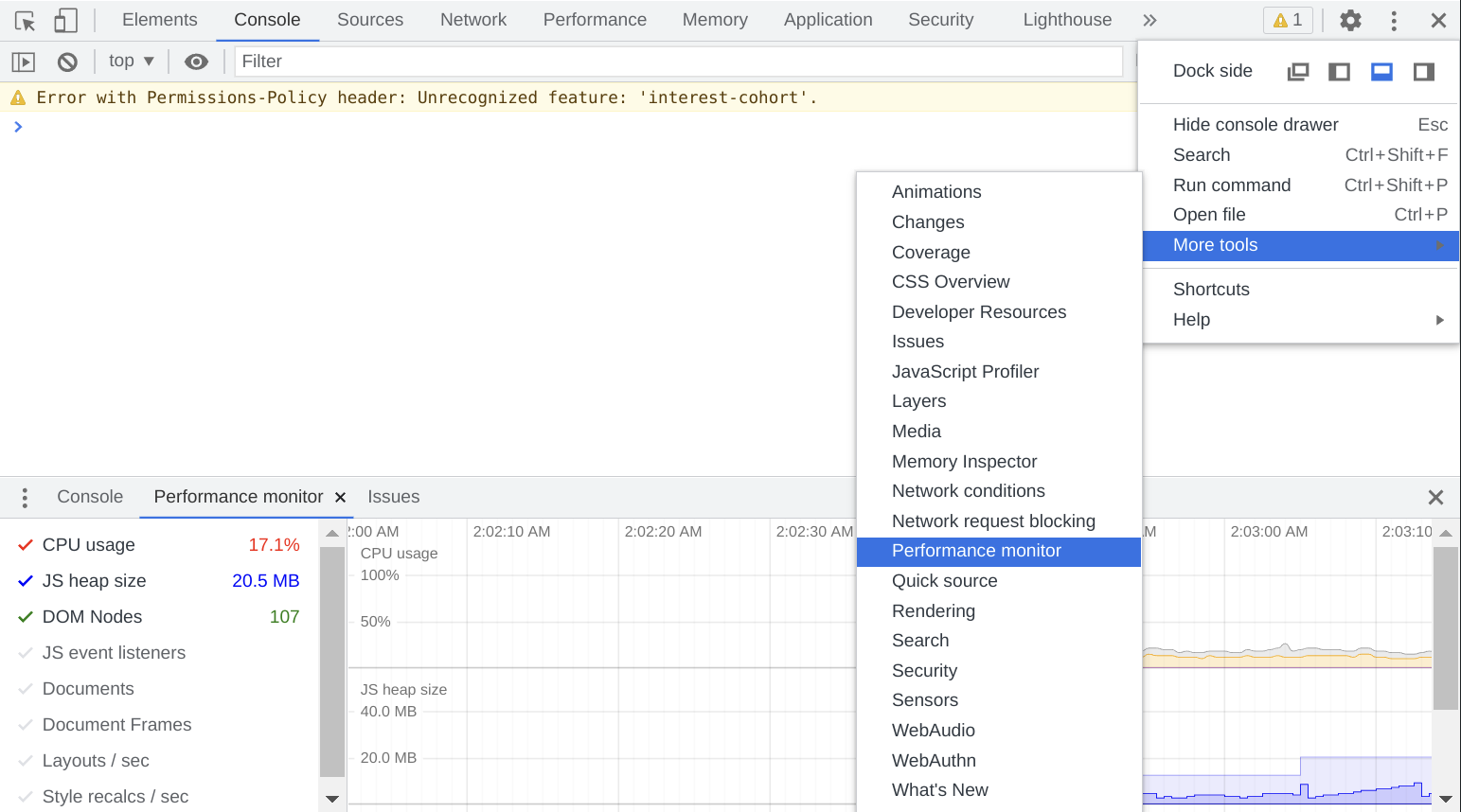
For me:
- On Windows 10 Desktop, Core i7-8700, 16GB RAM, AMD RX480 GPU, 2048 x 1080 resolution = 57% CPU usage
- On Manjaro Laptop (Arch Linux), AMD Ryzen 7 PRO 5850U, 48GB RAM, AMD Radeon RX Vega 8 (integrated GPU), 4K resolution = 99% CPU usage
If your CPU is close to 100%, it may be rasterizing everything in the same CPU process.
Pop open chrome://gpu and see what's orange or red.
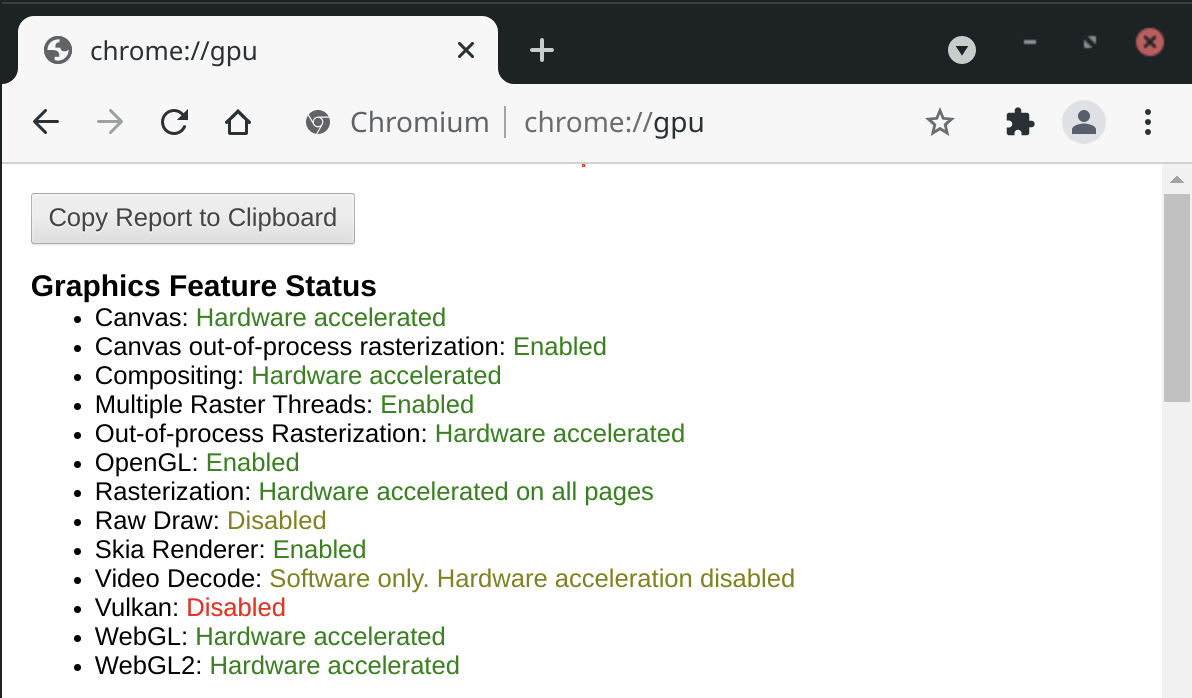
Then open chrome://flags and search for "raster" to see what can be force-enabled.
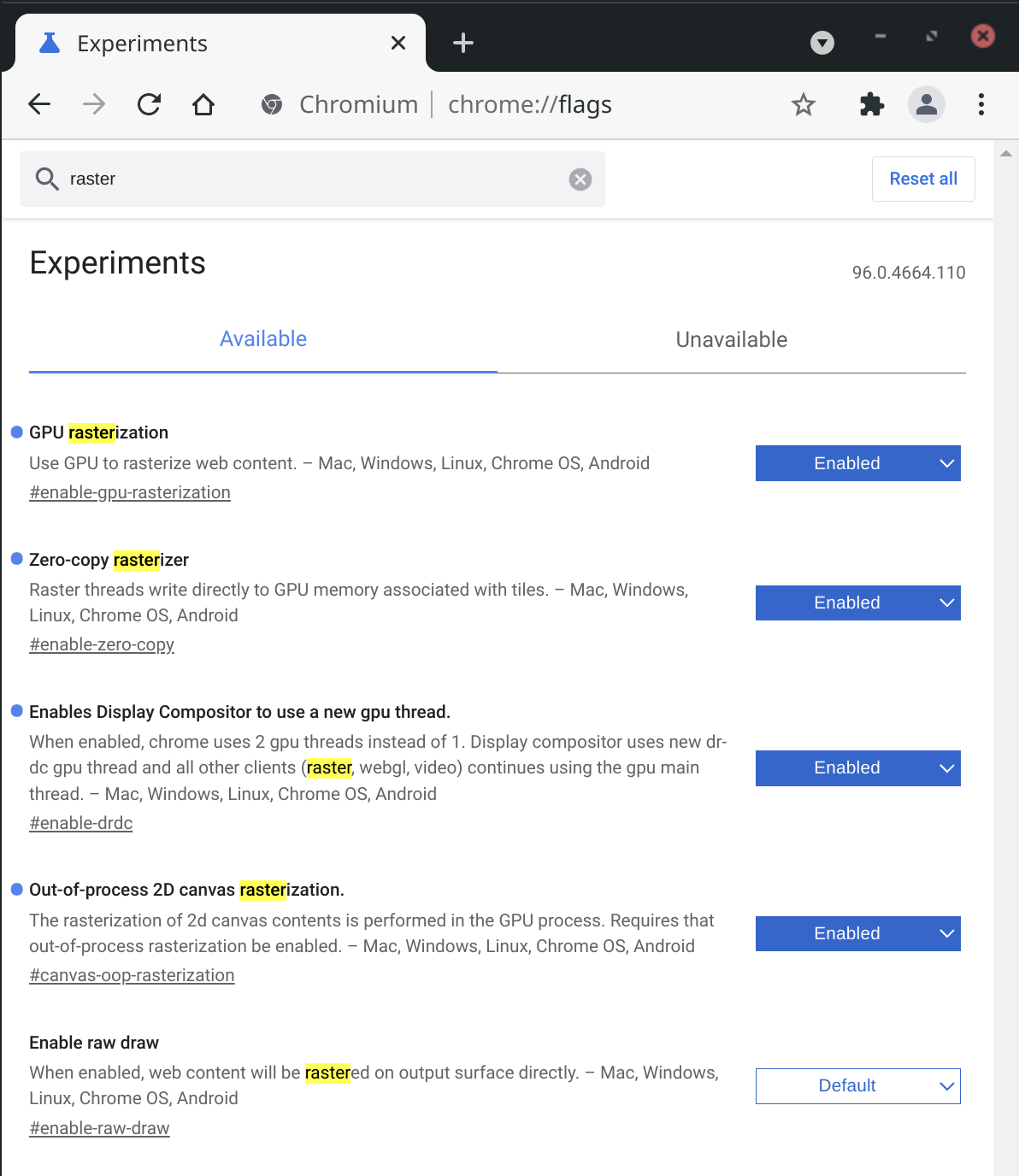
- On my Manjaro/Ryzen/Integrated GPU setup, force-enabling
Canvas out-of-process rasterization resulted in a dramatic framerate improvement.
- On my Windows/i7/Dedicated GPU setup, toggling the same flags moved the work to another process (still good), but did not have a significant framerate impact.
YMMV!
Acknowledgements

 uPlot 是一个小巧(压缩后约 50 KB)、快速、采用 MIT 许可证的 JavaScript 图表库,用于绘制时间序列、折线图、面积图、K 线图(OHLC)和柱状图,在浏览器中通过 Canvas 2D 绘制。