



8.9K ·GitHub
Что это такое?
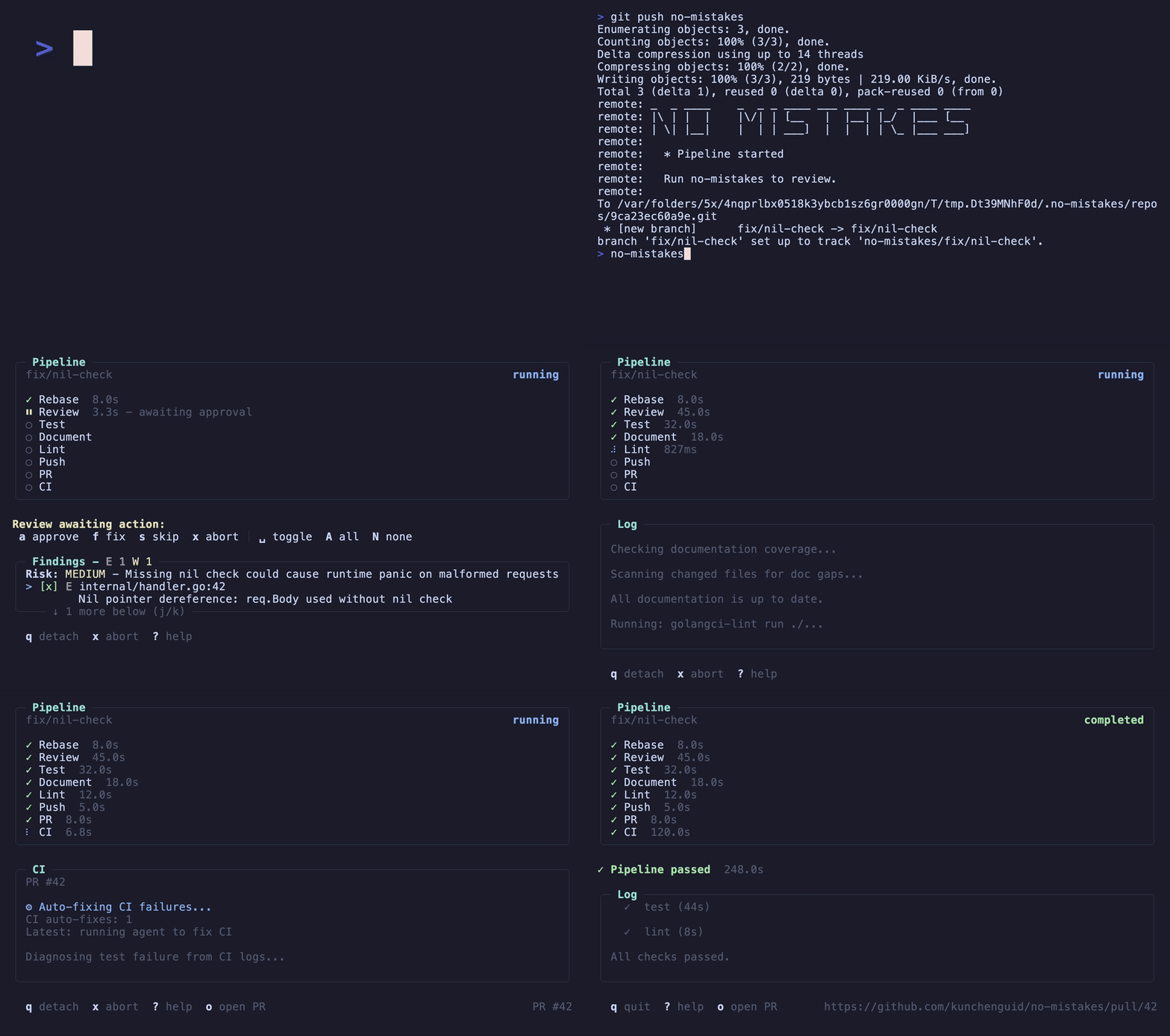
 Это локальный git-прокси, который стоит перед вашим настоящим удалённым git-репозиторием: вы отправляете код в no-mistakes вместо origin, он создаёт одноразовое рабочее дерево (worktree), запускает конвейер проверки на основе ИИ и передаёт ветку в ваш настоящий удалённый репозиторий, открывая чистый PR, только когда пройдены все проверки.
Это локальный git-прокси, который стоит перед вашим настоящим удалённым git-репозиторием: вы отправляете код в no-mistakes вместо origin, он создаёт одноразовое рабочее дерево (worktree), запускает конвейер проверки на основе ИИ и передаёт ветку в ваш настоящий удалённый репозиторий, открывая чистый PR, только когда пройдены все проверки.Это инструмент командной строки или облачный сервис?Это локальный инструмент командной строки и TUI, написанный на Go, который вы запускаете на своём компьютере; он работает как git-прокси для удалённого репозитория, а не как облачный сервис.
Это локальный инструмент командной строки и TUI, написанный на Go, который вы запускаете на своём компьютере; он работает как git-прокси для удалённого репозитория, а не как облачный сервис.Как мне его запустить?Выполните 'no-mistakes init', чтобы установить гейт и навык агента /no-mistakes, затем запустите гейт одним из способов: отправив закоммиченную ветку в удалённый репозиторий no-mistakes, запустив мастер TUI no-mistakes или вызвав /no-mistakes из вашего агента для написания кода.
Выполните 'no-mistakes init', чтобы установить гейт и навык агента /no-mistakes, затем запустите гейт одним из способов: отправив закоммиченную ветку в удалённый репозиторий no-mistakes, запустив мастер TUI no-mistakes или вызвав /no-mistakes из вашего агента для написания кода.Какие агенты для написания кода могут управлять конвейером проверки?Он не привязан к конкретному агенту: поддерживаются claude, codex, grok, rovodev, opencode, pi, copilot, antigravity и cursor/acp через acpx с запасными вариантами по порядку, но каждому гейту нужен хотя бы один работающий настроенный агент конвейера.
Он не привязан к конкретному агенту: поддерживаются claude, codex, grok, rovodev, opencode, pi, copilot, antigravity и cursor/acp через acpx с запасными вариантами по порядку, но каждому гейту нужен хотя бы один работающий настроенный агент конвейера.Гейт блокирует меня, пока проверяет мой код?Нет, конвейер работает в изолированном рабочем дереве, поэтому не мешает вашей текущей работе, а замечания, требующие суждения, передаются вам, а не применяются автоматически.
Нет, конвейер работает в изолированном рабочем дереве, поэтому не мешает вашей текущей работе, а замечания, требующие суждения, передаются вам, а не применяются автоматически.Какие есть три способа запустить гейт?Отправить код напрямую в удалённый git-репозиторий no-mistakes, запустить мастер TUI no-mistakes, чтобы создать ветку, закоммитить и отправить код через гейт, или использовать навык агента /no-mistakes, чтобы ваш агент для написания кода выполнил задачу и прогнал её через гейт.
Отправить код напрямую в удалённый git-репозиторий no-mistakes, запустить мастер TUI no-mistakes, чтобы создать ветку, закоммитить и отправить код через гейт, или использовать навык агента /no-mistakes, чтобы ваш агент для написания кода выполнил задачу и прогнал её через гейт.Что происходит, когда все проверки пройдены?Гейт передаёт вашу ветку в настроенную цель отправки и автоматически открывает за вас PR, так что не нужно вручную делать git push в origin или писать описание PR самому.
Гейт передаёт вашу ветку в настроенную цель отправки и автоматически открывает за вас PR, так что не нужно вручную делать git push в origin или писать описание PR самому.Кто решает, как исправлять замечания?Вы. Замечания с автоисправлением применяются за вас (или после вашего одобрения), а замечания, требующие вашего решения, это вопрос суждения: вы одобряете, исправляете или пропускаете их в TUI.
Вы. Замечания с автоисправлением применяются за вас (или после вашего одобрения), а замечания, требующие вашего решения, это вопрос суждения: вы одобряете, исправляете или пропускаете их в TUI.Что такое axi?no-mistakes axi — это неинтерактивный интерфейс TOON к тому же потоку одобрения, который навык /no-mistakes использует внутри, чтобы управлять конвейером без участия человека в интерфейсе.
no-mistakes axi — это неинтерактивный интерфейс TOON к тому же потоку одобрения, который навык /no-mistakes использует внутри, чтобы управлять конвейером без участия человека в интерфейсе.What are similar projects?orca, superpowers-zh, gastown, brag, gentle-ai, testsprite-cli, github-mcp-server, pstack-claude
orca, superpowers-zh, gastown, brag, gentle-ai, testsprite-cli, github-mcp-server, pstack-claudeWhich topics is it in?pull-request, copilot, antigravity, code-review, opencode, github, workflow-automation, tui, git, cursor, coding-agent, go
pull-request, copilot, antigravity, code-review, opencode, github, workflow-automation, tui, git, cursor, coding-agent, go