
kind README

The project's README from github.com/kubernetes-sigs/kind. As one markdown file: README.md.

kind

Please see Our Documentation for more in-depth installation etc.

kind is a tool for running local Kubernetes clusters using Docker container "nodes". kind was primarily designed for testing Kubernetes itself, but may be used for local development or CI.

If you have go and docker, podman or nerdctl installed go install sigs.k8s.io/[email protected] && kind create cluster is all you need!

kind consists of:

kind bootstraps each "node" with kubeadm. For more details see the design documentation.

NOTE: kind is still a work in progress, see the 1.0 roadmap.

Installation and usage

For a complete install guide see the documentation here.

You can install kind with go install sigs.k8s.io/[email protected].

NOTE: please use the latest go to do this. KIND is developed with the latest stable go, see .go-version for the exact version we're using.

This will put kind in $(go env GOPATH)/bin. If you encounter the error kind: command not found after installation then you may need to either add that directory to your $PATH as shown here or do a manual installation by cloning the repo and run make build from the repository.

Without installing go, kind can be built reproducibly with docker using make build.

Stable binaries are also available on the releases page. Stable releases are generally recommended for CI usage in particular. To install, download the binary for your platform from "Assets" and place this into your $PATH:

On Linux:

# For AMD64 / x86_64
[ $(uname -m) = x86_64 ] && curl -Lo ./kind https://kind.sigs.k8s.io/dl/v0.33.0/kind-$(uname)-amd64
# For ARM64
[ $(uname -m) = aarch64 ] && curl -Lo ./kind https://kind.sigs.k8s.io/dl/v0.33.0/kind-$(uname)-arm64
chmod +x ./kind
sudo mv ./kind /usr/local/bin/kind

On macOS via Homebrew:

brew install kind

On macOS via MacPorts:

sudo port selfupdate && sudo port install kind

On macOS via Bash:

# For Intel Macs
[ $(uname -m) = x86_64 ] && curl -Lo ./kind https://kind.sigs.k8s.io/dl/v0.33.0/kind-darwin-amd64
# For M1 / ARM Macs
[ $(uname -m) = arm64 ] && curl -Lo ./kind https://kind.sigs.k8s.io/dl/v0.33.0/kind-darwin-arm64
chmod +x ./kind
mv ./kind /some-dir-in-your-PATH/kind

On Windows:

curl.exe -Lo kind-windows-amd64.exe https://kind.sigs.k8s.io/dl/v0.33.0/kind-windows-amd64
Move-Item .\kind-windows-amd64.exe c:\some-dir-in-your-PATH\kind.exe

# OR via Chocolatey (https://chocolatey.org/packages/kind)
choco install kind

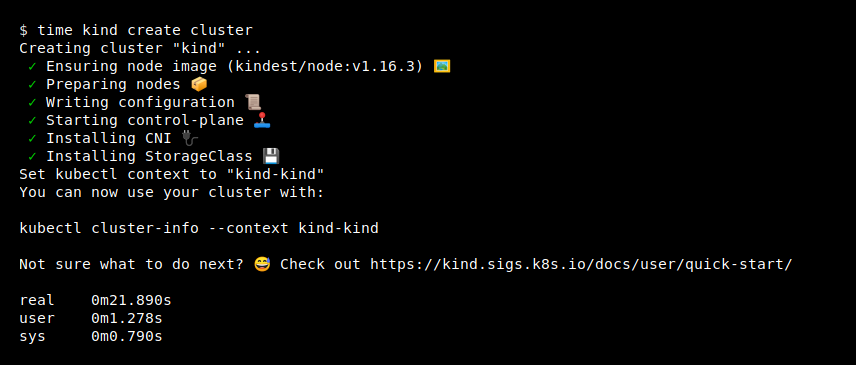
To use kind, you will need to install docker. Once you have docker running you can create a cluster with:

kind create cluster

To delete your cluster use:

kind delete cluster

To create a cluster from Kubernetes source:

kind build node-image
kind create cluster --image kindest/node:latest

Multi-node clusters and other advanced features may be configured with a config file, for more usage see the docs or run kind [command] --help

Community

Please reach out for bugs, feature requests, and other issues! The maintainers of this project are reachable via:

Current maintainers are @aojea, @BenTheElder, and @stmcginnis - feel free to reach out if you have any questions!

Pull Requests are very welcome! If you're planning a new feature, please file an issue to discuss first.

Check the issue tracker for help wanted issues if you're unsure where to start, or feel free to reach out to discuss. 🙂

See also: our own contributor guide and the Kubernetes community page.

Why kind?

Code of conduct

Participation in the Kubernetes community is governed by the Kubernetes Code of Conduct.

kind (kubernetes-sigs/kind)

Searching Database…

15.6K ·GitHub
这是什么?kind(Kubernetes IN Docker)通过把 Docker 容器当作“节点”来运行本地 Kubernetes 集群。它最初主要是为测试 Kubernetes 本身而设计的,但也很适合本地开发或 CI 场景。
kind 是我运行的一个 CLI,还是我导入的 Go 库?你以 CLI 的方式运行它。Go 包负责实现集群创建和镜像构建,kind 命令对它们做了封装,另外还有一些节点镜像,能在 Docker 容器里运行 systemd 和 Kubernetes。
怎么把第一个集群跑起来?装好 go 和一种容器运行时之后,只需要执行 go install sigs.k8s.io/[email protected] && kind create cluster 就可以了。你也可以从 releases 页面下载二进制文件,或者在 macOS 上用 Homebrew 安装;kind delete cluster 可以清理掉集群。
必须用 Docker 吗,还是其他运行时也行?Docker、Podman 和 nerdctl 都可以用。只有走 go install 这条路才需要 Go——没有它的话,可以用 make build 通过 Docker 可复现地构建 kind。
kind 能用于生产环境,还是仍处于实验阶段?README 仍称它是一个进行中的项目,距离 1.0 路线图还有一段路,但它已经是通过 CNCF 认证的合规安装器,并且官方建议在 CI 中优先使用稳定版本。
它能在 Windows 和 macOS 上运行吗,还是只支持 Linux?三个平台都支持:kind 支持 Linux、macOS 和 Windows,macOS 的安装方式里有 Homebrew 和 MacPorts 等。
我能在自己的笔记本上跑多节点或 HA 集群吗?可以——kind 支持多节点集群,包括 HA(高可用)配置。多节点等高级选项需要通过配置文件来设置,而不是命令行参数。
我能用 Kubernetes 源代码来创建集群吗?可以。把 Kubernetes 克隆到 $(go env GOPATH)/src/k8s.io/kubernetes,用它构建一个节点镜像,再用这个镜像创建集群——这对你测试自己对 Kubernetes 的改动很方便。
kind 具体是怎么构建每个节点的?每个节点就是一个 Docker 容器,kind 用 kubeadm(标准的 Kubernetes 引导工具)来引导它,在容器里运行 systemd 和各个 Kubernetes 组件;具体细节可以看设计文档。
What are similar projects?velero, slim, buildkit, containerd, kops, dive, litmus, kompose
Size
13.6 MB
Stars
15.6K
Age
8y
Commits · 90 Days