Agents that deliver finished work — reports, decks, code, replies, deployed changes — are now a
product category. Every version of it runs inside a model lab, on that lab's model, with your
company's brain on their side of the wall.
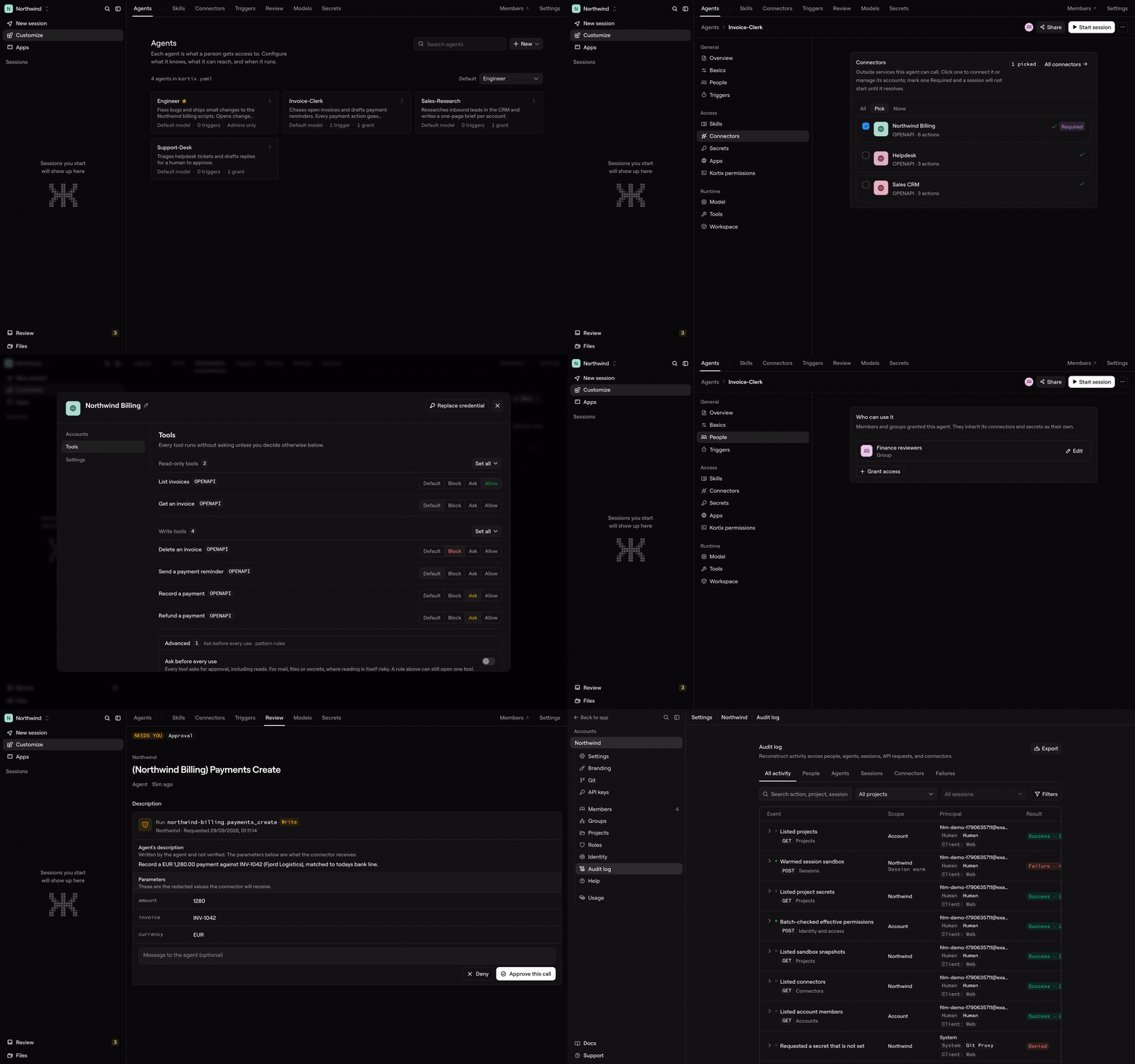
Kortix is the one you own. It's an open-source AI Management System: your agents, the
skills they share, your company memory, and every connector live in one git repo — versioned,
diffable, and shared by the whole company. The agents work on real cloud computers — an
isolated sandbox per session, on its own branch — and land what they produce through a change
request a human approves.
Any model, your own API keys, your own infrastructure or our managed cloud.
How it compares
|
Claude Cowork |
ChatGPT Work |
Kortix |
| Source |
Closed |
Closed |
Open source — read it, fork it, audit it |
| Models |
Anthropic only |
GPT-5.6 only |
Any provider, your own API keys |
| Where it runs |
Anthropic's cloud, or Bedrock / Google Cloud / Microsoft Foundry — no self-host |
OpenAI's cloud, no self-host |
Our cloud, your VPC, or your own on-prem network |
| Your configuration |
In their product |
In their product |
Files in a git repo you own |
| Access |
Paid plans (Pro, Max, Team, Enterprise) |
Paid plans, usage-metered |
Self-host free · managed cloud $40/seat/mo + usage |
Competitor rows reflect publicly documented behavior as of July 2026.
Quickstart
Three commands. Build your company like a codebase, then bring it live.
# 1 · Install the CLI
curl -fsSL https://kortix.com/install | bash

# 2 · Scaffold a project — creates kortix.yaml + your agents, skills and runtime config
kortix init

# 3 · Ship it — pushes your repo and brings the whole thing live in the cloud
kortix ship
That's the loop. From here:
kortix sessions new --prompt "Summarize this week's commits and open a change request"
kortix cr ls          # review what an agent proposes — merge to keep it
kortix chat           # talk to a session's agent from your terminal
Prefer zero setup? Sign up at kortix.com, create a project, and start a
session — nothing to install. Full command surface: CLI reference.
A company is going to be a git repository
Not as a metaphor — literally something you can clone. Inside it: your agents, the skills they've
built up, the way the work actually gets done, every fact the company has learned, and the
definition of the machines it all runs on. Versioned. Diffable. Owned outright.
project  (git repo + kortix.yaml)
   └─ session ──> cloud computer: an isolated sandbox on a branch named after the session
                     └─ the OpenCode agent works
                           └─ change request ──> you review & merge ──> main
- Every session gets its own cloud computer — a disposable, isolated Linux sandbox on its
own branch. The agent can install, run and break anything; only what it commits survives.
- Work reaches
main only through a change request you approve, so the company self-improves
one reviewed change at a time.
- Run thousands of sandboxes in parallel on the same config, each fully isolated, each feeding
work back through change requests.
You can grep your entire company.
What you manage
|
|
| Agents |
OpenCode agents with a scoped reach into tools — markdown at the baseline, with the whole OpenCode lifecycle open to you. One per role or task, installable in a click, able to rewrite themselves. |
| Skills |
Reusable know-how that encodes how your company does a job. Written once, shared into every session. |
| Memory |
A living company brain — plain files today, a system that compounds what it learns over time. |
| Connectors |
3,000+ apps in a click — plus MCP, OpenAPI, GraphQL and raw HTTP. Credentials are brokered server-side through one scoped token and never enter the machine. |
| Secrets |
Encrypted at rest, granted per agent, and injected into the sandbox at runtime. A granted secret is a real environment value inside that session. |
| Channels |
Slack today, Microsoft Teams behind an operator switch, email and voice experimental. Install the Slack app, invite the bot to a channel, and @-mention it to start a session where your team already works. |
| Triggers |
Cron and signed webhooks that spawn sessions automatically — every morning, or the instant something happens. |
Work runs three ways: on-demand (ask in chat, get it now), human-assisted (the agent works
and checks in for the calls that matter), and automated (runs on a schedule or trigger, end to
end).
Why Kortix
- Open & yours. Open source and self-hostable — your data, your models, your infrastructure. No lock-in, fully auditable.
- A workforce, not one assistant. Org-scale specialist agents that run in parallel and compound a shared memory.
- Real work, not chat. Agents run on real cloud computers and return finished deliverables — and take real actions in your tools.
- Everything is code. Versioned, reviewable, portable, governable — never a black box.
- Bring your own models. Any provider, your own keys — or the ChatGPT, Claude, or Cursor subscription you already pay for.
Self-host
Kortix runs on your own infrastructure — a laptop, a VPS, your own VPC, or your own on-prem
network. Start a production-style local instance from Docker images, then switch the CLI between
Cloud and your own hosts:
kortix self-host start
kortix hosts use selfhost  # ↔  kortix hosts use cloud
The first interactive setup asks only for the integration credentials that unlock managed git,
GitHub access, and Pipedream connectors — ports, local URLs, keys and Docker Compose defaults are
generated for you. Note that self-host start pulls its images from Docker Hub, so this is a
self-hosted install rather than a disconnected one.
Managed hosting is Kortix Cloud.
Enterprise & security
Built to survive a security review, not slip past one: one isolated machine per session · members,
groups & roles that match your org · per-resource permissions for people and agents ·
connector credentials brokered server-side, so the raw key never reaches the sandbox · a secrets
manager, encrypted at rest and injected at runtime · a full audit trail · merge that is deny-by-default
for an agent · approval gates you switch on for the actions that matter · your own VPC or on-prem
network.
Isolation is per provider: the Platinum provider runs microVMs, the default runs containers.
Ask us and we'll tell you which one you're on.
Contributing
pnpm install
pnpm dev            # web + API (scripts/dev-local.sh)
pnpm dev:web        # web app only
pnpm dev:api        # API only
pnpm dev:sandbox    # build the local sandbox image
pnpm build          # build all packages
pnpm nuke           # tear down the local Docker environment
Apps live under apps/ (web, api, cli, desktop-electron, mobile, sandbox);
documentation source is in apps/web/content/docs. The whole platform ships under one version
(root VERSION) — API, frontend, CLI and desktop release together as vX.Y.Z.
Local secrets, test lanes, and the PR gate: CONTRIBUTING.md. Issues and
pull requests are welcome.
We're building the thing that takes a company from human to AGI — and lets it keep every byte of itself on the way there.
kortix.com






 Kortix(Suna)是一个开源的 AI 管理系统,可以看作 Claude Cowork 和 ChatGPT Work 的替代品。你的智能体、它们共享的技能、公司记忆和连接器都存放在同一个 git 仓库中,整个公司都拥有这个仓库,并可以对其进行审计。