











konva README

The project's README from github.com/konvajs/konva. As one markdown file: README.md.

Konva logo

Konva

Build interactive graphics, editors, and diagrams for the web.

npm downloads npm version Financial Contributors on Open Collective Build Status Build Status CDNJS version

Konva is an open-source 2D canvas framework for interactive graphics. Its scene graph gives each shape its own events, drag behavior, transforms, animation, cache, and export controls.

Use Konva for design editors, whiteboards, diagrams, annotations, maps, and other visual tools. Konva is MIT licensed and does not require a license key.

This repository began as a GitHub fork of ericdrowell/KineticJS.

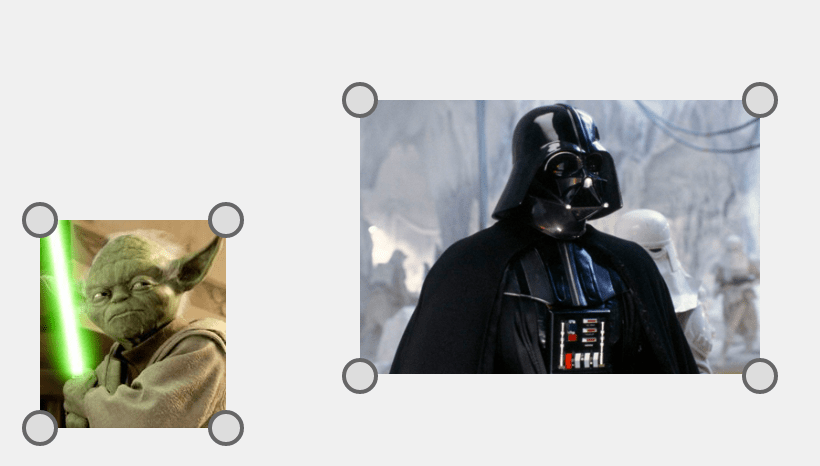
A Konva Transformer around a selected image

Framework integrations

Framework Package Documentation
React react-konva React guide
Vue vue-konva Vue guide
Svelte svelte-konva Svelte guide
Angular ng2-konva Angular guide

Quick Look

import Konva from 'konva';

const container = document.createElement('div');
document.body.appendChild(container);

const stage = new Konva.Stage({ container, width: 600, height: 400 });
const layer = new Konva.Layer();
const box = new Konva.Rect({
  x: 50, y: 50, width: 120, height: 80,
  fill: '#00a8e8', draggable: true,
});

layer.add(box);
stage.add(layer);

Building a full design editor? Polotno is a commercial design editor SDK built on Konva by the Konva maintainers. It ships templates, text editing, and export, so you integrate an editor instead of building one: npm install polotno.

Browsers support

Konva works in modern mobile and desktop browsers that support ES2018.

Debugging

The Chrome inspector simply shows the canvas element. To see the Konva objects and their details, install the konva-dev extension at https://github.com/konvajs/konva-devtool.

Loading and installing Konva

Konva supports UMD loading. So you can use all possible variants to load the framework into your project:

Load Konva via classical <script> tag from CDN:

<script src="https://unpkg.com/konva@10/konva.min.js"></script>

Install with npm:

npm install konva
// The modern way (e.g. an ES6-style import for webpack, parcel)
import Konva from 'konva';

Typescript usage

Add DOM definitions into your tsconfig.json:

{
  "compilerOptions": {
    "lib": [
        "es6",
        "dom"
    ]
  }
}

3 Minimal bundle

import Konva from 'konva/lib/Core';
// Now you have a Konva object with Stage, Layer, FastLayer, Group, Shape and some additional utils function.
// Also core currently already have support for drag&drop and animations.
// BUT there are no shapes (rect, circle, etc), no filters.

// but you can simply add anything you need:
import { Rect } from 'konva/lib/shapes/Rect';
// importing a shape will automatically inject it into Konva object

var rect1 = new Rect();
// or:
var shape = new Konva.Rect();

// for filters you can use this:
import { Blur } from 'konva/lib/filters/Blur';

4 NodeJS env

In order to run konva in nodejs environment you also need to install canvas or skia-canvas package manually for rendering backend.

# node-canvas backend
npm install konva canvas
# skia-canvas backend
npm install konva skia-canvas

Then you can use the same Konva API and all Konva demos will work just fine. You just don't need to use container attribute in your stage.

import Konva from 'konva';
import 'konva/canvas-backend'; // or import 'konva/skia-backend';

const stage = new Konva.Stage({
  width: 500,
  height: 500,
});
// then all regular Konva code will work

Backers

Konva is maintained by the team behind Polotno, a commercial design editor SDK built on Konva, which sponsors ongoing development.

https://simpleshow.com https://www.notably.ai/

Change log

See CHANGELOG.md.

Building the Konva Framework

To make a full build run npm run build. The command will compile all typescript files, combine then into one bundle and run minifier.

Testing

Konva uses Mocha for testing.

Konva is covered with hundreds of tests and well over a thousand assertions. Konva uses TDD (test driven development) which means that every new feature or bug fix is accompanied with at least one new test.

Generate documentation

Run npx gulp api which will build the documentation files and place them in the api folder.

Pull Requests

I'd be happy to review any pull requests that may better the Konva project, in particular if you have a bug fix, enhancement, or a new shape (see src/shapes for examples). Before doing so, please first make sure that all of the tests pass (npm run test).

Contributors

Financial Contributors

Become a financial contributor and help us sustain our community. [Contribute]

Individuals

Organizations

Support this project with your organization. Your logo will show up here with a link to your website. [Contribute]

konva (konvajs/konva)

Searching Database…

14.9K ·GitHub
这是什么东西?Konva.js 是一个开源的网页 2D 画布框架,用来构建可交互的图形:设计编辑器、白板、图表、标注和地图。
它是一个可以直接部署的成品编辑器,还是一个需要写代码调用的框架?是一个需要写代码调用的框架。它维护一个场景图,每个图形都自带事件、拖拽行为、变换、动画、缓存和导出控制;围绕它的应用要靠你自己搭建。
我怎么把它加到项目里?用 'npm install konva' 从 npm 安装,然后导入:import Konva from 'konva'。它也支持 UMD 加载,框架本身是用 TypeScript 写的。
它能和哪些前端框架搭配使用?官方为 React(react-konva)、Vue(vue-konva)、Svelte(svelte-konva)和 Angular(ng2-konva)提供了封装,每个都有各自的指南。
它在所有浏览器里都能运行吗?只支持现代的手机和桌面浏览器:Konva 面向支持 ES2018 的浏览器,老旧浏览器不在支持范围内。
它只能在浏览器里用,还是也能在服务器端运行?以浏览器为主,但它也能在 Node.js 中运行:安装一个 canvas 后端,比如 node-canvas('npm install konva canvas')或 skia-canvas,然后导入 'konva/canvas-backend' 或 'konva/skia-backend'。
大家用 Konva 实际做出什么东西?设计编辑器、白板、图表、标注和地图。README 里给出了一些演示,比如画布编辑器、自由绘制、图片裁剪和窗框设计器;商业设计编辑器 SDK Polotno 也是基于它构建的。
如果我只需要几个图形,有没有更轻量的构建版本?有。可以从 'konva/lib/Core' 导入 Stage、Layer、Group 和动画功能,里面不包含任何图形和滤镜,然后按需添加,比如从 'konva/lib/shapes/Rect' 导入 Rect,或从 'konva/lib/filters/Blur' 导入 Blur。
画布上的内容怎么调试?Chrome 开发者工具里只能看到一个普通的 canvas 元素。安装 konva-dev 浏览器扩展,就能看到 Konva 对象及其详细信息。
它免费商用吗?是,采用 MIT 许可证,不需要许可证密钥。它的持续开发由 Polotno 背后的团队赞助,Polotno 是一个基于 Konva 构建的商业设计编辑器 SDK。
Creator
konvajs
Size
23.3 MB
Stars
14.9K
Age
11y
Commits · 90 Days