Hermes Jev Skills
Give your agent a fast, cheap second brain for the small decisions.
Your agent burns frontier-model tokens on things that are not thinking: which model should answer this turn, which of 377 skills to load, which retrieved passages matter, which turns survive a summary, which button comes next. Those are decisions, not prose. Hand them to something that costs a fraction of a cent and answers in about 0.4 seconds, and let the expensive model do the writing.
That is what Jev is. It is TypeSafe's decision model. It never writes text. You give it a state and typed questions (pick one, score this, yes or no) and it answers with a calibrated confidence. This repo wires that into an agent's day.
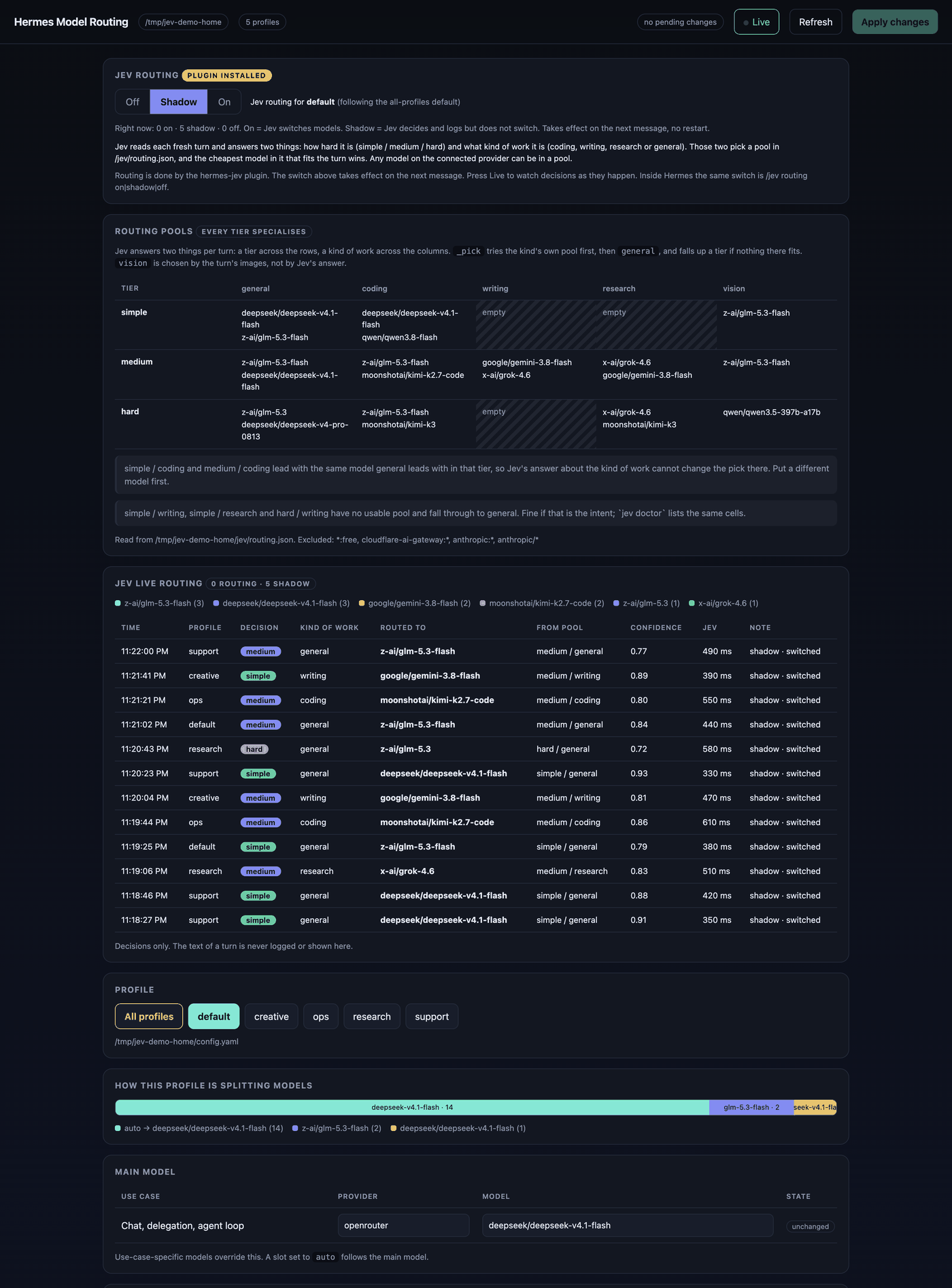
jev dashboard. The profiles, paths and decisions here are a demo home; the pools are a real working set. python3 scripts/demo_home.py builds a home where nothing is real, which is where the next one comes from. One switch for Jev routing, every pool as a tier-by-work-kind grid, and each decision as it happens (tier, work kind, model, which pool it came from, confidence, latency).
What Jev decides, and what it costs
| Skill |
What Jev decides |
Measured |
| Model routing |
Which model is good enough for this turn, from every model you can call |
~0.4 s per turn |
| Search |
Which of the results you fetched are worth opening, whether the evidence answers the question, and which of your candidate queries to run next. Jev never writes a query |
~1.9 s per round (median of five live runs, two requests: rank, then sufficiency and the pick) |
| Memory |
Which retrieved passages are worth reading, and which contain hidden instructions |
60 passages per request, up to 480 per call; an injection screen runs locally even when Jev is down |
| Handoffs |
Nothing, by default. We measured it: a handoff written from Jev's keep / summarize / drop digest recalled less than one written from the plain transcript. What ships is the whole dialogue, 1,200 words and a way back to the old session |
58.7% recall alone, 75.0% with one search, against 37.5% and 68.3% before (scorecard) |
| Choosing turns |
Which turns to keep when a transcript must be cut to a fixed size |
71 turns in 0.95 s; beat choosing by recency 11 questions to 4 |
| Skill selection |
Which installed skill this turn needs, or none |
377 skills in ~2.8 s; acknowledgements answered locally for free |
| Triage |
How urgent a message is, what kind it is, and whether a person must see it |
~0.4 s per message, $0.00006 |
| Mailbox sorting |
Which lane an inbox message belongs in — needs reply, updates, promotional, sales, spam — and whether it is worth a person's attention |
~0.44 s p50 per message, $0.00002 each |
| Computer use |
The next GUI action, from a table of actions you already judged safe. --plan splits a multi-step command once, up front |
~0.5 s per decision |
| Browser use |
The next page action, same contract |
~0.4 s per step |
Nine skills ship as plain SKILL.md files, so they are not Hermes-only. The same folder works in Claude Code, Codex, or anything that reads a skill file.
jev mail --file inbox.json             # sort a mailbox into lanes
jev mail --file inbox.json --summary   # counts per lane, what was unsure, what it cost
Try it in two commands
git clone https://github.com/kerpopule/hermes-jev-skills ~/hermes-jev-skills && python3 ~/hermes-jev-skills/install.py
jev setup-key # paste your key into the one-time page it opens, then run: jev doctor
Python 3.9 or newer, no dependencies. Got it as a zip? Unzip it anywhere and run python3 install.py from that folder. Or point your agent at this repo and say "install Hermes Jev Skills": it will follow AGENTS.md.
The installer finds Hermes, Claude Code and Codex on the machine and installs for each one it finds. python3 install.py --check shows exactly what it would do without changing anything. --uninstall reverses it.
Not sure yet? Run jev models suggest --write to draft routing pools from price bands, then /jev routing shadow for a day. Shadow mode decides and logs without switching anything, so a day of decisions costs almost nothing and risks nothing. Turn it on when the log looks right.
On Hermes
Built for Hermes. The dashboard has its own notes in router-dashboard/README.md.
Start in shadow mode. It is the honest way to see what Jev would do before it does anything.
/jev                         status
/jev routing shadow          decide and log, do not switch (start here)
/jev routing on              switch models per turn
/jev skills on               suggest the right skill per turn
/jev notice on               show "[Jev] hard · coding → kimi-k3 · confidence 0.92" on routed replies
/jev routing on all          make it the default for every profile (a profile's own setting still wins)
The agent gets five tools: jev_memory_filter, jev_compact_select, jev_choose_action, jev_supervise, jev_escalate.
The hermes-jev plugin uses only public plugin seams (pre_llm_call, the llm_request middleware, tools, a slash command), so hermes update does not break it and nothing in Hermes core is patched.
A plugin can swap the model, not the provider connection. On OpenRouter that still covers every vendor. If you run /model yourself, your choice wins.
Every model you have
jev models list              # everything this machine can call: price, context, vision, reasoning
jev models providers         # which providers you hold a key or login for
jev models suggest --write   # first-draft pools from price bands; then edit to taste
The catalog is models.dev, filtered to providers whose API-key name is set in your environment or Hermes .env, or that Hermes holds a login for. Only key names are read. Pools live in ~/.hermes/jev/routing.json (the default for every profile); ~/.hermes/profiles/<name>/jev/routing.json overrides it for one profile. Details in skills/jev-model-routing.
Your API key never touches the agent
jev setup-key opens a one-time page served only by your own computer. You paste your TypeSafe key there. It goes straight into the OS secret store (macOS Keychain, or secret-tool on Linux, or a 0600 file as a last resort) and, on a Hermes machine, into each profile's .env. The agent that ran the command sees one line: stored, verified, yes or no. Never the key, not even a prefix.
The page lives on an unguessable one-time URL, refuses requests with a foreign Host header (DNS rebinding), sends no referrer, logs nothing, and shuts down after one use or ten minutes. On a headless box, run jev setup-key --tty yourself for a hidden prompt.
Do not paste your key into a chat. If you already did, make a new one.
What leaves your machine
Jev is a cloud API, so this is spelled out rather than implied:
- Routing: the user's turn, redacted (emails, phones, tokens, long hex masked), capped at 2,500 characters (
ask_chars), read as the opening and, mostly, the end. Never history, tool results, files or memory. Turns that look like they hold a secret, and any profile you list in private_profiles, send only coarse features: length, whether code is present, whether risk words appear.
- Memory: the query and up to 900 characters per passage, redacted. Your store's ids, paths and sources are replaced with
P0, P1… and never sent. A passage that looks like a credential is not sent at all.
- Choosing turns (
jev compact-select, or handoffs with HANDOFF_JEV=1): the first and last 350 characters of each turn, redacted. Turns that look sensitive are skipped. A default handoff sends Jev nothing.
- Skills: the turn, redacted, plus skill names and descriptions.
- Search (
jev search): the date, the question, the queries already tried, and up to 900 characters of each shortlisted result (title, URL, snippet), redacted. Result ids stay local: Jev sees P0, P1… A result that looks like a credential is not sent, and neither is one carrying hidden instructions. A question that looks sensitive is not sent at all.
- Mailbox sorting (
jev mail): the subject and up to 2,500 characters of the body, redacted; the sender's domain (never the mailbox); a local class read off the address alone (automated for a mailbox that cannot receive a reply, role for a shared one a team reads, list, or person); the message's timestamp, and only the timestamp — a Received: header is reduced to the date it carries, because the rest of it is the recipient's address and the internal IP of every hop; whether the mail carries a real List-Unsubscribe header, and separately whether the body merely mentions unsubscribing; and whether you have replied in the thread. Mail is decoded before it is screened — quoted-printable, percent-encoding, HTML entities and base64 runs — because a newsletter footer carries your own address percent-encoded in the unsubscribe link and base64'd in the tracking link, and a plain-text redactor sees neither. Query strings are stripped from URLs for the same reason. A message that looks like it holds a secret is not sent at all, and the check runs on the decoded text, so a base64 MIME body cannot carry a key past it. What redaction does not remove: a person's display name (Jane Vale <[email]>) is sent as written. The body is also screened for text aimed at an agent; a hit is flagged on the result and never filed away, because one sentence in a body would otherwise be the most useful thing an attacker could reach here.
- Computer and browser use: the goal, short element labels, and your action descriptions. Never screenshots, page text or field values. A goal or label that looks sensitive is refused before sending.
Logs hold decisions only (tier, model, confidence, latency). Never prompt text.
One thing to be plain about: in the default redacted-text mode, routing sends the turn itself, redacted. The plugin also tells your agent never to send Jev customer data — and on an automatically routed turn the agent has no say in that, because routing happens before it acts. If a profile handles data that must not leave the machine, put it in private_profiles, which sends only coarse features (length, code present, risk words) and never the text.
Everything fails open
No key, timeout, rate limit, malformed reply, low confidence: routing keeps your current model, memory returns the original list, compaction drops nothing, skill selection suggests nothing, search returns the screened head of your list with the decision marked unknown, and computer use returns reobserve. A Jev outage costs you at most the time budget (2.5 s for routing) and never blocks a turn.
Safety rails that do not depend on Jev being right:
- Risk words (production, delete, migration, security, payment, legal…) never route to the cheapest tier.
- A large context never switches to a cheaper model mid-session.
- A transcript turn is only dropped on a confident answer.
- Jev can only ever return an action id you put in the table.
Layout
jevkit/            the library and the `jev` command (stdlib only)
skills/            nine SKILL.md skills, agent-agnostic
hermes/plugin/     the Hermes plugin
router-dashboard/  the model routing page (`jev dashboard`)
install.py         installer / uninstaller
tests/             offline tests, every Jev reply faked
scripts/           the release gate, the demo home, and a nightly report on open PRs and issues
evals/             measurements you can rerun on your own sessions
docs/              integration notes and hard-won operational lessons
| Doc |
Read it when |
| turning-a-jev-feature-on.md |
Before you enable anything. Shadow mode, silent defaults, why a quiet log proves nothing, and bounding by the clock rather than the count. |
| using-jev-in-a-hermes-fleet.md |
Running Jev across more than one agent: the never-bypass rule, why fail-open is not a bypass, which decisions Jev owns, the thresholds that must not drift, and where a fleet's own facts belong. |
| writing-a-jev-question.md |
Before you write a state or a question. The measured finding that one sentence about what is required versus merely preferred doubled accuracy, and how to phrase each of the three shapes. |
| measuring-a-router.md |
Replaying routing against your own traffic before you trust the savings. |
| search-loop.md |
Running a search as a loop: which results to open, when to stop, and how to write candidate queries so Jev can pick one. |
| wiring-triage-into-a-live-pipeline.md |
Adding classification to something already carrying real traffic. |
| hermes-compaction.md |
Handoffs on Hermes: what we measured, what ships, and the two search calls that make a handoff enough. |
| response-caches.md |
Before you put a response cache in front of an agent. Why it does little for a Jev loop, and the plan cache we built instead. |
| evals/compaction |
Measuring handoffs on your own sessions. |
The tests are offline and every Jev reply is faked, so they are safe to run anywhere:
python3 -m unittest discover -s tests
License
MIT (LICENSE). Work ported or borrowed from other MIT projects is listed in NOTICE, with their copyright notices: fazlerocks/jevmail (the mailbox lanes), savka777/jev-use (plan-once) and rohanarun/computer-use-cache (two cache ideas). The optional browser runner wraps browser-use/jev-ultrafast (MIT), which is not bundled.
Jev and TypeSafe are products of TypeSafe AI; this project is independent.
Contributions are welcome and keep their author in the git history. People whose work is in a release are named in CHANGELOG.md.

 Hermes Jev Skills даёт ИИ-агенту дешёвый и быстрый «второй мозг» для мелких рутинных решений (маршрутизация моделей, фильтрация памяти, выбор скиллов, сжатие ходов, использование компьютера/браузера), чтобы дорогая фронтирная модель занималась только написанием текста. Решениями занимается Jev — откалиброванная модель решений от TypeSafe.