Webwright
Turn Your Coding Models to Be State-of-the-art Browser Agents




Webwright gives LLM a terminal where it can launch multiple browser sessions to inspect the page and complete a web task. It captures and inspects page screenshots/states only when needed. It enforces each web task to be completed end-to-end within a re-runnable Python script, i.e. your web agent browsing history is a single code file. No multi-agent system, no graph engine, no plugin layer, no hidden orchestration — just a terminal, a browser, and a model.
Already got your favorite agents, and wonder how to make Claude Code, Codex, Hermes, OpenClaw more capable in browser tasks? Consider adding Webwright plugin/skills!
📰 News
- 2026-07-21 — Skill Factory: every solve leaves a script behind, distilled into reusable, verified, parameterized code skills that rerun standalone with no model (~40 s, zero tokens). On WebArena, reuse lifts held-out accuracy 55% → 70% (+15 pp). See Skill Factory.
- 2026-05-11 — Support Task2UI mode: Webwright completes the task and renders task results into an HTML-based web app you can easily view and reuse.
- 2026-05-06 — Codex and Claude Code plugin manifests added; install via
/plugin install webwright@webwright. OpenClaw and Hermes Agent integrations shipped; the same skills/webwright/ folder now loads across Claude Code, Codex, OpenClaw, and Hermes.
- 2026-05-04 — Initial public release: ~1.5k LoC, OpenAI / Anthropic / OpenRouter backends, Playwright environment.
💡 Motivation: Beyond Step-by-Step Web Interaction in a Stateful Browser
Most web agents today treat the browser session itself as the workspace: at each step the model receives the current page state and predicts a single next operation — a click, a type, a DOM selector, or a short tool call. Whatever the format, the agent is locked into predicting one web action at a time inside a predefined interaction loop. That harness was useful when LLMs were weaker. As models get stronger at writing and debugging code, the same harness becomes a bottleneck.
Webwright takes a different stance: separate the agent from the browser, and treat the browser as something the agent can launch, inspect, and discard while developing a program. The persistent artifact is not the browser session — it's the code and logs in the local workspace.
- 🧱 Robust, reusable interaction with web environments — instead of fragile pixel-level actions, a coding agent with a terminal queries elements, waits for conditions, and handles dynamic behaviors like lazy loading or re-rendering. The resulting scripts can be rerun, adapted, and shared across tasks rather than rediscovered from scratch.
- ⚡ Efficient composition of complex workflows — multi-step interactions like selecting a date or filling a form become a compact program. Loops, functions, and abstractions let the agent generalize across similar tasks (e.g. different dates) without re-predicting the same low-level sequences. Fewer interaction rounds, faster execution, less error accumulation on long horizons.
- 🧪 Workspace-as-state, not browser-as-state — the agent can write exploratory scripts, spawn fresh browser sessions, and decide for itself when to capture screenshots and inspect failures, much like a human engineer iterating on an RPA script.
- 🪄 Surprisingly effective despite being minimal — this stripped-down setup turns out to handle complex and especially long-horizon web tasks well (see Performance).
🌟 Why Webwright
Most web agent frameworks bury the actual agent loop under layers of abstractions. Webwright takes the opposite stance:
- 🪶 Lightweight by design — core agent loop in a single ~450-line file, Playwright environment in ~570 lines, CLI in ~150 lines.
- 🧩 Pluggable model backends — OpenAI, Anthropic, and OpenRouter, each ~150–200 lines.
- 🔍 Zero hidden frameworks — just
httpx, pydantic, playwright, and typer.
- 🔁 Flat prompt → observe → execute script loop — readable end-to-end, easy to debug, easy to fork.
- 🧪 Run-artifact first — every run writes trajectories and screenshots to disk for inspection.
If you want a minimal, easy-to-debug starting point for browser-using agents instead of another heavyweight platform, this is it.
🆚 How Webwright Differs From Other Browser-Agent Repos
How they differ at the architectural level:
|
Stagehand (Browserbase) |
agent-browser (Vercel) |
browser-use |
Webwright |
| Paradigm |
Hybrid: code + NL primitives (act / extract / agent) |
CLI tool that another agent (Claude Code, Codex, etc.) calls |
Autonomous LLM agent loop over DOM/AX snapshots |
Coding agent with a terminal; browser is just an environment it spawns |
| Action space |
Playwright code, or NL → LLM-translated Playwright |
Discrete subcommands (open, click @e2, snapshot, eval) |
Indexed click/type actions selected by the LLM |
Free-form Python (writes Playwright scripts itself) |
| What is "state"? |
The browser session |
The browser session (held by daemon across CLI calls) |
The browser session |
The local workspace — code, screenshots, logs. Browser is disposable. |
| Loop shape |
Imperative; agent() does multi-step when needed |
One CLI invocation per micro-step |
observe → predict next action → execute → repeat |
write code → execute → inspect screenshots → repair (code-as-action) |
🎥 Demo
https://github.com/user-attachments/assets/4ed94cd5-11be-4daa-b2d7-1260a803baca
State-of-the-art on two real-website benchmarks with a 100-step budget — see the blog post for full details.
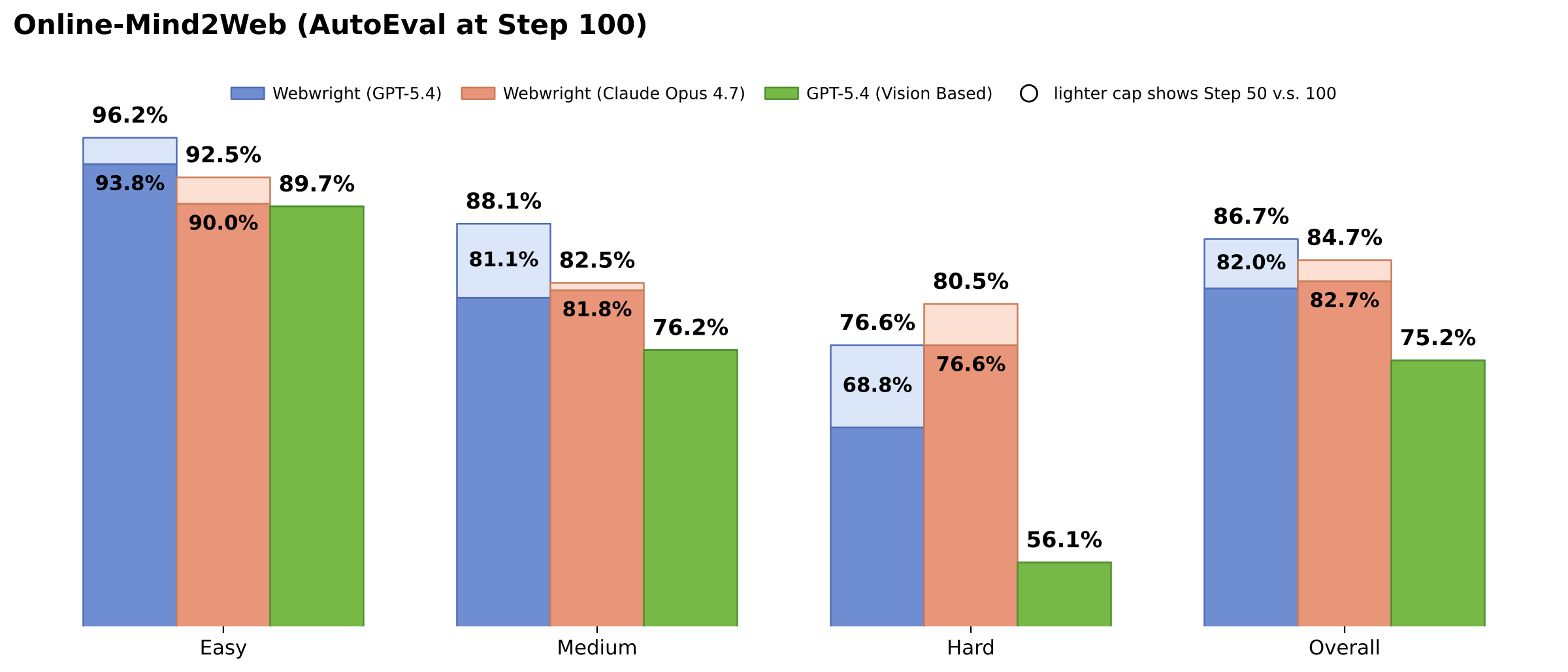
- 🏆 Online-Mind2Web (300 tasks): 86.7% with GPT-5.4 — highest among open-sourced harnesses in the AutoEval category. Claude Opus 4.7 reaches 84.7%, and is stronger on the hard split (80.5% vs. 76.6% for GPT-5.4 at N=100).
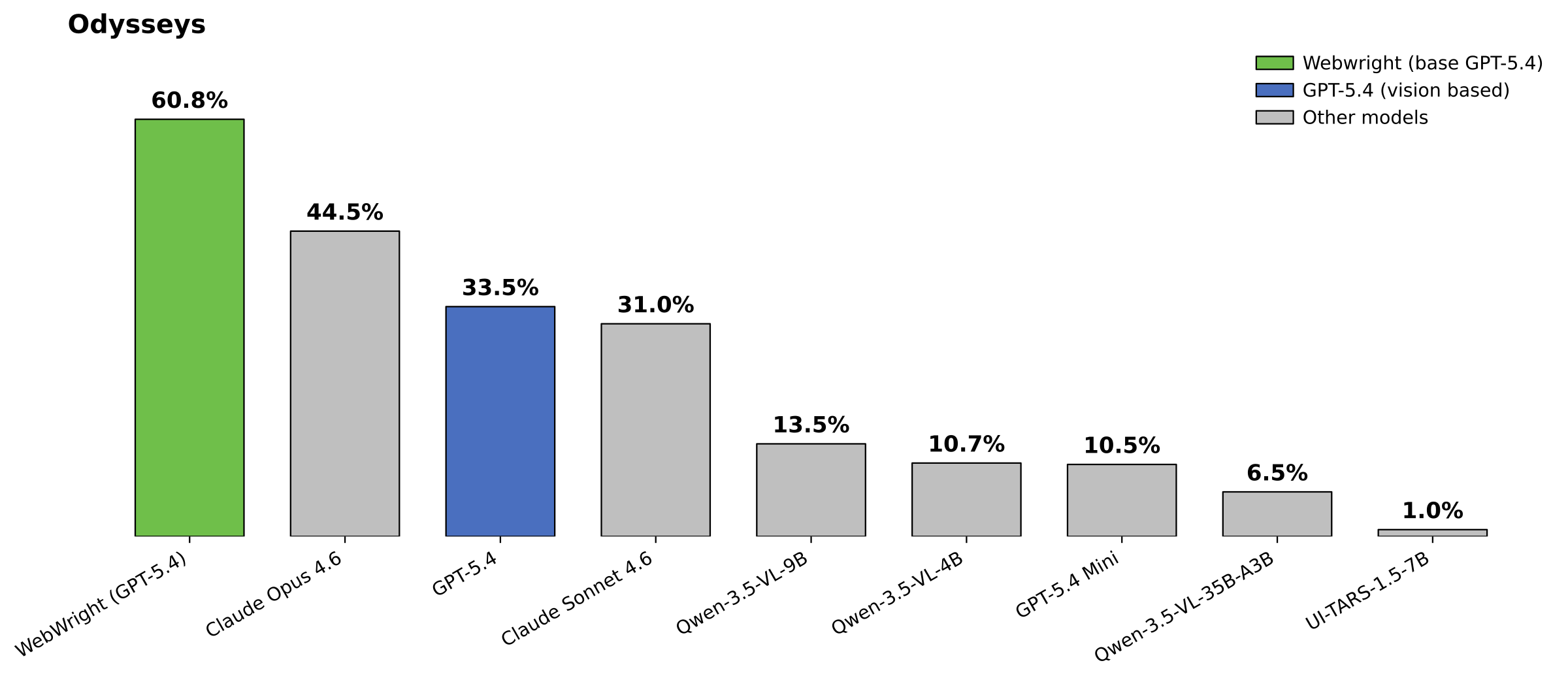
- 🚀 Odysseys (200 long-horizon tasks): 60.1% with GPT-5.4 (avg. 76.1 steps) — +15.6 points over the prior SOTA (Opus 4.6 at 44.5%, using vision based approach and persistent browser) and +26.6 points over base GPT-5.4 (33.5% using xy-coordinate prediction and persistent browser).
- 🧠 Code-as-action beats coordinate prediction: Webwright substantially outperforms a reproduced GPT-5.4 screenshot+xy-coordinate baseline across all difficulty splits.
- 🧰 Small models + reusable tools: generated scripts can be packaged as parameterized CLI tools — even Qwen-3.5-9B completes tasks well on Online-Mind2Web sites with 5+ tools available.
🗺️ Project Map
webwright/
├── pyproject.toml           # package: webwright
├── src/webwright/
│   ├── run/cli.py           # CLI entrypoint (`webwright`)
│   ├── agents/default.py    # core agent loop
│   ├── environments/        # Playwright browser workspace
│   ├── tools/               # image_qa, self_reflection
│   ├── models/              # openai_model, anthropic_model, base
│   ├── config/              # base.yaml, model_openai.yaml, model_claude.yaml
│   └── utils/
├── assets/
│   └── task_showcase/       # tiny Flask dashboard for repeatable runs
│       ├── app.py
│       ├── templates/       # dashboard.html, task.html
│       └── tasks/<short_id>/ # task.json + report.json per task
├── tests/
└── outputs/                 # run artifacts (trajectories, screenshots)
📰 Task Showcase (repeatable runs as a dashboard)
A tiny Flask app under assets/task_showcase/ consolidates
Webwright runs for repeatable odyssey tasks (deals, inventory, listings,
job boards, weather, etc.) into a single dashboard. Each task ships only two
files — task.json (metadata) and report.json (curated, structured output:
sources + result sections like tables, lists, summaries) — and the templates
render them generically, so adding a new task is just dropping a new folder
in assets/task_showcase/tasks/.
pip install flask
python assets/task_showcase/app.py    # http://127.0.0.1:5005
To have Webwright produce a renderer-ready task folder at runtime, stack the
Task Showcase overlay:
python -m webwright.run.cli \
    -c base.yaml -c model_openai.yaml -c task_showcase.yaml \
    -t "<repeatable web task>" \
    --task-id my_repeatable_task \
    -o outputs/default
Note: report.json is only generated when -c task_showcase.yaml is
included. A plain base.yaml run produces trajectory.json and debug
artifacts but no report.json.
The run writes task_showcase/tasks/<short_id>/task.json and report.json
inside the output workspace. Render those generated files without copying them
back into the repo:
python assets/task_showcase/app.py \
    --tasks-dir outputs/default/<run>/task_showcase/tasks
🧠 Skill Factory (turn solved tasks into runnable code skills)
Most agent skills are context the model reads. Ours are programs.
webwright.skill_factory distills the script every solve leaves
behind into a growing library of reusable, verified, parameterized skills — code you can run
without a model and compose into the next task instead of re-exploring the site. Plugs in with
no change to the agent loop:
- Reuse — before a solve starts, the library is checked out of the agent loop (
recommend):
route either runs a matching skill directly (no model) or injects it into the prompt as a prior
({verdict: run|adapt|skip, skill_id, source_path}); the agent reuses the hint without ever
querying the library itself.
- Grow — afterwards,
python -m webwright.skill_factory learn outputs/ --library ./library
groups solves of the same template and distills one parameterized skill (build does solve→learn
in one shot; update is manual-manifest mode).
Verified twice before it lands: an input gate keeps a wrong solve from ever feeding a skill, and
the distilled skill must replay its own answers standalone — no model — so a broken skill can't
poison the library. New solves widen a skill in place, regression-replayed so old coverage can't break.
Once learned, a skill runs standalone in ~40 s with zero tokens. On WebArena (10 retrieve-type
templates, 3 self-hosted sites, gpt-5.4) reuse lifts held-out accuracy 55% → 70% (+15 pp) while
cutting steps. See src/webwright/skill_factory/README.md.
🚀 Quick Start
Prerequisites
- Python 3.10+
- Chromium installed through Playwright
- An API key for your chosen backend (OpenAI, Anthropic, or OpenRouter)
Install
pip install -e .
playwright install chromium
Run
Export credentials for the configured backend (for example, OPENAI_API_KEY
with model_openai.yaml or ANTHROPIC_API_KEY with model_claude.yaml). The
image_qa and self_reflection tools use the same configured model by default,
so an Anthropic run does not require an OpenAI key. Then:
python -m webwright.run.cli \
    -c base.yaml -c model_openai.yaml \
    -t "Search for flights from SEA to JFK on 2026-08-15 to 2026-08-20" \
    --start-url https://www.google.com/flights \
    --task-id demo_openai \
    -o outputs/default
🚩 Flags
| Flag |
Description |
-c |
Config file(s) from src/webwright/config/ (stackable). |
-t |
Task instruction. |
--start-url |
Initial page. |
--task-id |
Output subfolder name. |
-o |
Output directory. |
🔌 Use as a Plugin
Webwright ships plugin manifests for both Claude Code (.claude-plugin/plugin.json) and OpenAI Codex (.codex-plugin/plugin.json), with the shared skill at skills/webwright/ and slash commands at skills/webwright/commands/. The host agent drives the Webwright loop natively — no extra LLM API key or cost beyond your host subscription. Hosts that read PNG screenshots natively skip the image_qa / self_reflection tools.
Common runtime deps (install once after either path):
pip install -e .
playwright install chromium
Claude Code
Install
Install through the bundled marketplace inside Claude Code:
# 1. Add this repo as a Claude Code plugin marketplace
/plugin marketplace add microsoft/Webwright

# 2. Install the plugin from that marketplace
/plugin install webwright@webwright
Prefer a local checkout? Point the marketplace command at the cloned repo instead:
/plugin marketplace add /absolute/path/to/Webwright
/plugin install webwright@webwright
Use
Start a new Claude Code session after installing — plugins are loaded at session start and won't appear until you restart.
You can either ask Claude Code in plain English (the skill auto-activates from its description), or use one of the slash commands:
/webwright:run search Google Flights for flights from SEA to JFK on 2026-08-15 to 2026-08-20
/webwright:craft search a ticket on Google Flights from LAX to SFO depart June 7 return June 14
/webwright:run (or any plain prompt) produces a one-shot final_script.py for the literal task values./webwright:craft produces a reusable CLI tool: final_script.py becomes one parameterized function with a Google-style Args: docstring and an argparse wrapper whose flags default to the concrete task values, so you can rerun it later with different arguments — e.g. python final_script.py --origin JFK --destination LAX --depart-date 2026-07-01.
In both modes Claude Code scaffolds a workspace with plan.md, runs instrumented Playwright scripts under final_runs/run_<id>/, and visually self-verifies each critical point against the saved screenshots.
OpenAI Codex
Install
Codex reads Claude-style marketplaces, so the same repo works as a Codex plugin marketplace. From the Codex CLI:
# 1. Add this repo as a Codex plugin marketplace
codex plugin marketplace add microsoft/Webwright

# 2. Open the plugin browser and install Webwright
codex
/plugins
Prefer a local checkout?
codex plugin marketplace add /absolute/path/to/Webwright
Then restart Codex so the new marketplace and plugin are picked up.
Use
In a new Codex thread, either ask in plain English (the skill auto-activates from its description) or invoke the bundled skill explicitly with @webwright:
@webwright search Google Flights for flights from SEA to JFK on 2026-08-15 to 2026-08-20
Codex scaffolds a workspace with plan.md, runs instrumented Playwright scripts under final_runs/run_<id>/, and visually self-verifies each critical point against the saved screenshots.
To turn the plugin off without uninstalling, set its entry in ~/.codex/config.toml to enabled = false and restart Codex.
🦞 OpenClaw
Install
Install directly from a local checkout (path, archive, npm spec, git repo, or clawhub: spec all work):
openclaw plugins install /absolute/path/to/Webwright
openclaw gateway restart   # reload so the plugin and skill are picked up
Verify:
openclaw plugins list | grep webwright
openclaw skills  list | grep webwright   # should show "✓ ready"
Use
The webwright skill is now available to any OpenClaw agent surface (CLI, Telegram, etc.) — invoke it by asking the agent in natural language, or via the slash commands shipped under skills/webwright/commands/, e.g. /webwright run <task>.
To uninstall: openclaw plugins uninstall webwright.
Hermes Agent
Install
Hermes Agent is a skills-compatible client, so the same skills/webwright/ folder loads as a Hermes skill. Symlink it into your Hermes user-skills directory:
mkdir -p ~/.hermes/skills
ln -sfn /absolute/path/to/Webwright/skills/webwright ~/.hermes/skills/webwright
No Hermes-specific manifest is needed; only SKILL.md is loaded.
Use
Start Hermes (hermes) and ask it to drive a web task in natural language — the skill auto-activates from its description. You can also invoke it explicitly with /webwright.
Note: the named subcommands shipped under skills/webwright/commands/ (/webwright:run, /webwright:craft) are a Claude Code / Codex convention and are inert in Hermes; the skill itself still works end-to-end.
📃 Trajectory Comparison & Viewer
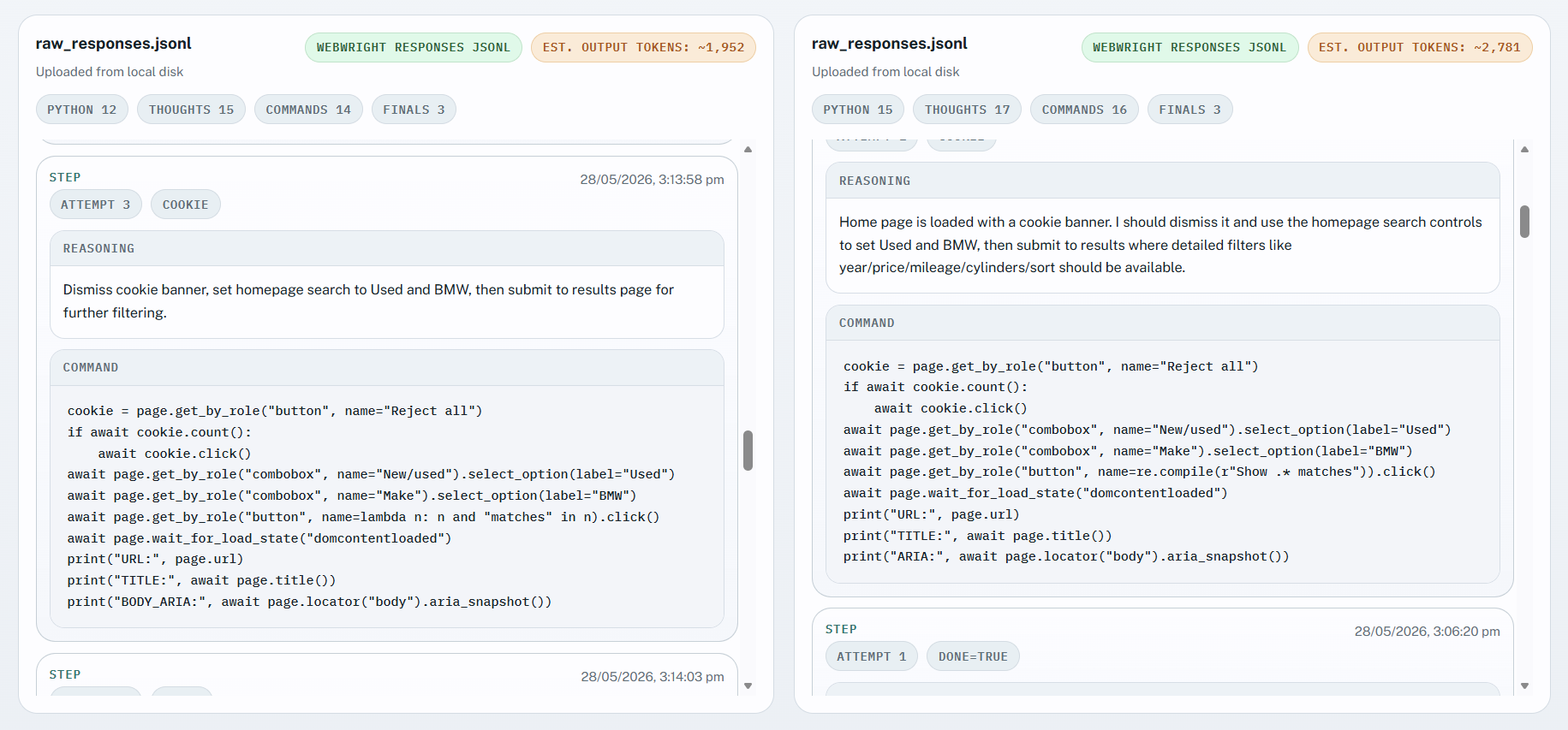
You can run the same tasks using the Webwright harness and its Codex / GitHub Copilot skill variant, and see how token usage and trajectories stack up between different harnesses. The trajectory viewer supports Codex, GitHub Copilot and Webwright harness traces.
How to use
cd assets/compare_trajectory/
python3 -m http.server
Open the webpage in your browser and upload the Webwright raw_responses.jsonl and attach trajectory.json to view. Then on the other side you can upload your Codex or GitHub Copilot trace.
Obtaining Codex traces:
ls ~/.codex/sessions/2026/MONTH/DAY/SESS

 Webwright is a lightweight coding-agent framework that gives an LLM a terminal to launch and inspect browser sessions, completing web tasks end-to-end as a single re-runnable Python script instead of a step-by-step click/type loop.