PersistentWindows
This project addresses a long-standing issue in Windows 7, 10, and 11, where windows get repositioned after events such as the system waking up, external monitor connections or disconnections, changes in monitor resolution (e.g., exiting full-screen gaming), or during RDP reconnections. The code was forked from ninjacrab.com/persistent-windows.
Original Description
What is PersistentWindows?
A poorly named utility that persists window positions and size when the monitor display count/resolution adjusts
and restores back to its previous settings.
For those of you with multi-monitors running on a mixture of DisplayPort and any other connection, you can run
this tool and not have to worry about re-arranging when all is back to normal.
Key Features
- Auto restore: Keeps track of window position changes, and automatically restores the desktop layout, including the taskbar position, to the last matching monitor setup.
- Supports remote desktop sessions with multiple display configurations.
- Instantly restore new window to it's last closing position, saving the effort of app developers to maintain window position history.
- Capture windows to disk: manually saves desktop layout capture to hard drive in liteDB format, so that closed windows can be restored to corresponding virtual desktop after PC reboot.
- Capture snapshot: manually saves desktop layout to ram. The window Z-order is preserved in the snapshot. Up to 36 snapshots ([0-9a-z]) can be taken for each display configuration.
- Automatically persists the location history of all windows (alive and closed) to hard drive in xml format, so that manual-restore-point (aka snapshot) and auto-restore-point will continue to function smoothly upon app upgrade/restart, even after PC reboot.
- Webpage commander to improve the efficiency of web browsing for all major web browsers using one-letter commands like in vi editor.
- Efficient window switching between foreground and background dual positions.
- Pause/resume auto restore.
- Automatic upgrade support.
- For more Features and Commands, take a look at the Quick Help page
Installation
Method 1.
- Run "winget install PersistentWindows" from command window, the actual installation path is c:\users\[user]\AppData\Local\Microsoft\WinGet\Packages\kangyu-california.PersistentWindows...., and start the program by typing "PersistentWindows" in a NEW command window.
Method 2.
- Download the latest PersistentWindows*.zip file from the Releases page
- Unzip the file into any directory.
- You can remove the version number from the folder name, because when the program is updated to newer versions, the folder remains the same
Note: the program can be run from any directory, but the program saves its data in
C:\Users\[User]\AppData\Local\PersistentWindows
For PersistentWindows to be able to restore windows with elevated privileges (for tools like Task Manager or Event Viewer), it needs to be run with Administrator privileges.
To set up PersistentWindows to automatically start at user login:
This can be done by creating a task in Task Scheduler, or by adding a shortcut to the Startup Folder (shell:startup).
Choose one of the three methods:
Method 1. Task Scheduler (Windows 10/11)
- (Optional) Edit the second line of auto_start_pw_aux.ps1 to customize the command options passed to PersistentWindows.exe, for example you may append the following option to disable advanced features.
+ " -basic_features".
- Goto the installation dir, run auto_start_pw.bat file (preferably as administrator) to create a task in the Task Scheduler.

Method 2. Task Scheduler (Windows 7/10/11)
- Create a pw.bat file in the installation folder with following content
start "" /B "%~dp0PersistentWindows.exe" -splash=0
- Launch a DOS window (cmd.exe) with admin privileges, goto (cd) the PW installation folder, and run the following command
schtasks /create /sc onlogon /tn "StartPersistentWindows" /f /tr "'%~dp0pw.bat'" /rl HIGHEST
REM Override High DPI Scaling
REG ADD "HKCU\Software\Microsoft\Windows NT\CurrentVersion\AppCompatFlags\Layers" /v "%~dp0PersistentWindows.exe" /t REG_SZ /d "~ HIGHDPIAWARE" /f
Method 3. Startup Folder (Windows 7/10/11)
Uninstall
Step 1. run uninstall.bat as admin to delete private appdata folder created by PersistentWindows and remove auto start task
Step 2. if installed using winget, run "winget uninstall PersistentWindows", otherwise remove the directory containing PersistentWindows.exe
Usage Instructions
Run PersistentWindows.exe (preferably as administrator). Note that this app has no main window and its icon is hidden in the System Tray area on the taskbar by default.
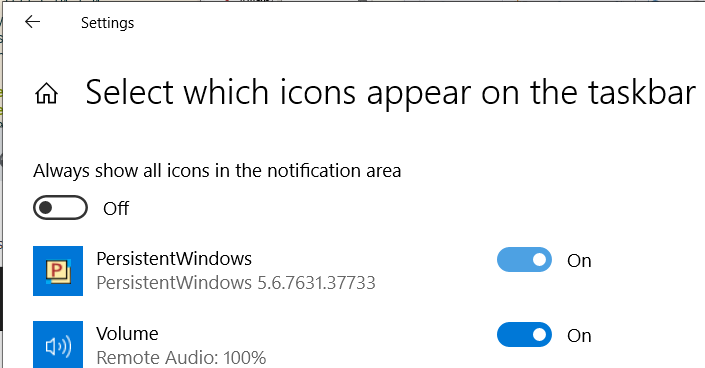
To have the icon always appear on the taskbar, flip on the PersistentWindows item in the taskbar settings.
Right click the PersistentWindows icon to show the menu, where the capture and restore actions can be selected.

To restore the taskbar position, avoid moving mouse when the icon turns red.
When software upgrades are available, a notice will show up in the menu.
Privacy Statement
- PersistentWindows performs its duty by collecting following information:
- window position
- window size
- window Z-order
- window caption text
- window class name
- process id and command line of the window
- Ctrl, Alt, Shift key strokes when clicking or moving a window
- Ctrl, Alt, Shift key strokes when selecting PersistentWindows menu items
- key-stroke events when interacting with the PersistentWindows icon on taskbar
- key-stroke events (only as webpage command shortcut), mouse click/scroll events and cursor position/shape in web browser when webpage commander window is activated (Alt + W)
- The history of keyboard/mouse events is typically erased 1 second after received
- Window information history is kept in ram or on the hard drive in LiteDB file format, waiting to be recalled by auto/manual restore
- PersistentWindows periodically checks the github repository for software version upgrades. This can be disabled in the options menu.
Known Issues
If PersistentWindows is not invoked by auto-start task, it may malfunction on fractionally scaled display (such as 125%, 150% etc), it is strongly suggested to override the high DPI scaling property of PersistentWindows.exe to "Application" via Properties->Compatibility->Change high DPI settings dialog from explorer, user needs to capture windows to disk immediately after relaunching PW w/ the new DPI setting.

PersistentWindows can get stuck in a "busy" state (with a red icon in the System Tray) during a restore if one of the windows becomes unresponsive. You may find out the culprit window in Task Manager using "Analyze wait chain". The unresponsive app might need an immediate hot-upgrade, or need to be killed to let PersistentWindows proceed


Tips To Digest Before Reporting A Bug or Enhancement Request
PersistentWindows provides a rich set of command line options for customization, check out Quick Help page for a complete list of available options. how to customize command line options
The window Z-order can be restored in addition to the two-dimentional layout. This feature is enabled for manual snapshot restore only. To turn on Z-order fix for automatic restore, run PersistentWindows with -fix_zorder=1
To help me diagnose a bug, please run Event Viewer, locate the "Windows Logs" -> "Application" section, then search for Event ID 9990 and 9999, and copy-paste the content of these events to the new issue report, as shown in the following example

If there are too many events to report, click "Filter current log" from the Action panel in Event Viewer, choose all 9990 and 9999 events in last hour, then click "Save Filtered Log File As", select "Text (*.txt)" format, and attach the saved events file to the bug report


 PersistentWindows 是一个 Windows 桌面实用工具,会记住你的窗口位置,并在从睡眠唤醒、显示器连接/断开、分辨率变化或 RDP 重连等事件之后自动恢复那套布局。