





Что это такое?
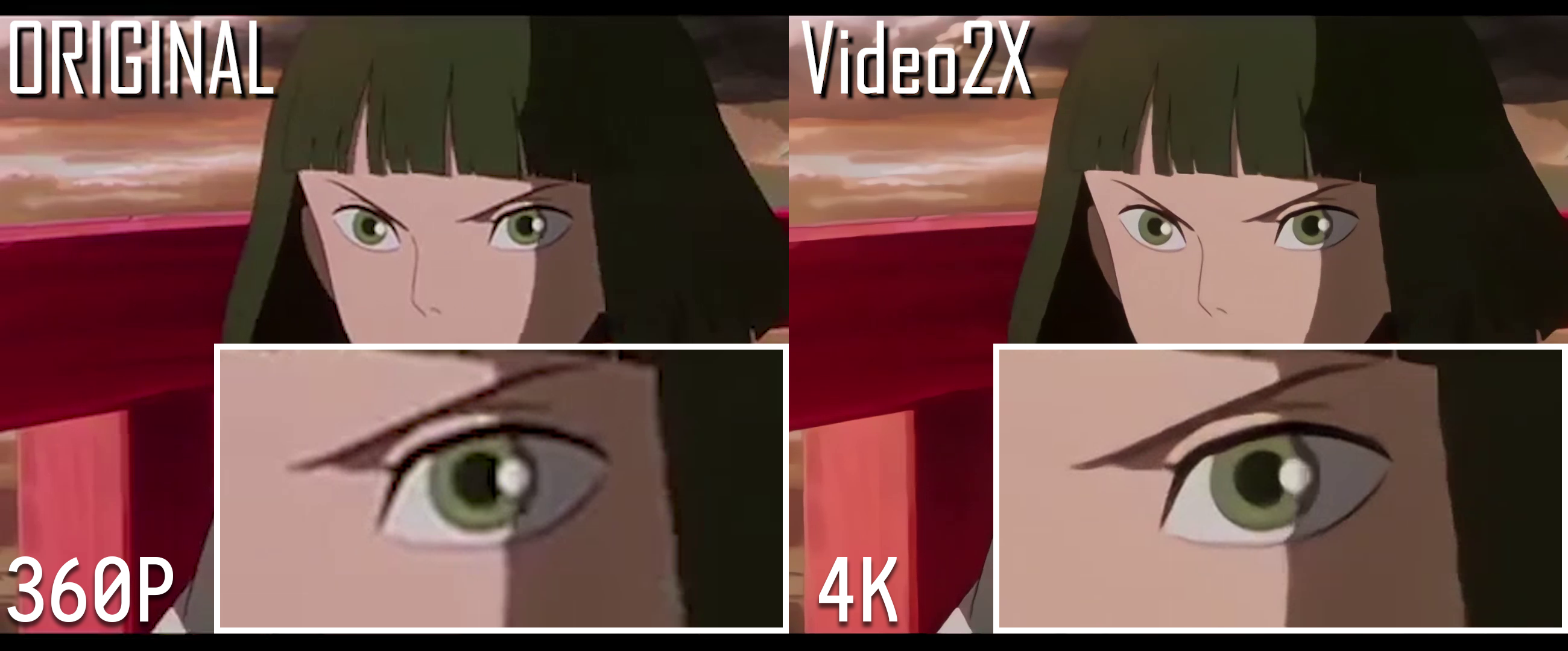
 Video2X — инструмент с открытым исходным кодом для улучшения разрешения видео и интерполяции кадров: с помощью машинного обучения он увеличивает видео в низком разрешении до более высокого качества и добавляет промежуточные кадры для более плавного движения.
Video2X — инструмент с открытым исходным кодом для улучшения разрешения видео и интерполяции кадров: с помощью машинного обучения он увеличивает видео в низком разрешении до более высокого качества и добавляет промежуточные кадры для более плавного движения.Это программа с окном или её запускают из командной строки?Поддержаны оба варианта: на Windows это приложение с графическим интерфейсом и обычным установщиком, на Linux есть пакеты или AppImage, а Docker-образ подойдёт для работы без интерфейса на Linux и macOS.
Поддержаны оба варианта: на Windows это приложение с графическим интерфейсом и обычным установщиком, на Linux есть пакеты или AppImage, а Docker-образ подойдёт для работы без интерфейса на Linux и macOS.Мой компьютер его потянет?Нужен процессор с поддержкой AVX2 (Intel Haswell 2013 года или новее, AMD Excavator 2015 года или новее) и видеокарта с поддержкой Vulkan — подойдёт что угодно начиная с NVIDIA GTX 600-й серии, AMD HD 7000-й серии или Intel HD 4000.
Нужен процессор с поддержкой AVX2 (Intel Haswell 2013 года или новее, AMD Excavator 2015 года или новее) и видеокарта с поддержкой Vulkan — подойдёт что угодно начиная с NVIDIA GTX 600-й серии, AMD HD 7000-й серии или Intel HD 4000.А на macOS он работает?Отдельной сборки под macOS нет; macOS поддерживается через контейнерный образ Video2X в GitHub Container Registry, как и Linux.
Отдельной сборки под macOS нет; macOS поддерживается через контейнерный образ Video2X в GitHub Container Registry, как и Linux.Она бесплатная и что разрешает лицензия?Она бесплатная и с открытым исходным кодом под лицензией GNU AGPL v3 — для личного использования всё в порядке, но изменения и производные проекты нужно выпускать под той же лицензией.
Она бесплатная и с открытым исходным кодом под лицензией GNU AGPL v3 — для личного использования всё в порядке, но изменения и производные проекты нужно выпускать под той же лицензией.А если у меня слабая видеокарта?Можно запустить Video2X бесплатно на Google Colab: там дают NVIDIA T4, L4 или A100 на срок до 12 часов за сессию, но не стоит гонять сессии подряд, чтобы улучшать видео круглосуточно, — Google может забанить аккаунт.
Можно запустить Video2X бесплатно на Google Colab: там дают NVIDIA T4, L4 или A100 на срок до 12 часов за сессию, но не стоит гонять сессии подряд, чтобы улучшать видео круглосуточно, — Google может забанить аккаунт.Какие ИИ-модели он поддерживает для увеличения разрешения?Для увеличения разрешения в него встроены Anime4K v4, Real-ESRGAN и Real-CUGAN, а для интерполяции кадров — RIFE; всё это работает через ncnn на Vulkan. Также можно подключить любые собственные GLSL-шейдеры, совместимые с MPV.
Для увеличения разрешения в него встроены Anime4K v4, Real-ESRGAN и Real-CUGAN, а для интерполяции кадров — RIFE; всё это работает через ncnn на Vulkan. Также можно подключить любые собственные GLSL-шейдеры, совместимые с MPV.Он может исправить дёрганое видео с низкой частотой кадров, а не только увеличить разрешение?Да — помимо фильтрации (увеличения разрешения) есть отдельный режим интерполяции кадров на базе RIFE, так что можно поднять и частоту кадров, и разрешение ролика.
Да — помимо фильтрации (увеличения разрешения) есть отдельный режим интерполяции кадров на базе RIFE, так что можно поднять и частоту кадров, и разрешение ролика.При обработке ему нужно много свободного места на диске?Нет. Конвейер версии 6.x не требует дополнительного места на диске во время обработки — место нужно только под итоговый файл.
Нет. Конвейер версии 6.x не требует дополнительного места на диске во время обработки — место нужно только под итоговый файл.Почему весь проект переписали для версии 6?Автор переписал Video2X с нуля на C/C++, чтобы он по-настоящему работал с куда меньшими хлопотами, чем бета 5.0.0, — благодаря оптимизированному конвейеру он работает очень быстро и выдаёт заметно более качественный результат.
Автор переписал Video2X с нуля на C/C++, чтобы он по-настоящему работал с куда меньшими хлопотами, чем бета 5.0.0, — благодаря оптимизированному конвейеру он работает очень быстро и выдаёт заметно более качественный результат.What are similar projects?ALH-Pro, Waifu2x-Extension-GUI, dlss5-visual-enhancer, paper2gui, Anime4K, video2dlssnr, waifu2x, KytyPS5
ALH-Pro, Waifu2x-Extension-GUI, dlss5-visual-enhancer, paper2gui, Anime4K, video2dlssnr, waifu2x, KytyPS5Which topics is it in?anime4k, frame-interpolation, video-upscaling, colab, appimage, super-resolution, neural-networks, vulkan, video-processing, ffmpeg, cpp, c++
anime4k, frame-interpolation, video-upscaling, colab, appimage, super-resolution, neural-networks, vulkan, video-processing, ffmpeg, cpp, c++