

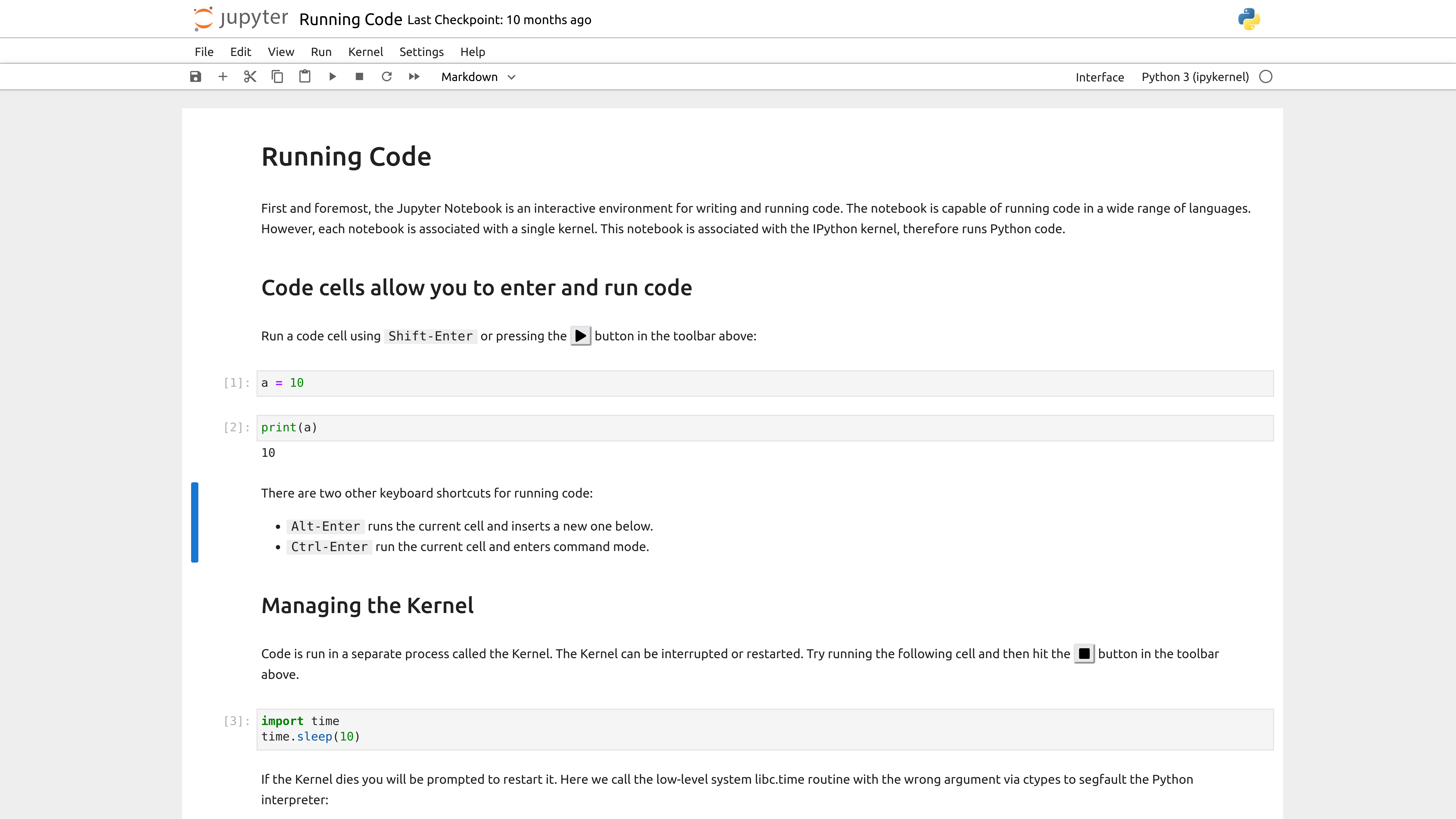

notebook README

The project's README from github.com/jupyter/notebook. As one markdown file: README.md.

Jupyter Notebook

Github Actions Status Documentation Status Binder

The Jupyter notebook is a web-based notebook environment for interactive computing.

Jupyter notebook example

Maintained versions

We maintain the two most recently released major versions of Jupyter Notebook, Classic Notebook v6 and Notebook v7. Notebook v5 is no longer maintained. All Notebook v5 users are strongly advised to upgrade to Classic Notebook v6 as soon as possible.

Upgrading to Notebook v7 may require more work, if you use custom extensions, as extensions written for Notebook v5 or Classic Notebook v6 are not compatible with Notebook v7.

Notebook v7

The newest major version of Notebook is based on:

This represents a significant change to the jupyter/notebook code base.

To learn more about Notebook v7: https://jupyter.org/enhancement-proposals/notebook-v7/

Classic Notebook v6

Maintenance and security-related issues only are now being addressed in the 6.5.x branch. It depends on nbclassic for the HTML/JavaScript/CSS assets.

New features and continuous improvement is now focused on Notebook v7 (see section above).

If you have an open pull request with a new feature or if you were planning to open one, we encourage switching over to the Jupyter Server and JupyterLab architecture, and distribute it as a server extension and / or JupyterLab prebuilt extension. That way your new feature will also be compatible with the new Notebook v7.

Jupyter notebook, the language-agnostic evolution of IPython notebook

Jupyter notebook is a language-agnostic HTML notebook application for Project Jupyter. In 2015, Jupyter notebook was released as a part of The Big Split™ of the IPython codebase. IPython 3 was the last major monolithic release containing both language-agnostic code, such as the IPython notebook, and language specific code, such as the IPython kernel for Python. As computing spans across many languages, Project Jupyter will continue to develop the language-agnostic Jupyter notebook in this repo and with the help of the community develop language specific kernels which are found in their own discrete repos.

Installation

You can find the installation documentation for the Jupyter platform, on ReadTheDocs. The documentation for advanced usage of Jupyter notebook can be found here.

For a local installation, make sure you have pip installed and run:

pip install notebook

Usage - Running Jupyter notebook

Running in a local installation

Launch with:

jupyter notebook

Running in a remote installation

You need some configuration before starting Jupyter notebook remotely. See Running a notebook server.

Development Installation

See CONTRIBUTING.md for how to set up a local development installation.

Contributing

If you are interested in contributing to the project, see CONTRIBUTING.md.

Community Guidelines and Code of Conduct

This repository is a Jupyter project and follows the Jupyter Community Guides and Code of Conduct.

Resources

About the Jupyter Development Team

The Jupyter Development Team is the set of all contributors to the Jupyter project. This includes all of the Jupyter subprojects.

The core team that coordinates development on GitHub can be found here: https://github.com/jupyter/.

Jupyter uses a shared copyright model. Each contributor maintains copyright over their contributions to Jupyter. But, it is important to note that these contributions are typically only changes to the repositories. Thus, the Jupyter source code, in its entirety is not the copyright of any single person or institution. Instead, it is the collective copyright of the entire Jupyter Development Team. If individual contributors want to maintain a record of what changes/contributions they have specific copyright on, they should indicate their copyright in the commit message of the change, when they commit the change to one of the Jupyter repositories.

With this in mind, the following banner should be used in any source code file to indicate the copyright and license terms:

# Copyright (c) Jupyter Development Team.
# Distributed under the terms of the Modified BSD License.

notebook (jupyter/notebook)

Searching Database…

13.4K ·GitHub
这是什么?Jupyter Notebook 是一个基于网页、与编程语言无关的笔记本环境,用于交互式计算。你可以在一个文档中编写和运行代码、文本和可视化内容,并通过浏览器访问。
这是我要导入的库,还是我要运行的应用程序?它是一个独立的服务器应用:你在命令行中启动它,然后通过网页浏览器提供笔记本界面,而不是需要导入到其他程序中使用的东西。
我该怎么让它运行起来?用 pip 安装,然后在命令行中启动,开启笔记本服务器,界面会在浏览器中打开。
运行它除了 pip 还需要别的东西吗?在本地安装只需要 pip;如果要远程使用,则需要先配置服务器访问权限。
升级后还能继续使用我的旧扩展吗?不能。为 Notebook v5 或 Classic Notebook v6 编写的扩展无法在新的 Notebook v7 中使用,而且 v5 本身已不再维护,因此升级可能会导致自定义扩展失效。
它能在哪些操作系统上运行?作为通过 pip 安装的 Python 包,只要有 Python 和浏览器,它就能运行,包括 Linux、macOS 和 Windows。
Classic Notebook v6 和 Notebook v7 有什么区别?v7 基于 JupyterLab 前端组件和 Jupyter Server 后端重新构建;而 v6 只接收维护和安全修复,并依赖 nbclassic 提供界面资源。
为什么它被称为 IPython notebook 与语言无关的演进版?2015 年,“大拆分”(The Big Split)将原来的 IPython 代码库拆分为与语言无关的 notebook(即本项目)和针对特定语言的内核,因此 Jupyter Notebook 可以通过不同的内核仓库运行多种语言,而不只是 Python。
Notebook v5 还在支持吗?不再支持。Notebook v5 已不再维护,强烈建议用户至少升级到 Classic Notebook v6。
Creator
jupyter
Size
48.2 MB
Stars
13.4K
Age
11y
Commits · 90 Days