CycleGAN
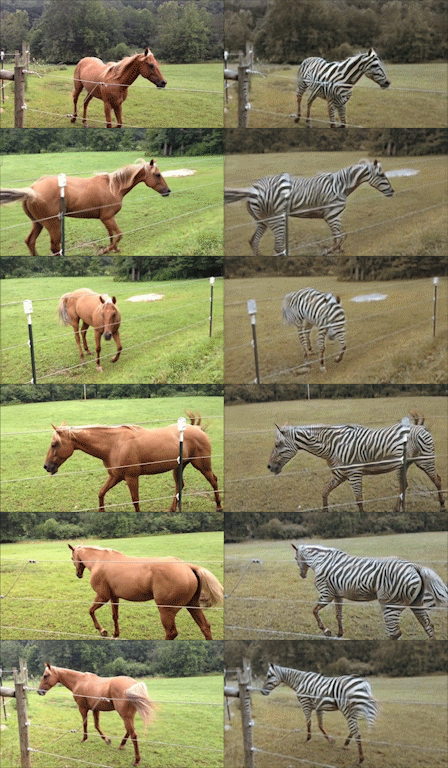
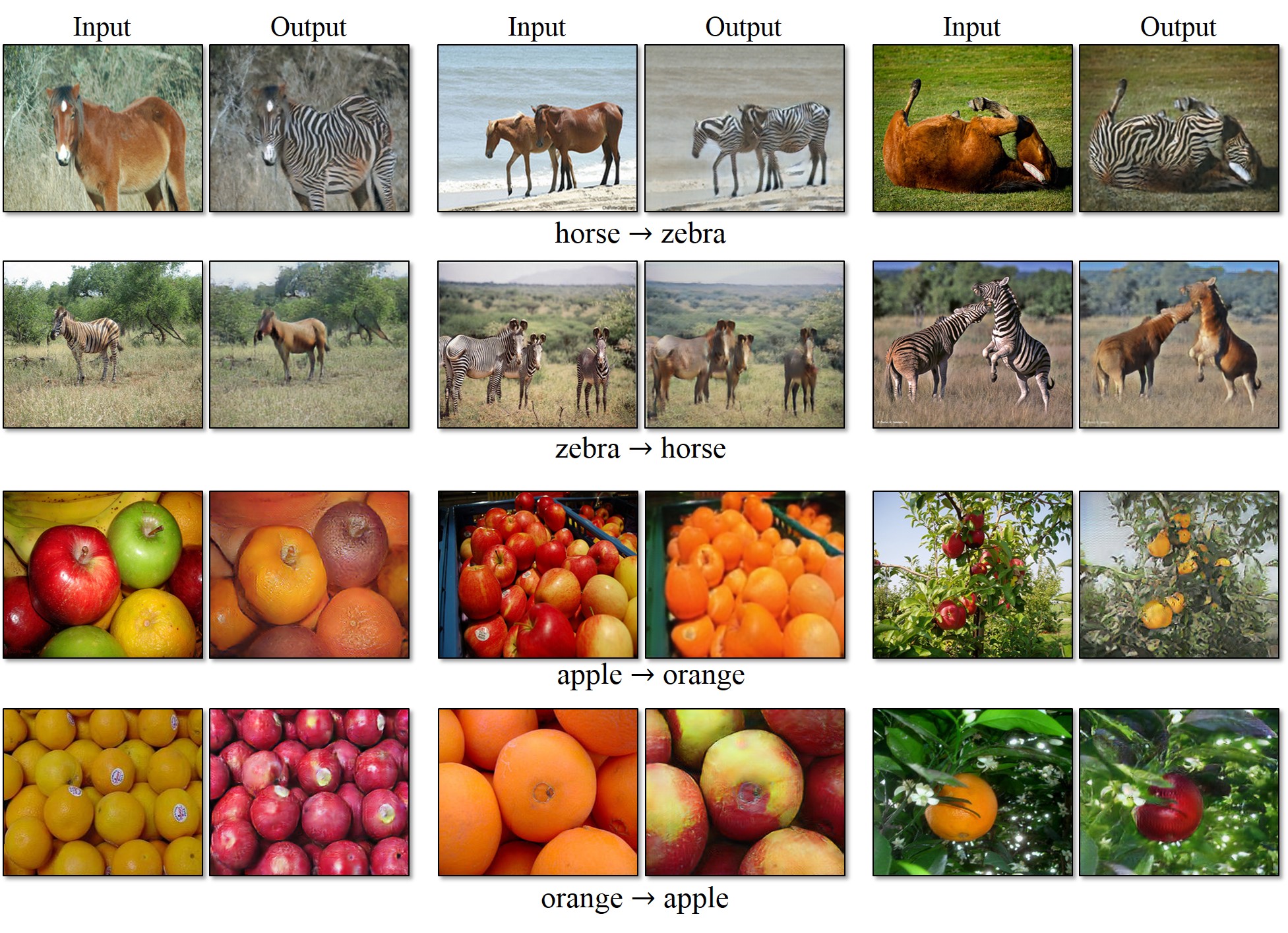
Torch implementation for learning an image-to-image translation (i.e. pix2pix) without input-output pairs, for example:
New: Please check out contrastive-unpaired-translation (CUT), our new unpaired image-to-image translation model that enables fast and memory-efficient training.
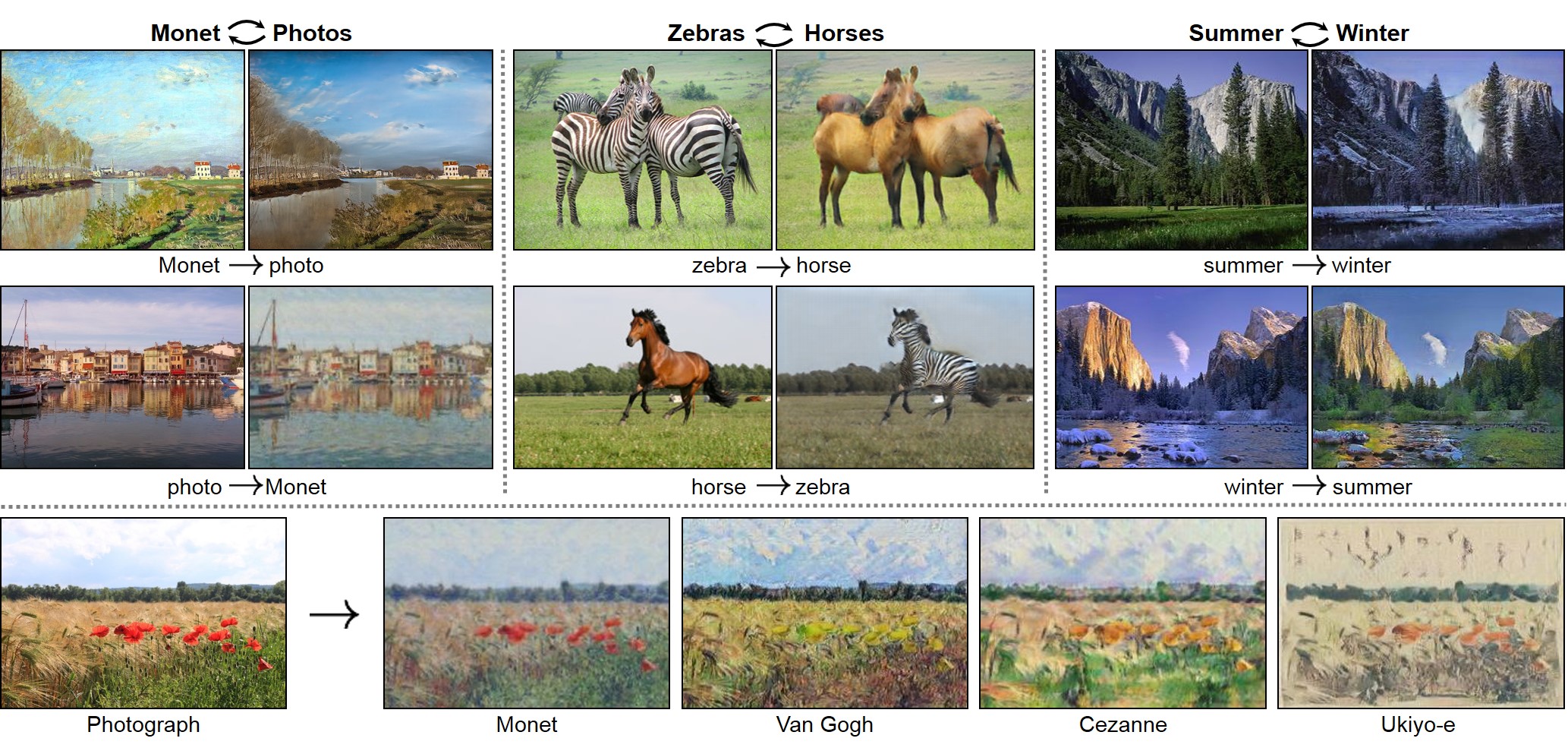
Unpaired Image-to-Image Translation using Cycle-Consistent Adversarial Networks
Jun-Yan Zhu*, Taesung Park*, Phillip Isola, Alexei A. Efros
Berkeley AI Research Lab, UC Berkeley
In ICCV 2017. (* equal contributions)
This package includes CycleGAN, pix2pix, as well as other methods like BiGAN/ALI and Apple's paper S+U learning.
The code was written by Jun-Yan Zhu and Taesung Park.
Update: Please check out PyTorch implementation for CycleGAN and pix2pix.
The PyTorch version is under active development and can produce results comparable or better than this Torch version.
Other implementations:
[Tensorflow] (by Harry Yang),
[Tensorflow] (by Archit Rathore),
[Tensorflow] (by Van Huy),
[Tensorflow] (by Xiaowei Hu),
[Tensorflow-simple] (by Zhenliang He),
[TensorLayer] (by luoxier),
[Chainer] (by Yanghua Jin),
[Minimal PyTorch] (by yunjey),
[Mxnet] (by Ldpe2G),
[lasagne/Keras] (by tjwei),
[Keras] (by Simon Karlsson)
Applications
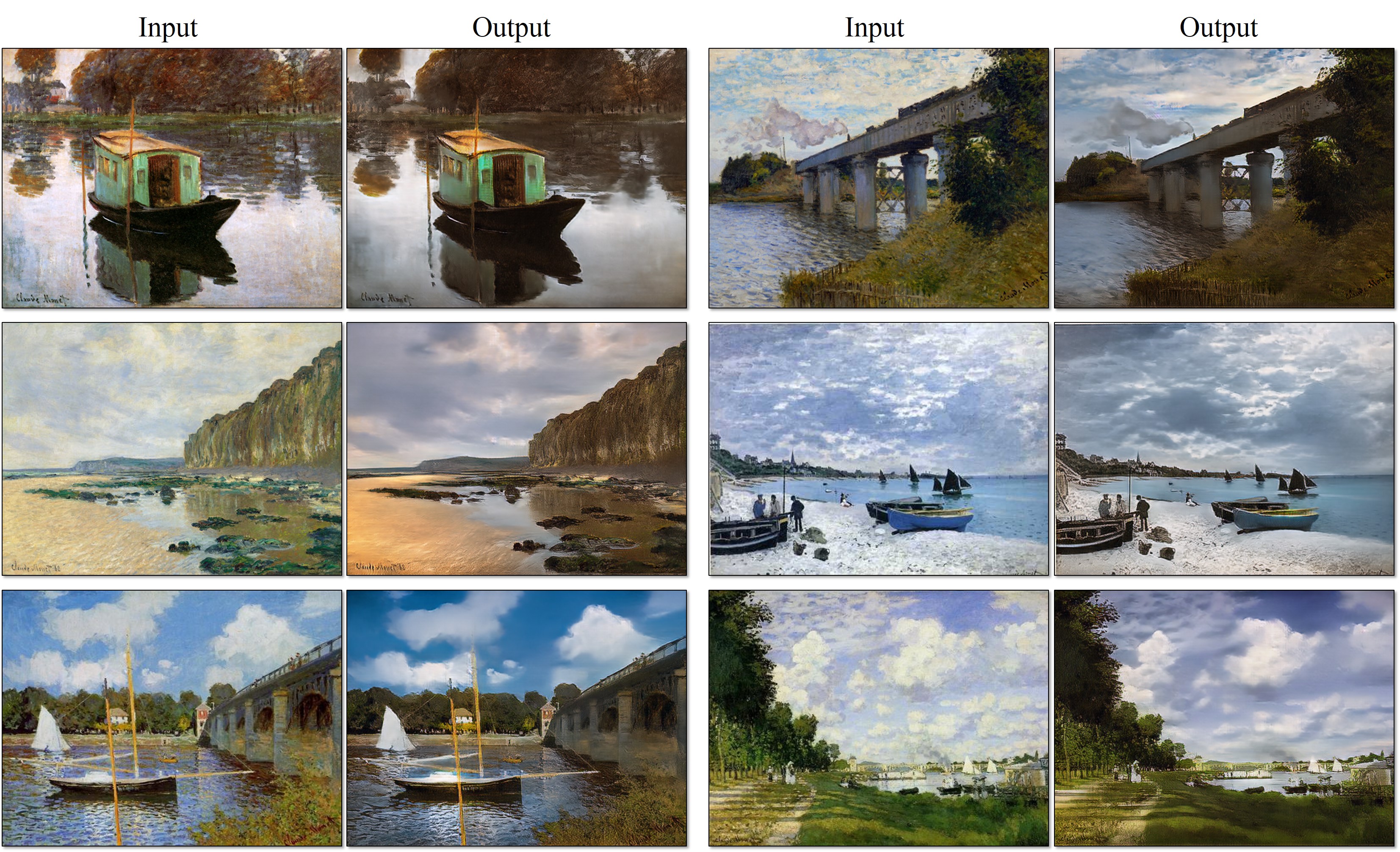
Monet Paintings to Photos
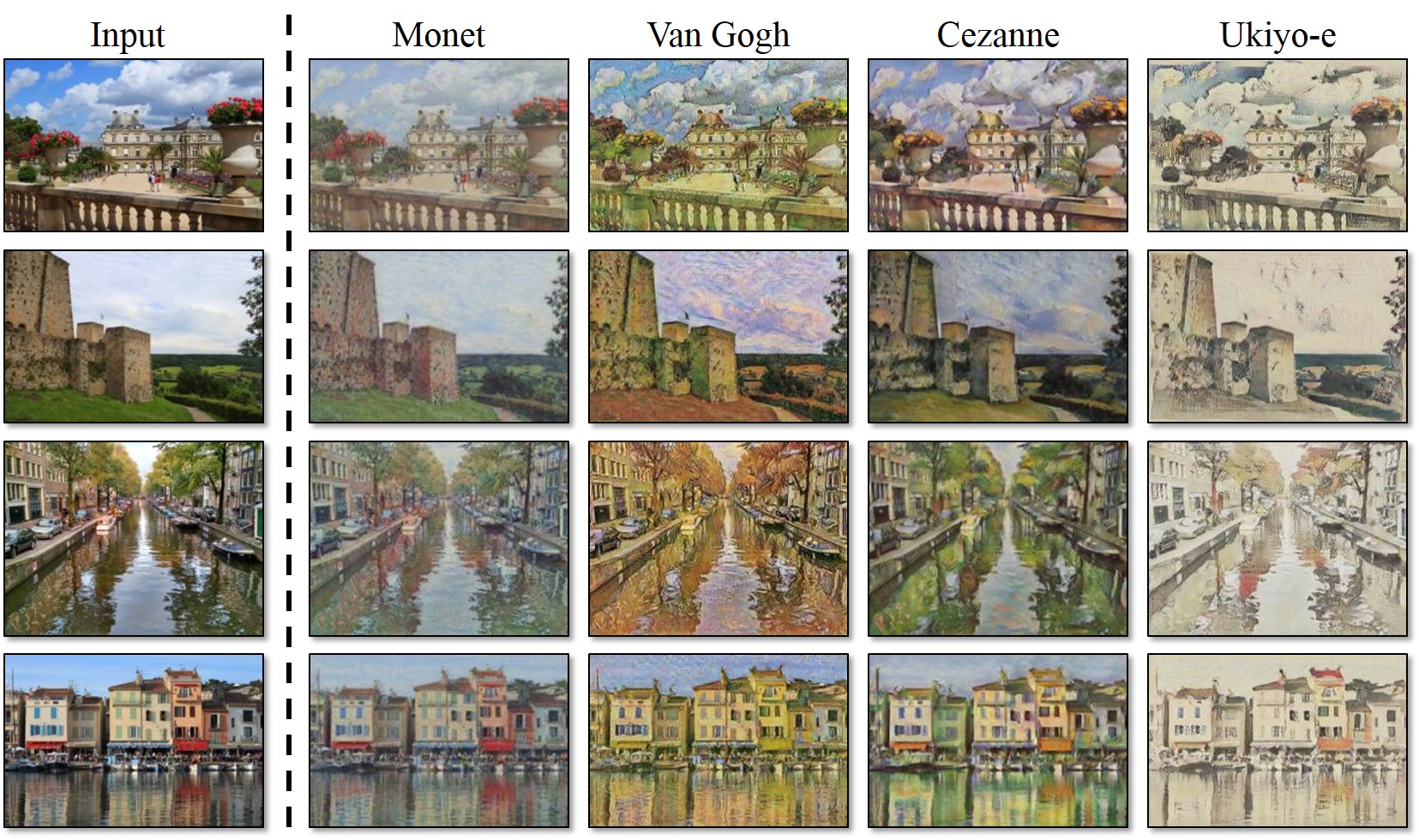
Collection Style Transfer
Object Transfiguration
Season Transfer
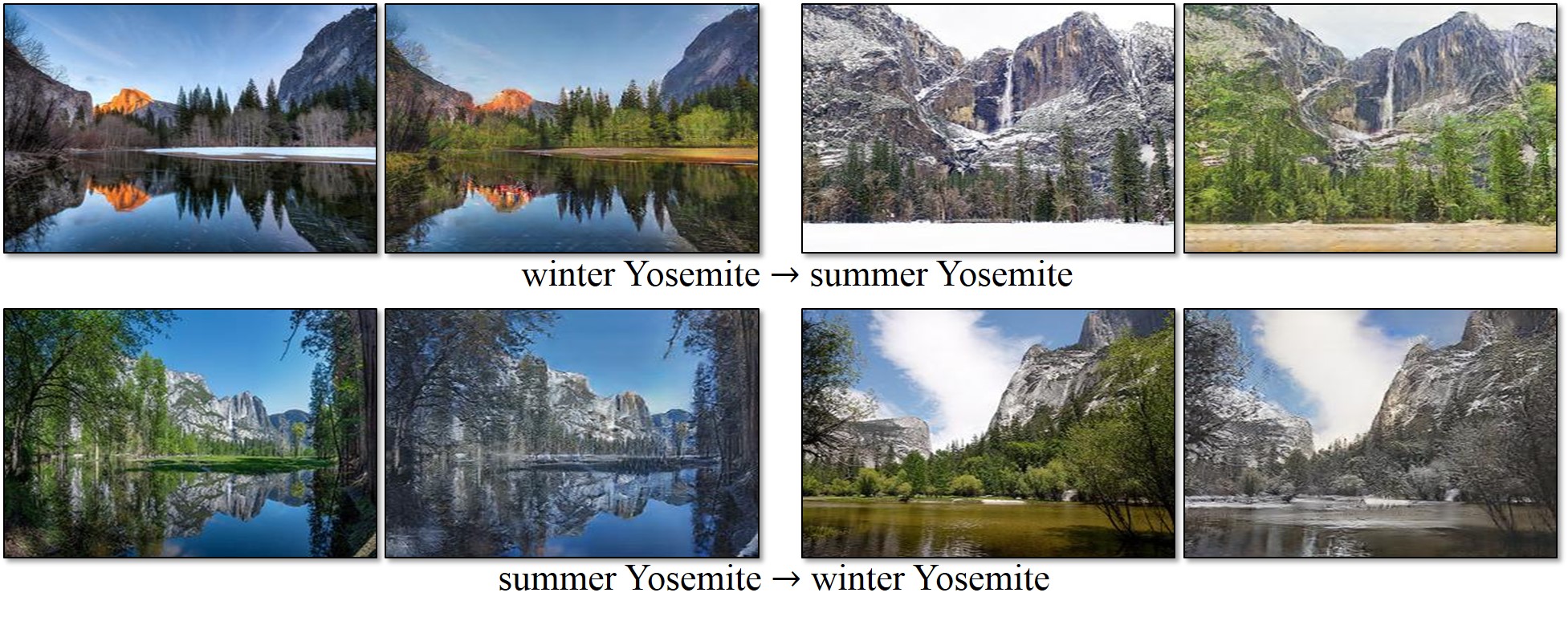
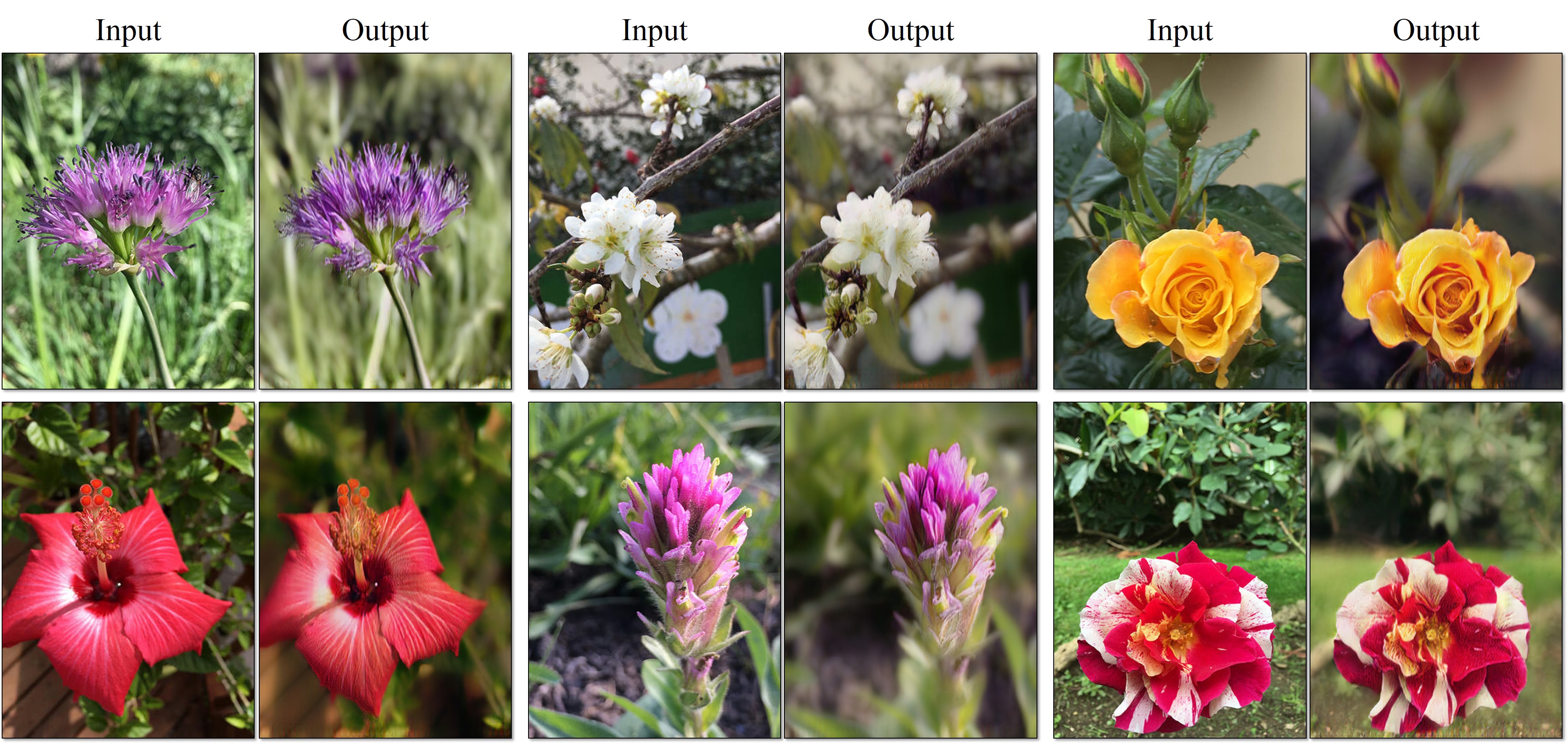
Photo Enhancement: Narrow depth of field
Prerequisites
- Linux or OSX
- NVIDIA GPU + CUDA CuDNN (CPU mode and CUDA without CuDNN may work with minimal modification, but untested)
- For MAC users, you need the Linux/GNU commands
gfind and gwc, which can be installed with brew install findutils coreutils.
Getting Started
Installation
luarocks install nngraph
luarocks install class
luarocks install https://raw.githubusercontent.com/szym/display/master/display-scm-0.rockspec
git clone https://github.com/junyanz/CycleGAN
cd CycleGAN
Apply a Pre-trained Model
bash ./datasets/download_dataset.sh ae_photos
- Download the pre-trained model
style_cezanne (For CPU model, use style_cezanne_cpu):
bash ./pretrained_models/download_model.sh style_cezanne
- Now, let's generate Paul Cézanne style images:
DATA_ROOT=./datasets/ae_photos name=style_cezanne_pretrained model=one_direction_test phase=test loadSize=256 fineSize=256 resize_or_crop="scale_width" th test.lua
The test results will be saved to ./results/style_cezanne_pretrained/latest_test/index.html.
Please refer to Model Zoo for more pre-trained models.
./examples/test_vangogh_style_on_ae_photos.sh is an example script that downloads the pretrained Van Gogh style network and runs it on Efros's photos.
Train
- Download a dataset (e.g. zebra and horse images from ImageNet):
bash ./datasets/download_dataset.sh horse2zebra
DATA_ROOT=./datasets/horse2zebra name=horse2zebra_model th train.lua
- (CPU only) The same training command without using a GPU or CUDNN. Setting the environment variables
gpu=0 cudnn=0 forces CPU only
DATA_ROOT=./datasets/horse2zebra name=horse2zebra_model gpu=0 cudnn=0 th train.lua
- (Optionally) start the display server to view results as the model trains. (See Display UI for more details):
th -ldisplay.start 8000 0.0.0.0
Test
DATA_ROOT=./datasets/horse2zebra name=horse2zebra_model phase=test th test.lua
The test results will be saved to an HTML file here: ./results/horse2zebra_model/latest_test/index.html.
Model Zoo
Download the pre-trained models with the following script. The model will be saved to ./checkpoints/model_name/latest_net_G.t7.
bash ./pretrained_models/download_model.sh model_name
orange2apple (orange -> apple) and apple2orange: trained on ImageNet categories apple and orange.horse2zebra (horse -> zebra) and zebra2horse (zebra -> horse): trained on ImageNet categories horse and zebra.style_monet (landscape photo -> Monet painting style), style_vangogh (landscape photo -> Van Gogh painting style), style_ukiyoe (landscape photo -> Ukiyo-e painting style), style_cezanne (landscape photo -> Cezanne painting style): trained on paintings and Flickr landscape photos.monet2photo (Monet paintings -> real landscape): trained on paintings and Flickr landscape photographs.cityscapes_photo2label (street scene -> label) and cityscapes_label2photo (label -> street scene): trained on the Cityscapes dataset.map2sat (map -> aerial photo) and sat2map (aerial photo -> map): trained on Google maps.iphone2dslr_flower (iPhone photos of flowers -> DSLR photos of flowers): trained on Flickr photos.
CPU models can be downloaded using:
bash pretrained_models/download_model.sh <name>_cpu
, where <name> can be horse2zebra, style_monet, etc. You just need to append _cpu to the target model.
Training and Test Details
To train a model,
DATA_ROOT=/path/to/data/ name=expt_name th train.lua
Models are saved to ./checkpoints/expt_name (can be changed by passing checkpoint_dir=your_dir in train.lua).
See opt_train in options.lua for additional training options.
To test the model,
DATA_ROOT=/path/to/data/ name=expt_name phase=test th test.lua
This will run the model named expt_name in both directions on all images in /path/to/data/testA and /path/to/data/testB.
A webpage with result images will be saved to ./results/expt_name (can be changed by passing results_dir=your_dir in test.lua).
See opt_test in options.lua for additional test options. Please use model=one_direction_test if you only would like to generate outputs of the trained network in only one direction, and specify which_direction=AtoB or which_direction=BtoA to set the direction.
There are other options that can be used. For example, you can specify resize_or_crop=crop option to avoid resizing the image to squares. This is indeed how we trained GTA2Cityscapes model in the projet webpage and Cycada model. We prepared the images at 1024px resolution, and used resize_or_crop=crop fineSize=360 to work with the cropped images of size 360x360. We also used lambda_identity=1.0.
Datasets
Download the datasets using the following script. Many of the datasets were collected by other researchers. Please cite their papers if you use the data.
bash ./datasets/download_dataset.sh dataset_name
facades: 400 images from the CMP Facades dataset. [Citation]cityscapes: 2975 images from the Cityscapes training set. [Citation]. Note: Due to license issue, we do not host the dataset on our repo. Please download the dataset directly from the Cityscapes webpage. Please refer to ./datasets/prepare_cityscapes_dataset.py for more detail.maps: 1096 training images scraped from Google Maps.horse2zebra: 939 horse images and 1177 zebra images downloaded from ImageNet using the keywords wild horse and zebraapple2orange: 996 apple images and 1020 orange images downloaded from ImageNet using the keywords apple and navel orange.summer2winter_yosemite: 1273 summer Yosemite images and 854 winter Yosemite images were downloaded using Flickr API. See more details in our paper.monet2photo, vangogh2photo, ukiyoe2photo, cezanne2photo: The art images were downloaded from Wikiart. The real photos are downloaded from Flickr using the combination of the tags landscape and landscapephotography. The training set size of each class is Monet:1074, Cezanne:584, Van Gogh:401, Ukiyo-e:1433, Photographs:6853.iphone2dslr_flower: both classes of images were downloaded from Flickr. The training set size of each class is iPhone:1813, DSLR:3316. See more details in our paper.
Display UI
Optionally, for displaying images during training and test, use the display package.
- Install it with:
luarocks install https://raw.githubusercontent.com/szym/display/master/display-scm-0.rockspec
- Then start the server with:
th -ldisplay.start
- Open this URL in your browser: http://localhost:8000
By default, the server listens on localhost. Pass 0.0.0.0 to allow external connections on any interface:
th -ldisplay.start 8000 0.0.0.0
Then open http://(hostname):(port)/ in your browser to load the remote desktop.
Setup Training and Test data
To train CycleGAN model on your own datasets, you need to create a data folder with two subdirectories trainA and trainB that contain images from domain A and B. You can test your model on your training set by setting phase='train' in test.lua. You can also create subdirectories testA and testB if you have test data.
You should not expect our method to work on just any random combination of input and output datasets (e.g. cats<->keyboards). From our experiments, we find it works better if two datasets share similar visual content. For example, landscape painting<->landscape photographs works much better than portrait painting <-> landscape photographs. zebras<->horses achieves compelling results while cats<->dogs completely fails. See the following section for more discussion.
Failure cases
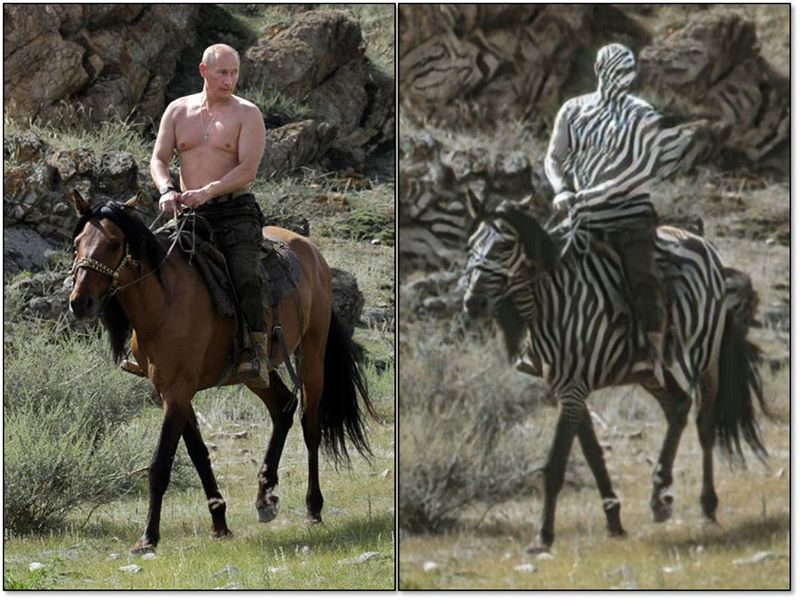
Our model does not work well when the test image is rather different from the images on which the model is trained, as is the case in the figure to the left (we trained on horses and zebras without riders, but test here one a horse with a rider). See additional typical failure cases here. On translation tasks that involve color and texture changes, like many of those reported above, the method often succeeds. We have also explored tasks that require geometric changes, with little success. For example, on the task of dog<->cat transfiguration, the learned translation degenerates into making minimal changes to the input. We also observe a lingering gap between the results achievable with paired training data and those achieved by our unpaired method. In some cases, this gap may be very hard -- or even impossible,-- to close: for example, our method sometimes permutes the labels for tree and building in the output of the cityscapes photos->labels task.
Citation
If you use this code for your research, please cite our paper:
@inproceedings{CycleGAN2017,
  title={Unpaired Image-to-Image Translation using Cycle-Consistent Adversarial Networkss},
  author={Zhu, Jun-Yan and Park, Taesung and Isola, Phillip and Efros, Alexei A},
  booktitle={Computer Vision (ICCV), 2017 IEEE International Conference on},
  year={2017}
}
contrastive-unpaired-translation (CUT)
pix2pix-Torch | pix2pixHD |
BicycleGAN | vid2vid | SPADE/GauGAN
iGAN | GAN Dissection | GAN Paint
Cat Paper Collection
If you love cats, and love reading cool graphics, vision, and ML papers, please check out the Cat Paper Collection.
Acknowledgments
Code borrows from pix2pix and DCGAN. The data loader is modified from DCGAN and Context-Encoder. The generative network is adopted from neural-style with Instance Normalization.

 CycleGAN — это исходная реализация на Torch для статьи «Unpaired Image-to-Image Translation using Cycle-Consistent Adversarial Networks». Она позволяет превращать лошадей в зебр, применять к фотографиям стили живописи, например Моне или Ван Гога, и выполнять похожие преобразования изображений без парных обучающих снимков «до» и «после».