






What is this?
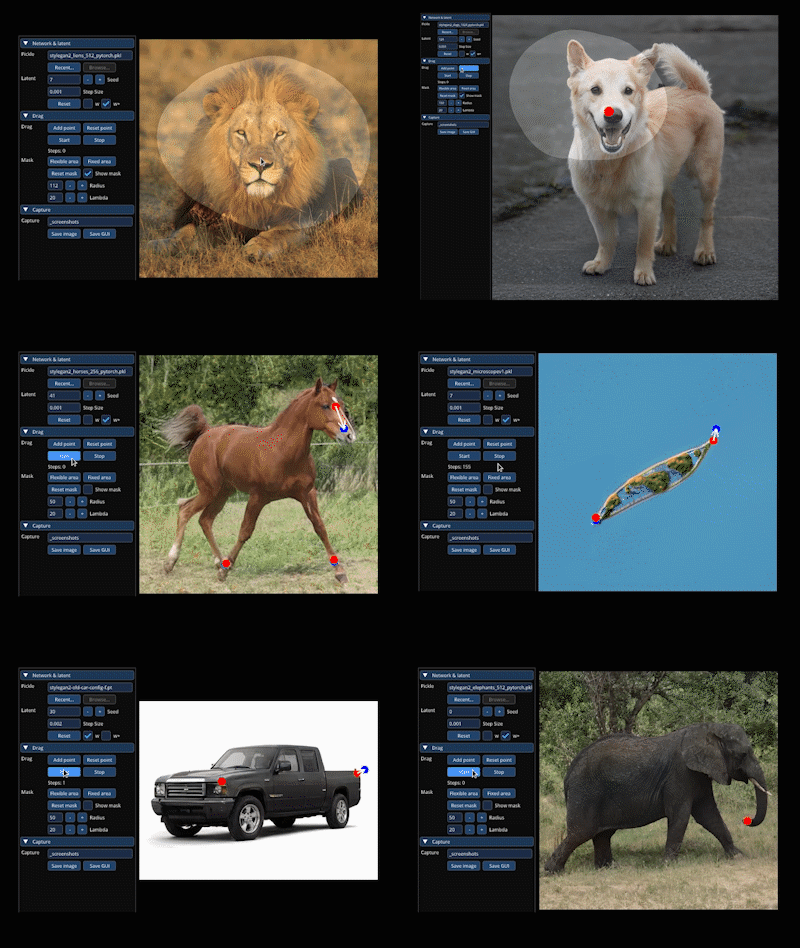
 DragGAN is the official implementation of the SIGGRAPH 2023 paper that lets you interactively drag points on a GAN-generated image to move or reshape objects within it.
DragGAN is the official implementation of the SIGGRAPH 2023 paper that lets you interactively drag points on a GAN-generated image to move or reshape objects within it.Is this a library I import, or a standalone app?It is a standalone research tool with its own GUI and a separate Gradio web demo, built on StyleGAN2/3 models rather than something you import as a library.
It is a standalone research tool with its own GUI and a separate Gradio web demo, built on StyleGAN2/3 models rather than something you import as a library.How do I get DragGAN running?Install the CUDA-based requirements following the NVlabs/stylegan3 setup, download the pretrained StyleGAN2 weights with the provided script, then launch the DragGAN GUI (or the Gradio demo) from the command line.
Install the CUDA-based requirements following the NVlabs/stylegan3 setup, download the pretrained StyleGAN2 weights with the provided script, then launch the DragGAN GUI (or the Gradio demo) from the command line.What hardware does DragGAN need?A CUDA-capable GPU is expected by default, but there is a separate install path for GPU acceleration on Apple Silicon Macs (M1/M2) or for CPU-only use.
A CUDA-capable GPU is expected by default, but there is a separate install path for GPU acceleration on Apple Silicon Macs (M1/M2) or for CPU-only use.Can I just drag points on any photo?No - the GUI only edits GAN-generated images directly; to edit a real photo you first need to perform GAN inversion (e.g. with PTI) to get a matching latent code.
No - the GUI only edits GAN-generated images directly; to edit a real photo you first need to perform GAN inversion (e.g. with PTI) to get a matching latent code.Does it run on Windows and Mac, or only Linux with an Nvidia GPU?It supports all three: there's a dedicated Windows run command, a Gradio demo that works the same on Windows and Linux, and a CPU/Apple Silicon install path for Macs without CUDA.
It supports all three: there's a dedicated Windows run command, a Gradio demo that works the same on Windows and Linux, and a CPU/Apple Silicon install path for Macs without CUDA.Can I use DragGAN commercially?No - the DragGAN algorithm itself is licensed CC-BY-NC (non-commercial), and any use must preserve the 'AI Generated' watermark on outputs; the remaining code mixes in the Nvidia Source Code License.
No - the DragGAN algorithm itself is licensed CC-BY-NC (non-commercial), and any use must preserve the 'AI Generated' watermark on outputs; the remaining code mixes in the Nvidia Source Code License.What pretrained models come with DragGAN?A script downloads pretrained StyleGAN2 weights, and you can additionally fetch StyleGAN-Human and Landscapes HQ (LHQ) weights to try other domains.
A script downloads pretrained StyleGAN2 weights, and you can additionally fetch StyleGAN-Human and Landscapes HQ (LHQ) weights to try other domains.Why do outputs need an 'AI Generated' watermark?The license requires any use or derivative of the code to keep the watermarking feature that marks generated images as 'AI Generated'.
The license requires any use or derivative of the code to keep the watermarking feature that marks generated images as 'AI Generated'.Is there a Docker option?Yes, a Docker image based on the NGC PyTorch repository is provided to run the Gradio visualizer, though it takes about 25GB of disk space.
Yes, a Docker image based on the NGC PyTorch repository is provided to run the Gradio visualizer, though it takes about 25GB of disk space.What are similar projects?pytorch-CycleGAN-and-pix2pix, CycleGAN, pix2pix, lama, stylegan2, GFPGAN, Deep-Live-Cam, Bringing-Old-Photos-Back-to-Life
pytorch-CycleGAN-and-pix2pix, CycleGAN, pix2pix, lama, stylegan2, GFPGAN, Deep-Live-Cam, Bringing-Old-Photos-Back-to-LifeWhich topics is it in?image-manipulation, generative-adversarial-network, gan, gradio, image-editing, interactive, image-generation, apple-silicon, artificial-intelligence, nvidia, computer-vision, cuda
image-manipulation, generative-adversarial-network, gan, gradio, image-editing, interactive, image-generation, apple-silicon, artificial-intelligence, nvidia, computer-vision, cuda