
claude-image-view README

The project's README from github.com/jarrodwatts/claude-image-view. As one markdown file: README.md.

Claude Image View

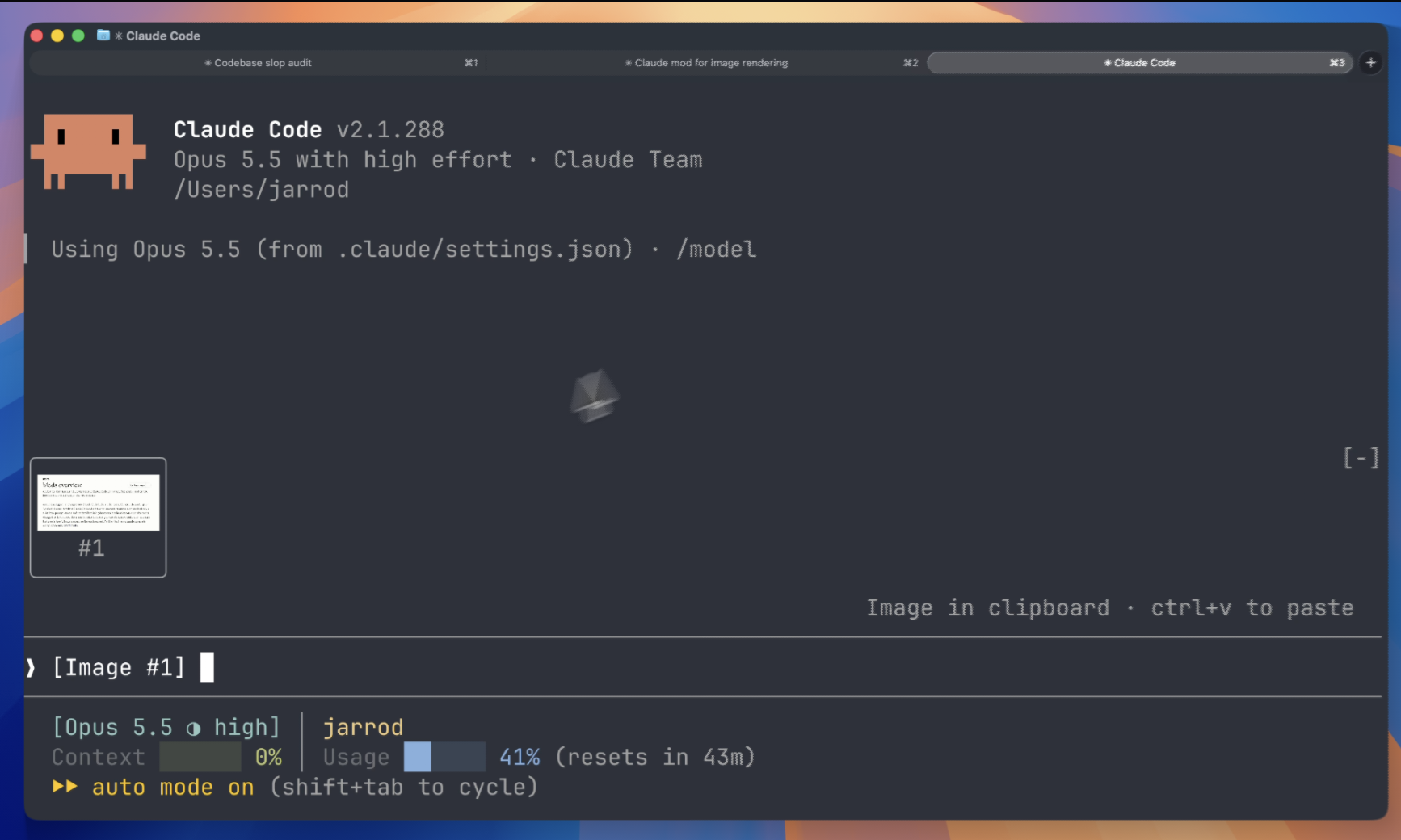
A Claude Code mod that shows the images you paste, so you see thumbnails above your prompt instead of bare [Image #1] tags.

License Stars

Claude Image View in action

Install

Inside Claude Code, run:

/plugin marketplace add jarrodwatts/claude-image-view
/plugin install image-view
/reload-plugins

That's it. Paste an image into the prompt and its thumbnail appears above the input.

Prefer the terminal?
claude plugin marketplace add jarrodwatts/claude-image-view
claude plugin install image-view@claude-image-view

Then run /reload-plugins inside a session, or start a new one.

What You See

Paste one or more images and a row of thumbnails sits above the prompt, each labelled with the number of its tag:

╭────────────────────────╮ ╭────────────╮
│                        │ │            │
│      (screenshot)      │ │  (photo)   │
│                        │ │            │
│           #1           │ │     #2     │
╰────────────────────────╯ ╰────────────╯
❯ why is the header misaligned here [Image #1] vs [Image #2]

How It Works

Claude Code saves every pasted image to a cache folder for the session, as <tmp>/<project>/<session>/images/<n>.png, and puts an [Image #n] tag in the prompt. Claude Image View is a mod:

  1. Every 200ms it reads the prompt box and looks for [Image #n] tags. It checks on a timer because pasting an image doesn't raise an edit event.
  2. For each tag it finds the cached PNG and reads its size from the PNG header.
  3. It draws the thumbnails in the band above the prompt with Claude Code's Image element. The terminal reads the file itself, so the image data never passes through the mod.

Security

Claude Image View is local-only. It makes no network requests and writes no files. It reads the prompt box, lists Claude Code's temp folder to find the current session's image cache, and reads the first bytes of each pasted image. If CLAUDE_CODE_TMPDIR isn't set, it runs id -u once to find the default temp folder.

Run claude plugin validate on the repo to see every event it hooks and every call it makes.

Requirements

Other terminals show [Image #n] in each tile instead of the picture. The Claude Desktop app already previews pasted images, so the mod draws nothing there.

Troubleshooting

Nothing appears when I paste. Run /plugin and check the dim line under the tabs lists image-view as an active mod. If it isn't listed, run /reload-plugins.

The tile says "no preview". The mod couldn't find the cached file. Claude Code may have moved where it stores pasted images. Please open an issue with your Claude Code version.

The tile shows [Image #1] text instead of the picture. Your terminal doesn't support the kitty graphics protocol. See Requirements.

The tile shows [Image #1] text in agent view or a background session, even in Ghostty or kitty. Claude Code turns terminal images off for background sessions. If you attach from a terminal with the kitty graphics protocol, turn them back on in the env block of ~/.claude/settings.json, then start a new session:

"env": { "CLAUDE_CODE_FORCE_TERMINAL_IMAGES": "1" }

Development

git clone https://github.com/jarrodwatts/claude-image-view
cd claude-image-view

# Load it for one session without installing
claude --plugin-dir .

# Check it and run the tests
claude plugin validate .
claude plugin test .

Claude Code writes the API types into .claude-plugin/types/ the first time it loads the mod, and tsc -p . type-checks it from then on.

License

MIT. See LICENSE.

Star History

Star History Chart

claude-image-view (jarrodwatts/claude-image-view)

Searching Database…

这是什么?Claude Image View 是一个 Claude Code mod,它会显示你粘贴到提示框里的图片缩略图,而不是光秃秃的 [Image #1] 文本标签。
这是独立应用,还是 Claude Code 的插件?它是一个加载在现有 Claude Code 终端会话里的插件(mod),不是独立应用;Claude Code 甚至会在首次加载时为这个 mod 生成 API 类型。
怎么把它跑起来?在 Claude Code 里安装它,然后只要往提示框粘贴一张图片,缩略图就会自动出现在输入框上方;如果什么都没显示,运行 /reload-plugins 或新开一个会话。
要让它真正工作需要什么?你需要带 mods 支持的 Claude Code v2.1.287 或更新版本,运行在 macOS 或 Linux 上,并且使用支持 kitty 图形协议的终端,比如 Ghostty 或 kitty。
缩略图预览总能工作吗?不能。不支持 kitty 图形协议的终端只会显示原始的 [Image #n] 文本而不是图片;Claude Code 还会对后台或代理视图会话禁用终端图片,除非你在 settings.json 里重新启用。
这个 mod 会把我粘贴的图片发到别处吗?不会。它只在本地运行:不发起任何网络请求,也不写任何文件,只读取提示框内容和 Claude Code 已经为该会话缓存到本地的 PNG。
它在 Claude Desktop 应用里有什么作用吗?没有。Claude Desktop 本身就会预览粘贴的图片,所以这个 mod 在那里什么都不画。
它究竟是怎么找到并渲染图片的?它每 200 毫秒扫描一次提示框里的 [Image #n] 标签,把每个标签与 Claude Code 为该会话缓存的 PNG 匹配,从 PNG 头读取尺寸,再用 Claude Code 的 Image 元素把它画在提示框上方。
“无预览”占位块是什么意思?它表示这个 mod 没能找到该标签对应的缓存 PNG,通常是因为 Claude Code 更改了粘贴图片的存放位置;建议的解决办法是带上你的 Claude Code 版本号开一个 issue。
Size
0.4 MB
Stars
236
Age
16d
Commits · 90 Days