

Что это?
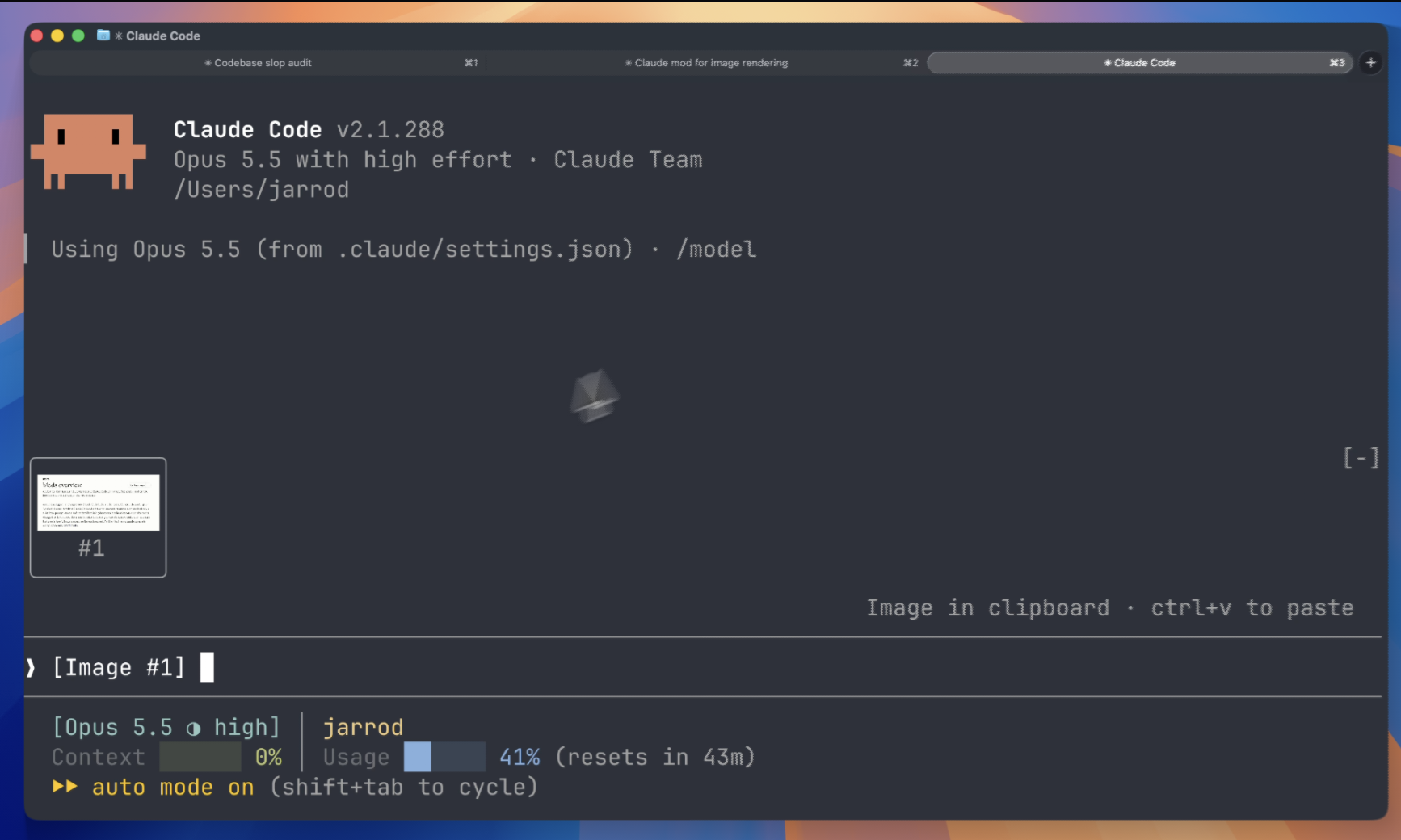
 Claude Image View — это мод для Claude Code, который показывает миниатюры изображений, вставленных в промпт, вместо голых текстовых тегов [Image #1].
Claude Image View — это мод для Claude Code, который показывает миниатюры изображений, вставленных в промпт, вместо голых текстовых тегов [Image #1].Это отдельное приложение или плагин для Claude Code?Это плагин (мод), который загружается внутри существующей терминальной сессии Claude Code, а не отдельное приложение; Claude Code даже генерирует для мода его API-типы при первой загрузке.
Это плагин (мод), который загружается внутри существующей терминальной сессии Claude Code, а не отдельное приложение; Claude Code даже генерирует для мода его API-типы при первой загрузке.Как его запустить?Установите его изнутри Claude Code, затем просто вставьте изображение в промпт — его миниатюра автоматически появится над полем ввода; если ничего не отображается, выполните /reload-plugins или начните новую сессию.
Установите его изнутри Claude Code, затем просто вставьте изображение в промпт — его миниатюра автоматически появится над полем ввода; если ничего не отображается, выполните /reload-plugins или начните новую сессию.Что нужно, чтобы всё это реально работало?Нужен Claude Code v2.1.287 или новее с поддержкой модов, запущенный на macOS или Linux, внутри терминала с поддержкой графического протокола kitty, например Ghostty или kitty.
Нужен Claude Code v2.1.287 или новее с поддержкой модов, запущенный на macOS или Linux, внутри терминала с поддержкой графического протокола kitty, например Ghostty или kitty.Предпросмотр миниатюр работает всегда?Нет: терминалы без графического протокола kitty покажут лишь исходный текст [Image #n] вместо картинки, а Claude Code к тому же отключает изображения в терминале для фоновых сессий и режима просмотра агентов, если не включить их обратно в settings.json.
Нет: терминалы без графического протокола kitty покажут лишь исходный текст [Image #n] вместо картинки, а Claude Code к тому же отключает изображения в терминале для фоновых сессий и режима просмотра агентов, если не включить их обратно в settings.json.Этот мод отправляет мои вставленные изображения куда-то?Нет, он работает только локально: не делает сетевых запросов и не пишет файлов, а лишь читает поле промпта и PNG-файлы, которые Claude Code уже закэшировал локально для сессии.
Нет, он работает только локально: не делает сетевых запросов и не пишет файлов, а лишь читает поле промпта и PNG-файлы, которые Claude Code уже закэшировал локально для сессии.Он что-то делает внутри приложения Claude Desktop?Нет, Claude Desktop и сам показывает превью вставленных изображений, так что мод там ничего не рисует.
Нет, Claude Desktop и сам показывает превью вставленных изображений, так что мод там ничего не рисует.Как именно он находит и рисует изображения?Каждые 200 мс он сканирует поле промпта на теги [Image #n], сопоставляет каждый тег с PNG, закэшированным Claude Code для этой сессии, читает размер из заголовка PNG и рисует изображение над промптом с помощью элемента Image из Claude Code.
Каждые 200 мс он сканирует поле промпта на теги [Image #n], сопоставляет каждый тег с PNG, закэшированным Claude Code для этой сессии, читает размер из заголовка PNG и рисует изображение над промптом с помощью элемента Image из Claude Code.Что означает плитка «no preview»?Это значит, что мод не нашёл закэшированный PNG для этого тега — обычно потому, что Claude Code изменил место хранения вставленных изображений; в качестве решения предлагается создать issue, указав вашу версию Claude Code.
Это значит, что мод не нашёл закэшированный PNG для этого тега — обычно потому, что Claude Code изменил место хранения вставленных изображений; в качестве решения предлагается создать issue, указав вашу версию Claude Code.What are similar projects?gyotaku, claude-db, flyingmouse-format, revpdf-release, jevmem, lazy-frames, agent-router, vibe-aso
gyotaku, claude-db, flyingmouse-format, revpdf-release, jevmem, lazy-frames, agent-router, vibe-asoWhich topics is it in?ghostty, terminal-emulators, screenshot, claude-code-plugin, image, cli-tool, image-processing, offline, utility, local-first, plugin, claude
ghostty, terminal-emulators, screenshot, claude-code-plugin, image, cli-tool, image-processing, offline, utility, local-first, plugin, claude