

What is this?
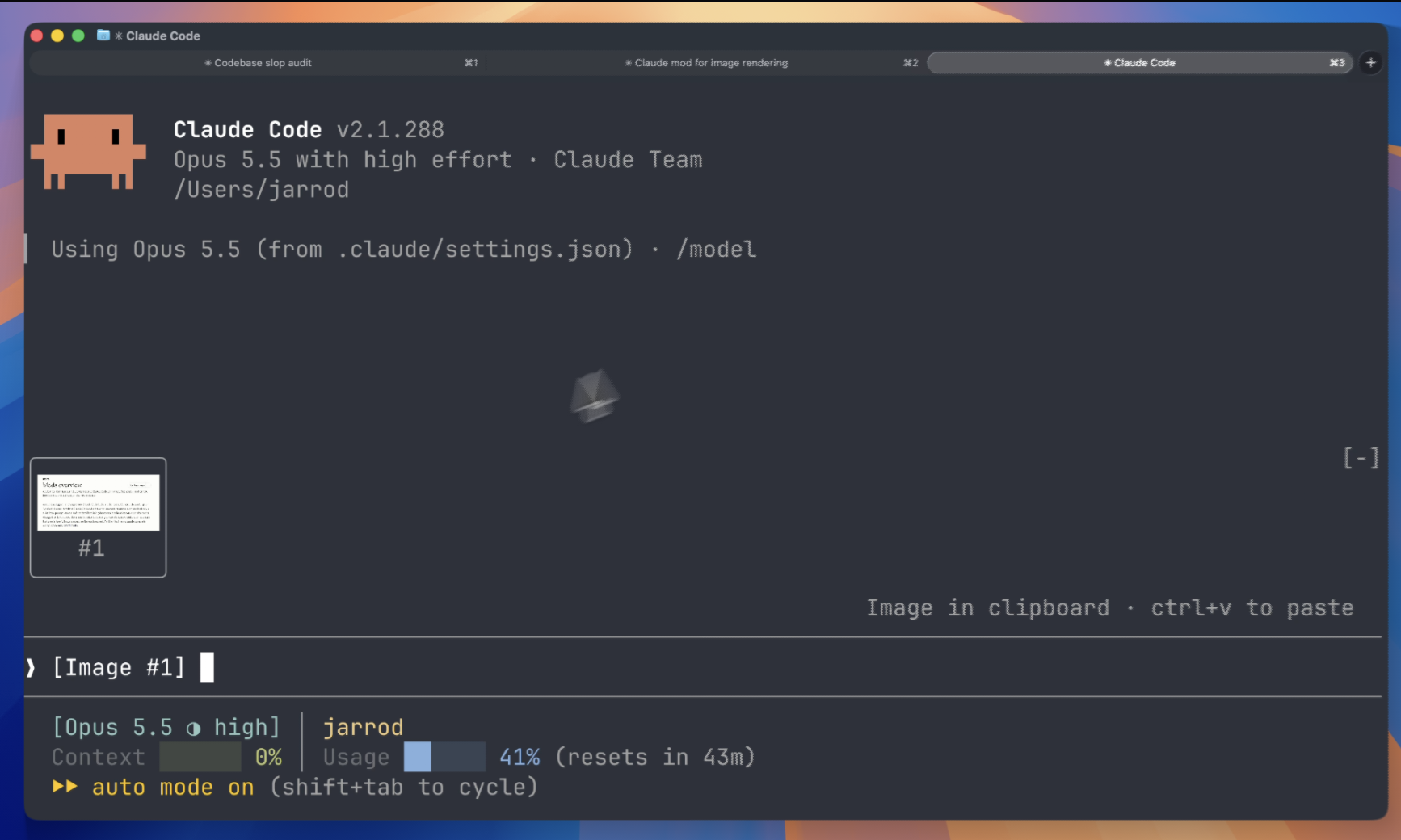
 Claude Image View is a Claude Code mod that shows thumbnails of images you paste into the prompt, instead of bare [Image #1] text tags.
Claude Image View is a Claude Code mod that shows thumbnails of images you paste into the prompt, instead of bare [Image #1] text tags.Is this a standalone app or a plugin for Claude Code?It's a plugin (mod) that loads inside an existing Claude Code terminal session rather than a separate application; Claude Code even generates its API types for the mod on first load.
It's a plugin (mod) that loads inside an existing Claude Code terminal session rather than a separate application; Claude Code even generates its API types for the mod on first load.How do I get it running?Install it from inside Claude Code, then just paste an image into the prompt and its thumbnail appears above the input automatically; if nothing shows, run /reload-plugins or start a new session.
Install it from inside Claude Code, then just paste an image into the prompt and its thumbnail appears above the input automatically; if nothing shows, run /reload-plugins or start a new session.What do I need for this to actually work?You need Claude Code v2.1.287 or later with mods support, running on macOS or Linux, inside a terminal that supports the kitty graphics protocol, such as Ghostty or kitty.
You need Claude Code v2.1.287 or later with mods support, running on macOS or Linux, inside a terminal that supports the kitty graphics protocol, such as Ghostty or kitty.Does the thumbnail preview always work?No: terminals without the kitty graphics protocol just show the raw [Image #n] text instead of a picture, and Claude Code also disables terminal images for background or agent-view sessions unless you re-enable them in settings.json.
No: terminals without the kitty graphics protocol just show the raw [Image #n] text instead of a picture, and Claude Code also disables terminal images for background or agent-view sessions unless you re-enable them in settings.json.Does this mod send my pasted images anywhere?No, it's local-only: it makes no network requests and writes no files, only reading the prompt box and the PNGs Claude Code already cached locally for the session.
No, it's local-only: it makes no network requests and writes no files, only reading the prompt box and the PNGs Claude Code already cached locally for the session.Does it do anything inside the Claude Desktop app?No, Claude Desktop already previews pasted images on its own, so the mod draws nothing there.
No, Claude Desktop already previews pasted images on its own, so the mod draws nothing there.How does it actually find and render the images?Every 200ms it scans the prompt box for [Image #n] tags, matches each one to the PNG Claude Code cached for that session, reads the size from the PNG header, and draws it above the prompt using Claude Code's Image element.
Every 200ms it scans the prompt box for [Image #n] tags, matches each one to the PNG Claude Code cached for that session, reads the size from the PNG header, and draws it above the prompt using Claude Code's Image element.What does a 'no preview' tile mean?It means the mod couldn't locate the cached PNG for that tag, usually because Claude Code changed where it stores pasted images; the fix suggested is to open an issue with your Claude Code version.
It means the mod couldn't locate the cached PNG for that tag, usually because Claude Code changed where it stores pasted images; the fix suggested is to open an issue with your Claude Code version.What are similar projects?gyotaku, claude-db, flyingmouse-format, revpdf-release, jevmem, lazy-frames, agent-router, vibe-aso
gyotaku, claude-db, flyingmouse-format, revpdf-release, jevmem, lazy-frames, agent-router, vibe-asoWhich topics is it in?ghostty, terminal-emulators, screenshot, claude-code-plugin, image, cli-tool, image-processing, offline, utility, local-first, plugin, claude
ghostty, terminal-emulators, screenshot, claude-code-plugin, image, cli-tool, image-processing, offline, utility, local-first, plugin, claude