
A live groovebox firmware for the M-VAVE FM-1 — for any style.
Free and open source (GPL-3.0), based on Felucca.
SLOOP turns the FM-1 into a four-track groovebox you play live: three synths and a drum machine with 16 sounds on the white keys, nine synthesis engines, your own samples, a song mode you play with your hands. House, techno, hip-hop, drum & bass, synthwave, lo-fi, ambient, chiptune — it does not pick a style for you. No factory patterns, nothing to load: everything you hear, you play.
Screenshots
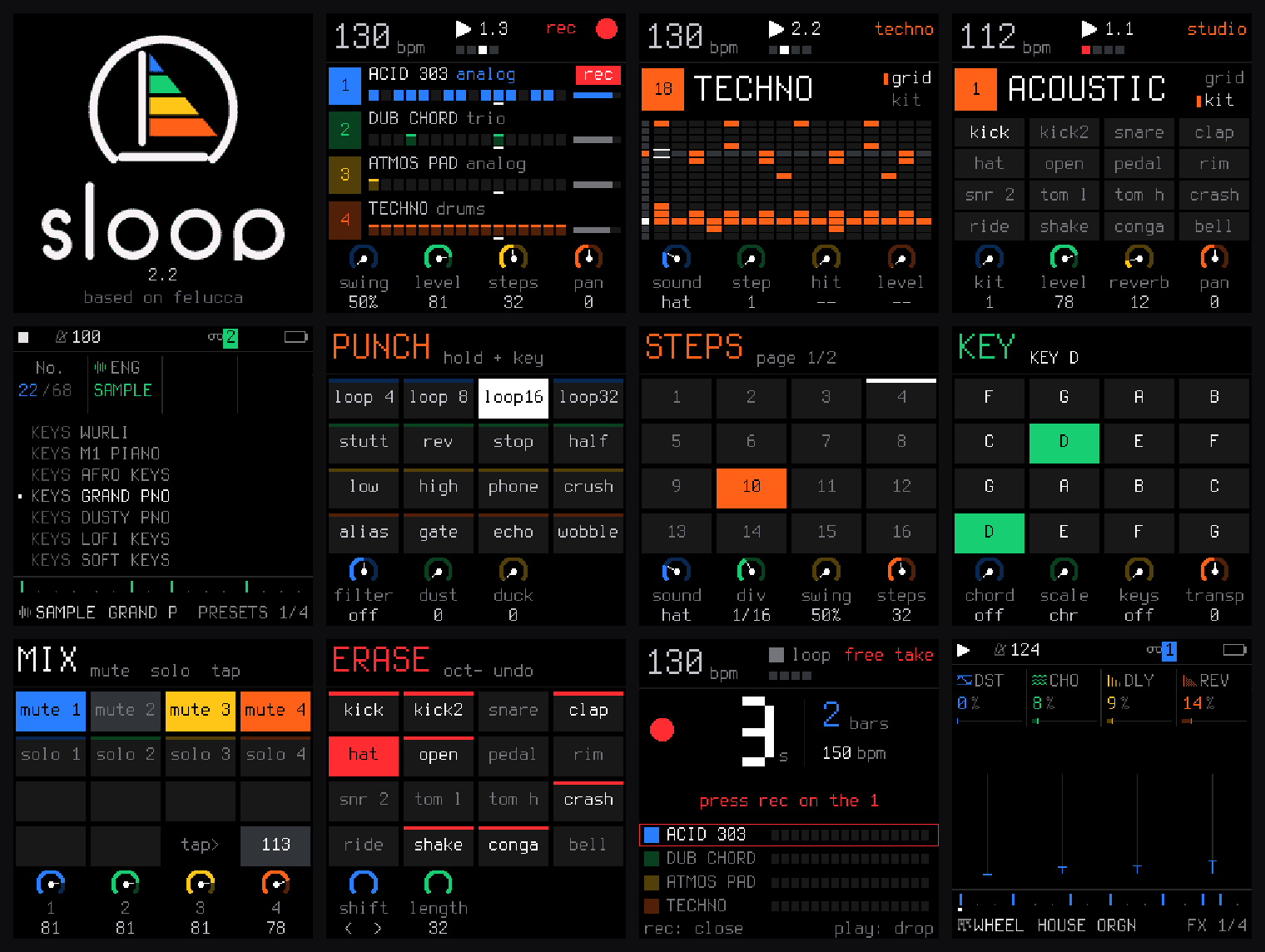
The FM-1's screen: start-up, the four tracks (recording), the drum grid and the acoustic kit, the sounds by kind, the layers (punch-in FX, steps, key and chords, mix, erase), a free take, the FX sends.
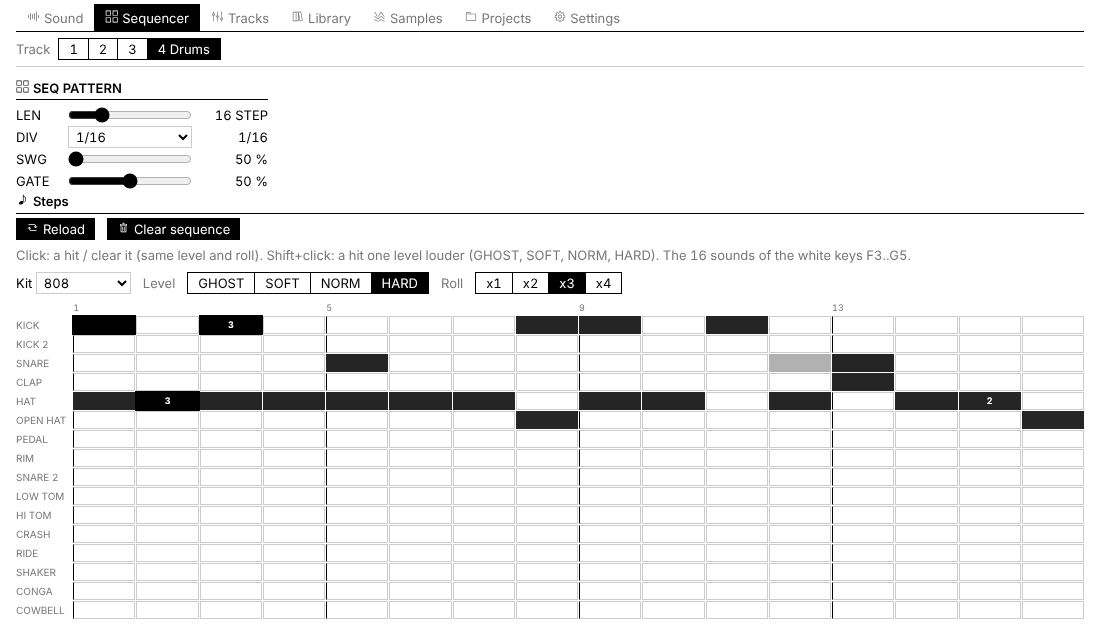
The web editor: the drum track as a 16-lane grid, with levels and ratchets.
New in 2.2
- A new drum engine built like the classic machines (tuned body and pitch drop, click, noise through a resonant filter, drive; softer hits are darker). 32 synthesised kits rebuilt on it — new: PHONK, AMAPIANO, UK GARAGE, deep house — and a sampled acoustic kit (CC0 studio recordings). Every kit is level-matched.
- 68 sounds, browsed by kind (basses, keys, organs, pads, leads, plucks and bells, stabs), all level-matched. 14 new, among them 808 SLIDE, ACID 303, SUPERSAW, M1 PIANO, AFRO KEYS, KALIMBA, DUB CHORD, HOUSE ORGN — and GRAND PNO, a real Steinway grand (CC0).
- Lock a layer: hold a layer button and tap HOME — it stays open with both hands free (FX on the keys with one hand, FILTER / DUST / DUCK with the other). Any other button lets it go.
- Stereo chorus and a new stereo reverb (a feedback delay network: dense, no metallic ring).
- More reliable: saves retried until they succeed, the song end gives your loop back, swing never plays a step twice, no click on retriggered voices, the installer refuses a damaged package, no more flicker on the button lights.
Everything in SLOOP.md.
Features
- Hold a button, touch a key. Every function button is a layer: hold it and the 16 white keys and the four knobs change job, and the screen shows how. Tap it and its pages open.
- FX: 16 punch-in effects (loops, stutter, reverse, tape stop, filters, crush…)
- EDIT: erase a sound or a note as the loop plays; shift, double or halve the pattern; undo / redo
- ARP: note repeat (1/8 to 1/64), locked to the grid
- SEQ: step entry, with a level and a ratchet per step
- SCL: the key of the song, and one-key chords (triad, 7th, 9th, sus4, power)
- GLO: mute, solo, tap tempo, track levels
- SAVE: play sections A–D live, record the song as you play
- Keys 1, 5, 9 and 13 glow dimly as landmarks: the rows of the 4 × 4 grid on the screen
- Hold a layer button and tap HOME to lock the layer open: both hands free
- Drums: 16 sounds on the white keys, ghost and hard hits (hold OCT− / OCT+), ratchets x1–x4, 37 kits (a sampled acoustic kit in 5 treatments, 32 synthesised: 808, 909, 606, house, deep house, techno, minimal, electro, trap, drill, phonk, UK garage, jungle, dubstep, reggaeton, amapiano, afrobeat, latin, disco, synthwave, chiptune, industrial, hyperpop, ambient, jazz brushes…), all level-matched.
- Synths: 9 engines — analog, 4-op FM, phase distortion, three-oscillator, tonewheel organ, formant voice, granular, lo-fi chip, sampler — with envelopes, LFO, arpeggiator, glide, drive, slicer and sends to a stereo chorus, a tempo delay and a stereo reverb. 68 presets to start from, browsed by kind and level-matched (sliding 808s, acid, reese and FM basses, a Steinway grand, Rhodes, house and afro keys, organs, supersaw, plucks and bells, stabs and dub chords, pads, talkbox, scratches) and 32 slots for your own.
- Recording with no click: a free take sets the loop length and the tempo from your playing; REC records at once while playing; notes land where you heard them (latency-compensated).
- Groove: MPC-style swing (50–75 %), a sample-accurate clock (no drift at any tempo), polymeters.
- Master: DUST (old sampler + vinyl), DUCK (the kick pumps the synths), a DJ filter.
- Memory: undo / redo, autosave of the working project, 4 projects, 32 user presets.
- Songs, live: hold SAVE and press a key — sections A–D start on the next bar, always in time; SONG REC writes the order you play into the song, PLAY in song mode plays it back.
- Your own samples: three user slots; the web editor chops a recording into 16 pieces (tap along while it plays) and uploads them.
- Web editor: every parameter, the drum track as a 16-lane grid, the mixer, a preset library, sample upload. Live sync with the device.
Install
From the browser: open the SLOOP installer in Chrome or Edge, connect the FM-1 by USB (a data cable, no hub), press INSTALL and wait for Done. Nothing to download or compile. The web editor works the same way.
Other ways: the .fwsc of each release with python tools/fm1_install.py sloop-2.2.fwsc (needs pip install mido python-rtmidi), or build it yourself and run INSTALL-SLOOP.bat (Windows).
Going back: M-VAVE's own updater (M-UPGRADE) and the official FM-1 firmware. If an install is cut off, the FM-1 stays in update mode: press Install again and it finishes.
Custom firmware is installed at your own risk. If an FM-1 no longer starts, recovery needs FM-1-transporter.
Documentation
Building
See BUILDING.md. In short: the JieLi toolchain and three files of the AC79 SDK, then ./build.sh (Linux / macOS) or INSTALL-SLOOP.bat (Windows with WSL). tests/run_tests.sh runs the host test suite (audio renders, sequencer timing, UI, storage, update loader, web pages).
Credits
SLOOP is a fork of Felucca by Leo Kuroshita (@kurogedelic), Hügelton Instruments: the engines, the sequencer, the editor and the installer come from there. Font: Terminus (SIL OFL 1.1). Samples: Versilian Studios VSCO-2 CE and VCSL, Sonic Pi (all CC0). PHASE engine after CrispyZebra; VOICE after klattsch. Icons: Fukiai.
Licence
Code: GPL-3.0-only (see LICENSE and LICENSING.md for the assets). No warranty. M-VAVE and FM-1 are trademarks of their owners; SLOOP is not affiliated with M-VAVE. Drum kit names describe styles, not products.

 SLOOP 是一个免费开源的 M-VAVE FM-1 硬件 groovebox 自定义固件,用更强大的合成器引擎组合、真正的鼓机、实时音序器和浏览器内编辑器取代原厂固件。