This repository is no longer maintained! :warning:
NexT
NexT is a high quality elegant Hexo theme. It is crafted from scratch, with love.




Live Preview
More NexT examples here.
Installation
1. Change dir to hexo root directory. There must be node_modules, source, themes and other directories:
$ cd hexo
$ ls
_config.yml  node_modules  package.json  public  scaffolds  source  themes
2. Get theme from GitHub. There are several variants to do it:
At most cases stable. Recommended for most users.

$ mkdir themes/next
$ curl -s https://api.github.com/repos/iissnan/hexo-theme-next/releases/latest | grep tarball_url | cut -d '"' -f 4 | wget -i - -O- | tar -zx -C themes/next --strip-components=1
You must define version. Replace v5.1.2 with any version from tags list.

$ mkdir themes/next
$ curl -L https://api.github.com/repos/iissnan/hexo-theme-next/tarball/v5.1.2 | tar -zxv -C themes/next --strip-components=1

$ git clone --branch v5.1.2 https://github.com/iissnan/hexo-theme-next themes/next
May be unstable, but includes latest features. Recommended for developers.
$ mkdir themes/next
$ curl -L https://api.github.com/repos/iissnan/hexo-theme-next/tarball | tar -zxv -C themes/next --strip-components=1
$ git clone https://github.com/iissnan/hexo-theme-next themes/next
Clone command will give you the whole repository. And in any time you can switch to any tagged release.
Get tags list:
$ cd themes/next
$ git tag -l
…
v5.0.0
v5.0.1
v5.1.0
v5.1.1
v5.1.2
For example, you want to switch on v5.1.0 tagged release version. Input the following command:
$ git checkout tags/v5.1.0
Note: checking out 'tags/v5.1.0'.
…
HEAD now on 1f72f68... CSS: Remove global list-style setting of ul
And if you want to switch back on master branch, input this command:
$ git checkout master
3. Set theme in main hexo root config _config.yml file:
theme: next
Bugs
For those who also encounter Error: Cannot find module 'hexo-util' issue, please check your NPM version.
> 3: Still not work. Please remove node_modules directory and reinstall using npm install.< 3: Please add hexo-util explicitly via npm install --save-dev hexo-util to you site package deps.
Update
$ cd themes/next
$ git pull
Bugs
Commit your changes or stash them before you can merge
You must Commit, Stash or Discard local changes. See here how to do it.
Theme configurations using Hexo data files (#328)
Currently, it is not smooth to update NexT theme from pulling or downloading new releases. It is quite often running into conflict status when updating NexT theme via git pull, or need to merge configurations manually when upgrading to new releases.
At present, NexT encourages users to store some options in site's _config.yml and other options in theme's _config.yml. This approach is applicable, but has some drawbacks:
- Configurations are splited into two pieces
- Users maybe confuse which place should be for options
In order to resolve this issue, NexT will take advantage of Hexo Data files. Because Data files is introduced in Hexo 3, so you need upgrade Hexo to 3.0 (or above) to use this feature.
If you prefer Hexo 2.x, you can still use the old approach for configurations. NexT is still compatible with Hexo 2.x.
Benefits
With this feature, now you can put all your configurations into one place (source/_data/next.yml), you don't need to touch next/_config.yml. If there are any new options in new releases, you just need to copy those options from next/_config.yml, paste into _data/next.yml and set their values to whatever you want.
How to use this feature
- Please ensure you are using Hexo 3 (or above)
- Create an file named
next.yml in site's source/_data directory (create _data directory if it did not exist)
- Copy NexT theme options both in site's
_config.yml and theme's _config.yml into next.yml.
- Use
--config source/_data/next.yml parameter to start server, generate or deploy.
For example: hexo clean --config source/_data/next.yml && hexo g --config source/_data/next.yml.
Features
Multiple languages support, including:
:cn: Simplified Chinese & Traditional Chinese.
:us: English
:ru: Russian
:fr: French
:de: German
:jp: Japanese
:indonesia: Indonesian
:portugal: Portuguese (Brazil)
:kr: Korean
:it: Italian
:netherlands: Dutch
:vietnam: Vietnamese
Default language is English.
language: en
# language: zh-Hans
# language: zh-hk
# language: zh-tw
# language: ru
# language: fr-FR
# language: de
# language: ja
# language: id
# language: pt
# language: pt-BR
# language: ko
# language: it
# language: nl-NL
# language: vi
Set language field as following in site _config.yml to change to Chinese.
language: zh-Hans
NexT has native support for DuoShuo and Disqus comment systems.
Add the following snippets to your _config.yml:
duoshuo:
  enable: true
  shortname: your-duoshuo-shortname
OR
disqus_shortname: your-disqus-shortname
Tags page.
Add a tags page contains all tags in your site.
Create a page named tags
hexo new page "tags"
Edit tags page, set page type to tags.
  title: All tags
  date: 2014-12-22 12:39:04
  type: "tags"
Add tags to theme _config.yml:
  menu:
    home: /
    archives: /archives
    tags: /tags
Categories page.
Add a categories page contains all categories in your site.
Create a page named categories
hexo new page "categories"
Edit categories page, set page type to categories.
  title: All categories
  date: 2014-12-22 12:39:04
  type: "categories"
Add categories to theme _config.yml:
  menu:
    home: /
    archives: /archives
    categories: /categories
NexT can automatically add links to your Social Media accounts:
social:
  GitHub: your-github-url
  Twitter: your-twitter-url
  Weibo: your-weibo-url
  DouBan: your-douban-url
  ZhiHu: your-zhihu-url
Feed link.
Show a feed link.
Set rss field in theme's _config.yml, as the following value:
rss: false will totally disable feed link.
rss: use sites' feed link. This is the default option.
Follow the installation instruction in the plugin's README. After the configuration is done for this plugin, the feed link is ready too.
rss: http://your-feed-url set specific feed link.
Up to 5 code highlight themes built-in.
NexT uses Tomorrow Theme with 5 themes for you to choose from.
Next use normal by default. Have a preview about normal and night:
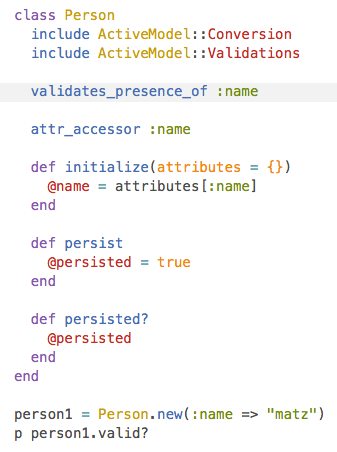
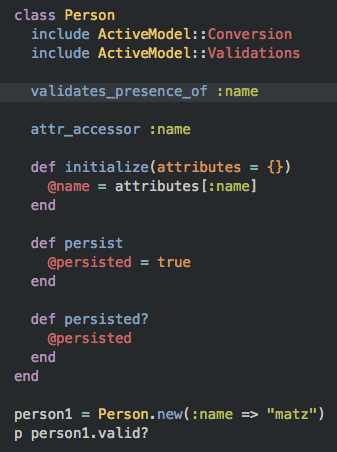
Head over to Tomorrow Theme for more details.
Configuration
NexT comes with few configurations.
# Menu configuration.
menu:
  home: /
  archives: /archives

# Favicon
favicon: /favicon.ico

# Avatar (put the image into next/source/images/)
# can be any image format supported by web browsers (JPEG,PNG,GIF,SVG,..)
avatar: /default_avatar.png

# Code highlight theme
# available: normal | night | night eighties | night blue | night bright
highlight_theme: normal

# Fancybox for image gallery
fancybox: true

# Specify the date when the site was setup
since: 2013
Browser support


BrowserStack is a cloud-based cross-browser testing tool that enables developers to test their websites across various browsers on different operating systems and mobile devices, without requiring users to install virtual machines, devices or emulators.
Contributing
Contribution is welcome, feel free to open an issue and fork. Waiting for your pull request.

 NexT 是 Hexo 的一款高品质、优雅的主题。Hexo 是一个静态网站生成器,NexT 是最受欢迎的 Hexo 主题之一,在 GitHub 上获得了超过 15000 颗星。