



14K ·GitHub
What is this?
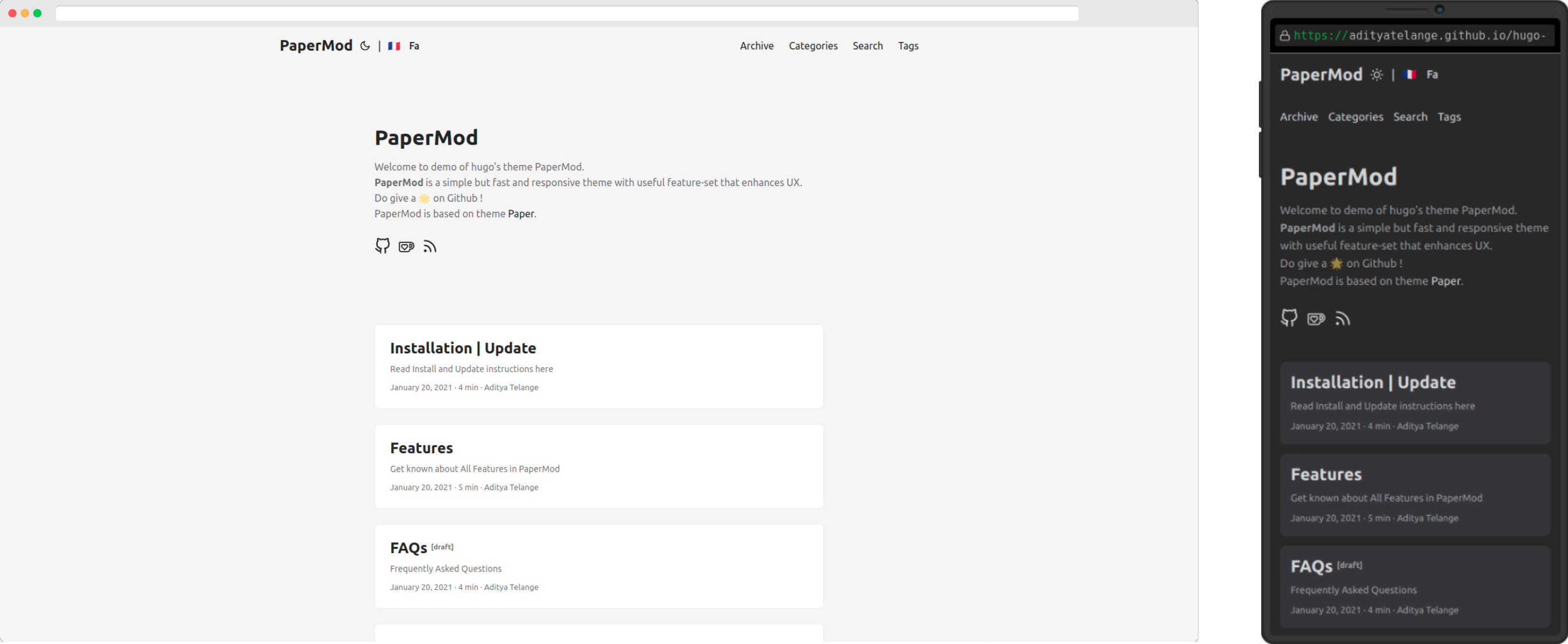
 Hugo PaperMod is a fast, clean, responsive theme for the Hugo static site generator. It is based on hugo-paper and adds many extra features and customization options.
Hugo PaperMod is a fast, clean, responsive theme for the Hugo static site generator. It is based on hugo-paper and adds many extra features and customization options.So it is not an app I install on its own — what exactly is it?It is a theme: a pack of templates and assets you add to an existing Hugo site to define how the whole site looks and behaves.
It is a theme: a pack of templates and assets you add to an existing Hugo site to define how the whole site looks and behaves.How do I get it onto my Hugo site?Follow the Installation guide in the project wiki, which covers installing and updating the theme; a live demo and an example site are linked in the README if you want to preview first.
Follow the Installation guide in the project wiki, which covers installing and updating the theme; a live demo and an example site are linked in the README if you want to preview first.Do I need Node.js, webpack or other build tools for it?No — PaperMod has zero JS build dependencies, so there is no webpack, Node.js or other tooling; it uses Hugo's built-in asset generator for fingerprinting, bundling and minification.
No — PaperMod has zero JS build dependencies, so there is no webpack, Node.js or other tooling; it uses Hugo's built-in asset generator for fingerprinting, bundling and minification.Is it meant for personal blogs, or bigger sites too?It targets blogs and portfolio-style personal sites, and it also natively supports multi-author sites, so small publications with several writers fit as well.
It targets blogs and portfolio-style personal sites, and it also natively supports multi-author sites, so small publications with several writers fit as well.Where do the sites I build with it actually run?Anywhere static files can be served: the output is a static website, so any browser and any static hosting works — only Hugo itself runs at build time, nothing server-side after that.
Anywhere static files can be served: the output is a static website, so any browser and any static hosting works — only Hugo itself runs at build time, nothing server-side after that.What does PaperMod include out of the box?A lot: three homepage layouts (Regular, Home-Info, and Profile), automatic light and dark themes with a manual toggle, built-in multilingual support with a language selector, client-side search powered by Fuse.js, Open Graph, Twitter Cards and Schema.org SEO, per-post cover images, an auto-generated table of contents, multi-author support, breadcrumbs, code copy buttons and related-post suggestions.
A lot: three homepage layouts (Regular, Home-Info, and Profile), automatic light and dark themes with a manual toggle, built-in multilingual support with a language selector, client-side search powered by Fuse.js, Open Graph, Twitter Cards and Schema.org SEO, per-post cover images, an auto-generated table of contents, multi-author support, breadcrumbs, code copy buttons and related-post suggestions.How fast are sites built with PaperMod?Very fast: the README reports consistently near-perfect Pagespeed Insights scores. Hugo's built-in asset pipeline handles fingerprinting, bundling and minification, and there is no webpack or Node.js toolchain in the way.
Very fast: the README reports consistently near-perfect Pagespeed Insights scores. Hugo's built-in asset pipeline handles fingerprinting, bundling and minification, and there is no webpack or Node.js toolchain in the way.Which libraries does PaperMod build on?The README credits Highlight.js, Fuse.js, Feather Icons and Simple Icons. Fuse.js powers the client-side search, while Feather and Simple Icons provide the UI and social icons.
The README credits Highlight.js, Fuse.js, Feather Icons and Simple Icons. Fuse.js powers the client-side search, while Feather and Simple Icons provide the UI and social icons.Can I customize it without forking the theme?Yes — the wiki includes a guide to overriding templates without forking, and social links and per-post sharing are configurable. The wiki also covers features, FAQ, icons and the full list of template variables.
Yes — the wiki includes a guide to overriding templates without forking, and social links and per-post sharing are configurable. The wiki also covers features, FAQ, icons and the full list of template variables.What are similar projects?minimal-mistakes, jekyll-theme-chirpy, NotionNext, hexo-theme-next, tailwind-nextjs-starter-blog, al-folio, beautiful-jekyll, arc-library
minimal-mistakes, jekyll-theme-chirpy, NotionNext, hexo-theme-next, tailwind-nextjs-starter-blog, al-folio, beautiful-jekyll, arc-libraryWhich topics is it in?portfolio, fast, mit-license, blog, seo, static-site-generator, dark-mode, theme, high-performance, search, multilingual, customization
portfolio, fast, mit-license, blog, seo, static-site-generator, dark-mode, theme, high-performance, search, multilingual, customization