SIA (Self-Improving AI)


Official implementation of SIA: Self Improving AI with Harness & Weight Updates (Hebbar et al., 2026) — a self-improving loop where a language-model agent updates both the harness and the weights of a task-specific agent. The paper reports a 56.6% gain on LawBench, 91.9% runtime reduction on GPU kernels, and 502% improvement on single-cell RNA denoising over baseline.
SIA is a Self Improving AI framework to autonomously improve the performance of any AI system (Model / Agent) on a benchmark task.
Just want to try it? Skip to Run SIA locally.
Introduction Videos
Architecture
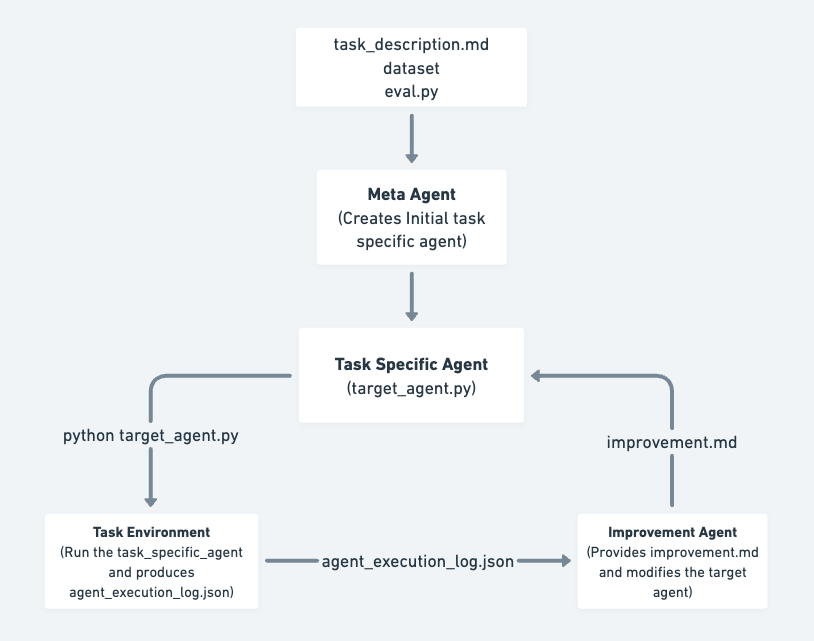
Control flow between Meta, Target, and Feedback agents over successive generations.
SIA operates by coordinating three main types of AI agents that work together to continuously improve task performance:
Glossary
- Meta-Agent: Reads the task description and generates an initial Target Agent tailored to the task.
- Target / Task Specific Agent: Attempts to complete the task and records its actions and results.
- Feedback/Improvement Agent: Reviews the Target Agent's performance logs, identifies improvements, and updates the Target Agent accordingly.
This iterative process allows the system to autonomously refine and enhance its ability to solve scientific tasks.
Benchmark Results
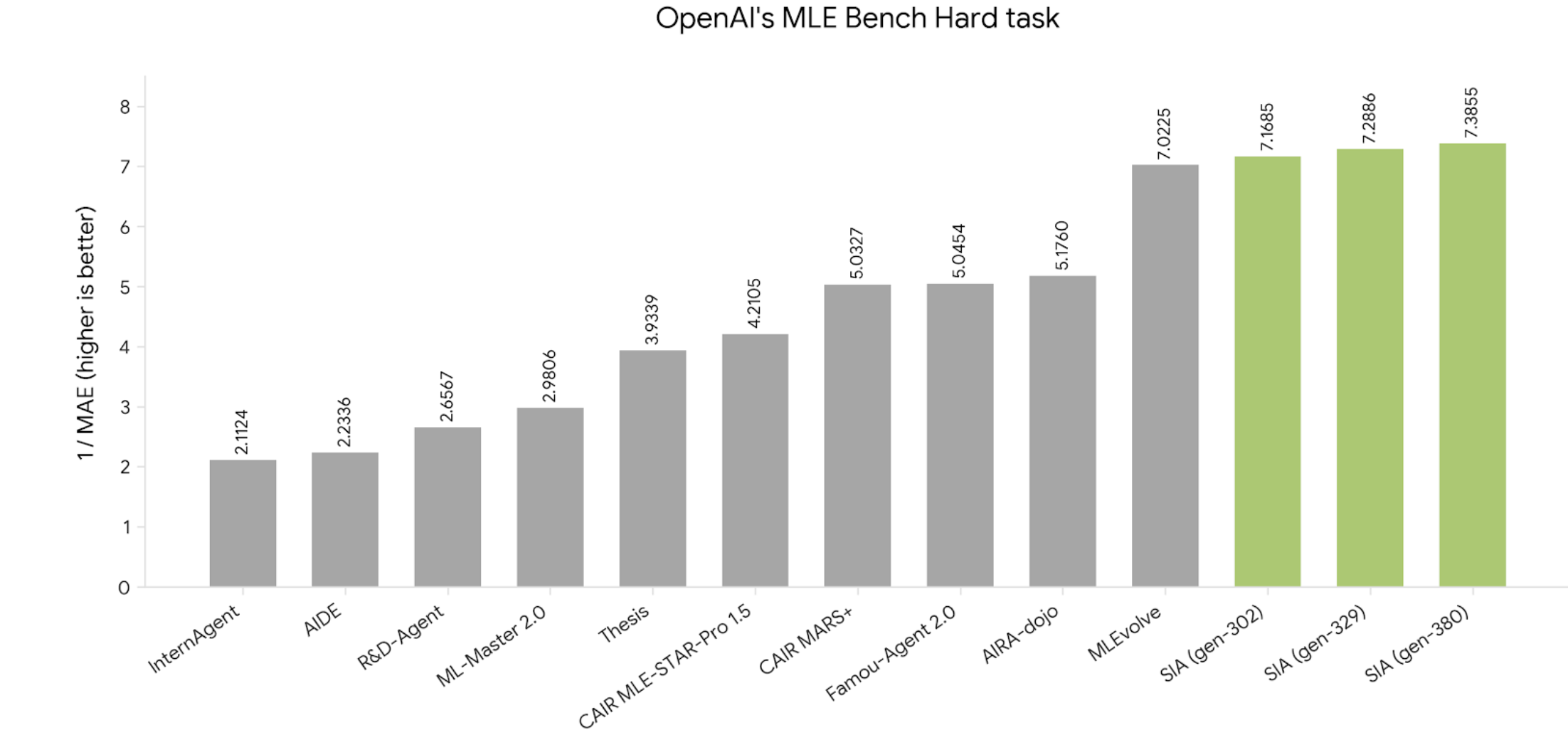
OpenAI MLE-Bench Hard: a gauntlet of real Kaggle ML competitions where agents must write, run, and iterate full ML pipelines. SIA ranks #1 across all generations tested.
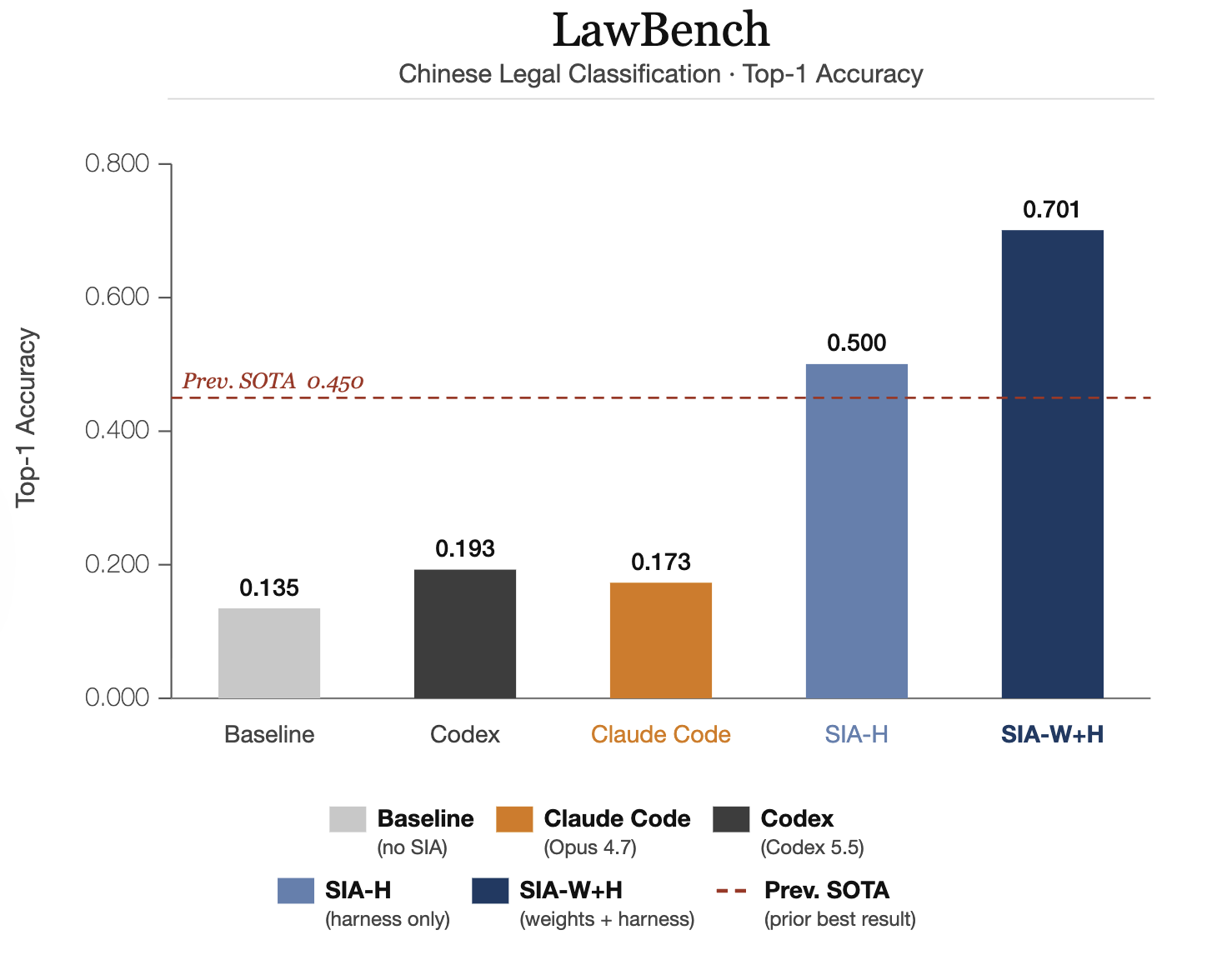
LawBench: predict the criminal charge from Chinese court case descriptions across 191 charge categories. SIA-W+H reaches 70.1% Top-1 accuracy, beating the prior SOTA of 45%.
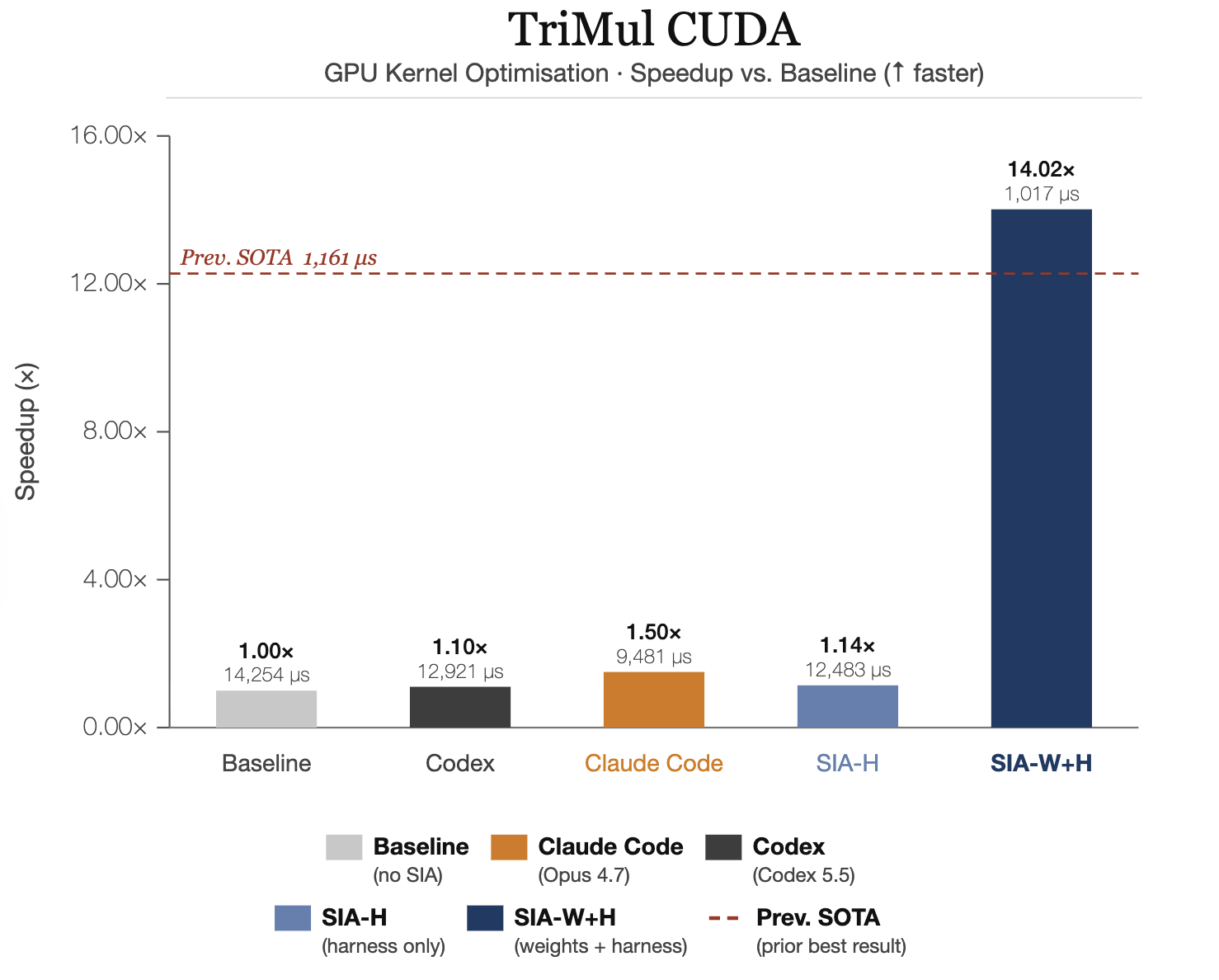
AlphaFold-3 TriMul Triton Kernel: implement and optimize the Triangle Multiplicative Update as a Triton kernel, preserving correctness while hitting H100 latency targets. SIA-W+H achieves 14x speedup over baseline.
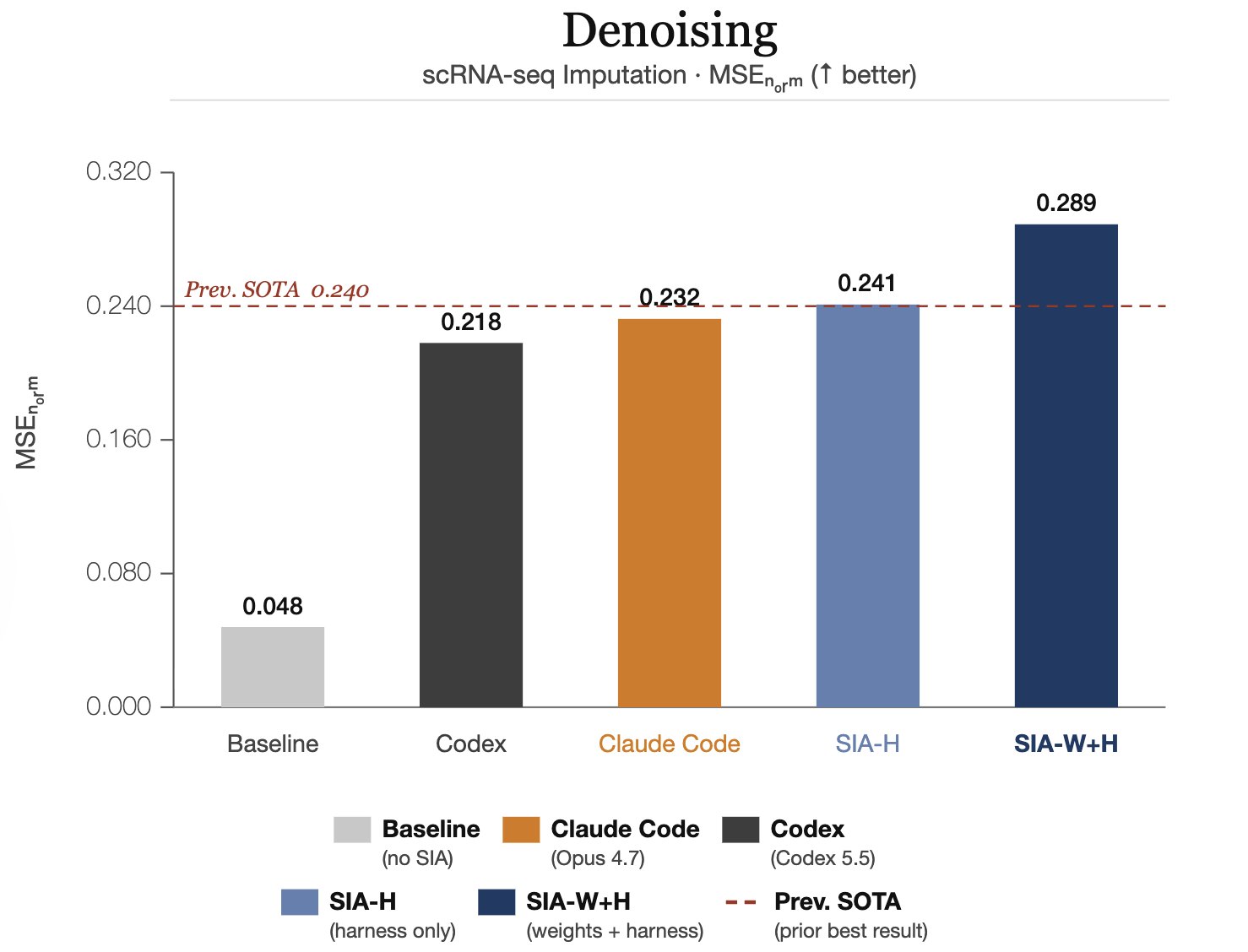
scRNA-seq Denoising: impute missing gene expression values in single-cell RNA sequencing data. SIA-W+H scores 0.289 MSEnorm, surpassing the prior SOTA of 0.240.
Run SIA locally with built-in tasks
SIA ships with four built-in tasks: gpqa, lawbench, longcot-chess, spaceship-titanic.
Install
Pick the agent impl that matches the LLMs you want to run.
Claude agent impl (Claude Agent SDK, Claude models only):
python3 -m venv .venv && source .venv/bin/activate
pip install 'sia-agent[claude]'
export ANTHROPIC_API_KEY="..."
OpenHands agent impl (multi-provider — Gemini, OpenAI, Anthropic, etc.):
python3 -m venv .venv && source .venv/bin/activate
pip install 'sia-agent[openhands]'

# Export the key(s) for the provider(s) you'll use:
export ANTHROPIC_API_KEY="..."   # for anthropic/* models
export GEMINI_API_KEY="..."      # for gemini/* models (or GOOGLE_API_KEY)
export OPENAI_API_KEY="..."      # for openai/* models
export OPENROUTER_API_KEY="..."  # for any model, via the openrouter provider
One key for everything: the bundled openrouter-meta / openrouter-target profiles route both
agents through OpenRouter, so a single OPENROUTER_API_KEY covers
400+ models without a per-provider account:
sia run --task gpqa --meta-agent-profile openrouter-meta --target-agent-profile openrouter-target
Full provider/model reference: docs/configuration.md.
Run
The CLI has two sub-commands: sia run (the self-improvement loop) and
sia web (the runs visualizer, see Visualize runs).
sia run --task gpqa --max_gen 5 --run_id 1
Swap --task for any of the four bundled tasks. (sia --task ... without the
run sub-command still works and is treated as sia run ....)
Artifacts land in runs/run_{run_id}/gen_{n}/:
target_agent.py — the agent for that generationagent_execution.json — execution logsimprovement.md — diff rationale (gen 2+)
While a run is in progress a live dashboard auto-starts at
http://127.0.0.1:8000 (disable with --no-web).
Security: the default --sandbox none mode runs agent-generated code with host access. For untrusted tasks or models, use --sandbox docker, which isolates execution in a Docker container with no network access. See SECURITY.md for the full security model.
Common flags (sia run)
| Flag |
Default |
Description |
--task |
— |
Bundled task name (mutually exclusive with --task_dir) |
--task_dir |
— |
Path to an external task directory |
--max_gen |
3 |
Number of self-improvement generations |
--run_id |
1 |
Unique run identifier |
--meta-agent-profile |
default-meta |
Profile for the meta/feedback agent (name or path to a .json) |
--target-agent-profile |
default-target |
Profile for the target agent (name or path to a .json) |
--no-web |
off |
Don't auto-start the live dashboard during the run |
--web-port |
8000 |
Port for the live dashboard (--web-host to change the bind host) |
The model, agent impl, and provider for each agent come from a profile (see below). For example,
to evaluate Kimi-K2.6 on Nebius as the target model:
export NEBIUS_API_KEY="..."        # + ANTHROPIC_API_KEY for the default meta agent
sia run --task gpqa --target-agent-profile kimi-nebius-target --max_gen 5 --run_id 2
Full agent-impl, model, and API-key reference: docs/configuration.md. Hit a snag? docs/troubleshooting.md.
Visualize runs
A built-in web dashboard renders everything under runs/: the per-generation
target-agent code (syntax-highlighted), meta/feedback prompts, improvement
plans, evaluation scores (with an accuracy-across-generations chart and
per-domain breakdown), execution trajectories, and logs.
sia web                          # serve ./runs at http://127.0.0.1:8000
sia web --runs-dir ./runs --port 8080
It also starts automatically alongside sia run (disable with --no-web), so
you can watch generations land live.
| Flag |
Default |
Description |
--runs-dir |
./runs |
Directory of runs to visualize |
--host |
127.0.0.1 |
Bind host |
--port |
8000 |
Bind port |
--no-browser |
off |
Don't open a browser window automatically |
Author your own profile
A provider is an endpoint + credentials; a profile configures one agent role. A meta-agent
profile bundles (agent_impl, model, provider); a target-agent profile bundles (model, provider, agent_reference). Both are JSON files — bundled defaults live in sia/defaults/{providers,profiles}/,
and you can add your own under ./providers/ and ./profiles/ (or set $SIA_PROVIDERS_DIR /
$SIA_PROFILES_DIR). No code change required.
mkdir -p providers profiles
// providers/my-endpoint.json   — an OpenAI-compatible provider
{
  "provider_id": "my-endpoint",
  "name": "My Endpoint",
  "client_kind": "openai",                 // anthropic | openai | google
  "base_url": "https://api.example.com/v1",
  "api_key_env": "MY_ENDPOINT_API_KEY"
}
// profiles/my-target.json      — the target agent's model + provider + reference
{
  "profile_id": "my-target",
  "name": "My model on My Endpoint",
  "model": "vendor/my-model",
  "provider_id": "my-endpoint",             // references the provider above
  "agent_reference": "default"              // "default" = the task package's reference;
                                            // or { "source": "./my_agent_dir/", "entrypoint": "main.py" }
}
export MY_ENDPOINT_API_KEY="..."
sia run --task gpqa --target-agent-profile my-target      # by name (resolves ./profiles/my-target.json)
sia run --task gpqa --target-agent-profile ./profiles/my-target.json   # or by explicit path
The agent_reference is the seed the meta-agent starts from and the feedback-agent improves:
"default" uses the task package's bundled reference, or supply your own with
{ "source": "./my_agent.py" } (a single file) or { "source": "./dir/", "entrypoint": "main.py" }
(a multi-file directory the agent reads with its tools). A requirements.txt inside a directory
reference is installed per generation.
To run the meta/feedback agent elsewhere, give a meta profile a different agent_impl
(openhands or pydantic-ai) and pass it with --meta-agent-profile. The claude agent impl is
Anthropic-only. See docs/configuration.md for the full schema and more examples.
Bring your own task
Prepare a task directory with the layout below and point --task_dir at it:
my-task/
├── data/
│   ├── public/
│   │   ├── task.md          # Task description — SIA reads this
│   │   └── ...              # Inputs the agent is allowed to see
│   └── private/             # Held-out eval data; never exposed to the agent
└── reference/
    ├── reference_target_agent.py     # Template; copy from sia/tasks/_shared/
    └── SAMPLE_TASK_DESCRIPTIONS.md   # Optional: example tasks for the meta-agent
sia run --task_dir ./my-task --max_gen 5 --run_id 1
Or bring an MLE-Bench competition. SIA can bootstrap a task directory directly from any MLE-Bench competition — it pulls the dataset via the Kaggle API, sets up the public/private split, and drops in the reference agent template:
python -m sia.prepare_mlebench_dataset -c "spaceship-titanic"
sia run --task_dir ./tasks/spaceship-titanic --max_gen 5 --run_id 1
Full step-by-step for both paths: docs/walkthrough.md.
Evaluation
After every generation the orchestrator scores the target agent automatically and
feeds the result into the next generation's feedback prompt — this is the signal
the self-improvement loop optimizes against.
- The target agent writes its output into the generation directory (e.g.
gen_1/submission.csv).
- The orchestrator runs the task's evaluator:
python evaluate.py --gen-dir gen_1/.
evaluate.py scores the output against the held-out ground truth in data/private/
and writes gen_1/results.json (or evaluation_results.json).- Those metrics are injected into the feedback prompt and surfaced in
context.md
and the web dashboard (accuracy-across-generations chart, per-domain breakdown).
The four bundled tasks already ship an evaluator. For a custom task, drop an
evaluate.py exposing an evaluate() function into data/public/ — it decides the
submission format, compares against data/private/, and returns a metrics dict.
Test it standalone before a full run:
python my-task/data/public/evaluate.py --gen-dir runs/run_1/gen_1 # should write results.json
Full contract, return-format rules, and a complete example: EVALUATION_GUIDE.md.
For metric robustness and anti-gaming checks, see docs/evaluator_design.md.
Contributing
Contributions are welcome. See CONTRIBUTING.md for development setup, test/lint/type-check commands, and guidance for adding new tasks.
Further reading
Citation
If you use SIA in your research, please cite:
@article{hebbar2026sia,
  title   = {SIA: Self Improving AI with Harness \& Weight Updates},
  author  = {Hebbar, Prannay and Manawat, Yogendra and Verboomen, Samuel and Ivanova, Alesia and Palanimalai, Selvam and Bhatia, Kunal and Baskaran, Vignesh},
  journal = {arXiv preprint arXiv:2605.27276},
  year    = {2026},
  url     = {https://arxiv.org/abs/2605.27276}
}

 SIA 是一个自我改进的 AI 框架,能够自主地提升任意 AI 系统在某个基准任务上的表现,无论这个系统是模型还是智能体。