W1700K SDR
Turns a Gemtek W1700K Wi-Fi 7 router into a wideband software-defined receiver.
The router's MediaTek MT7996 radio captures raw 14-bit IQ at up to 320 Msps,
its Airoha AN7581 SoC streams it over 10 GbE, and a Linux host shows it as a
live spectrum and waterfall in the browser, with the receiver's controls next
to it.
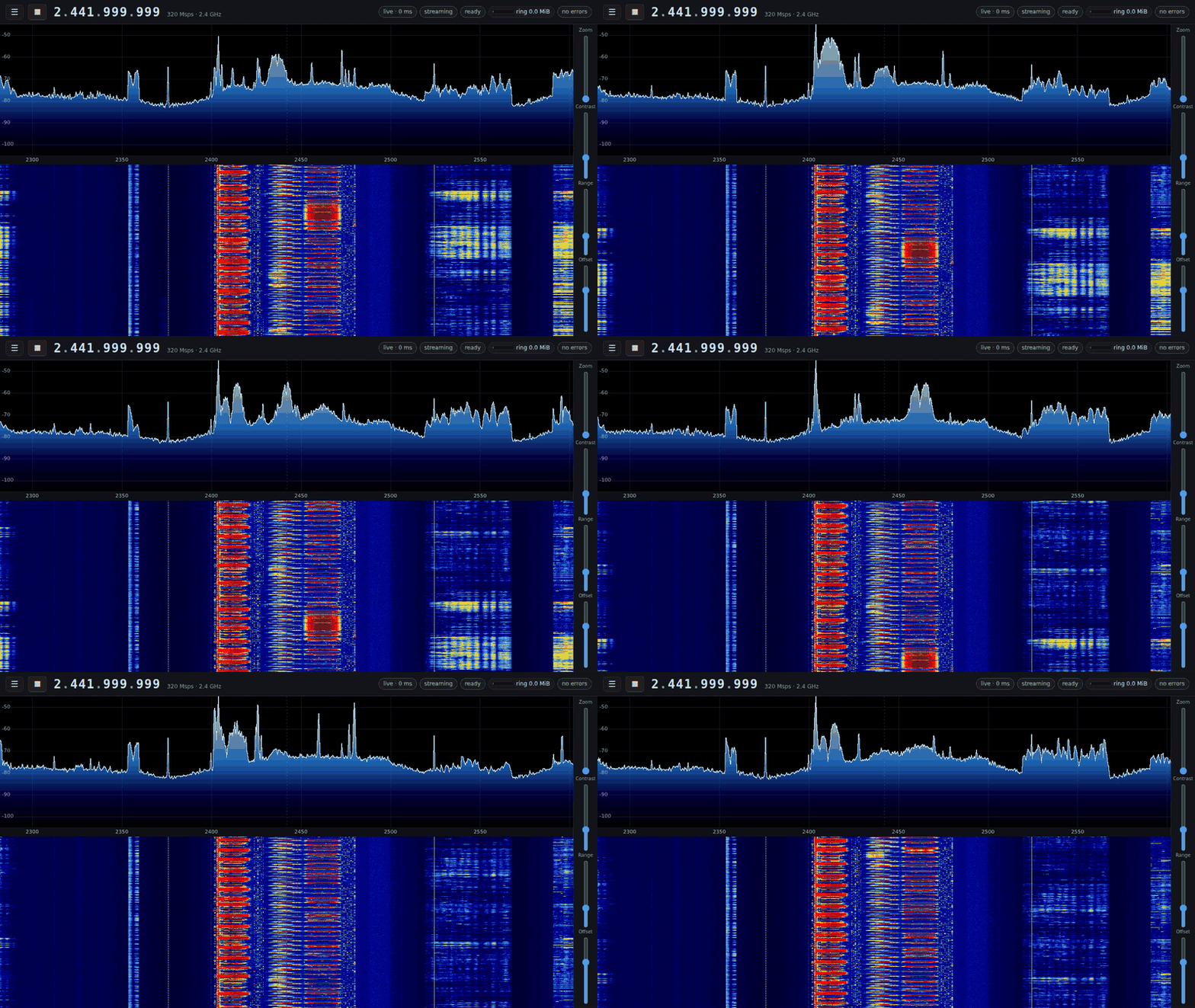
The whole 2.4 GHz band at 320 Msps, live, with the decimation's roll-off
corrected in the stream ("flatten"): a 262,144-point FFT of every sample, 100
spectra a second (this recording runs at 50 frames a second).
The MT7996 runs only our own firmware: a ROM patch, WM and WA built from this
repository, with no MediaTek code. It brings the radio up from a cold power-on
by itself, from MediaTek's initialisation and calibration decoded register by
register against a trace of MediaTek's own firmware, and takes its commands
(LO, sample rate, capture, stream, gain, filter) from the host. See
docs/architecture.md and docs/roadmap.md.
What it does
|
|
| Sample rates |
40, 80, 160 or 320 Msps of 14-bit complex IQ on every band, independent of the LO and the filter; on band 2 also 640/2 (every other sample of 640 Msps: flat to ±155 MHz, but signals 160–320 MHz away fold in) |
| Bands |
2.4 GHz (MT7976), 5 GHz and 6 GHz (two MT7977s); switching bands is a register write inside a running stream |
| Tuning |
No channels: the LO is any Hz a band's synthesizer locks at (unit A: 2.081–2.748, 4.647–7.509 and 4.707–7.576 GHz), on its grid of 2.98 Hz (2.4 GHz) or 11.9–14.3 Hz steps; retuned mid-stream (about 1 ms) |
| Front end |
AGC or manual LNA/baseband gain; analog filter 20–320 MHz |
| Transport |
the radio DMAs into a 1 GiB ring in SoC DRAM; the kernel sends every 8 KiB slice as one UDP datagram, zero-copy, on the 10 GbE port; at 320 Msps half the slices are packed to 28 bits per sample pair on the radio's own cores to fit the link (lossless, automatic) |
| Host |
w1700k-stream receives the export and serves the IQ stream to every consumer on the host (shared memory, complex int16, gap-tagged), with an optional correction ("flatten") of the decimation's roll-off applied to the samples themselves; w1700k-spectrum: 262,144-point FFT at 100 frames/s over every sample, browser UI, live controls; sdr-recv records the stream |
Screenshots
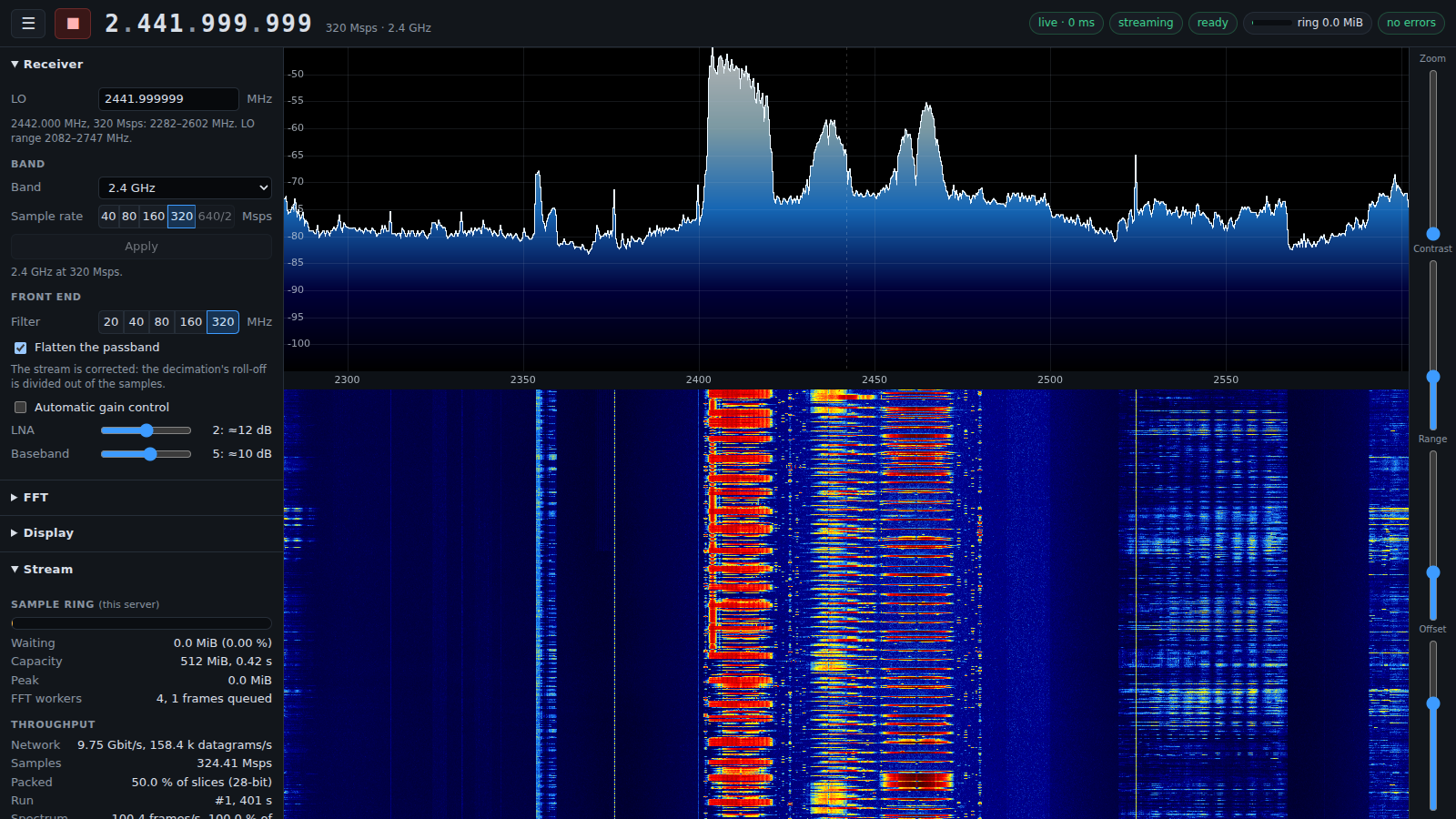
2.4 GHz at 320 Msps, flattened: Wi-Fi frames and shorter hopping bursts on a
floor that stays level to the band's edges. The Stream panel shows the link
carrying 9.75 Gbit/s, half of the slices packed, and every sample transformed.
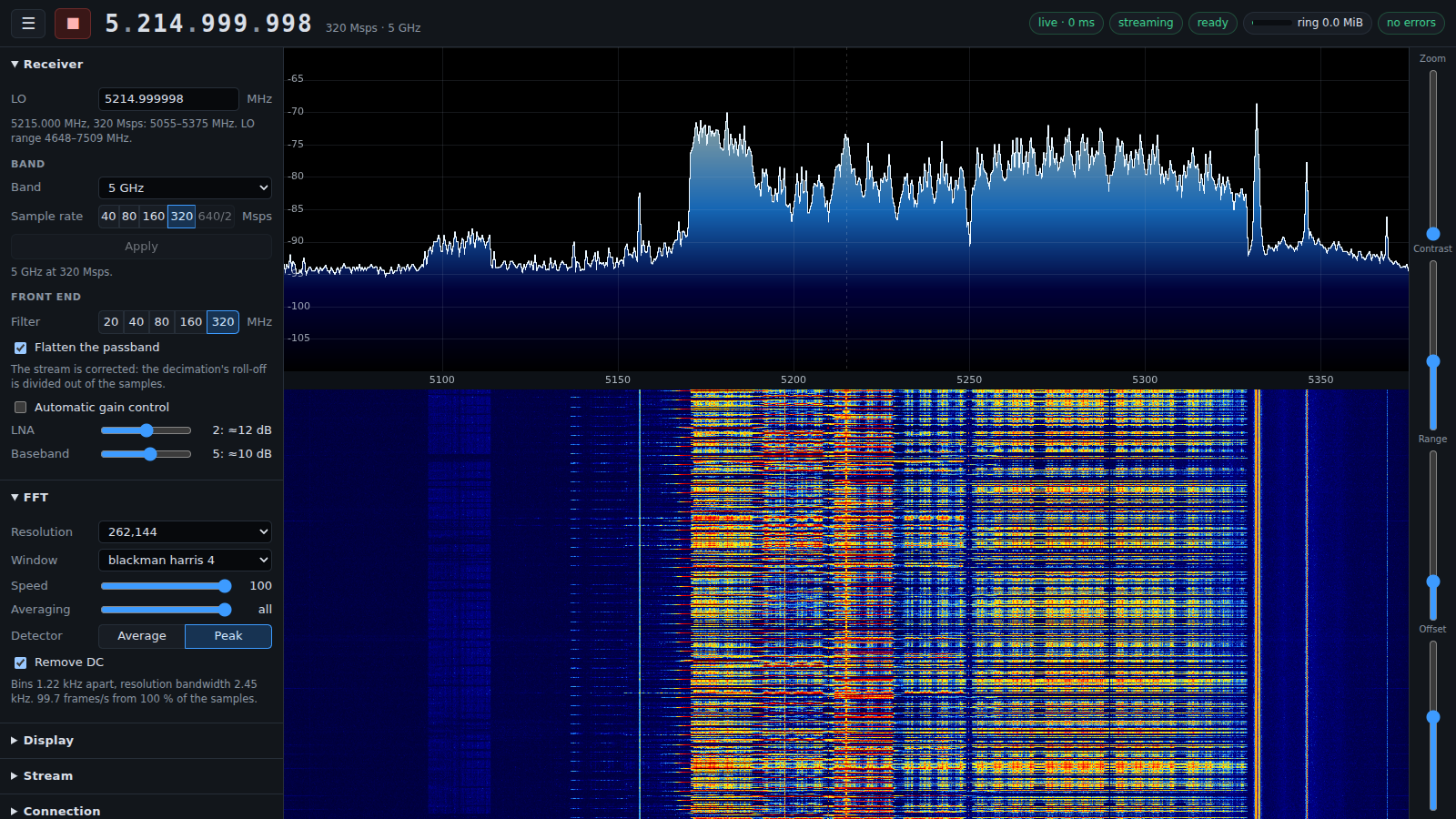
Two busy 80 MHz Wi-Fi channels at 5170–5330 MHz in a flattened 320 MHz view.
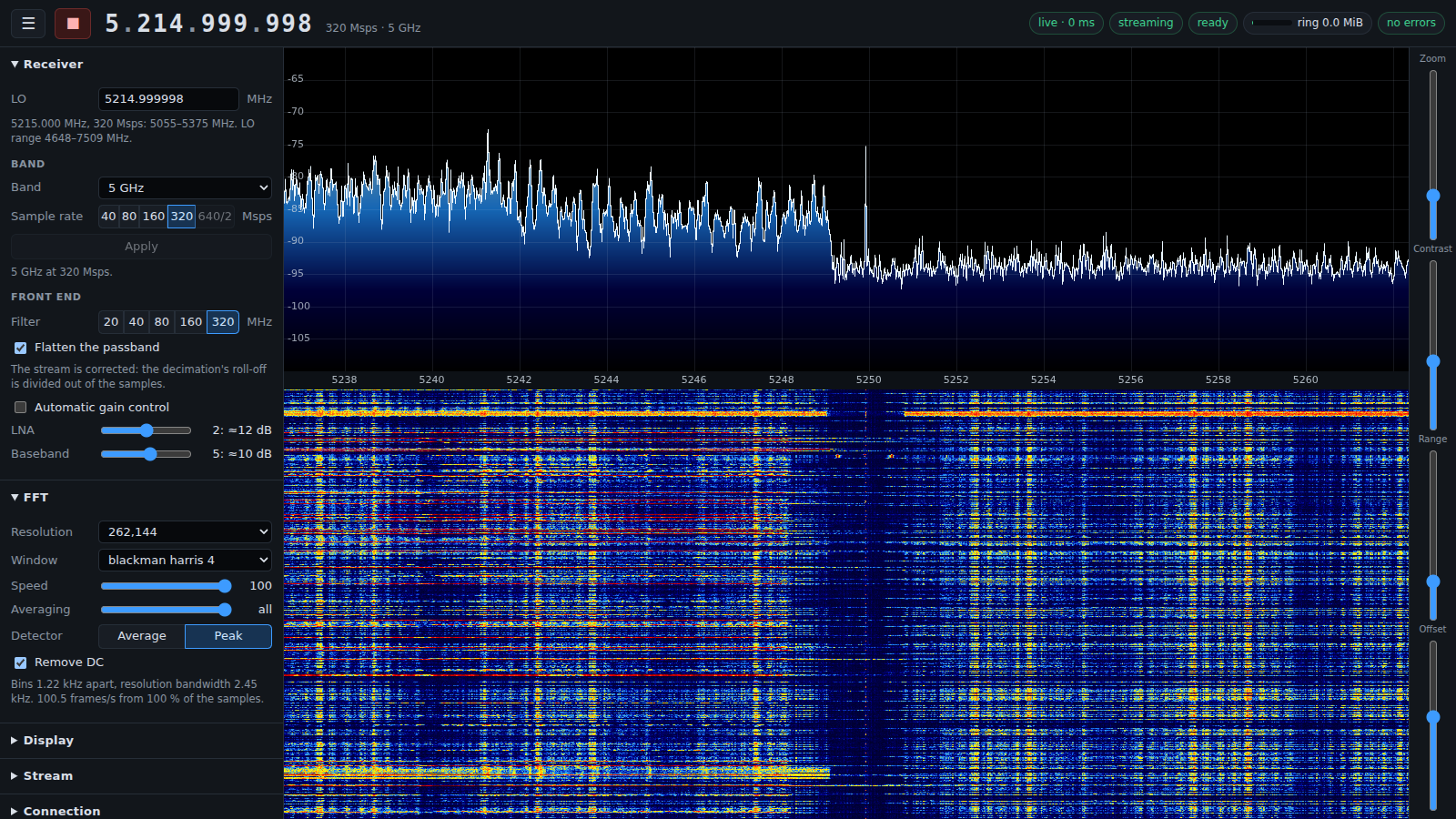
Zoomed to 24 MHz around 5250 MHz: the two channels' edges and the guard gap
between them, in 1.22 kHz bins.
Repository
| Path |
|
platform/ |
What runs on the SoC: our U-Boot, Linux 6.18 with board patches, a read-only BusyBox root |
kernel/w1700k_sdr/ |
The MT7996 driver (firmware download, the DMA ring, the 10 GbE export, the firmware's command mailbox) and its unit-side clients |
firmware/ |
Our MT7996 firmware: the ROM patch, the WM (radio bring-up and band set-up, streams, RF control) and the WA (packer) |
host/w1700k/ |
Host control: firmware load, streaming, RF control as firmware commands; w1700k serve for the web UI |
host/stream/ |
w1700k-stream, the host's one receiver of the export: the IQ stream in shared memory for every consumer, and the roll-off correction |
host/spectrum/ |
The spectrum/waterfall web server |
host/recv/ |
sdr-recv, the stream recorder |
init/ |
Installation from stock, updates, recovery, return to stock |
include/hw/ |
Register reference: every known MT7996, A-die and AN7581 register, as C headers |
docs/ |
Architecture, roadmap |
Getting started
You need a W1700K (HW 1.x) or W1700K2 (HW 2.1), a 3.3 V USB serial adapter on
its console header, an Ethernet cable to its lan3 port for installation, and
a 10 GbE NIC on the host cabled to its wan port (10GBASE-T; an X710 with a
copper SFP+ module works) for the IQ stream. Both revisions run the same images.
Most units carry a W25N04KV NAND; some W1700K2s carry a W25N04LV (ID ef 8b 23),
which is supported but has never been run on a unit: init/install stops on
one until you pass --i-dont-care-about-nand-corruption, and asks for a raw
dump of it (init/rawdump) for the maintainers.
make                                   # everything, from public sources (~10 min plus downloads)
make check                             # the test suite

sudo init/host/link up IFACE           # 192.168.1.10/24 on the NIC cabled to lan3
sudo init/host/tftp-forward enable IFACE
init/install                           # back up the NAND, install, save the radio calibration

sudo init/host/link up IFACE10G 10.77.0.10/24 9216    # the 10 GbE stream link
host/stream/build/w1700k-stream &                      # the stream, for every consumer on this host
host/spectrum/build/w1700k-spectrum --controller "host/bin/w1700k serve" --listen 0.0.0.0:8073
Then open http://HOST:8073/ and press ▶. The first start loads the radio
firmware and brings the radio up (about 2 s). Without the browser, the same
operations are host/bin/w1700k load|start|band|tune|gain|filter|stop|status.
Build requirements: a C/C++ compiler, make, git, Python 3.10+, the usual
Buildroot prerequisites, clang, ld.lld, llvm-objcopy and llvm-readobj (RISC-V
firmware), openssl (firmware container encryption), and
libfftw3-dev and zlib for the stream service and the spectrum server. No vendor firmware is
downloaded or needed.
Read before use
- Our firmware is receive-only. It runs none of MediaTek's transmit
calibrations and keeps the MAC's transmit path disabled; a gapless watch at
5250 MHz saw nothing during a load, where MediaTek's firmware transmits a
full-power burst. Still, do not cable an antenna port straight into a
sensitive instrument without an attenuator.
- Our ROM patch writes no eFuse. MediaTek's ROM patches since 2025
permanently program one eFuse gate bit on their first run (also with
MediaTek's own driver); a unit that ever ran one has that bit set.
- Installation replaces the stock operating system.
init/install first
copies the NAND's data to the host; keep that copy. init/restore writes it
back and returns the unit to its stock firmware.
- Accessing undocumented MT7996 or AN7581 addresses can hang the SoC or wedge
the radio until a power cycle.
include/hw/ marks every known hazard.
Licence
MIT, except the Linux driver and kernel patches (GPL-2.0-only), U-Boot patches
(GPL-2.0+), the driver's user-space header (GPL-2.0 WITH Linux-syscall-note)
and files derived from MediaTek's mt76 driver (BSD-3-Clause-Clear). See
LICENSE.

 W1700K SDR 把 Gemtek W1700K Wi-Fi 7 路由器变成一台宽带软件定义接收机:路由器的 MediaTek MT7996 射频芯片可以以最高 320 Msps 采集原始的 14 位 IQ 数据,它的 AN7581 SoC 通过 10 GbE 把数据流传输出去,Linux 主机则在浏览器里把它显示成实时的频谱图和瀑布图。